

We Tested Clay for 30 Days — Here's Our Honest 2026 Review (Pricing Inside)

By Kushal Magar · March 16, 2026 · 14 min read · Last updated: September 30, 2026
Clay is a data enrichment platform with 150+ providers and waterfall enrichment that delivers 78% email match rates. It is the most powerful tool in its category for teams with dedicated GTM engineers. However, credit spend is hard to predict (data credits and actions are metered separately, and top-ups carry a 30% markup), CRM sync requires the $446/mo Growth plan, and the learning curve takes 4-6 weeks. Our rating: 3.5/5.
Clay raised $100M, hit a $3.1B valuation, and counts OpenAI and Anthropic as customers. Every GTM influencer on LinkedIn calls it a must-have. So we signed up, ran real enrichment workflows for 30 days, tracked every credit spent, and documented what actually happened.
The short version: Clay's waterfall enrichment is genuinely the best on the market. We hit 78% email match rates across a 2,000-contact test list, compared to 42% from single-source tools. The workflow builder is powerful. Claygent AI can do things no other enrichment tool can.
The longer version: we burned through $800 in credits during week one while learning the platform. CRM sync required upgrading to the $446/mo Growth plan. And the spreadsheet interface that looks approachable on day one became a maze of formulas and conditional logic by day ten.
This Clay review covers exactly what we found: waterfall enrichment performance, real pricing math, Claygent AI capabilities, integration friction, and how a Clay workflow runs from setup to first results. If Clay turns out not to fit your team, our roundup of Clay alternatives covers other options.
Clay Review: What You Get (and What You Don't)
Clay is a data enrichment and workflow automation platform built on a spreadsheet interface. You create tables, add rows of companies or contacts, and build enrichment workflows using 150+ data providers. It is built for GTM engineers who want to chain multiple data sources, AI models, and outbound actions into a single pipeline.
The target user is a technical operator who is comfortable with formulas, API configurations, and multi-step logic. Here is what is actually included and where the limits show up.
| Feature | What's Included | Limitations |
|---|---|---|
| Waterfall Enrichment | 150+ data providers. Automatic cascading across sources for email, phone, company data. | Phone enrichment fails 30-40% of the time. A full enrichment with company data runs roughly 75 credits per lead. |
| Claygent AI | AI agent that browses the web, extracts data, and answers questions about prospects. | Uses variable token-based pricing. Results inconsistent on complex research tasks. |
| CRM Sync | HubSpot, Salesforce auto-sync with bi-directional updates. | Requires Growth plan ($446/mo). HTTP API and webhooks also start at Growth, so Launch users export manually. |
| Clay Sequencer | Native email sequencer on Launch and above. Also integrates with Instantly, Lemlist, and Outreach. | Newer feature. Most teams still use Instantly or Lemlist alongside Clay. |
| Intent Signals | Job changes, web intent signals, hiring triggers. | Web intent signals require Growth plan. Job changes available on Launch. |
| Workflow Builder | Spreadsheet-based with formulas, conditional logic, and multi-step enrichment chains. | Steep learning curve. Linking 10-15 steps gets confusing for non-technical users. |
Clay Waterfall Enrichment: The Real Numbers
Clay's waterfall enrichment is the feature that justifies the price for most teams. Instead of relying on a single data provider, Clay cascades across multiple sources until it finds a match. The result is significantly higher coverage than any single tool.
In our 30-day test, we ran a 2,000-contact B2B list through Clay's waterfall. The results were strong: 78% email match rate, compared to 42% from Apollo alone and 38% from Hunter alone. Company data (employee count, funding, tech stack) hit 85% fill rates. Phone numbers were the weak link at 60-65%, with 30-40% of lookups failing entirely.
The waterfall concept works. The problem is the credit math. Each provider in the waterfall consumes credits per lookup. A basic contact enrichment runs about 14 credits. A full enrichment with company data and technographics costs roughly 75 credits per lead. On the Launch plan at $0.05 per credit, that is $3.75 per fully enriched lead.
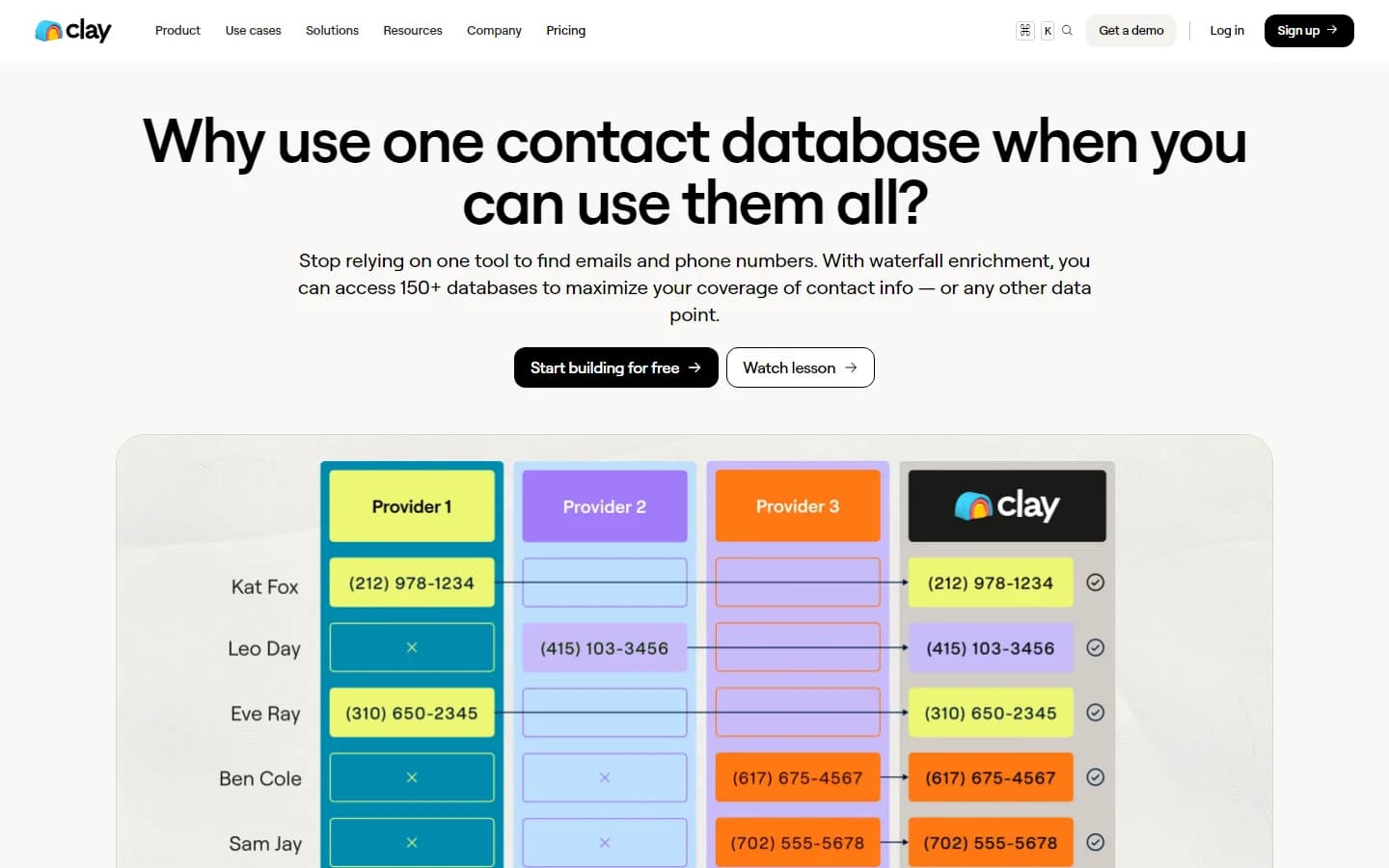
Clay waterfall enrichment — cascading across 150+ data providers
Clay vs. single-source enrichment: coverage compared
We also tested one 500-contact list two ways: through Clay's waterfall and through Apollo standalone. Clay hit 78% email coverage; Apollo standalone hit 42%. That 36-point gap is the core of Clay's value: each provider in the waterfall catches contacts the previous one missed. Whether it pays off depends on deal size, because every lookup that returns data spends credits, and a full enrichment adds up quickly.
Clay Pricing: What You Actually Pay
Clay pricing changed significantly in 2026. The old Starter, Explorer, and Pro tiers are gone. Here is the current Clay pricing as of September 2026. For a deeper breakdown of what changed and why, see our Clay pricing change analysis.
- Free: 100 data credits/mo, 500 actions/mo. Unlimited seats and tables. Waterfall enrichment and Claygent included. No phone enrichment. Max 200 rows per table.
- Launch ($167/mo billed annually): 2,500 data credits/mo at the entry tier, with larger tiers available. 15,000 actions/mo. Phone enrichment, job change signals, email integrations. Up to 50,000 rows per table. 10% savings on annual billing.
- Growth ($446/mo): 6,000-50,000 data credits (tiered). 40,000 actions/mo. CRM auto-sync, HTTP API, webhooks, web intent signals, priority support. 10% savings on annual billing.
- Enterprise (custom): 100,000+ data credits, 200,000+ actions/mo. SSO, RBAC, data warehouse sync, dedicated growth strategist. Annual commitment required.
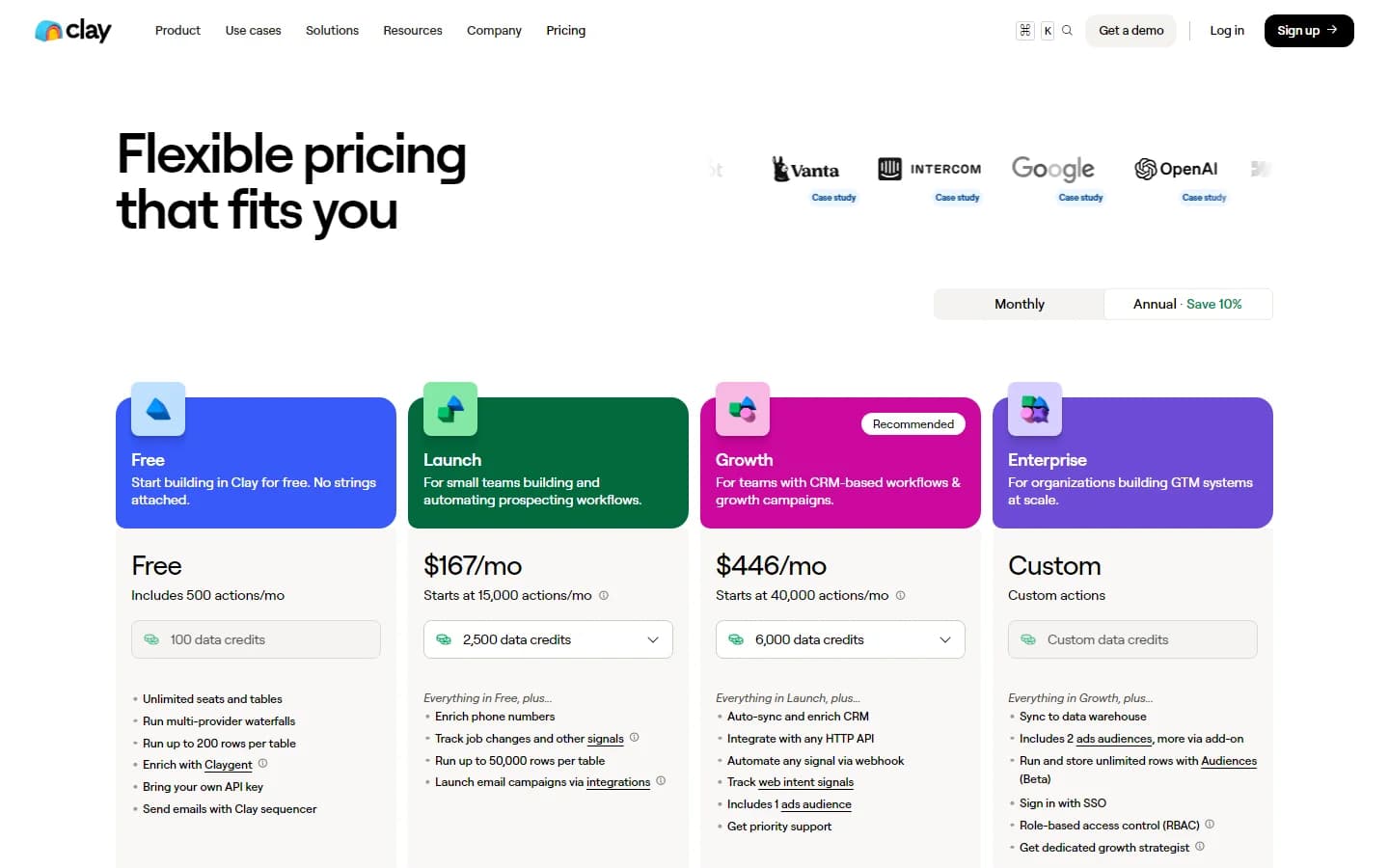
Clay pricing page as of March 2026
What you actually pay: a real scenario
Say you have 2 SDRs each prospecting 300 leads per week. That is 2,400 leads per month. If each lead needs a basic enrichment (email + company data, ~14 credits), you are burning 33,600 credits per month. The Launch plan starts at 3,000 credits. Even at the highest Launch tier (50,000 credits), you are cutting it close.
Factor in top-ups at a 30% premium, and the real monthly cost lands between $350 and $800 for a two-person team. Annually, that is $4,200 to $9,600.
The hidden costs nobody talks about
Clay has two billing dimensions: data credits and actions. Actions cover row creation, table operations, and webhook triggers. Every plan includes enough actions for "90% of customers" according to Clay, but heavy automation users can hit action limits on the Launch plan. Unused actions do not roll over. Data credits roll over but are capped at 2x your monthly allotment on Launch and Growth. Two details work in your favor: as of September 2026, Clay's pricing page states that enrichments returning no result are not charged data credits or actions, and bringing your own API keys for third-party providers skips data credit costs entirely, leaving only actions.
Clay Ease of Use: Setup and Learning Curve
Clay's spreadsheet interface is deceptive. On day one, it looks like Google Sheets. You create a table, add columns, and start enriching. The first few workflows feel approachable. Then you try to chain 10 steps together with conditional logic, and things get complicated fast.
Our team spent the first week learning. Not casually exploring — actively studying Clay University tutorials, joining their Slack community, and rebuilding broken workflows. One senior GTM ops person described the experience as "feeling like learning a new programming language disguised as a spreadsheet."
The community data backs this up. A survey of 500+ GTM professionals found that 28% of negative Clay reviews cite the learning curve as the primary issue. Non-technical users struggle significantly. The platform is not built for sales teams. It is built for GTM engineers.
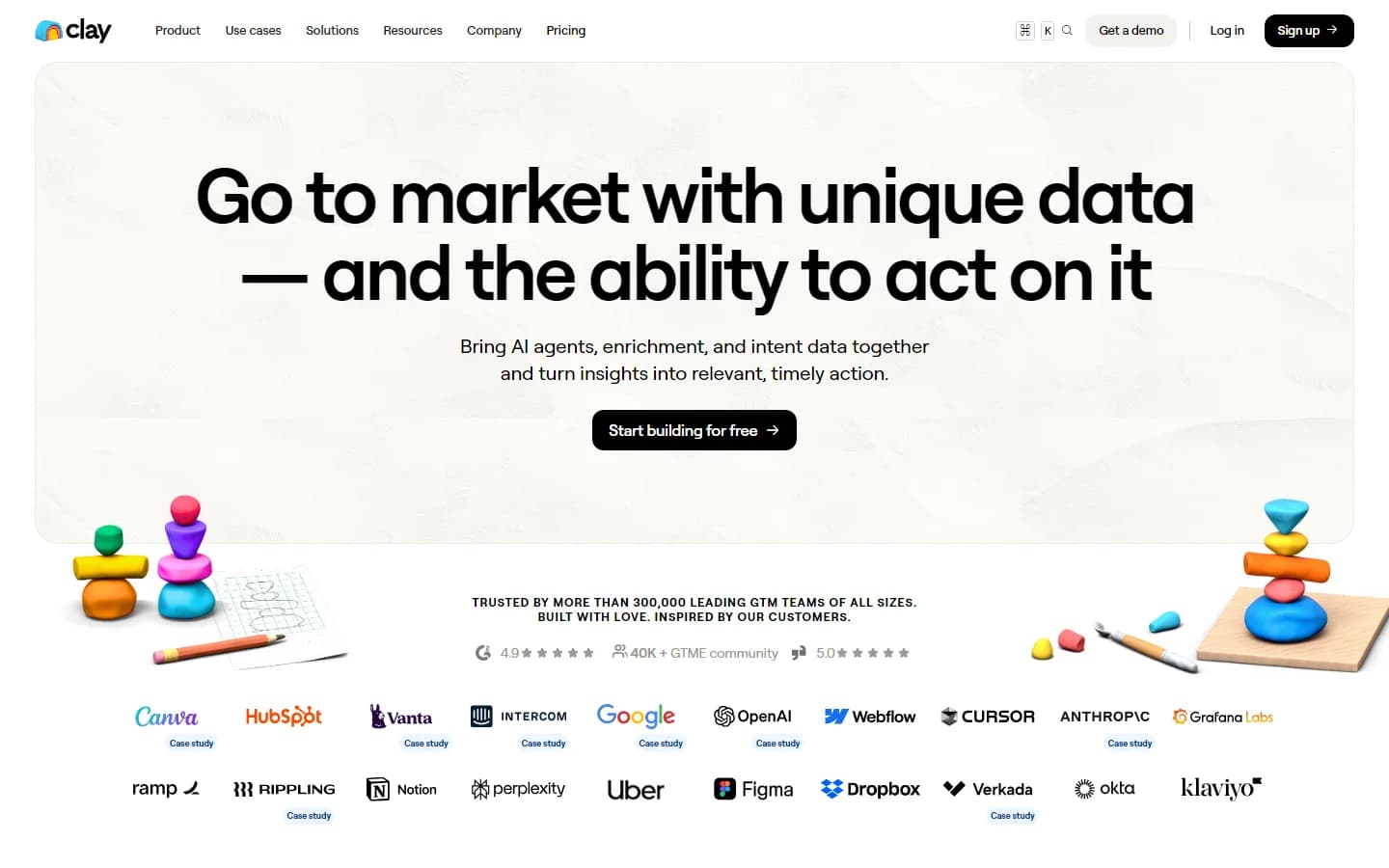
Clay homepage — the spreadsheet interface that hides real complexity
Who actually succeeds with Clay?
Teams with a dedicated GTM engineer or technical RevOps person thrive on Clay. Solo founders with technical backgrounds can build impressive workflows. Sales teams without technical support struggle and often abandon the tool within 60 days, burning credits in the process. Those teams often switch to simpler platforms like Cognism for GDPR-compliant data or ZoomInfo for enterprise-grade intelligence.
Clay Integrations: CRM, Outreach, and Beyond
Clay connects to the tools you expect: HubSpot, Salesforce, Instantly, Lemlist, Outreach, Zapier, and Make. The integration library is extensive. The problem is not what Clay integrates with. It is which plan gives you access to those integrations.
Does Clay integrate with HubSpot?
Yes, but the depth of integration depends on your plan. Native CRM auto-sync with bi-directional updates requires the Growth plan at $446/mo. As of September 2026, Clay's pricing page lists HTTP API integrations and webhooks at the Growth tier as well, so Launch ($167/mo) users are mostly limited to exporting records manually. In our testing, the Growth plan sync worked reliably — we pushed 300 enriched leads to Salesforce with custom field mapping in under 10 minutes.
Does Clay integrate with Salesforce?
Same story. Salesforce auto-sync is a Growth plan feature. On Launch, getting records into Salesforce means manual CSV exports and imports, which adds friction and a potential sync failure point every time a table changes.
Outreach tool connections
Clay's Sequencer is built in from the Launch plan up, but it is relatively new and limited compared to dedicated tools. Most Clay power users still route enriched data to Instantly, Lemlist, or Outreach for the actual sending. That means paying for Clay plus a separate outreach tool.
Claygent AI: What It Can and Cannot Do
Claygent is Clay's AI agent. You give it a natural-language prompt and it browses the web, reads pages, and returns structured data. It is included on all plans, which is one of Clay's genuine advantages.
In our testing, Claygent excelled at specific, bounded tasks. "Find the CEO of this company." "What tech stack does this company use?" "When was their last funding round?" For these, it returned accurate results 70-80% of the time.
Where Claygent struggled was on open-ended research. "Identify this company's top 3 competitors and summarize their pricing." Results were inconsistent. Sometimes accurate. Sometimes outdated. Sometimes entirely wrong. It is a useful enrichment accelerator, not a replacement for manual research on high-value accounts.
The cost is also worth noting. Claygent uses variable token-based pricing, not fixed data credits. Complex prompts that require multiple web page reads can consume significantly more than a standard enrichment. We saw individual Claygent runs cost 5-20x more than a basic email lookup.
What Are the Downsides of Using Clay?
Every tool has trade-offs. These are the ones that matter most based on our 30-day test and analysis of 500+ user reviews from G2, Trustpilot, and community forums.
- Credit burn is unpredictable. Data credits and actions are metered separately, a full enrichment with company data runs roughly 75 credits per lead, and top-ups carry a 30% premium.
- Learning curve takes 4-6 weeks. The spreadsheet interface looks simple but hides real complexity in multi-step workflows, formulas, and conditional logic.
- CRM auto-sync requires the Growth plan at $446/mo. HTTP API integrations and webhooks also start at Growth, so Launch ($167/mo) teams are left with manual exports.
- Data quality is inconsistent for SMBs. One user reported the find-people feature only returned results for 1 in 3 companies.
- Phone enrichment fails 30-40% of the time across providers, so phone coverage trails email coverage by a wide margin.
- Support responsiveness is a recurring complaint. Trustpilot rating sits at 2.5/5 with multiple 2026 reviews citing slow support and unresolved bugs.
- Actions do not roll over. Unused monthly actions expire, creating pressure to use them or lose them.
Credit burn is the top complaint
42% of negative Clay reviews mention credit burn. Users report spending $800 in a single week while learning the platform. The credit system penalizes experimentation — every test, every mistake, every learning moment costs real money. One GTM pro described burning through trial credits "in 10 minutes." Top-ups are priced at a 30% premium to plan credits, so under-buying on your plan and topping up later is the costliest way to buy credits.
The learning curve is not optional
28% of negative reviews cite the learning curve. This is not a tool you hand to your SDR team and expect results on Monday. Expect 4-6 weeks of dedicated onboarding. One user in the 500+ GTM pro survey said Clay made them "feel stupid. Every single time." The platform is designed for GTM engineers, not salespeople.
Data quality depends on your setup
18% of negative reviews flag data quality. Clay's strength is provider breadth, not provider accuracy. The platform gives you 150+ sources but does not help you pick the right ones. One user found the find-people feature "only finds the person for 1 in 3 companies," losing 66% of their market. Email match rates are strong at 78%, but phone enrichment and SMB coverage are weak spots.
How Clay Works: From Setup to First Results
Clay makes more sense once you see the order of operations. Here is how a typical workflow runs, step by step, and where plan limits show up along the way.
- Build a table. Start from Clay's built-in company and people search, or import your own CSV. Seats and tables are unlimited, but rows are capped: 200 per table on Free and 50,000 on Launch.
- Add enrichment columns. Pick the data point you need (work email, phone, company data) and set the provider order for the waterfall. Clay tries each provider in turn until one returns a result, and lookups that return nothing are not charged.
- Layer in Claygent. Add AI columns for research questions no data provider answers directly, such as a company's tech stack or latest funding round. Keep prompts narrow; open-ended research is where accuracy drops.
- Gate spend with logic. Use formulas and conditional logic so expensive steps only run on rows that pass your ICP filters, and test every new workflow on 10-20 rows before running the full table.
- Push the output. Send contacts to Clay's native sequencer (Launch and above) or to Instantly, Lemlist, or Outreach. Native CRM sync, HTTP API integrations, and webhooks unlock on Growth.
- Keep tables fresh. Add signals so records update when something changes. Job change signals are available on Launch; web intent signals require Growth.
The biggest cost lever is provider choice. If you already pay for a data provider, connect your own API key so those lookups use actions instead of data credits. Then put the providers that cost the fewest credits at the top of each waterfall, so pricier ones only fill the gaps.
The payoff for this setup work is flexibility. Once a table is built, the same pipeline can feed outbound, score and route inbound leads, or enrich existing CRM records. That flexibility is why teams with a GTM engineer get so much out of Clay, and why the learning curve covered above hits teams without one so hard.
Is Clay Worth It?
Clay is worth it for teams with a dedicated GTM engineer, complex multi-step enrichment needs, and a monthly budget above $500. The waterfall enrichment is the best on the market. Claygent AI is genuinely useful for bounded research tasks. The workflow builder can do things no other enrichment tool can.
Clay is not worth it for sales teams without technical support, teams closing deals under $10K, or anyone who needs predictable monthly costs. The learning curve is real. The credit burn is real. And locking CRM sync behind the $446/mo Growth plan prices out most early-stage teams. For a broader view of enrichment options, see our guide to the best CRM data enrichment tools.
Bottom line: if you have a GTM engineer and the budget, Clay is worth a 14-day trial on your own data. If you want Clay-level waterfall enrichment without the spreadsheet complexity, credit surprises, and 4-6 week onboarding, compare the best Clay alternatives for GTM teams before committing.
If Clay locking native CRM sync to its Growth plan is a dealbreaker, SyncGTM is one alternative worth a look: it pairs waterfall enrichment across 50+ data providers with native Salesforce, HubSpot, Pipedrive, Attio, and Close integrations.