

Kanbox Review 2026: B2B Data Coverage, Pricing & SyncGTM Comparison

By Kushal Magar · June 3, 2026 · 12 min read
Key Takeaway
Kanbox is a clean, low-cost all-in-one LinkedIn automation tool — scraping, single-source email finder, outreach, and a Kanban CRM from $10/mo. It shines for LinkedIn-first SMB teams. But its single-source enrichment, LinkedIn-only sourcing, and lack of buying signals cap its ceiling. SyncGTM's waterfall across 50+ providers, 76+ data points per lead, and built-in signals win when you need depth and off-LinkedIn coverage.
Kanbox is an all-in-one LinkedIn automation tool that bundles scraping, a single-source email finder, outreach sequences, and a Kanban CRM inbox from $10/mo (billed annually). It claims 98% email accuracy and enriches roughly 80% of scraped leads. It is the cleanest, cheapest way to run a LinkedIn-first motion end to end. Our rating: 4.2/5.
The case for Kanbox is simple. Most LinkedIn prospecting stacks need three or four tools — a scraper, an email finder, a sequencer, and a CRM. Kanbox folds all four into one workspace at a price that undercuts almost everything else in the category.
The limitation is just as clear. Kanbox finds emails with a single-source method: it predicts the address from a name and domain, then verifies it over SMTP. There is no waterfall fallback. When the pattern fails, the record comes back empty — and every lead has to originate on LinkedIn in the first place.
This review covers Kanbox pricing in full, the features that matter, real data coverage and accuracy, honest pros and cons, and a direct comparison with SyncGTM and Apollo for teams choosing an enrichment and outreach platform in 2026.
What Is Kanbox?
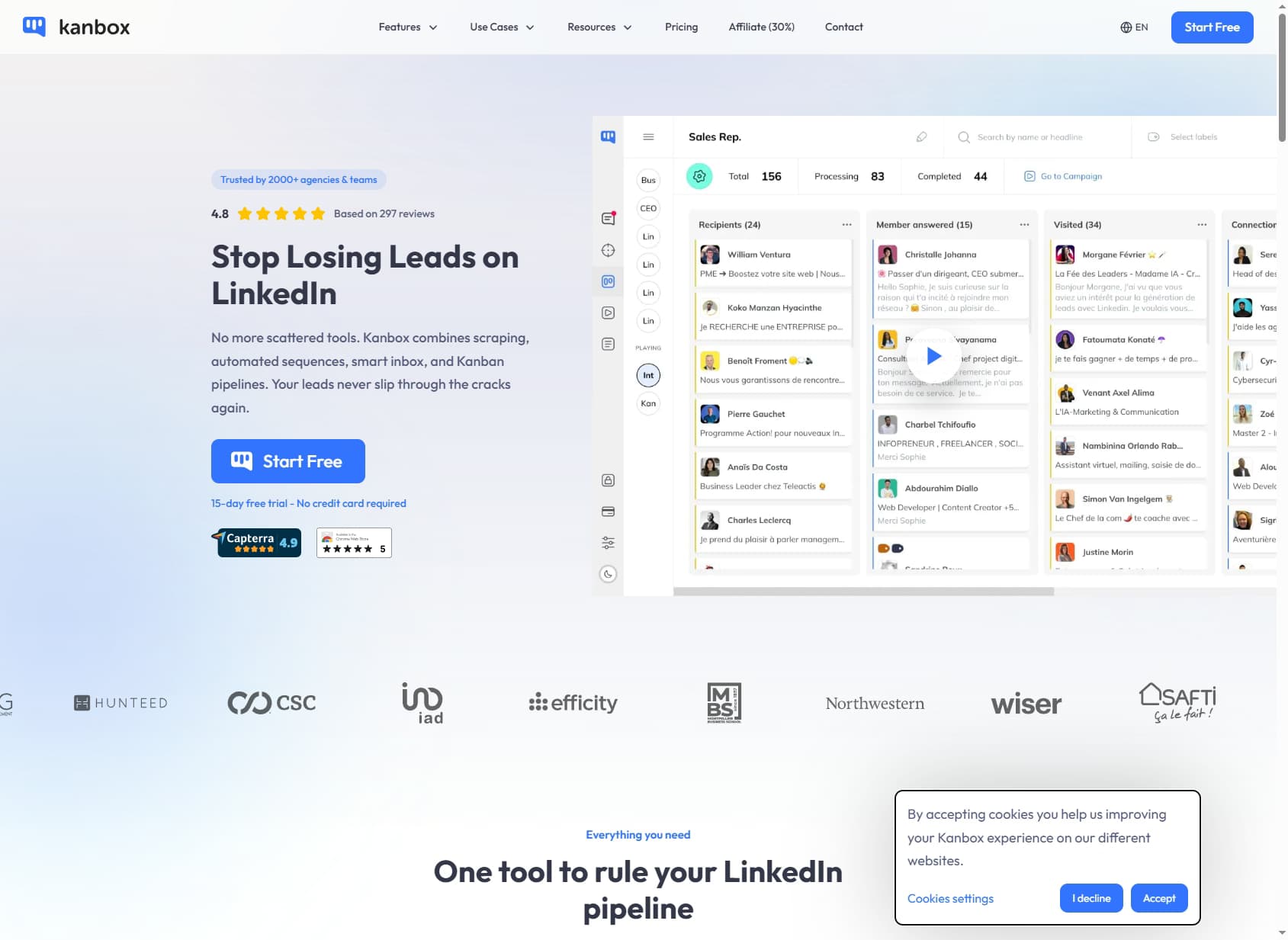
Kanbox is a B2B LinkedIn automation and lead generation platform built around one idea: run the entire LinkedIn prospecting workflow inside a single tool. Scrape, enrich, sequence, and manage replies without stitching together four separate apps.
The target user is a solopreneur, founder, recruiter, or SMB sales team whose pipeline runs primarily through LinkedIn. Kanbox handles scraping from LinkedIn, Sales Navigator, and Recruiter searches — up to 2,500 leads per day — then enriches those leads with B2B emails and pushes them into automated connection and message campaigns.
What sets Kanbox apart visually is the Kanban inbox. Instead of a cluttered LinkedIn message list, you get a full-screen chat plus a drag-and-drop pipeline, so every conversation maps to a deal stage. For LinkedIn-native sellers, that workflow is genuinely better than the native LinkedIn interface.
User sentiment backs this up. Kanbox holds a 4.8/5 average across 75 reviews on GetApp, with 4.9/5 for ease of use — though reviewers also flag a learning curve on advanced features and limited coverage beyond LinkedIn.
| Capability | What Kanbox Provides | Notable Gaps |
|---|---|---|
| LinkedIn Scraping | Up to 2,500 leads/day from LinkedIn, Sales Navigator, Recruiter, posts, and events. | LinkedIn-only. No off-platform sourcing or database lookups. |
| Email Finder | Single-source pattern match + real-time SMTP verification. ~80% of scraped leads enriched. | No waterfall fallback. B2B only — excludes Gmail/Yahoo. |
| Phone Numbers | Direct phone enrichment available. | 100 credits per number vs 1 for email. No published hit rate. |
| Outreach | Automated LinkedIn connection and message sequences with A/B testing. | LinkedIn-centric. Email sending less mature than dedicated senders. |
| CRM / Inbox | Visual Kanban pipelines + full-screen unified inbox. | CRM sync to HubSpot/Salesforce via CSV/API, not real-time native. |
| Buying Signals | Not available. | No hiring, funding, tech-change, or intent detection. |
Kanbox Pricing: Plans, Credits & What You Actually Pay
Kanbox publishes its pricing per plan — a welcome contrast to data tools that hide rates behind a sales call. Subscriptions cover the platform (scraping, automation, inbox, CRM). Email enrichment is billed separately through credit packs.
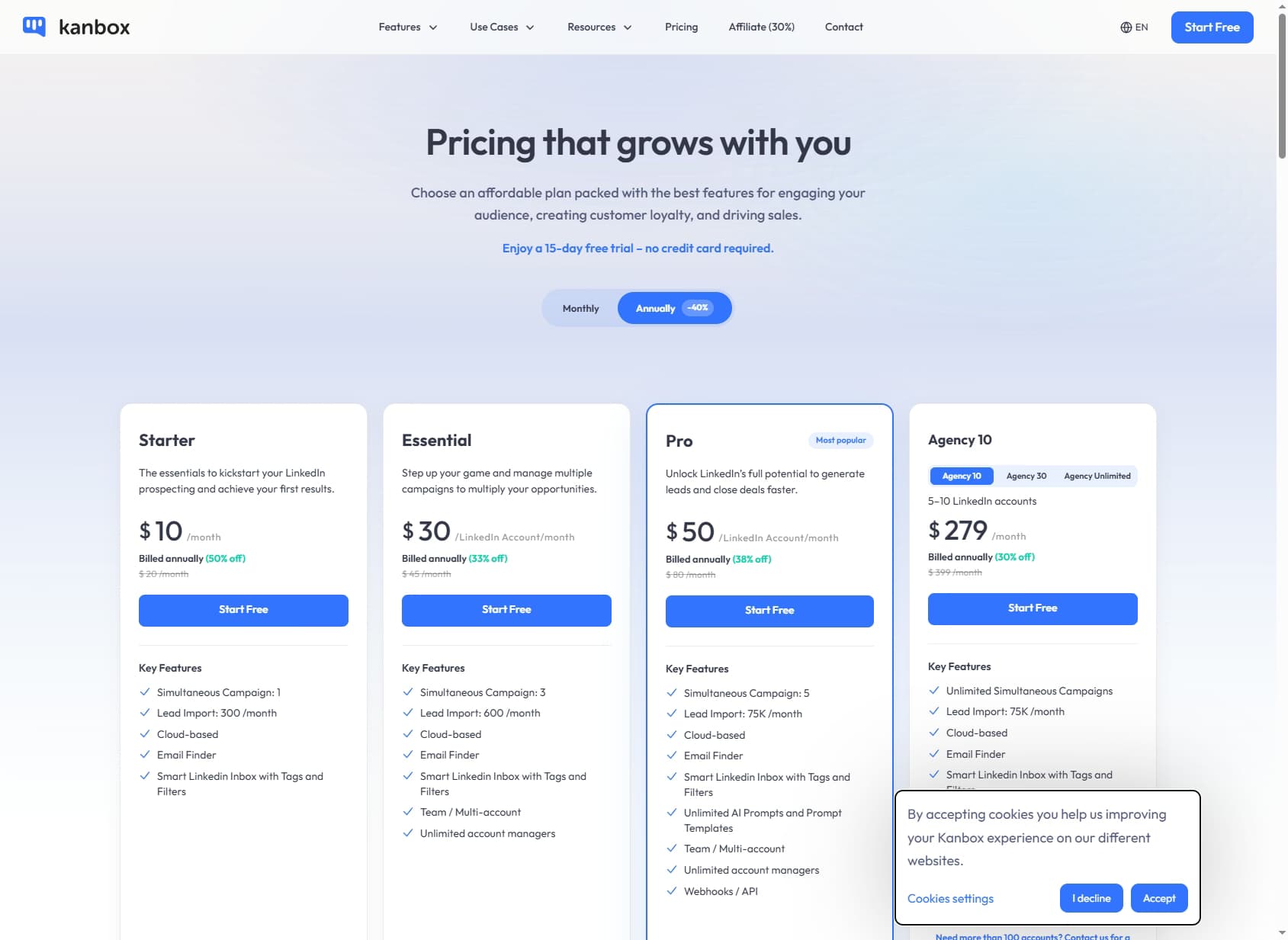
| Plan | Monthly | Annual (per mo) | Leads / Campaigns | API |
|---|---|---|---|---|
| Starter | $20 | $10 | 300 leads / 1 campaign | No |
| Essential | $45 / account | $30 / account | 600 leads / 3 campaigns | No |
| Pro | $80 / account | $50 / account | 75K leads / 5 campaigns | Yes |
| Agency 10 | $399 | $279 | 75K leads / unlimited (5–10 accts) | Yes |
The real cost math
The subscription is cheap, but email credits are the line item to watch. Credits cost $15 per pack, with one credit equal to one email found. A 1,000-credit pack therefore costs $15 — around $0.015 per verified email, which is competitive.
Phone numbers are the trap. At 100 credits per direct dial, each phone number costs roughly $1.50 worth of credits. If cold calling is part of your motion, that bill climbs fast — and there is no published phone hit rate to model against.
Annual billing roughly halves the platform price (Starter drops from $20 to $10). The 15-day free trial includes full Starter access and 30 email credits with no card required, so you can test fill rate on your own list before paying.
Kanbox Key Features
Kanbox is best understood as five tools in one. Each is competent; together they cover the full LinkedIn workflow.
LinkedIn scraping
Scrape leads from any LinkedIn, Sales Navigator, or Recruiter search, plus post engagers and event attendees. Throughput reaches 2,500 leads per day, with advanced filtering and CSV export on paid plans.
Email finder
The built-in finder predicts each prospect's email from their name and company domain, then verifies it live over SMTP. Results are tagged valid, risky (catch-all), or invalid, and you only spend a credit when an email is found.
Smart inbox & Kanban CRM
The unified inbox merges LinkedIn and Sales Navigator messages into one full-screen chat, and the Kanban board maps every conversation to a pipeline stage. This is Kanbox's standout feature and the one users praise most.
Automated campaigns
Build multi-step LinkedIn sequences — connection requests, follow-up messages, profile visits — with A/B testing and CRM pipeline automation. The Pro plan adds AI prompts for message personalization.
Kanbox Data Coverage & Accuracy
Kanbox advertises 98% B2B email accuracy and a sub-2% bounce rate, with roughly 80% of scraped leads enriched. Those are strong numbers — but they describe a single-source method, and the distinction matters for hit rate.
How the email finder actually works
Kanbox does not query a contact database. It infers the likely email pattern from the prospect's name and the company domain, then connects to the mail server to verify the address exists. No message is sent during verification.
That keeps data fresh and GDPR-friendly — emails are generated on-demand from public information, with no stored personal database. But it means one shot per prospect. If the pattern guess is wrong, or the domain is a catch-all that accepts everything, you get a blank or a risky result rather than a confirmed address.
Where single-source falls short
This is the core difference from waterfall enrichment. A waterfall tool like the leading waterfall providers queries many data sources in sequence — when source A misses, source B runs, then C. Kanbox has no fallback, so the records it cannot pattern-match simply stay empty.
The B2B-only rule adds another gap. Kanbox excludes Gmail and Yahoo, so prospects who run their business on a personal email — common among founders, freelancers, and very small companies — are out of reach entirely.
Firmographics and phone
On company data, Kanbox surfaces only what the scraped LinkedIn profile exposes — title, company, location. It does not natively append revenue, headcount ranges, funding, or tech stack, so you cannot segment a list by those firmographics without a second tool. Phone enrichment exists but at 100 credits per number with no published accuracy, making it a secondary capability rather than a reason to buy.
Kanbox Pros: What It Does Well
- ✓All-in-one LinkedIn workflow. Scraping, email finding, sequencing, and a CRM inbox in one tool. Replaces a four-app stack for LinkedIn-first sellers.
- ✓Excellent price-to-value. From $10/mo on annual billing, plus $0.015-per-email credits. One of the cheapest complete LinkedIn stacks available.
- ✓Best-in-class Kanban inbox. The full-screen chat and drag-and-drop pipeline are a real upgrade over LinkedIn's native messaging. Consistently the most-praised feature in user reviews.
- ✓Pay-per-result credits. You only spend a credit when an email is found, and credit packs never expire. No charge for failed lookups.
- ✓GDPR-friendly by design. On-demand generation from public data, no stored personal database, B2B-only addresses. A clean compliance story for EU teams.
Kanbox Cons: Where It Falls Short
- Single-source email enrichment. Kanbox predicts and verifies one email pattern per prospect. There is no waterfall fallback — if the pattern fails or the domain is a catch-all, the record returns empty. Waterfall tools recover many of those misses.
- LinkedIn-only sourcing. Every lead originates from LinkedIn, Sales Navigator, or Recruiter. If a prospect is not active on LinkedIn, or your ICP lives off-platform, Kanbox cannot find them at all.
- Phone numbers cost 100x an email. Direct phone enrichment is 100 credits per number versus 1 credit per email, with no published hit rate. Phone-heavy outbound gets expensive fast.
- No buying signals. Kanbox has no hiring, funding, tech-change, or job-change detection. You get contacts, but no indication of which accounts are in-market right now.
- Thin firmographics. Company data is limited to what the scraped LinkedIn profile exposes — no native revenue, headcount, funding, or tech-stack append.
- LinkedIn automation carries account-safety risk. Heavy scraping and automated actions on one LinkedIn account can trigger restrictions, despite Kanbox's activity limits.
Kanbox vs SyncGTM vs Apollo
Kanbox, SyncGTM, and Apollo overlap on outreach but diverge sharply on data. Kanbox is a LinkedIn-first all-in-one. Apollo is a database-plus-sequencer. SyncGTM is a waterfall enrichment platform with signals and outreach built in. Here is how they line up on the dimensions that decide an enrichment purchase in 2026.
| Feature | Kanbox | SyncGTM | Apollo |
|---|---|---|---|
| Starting Price | $10/mo (Starter, annual) | $49/mo | $59/mo (Basic) |
| Enrichment Architecture | Single-source (SMTP pattern-match) | Waterfall across 50+ providers | Single proprietary database |
| Email Hit Rate (US Enterprise) | ~80% on scraped lists (claimed) | 75–90% | 60–75% (own DB) |
| Phone / Mobile Numbers | 100 credits per direct phone | Via waterfall providers | Limited direct dials |
| Data Points Per Lead | Email + LinkedIn profile fields | 76+ enriched fields | ~30 fields |
| Buying Signals | None | Hiring, funding, tech changes, job changes | Basic intent (Bombora) |
| Native Outreach | LinkedIn automation + sequences | Email + LinkedIn sequencing | Email sequences |
| CRM Integrations | HubSpot, Salesforce, Pipedrive (CSV/API) | Native, real-time enrichment | HubSpot/Salesforce native |
| Source Coverage | LinkedIn, Sales Navigator, Recruiter only | 50+ data providers + LinkedIn | Proprietary DB + web |
| Pricing Transparency | Published per-plan | Published on website | Published |
The honest take on each option
Kanbox wins on price and on the LinkedIn workflow. If your entire motion lives on LinkedIn and you want one cheap tool to run it, Kanbox is hard to beat. The ceiling is single-source enrichment and LinkedIn-only sourcing.
SyncGTM wins on data depth and timing. The waterfall across 50+ providers recovers the records single-source tools miss, returns 76+ data points per lead, and layers on buying signals — hiring surges, funding rounds, tech-stack changes, job changes — that tell you which accounts are in-market now. At $49/mo it costs more than Kanbox, but it consolidates enrichment, signals, and outreach that would otherwise need three tools. See the SyncGTM pricing page for the full breakdown.
Apollo pairs a large proprietary database with email sequences, but its single-source hit rate trails waterfall tools on enterprise targets and its data decays between refreshes. It is a reasonable middle option for teams that want a database and a sequencer in one and do not need waterfall depth.
Who Should Use Kanbox?
Kanbox is the right tool in one specific scenario: your pipeline runs through LinkedIn, you want scraping, email finding, outreach, and a CRM inbox in one affordable workspace, and you do not yet need waterfall enrichment depth or buying signals.
Use Kanbox if:
- LinkedIn and Sales Navigator are your primary prospecting source.
- You are a solopreneur, recruiter, or SMB team optimizing for cost and simplicity.
- You want a cleaner LinkedIn inbox and a visual pipeline more than a deep contact database.
- Your ICP sits on standard B2B domains where pattern-match email finding hits ~80%.
Do not use Kanbox if:
- You need the highest possible hit rate — single-source enrichment leaves records on the table that a waterfall provider would recover.
- Your prospects live off LinkedIn or rely on personal email addresses.
- You want buying signals to time outreach, or rich firmographics to segment lists.
- Cold calling is central — phone credits at 100x email cost get expensive quickly.
For most of those cases, a platform like SyncGTM — or one of the waterfall enrichment alternatives covered elsewhere on the blog — will deliver more coverage per lead.
Kanbox Review: Frequently Asked Questions
What is Kanbox and how does it work?
Kanbox is an all-in-one LinkedIn automation and lead generation tool that combines scraping, a built-in email finder, automated outreach campaigns, a unified smart inbox, and visual Kanban CRM pipelines. You scrape leads directly from LinkedIn, Sales Navigator, or LinkedIn Recruiter searches, enrich them with B2B emails, then run automated connection and message sequences — all inside one workspace. Founded as a European tool, Kanbox is built around managing the full LinkedIn prospecting workflow rather than acting as a pure data provider. Its email finder generates addresses on-demand using name-and-domain pattern matching combined with real-time SMTP verification, rather than querying a pre-built contact database.
How accurate is the Kanbox email finder?
Kanbox advertises 98% B2B email accuracy and a sub-2% bounce rate, achieved through real-time SMTP verification against company mail servers. It reports roughly 80% of scraped leads enriched with an email. Two caveats matter. First, this is single-source enrichment — Kanbox predicts the email pattern from the prospect's name and company domain, then verifies it. If the pattern does not match or the mail server is a catch-all, you get nothing. Second, Kanbox only returns B2B addresses and explicitly excludes Gmail and Yahoo, so personal-email-heavy ICPs see lower fill. The 98% figure describes deliverability of emails it does find, not the share of your list that returns a result.
How much does Kanbox cost per month?
Kanbox publishes per-plan pricing. The Starter plan is $20/month (or $10/month billed annually) and covers one LinkedIn account, one campaign, and 300 lead imports per month. The Essential plan is $45/month per account (or $30 annually) with three campaigns and 600 leads. The Pro plan is $80/month per account (or $50 annually) with five campaigns, 75,000 leads per month, AI prompts, and API/webhook access. Agency plans start at $399/month for 5–10 accounts. Email credits are sold separately at $15 per pack, with packs from 1,000 to 50,000 credits — one credit equals one email found. A 15-day free trial with 30 email credits requires no credit card.
Does Kanbox provide phone numbers and firmographic data?
Kanbox offers phone enrichment, but it is expensive relative to email: 100 credits per direct phone number found, versus 1 credit per email. There is no published phone hit rate, and phone coverage is not a core strength. On firmographics, Kanbox is thin — it surfaces the company and role fields available from the LinkedIn or Sales Navigator profile it scraped, but does not natively append revenue, headcount ranges, funding status, or tech stack the way a dedicated enrichment platform does. Teams that need complete contact plus company enrichment in one call typically pair Kanbox with another tool or move to a platform like SyncGTM that handles both.
How does Kanbox compare to SyncGTM for B2B enrichment?
Kanbox and SyncGTM solve overlapping problems differently. Kanbox is LinkedIn-first: it excels at scraping LinkedIn searches, finding B2B emails via single-source SMTP matching, and running LinkedIn outreach from a clean Kanban inbox. SyncGTM is enrichment-first: it runs a waterfall across 50+ data providers, so when one source misses, the next runs — pushing hit rates to 75–90% on US enterprise and returning 76+ data points per lead. SyncGTM also adds buying signals (hiring surges, funding rounds, tech changes, job changes) that Kanbox has none of, plus multichannel outreach. Kanbox starts cheaper ($10/mo annual) and is ideal if your entire motion is LinkedIn. SyncGTM costs more ($49/mo) but consolidates enrichment depth, signals, and outreach for teams whose ICP extends beyond LinkedIn.
Is Kanbox GDPR compliant?
Kanbox states it is 100% GDPR compliant. It claims no centralized database of personal data, generates B2B emails on-demand from public information only, and collects no personal email addresses. That said, LinkedIn automation tools always carry some account-safety risk, because scraping and automated actions run against LinkedIn's terms of service. Kanbox mitigates this with activity limits and human-like behavior, but heavy automation on a single LinkedIn account still raises the chance of restrictions. Treat the GDPR claim as accurate for data handling, and manage LinkedIn automation volume conservatively to protect your account.