

Nymeria Review 2026: B2B Data Coverage, Pricing, Pros & Cons

By Kushal Magar · May 29, 2026 · 11 min read · Last updated: September 30, 2026
Key Takeaway
Nymeria is a single-source people-data tool that returns emails, phone numbers, and social links from $39/month with unlimited team members and a pay-only-for-results model. But it publishes no accuracy metrics, reviews flag 30–40% bounce concerns, credits do not roll over, and its one-database design caps hit rates. It fits manual, low-volume sourcing best; test it on your own hardest contacts before you buy.
This Nymeria review covers the tool's data coverage, pricing, and accuracy in 2026 — and where its single-source design falls short. Nymeria is a people-and-company data platform that finds emails, phone numbers, and social links from a single proprietary index, with paid plans from $39/month and unlimited team members. Our rating: 3.6/5.
Nymeria's appeal is simple: give it a person or profile and it returns a work email, a mobile number, and social handles in one lookup. You only spend a credit when it finds something, so empty searches cost nothing.
The structural limit is just as simple. Nymeria pulls every contact from a single proprietary index. When that one database doesn't have a record, there is no second source to fall back on. That is the core trade-off behind waterfall enrichment, which queries several providers in sequence instead of one.
This review breaks down Nymeria's pricing math, the accuracy picture (and the metrics it doesn't publish), its key features, the honest pros and cons, and a step-by-step way to test it before you commit in 2026.
What Is Nymeria?
Nymeria is a B2B people-and-company data platform that finds emails, phone numbers, and social links for contacts. It works through a web app, bulk CSV enrichment, browser extensions for Chrome, Edge, and Firefox, and a developer API — aimed at recruiting, sales, and marketing teams that need verified contact details fast.
Nymeria markets data freshness over a headline accuracy figure, stating it does not “guess emails or fuzzy match people profiles,” and notes that 700+ companies use its data. Pricing is per-credit with no per-seat fee, and a credit is only consumed on a successful enrichment — which makes it a natural fit for teams with many light users.
The headline distinction from multi-provider tools is the data model. Nymeria is single-source: every lookup hits one index. A waterfall enrichment tool queries several providers in sequence and returns whichever one resolves the contact — a structural difference that shows up directly in hit rate, which we cover in the data-coverage section below.
Nymeria Pricing: Plans, Credits, and What You Actually Pay
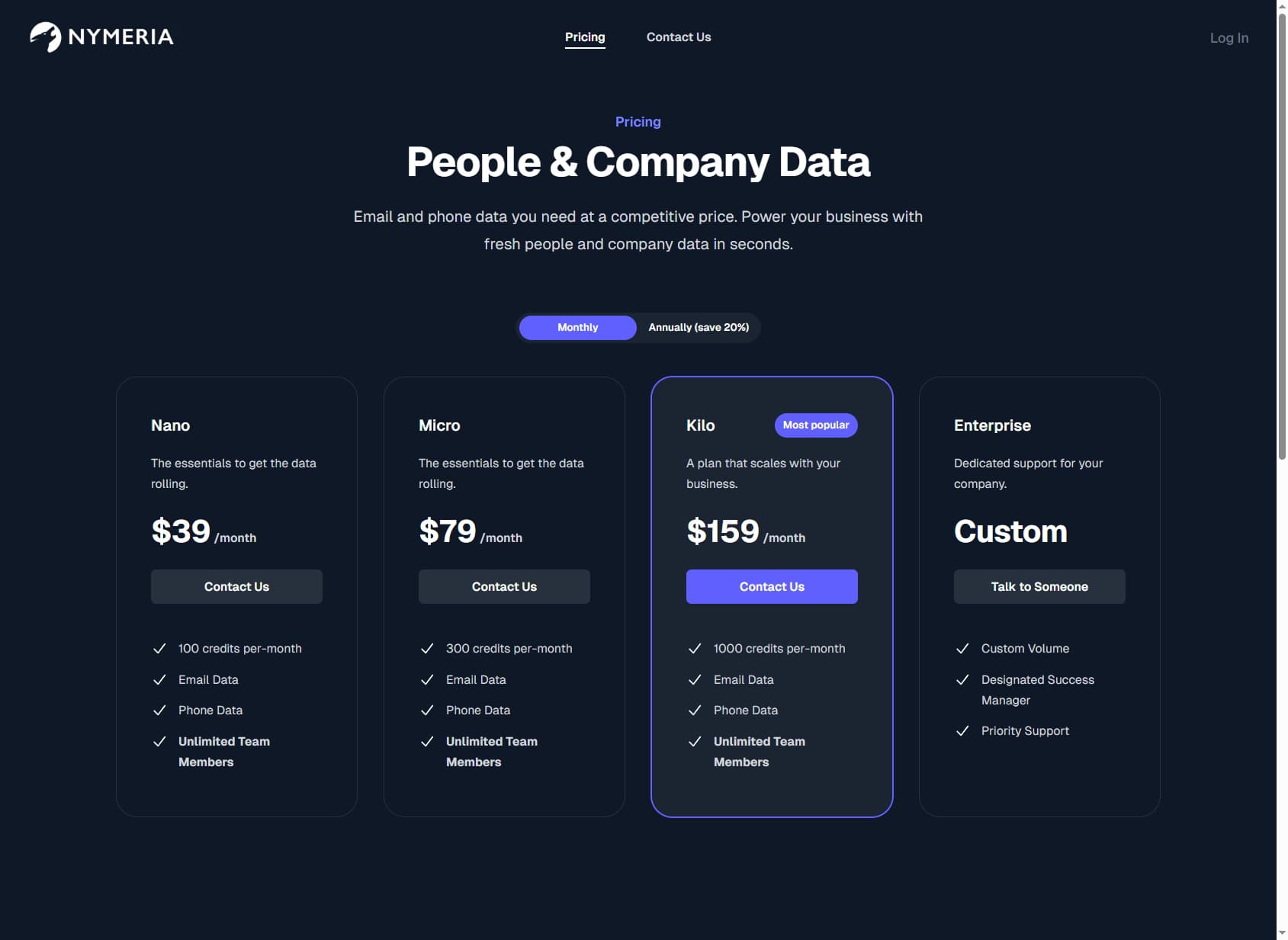
Nymeria pricing starts at $39/month and is structured around credits, with email, phone, and social data included on every plan. One credit is consumed only on a successful enrichment or email verification, and there is no per-seat fee — every plan includes unlimited team members.
| Plan | Monthly Price | Credits / Month | Effective Cost / Contact |
|---|---|---|---|
| Free | $0 | 5 | — |
| Nano | $39/mo | 100 | ~$0.39 |
| Micro | $79/mo | 300 | ~$0.26 |
| Kilo (most popular) | $159/mo | 1,000 | ~$0.16 |
| Enterprise | Custom | Custom volume | Negotiated |
The real cost math
Annual billing saves a flat 20% across all tiers. The catch is the per-credit math on the cheaper plans: Nano works out to roughly $0.39 per contact and Micro to about $0.26, while only the $159 Kilo plan brings that down to a competitive ~$0.16.
There is no credit rollover on monthly or annual plans — unused credits expire every month, so you pay for capacity whether you use it or not. Only custom Enterprise plans can issue credits up front. Teams that want predictable per-contact economics at volume should model expected monthly lookups before choosing a tier; on the plus side, Nymeria's pricing FAQ says you can cancel at any time. For a broader market view, see our roundup of the best B2B email finder tools.
Nymeria Review: Data Coverage and Accuracy Tested
Nymeria's biggest transparency gap is accuracy. The pricing page publishes no hit rate, no verified-email percentage, and no bounce rate — nothing. It markets data freshness instead, with the promise that it does not guess emails or fuzzy match profiles.
That absence matters because the entire value of a contact-data tool is whether the records actually work. With no published benchmark, you are testing blind: there is no number to plan a campaign around and no way to compare Nymeria's coverage to a tool that does publish one.
Where the gap comes from
Third-party reviews fill the silence with caution. Users report that contact information can be outdated, and independent commentary has flagged bounce rates in the 30–40% range on harder-to-find contacts. On a full prospecting list, a single index will always miss a meaningful share of records — that distinction between accuracy on the contacts a database has and coverage across the contacts you actually need is where single-source tools lose ground.
The review base is thin too. Nymeria holds roughly six reviews on its G2 profile, with little additional validation on Capterra and other directories. That makes real-world performance hard to verify against tools that have been benchmarked across thousands of contacts.
If coverage is your main concern, compare Nymeria with multi-provider options as well — see our roundup of waterfall contact providers for how that model differs from single-source tools.
Nymeria Key Features
Nymeria's feature set is built around fast contact-finding and enrichment rather than automated GTM workflows. The highlights:
| Feature | What It Does |
|---|---|
| Email, phone & social data | Returns work emails, mobile phone numbers, and social links for a contact in a single lookup — broader output than email-only finders. |
| Browser extensions | Extensions for Chrome, Edge, and Firefox surface contact data while you browse profiles, suiting profile-by-profile sourcing. |
| Bulk CSV enrichment | Upload a list and Nymeria appends emails, phone numbers, and social handles where it finds matches in its index. |
| Email verification | Built-in verification consumes a credit per request, letting you validate addresses alongside enrichment. |
| Developer API | Programmatic access for enriching records and extracting prospects from web pages and Nymeria's database within your own app. |
| Unlimited team members | Every standard plan shares one credit pool across an unlimited number of users — a cost advantage for agency teams. |
Nymeria Pros: What It Does Well
- ✓Email, phone, and social in one lookup. Many finders return only an email. Nymeria bundles mobile numbers and social links too, which matters for recruiters and reps who call and connect as much as they email.
- ✓Pay only for results. A credit is consumed only when Nymeria successfully returns contact data, so you don't burn budget on empty lookups.
- ✓No per-seat pricing. Unlimited team members on every plan suits agency and recruiting teams where many people each do low-volume lookups — a real cost advantage over per-seat tools.
- ✓Low entry price and a real free tier. Plans start at $39/month and every account gets 5 free credits a month with no credit card — enough to test data quality on your own target contacts first.
- ✓Extensions and an API. Chrome, Edge, and Firefox extensions cover manual sourcing, while the developer API supports programmatic enrichment for teams that want to build Nymeria into their own stack.
Nymeria Cons: Where It Falls Short
- Single-source database. Nymeria pulls every email, phone, and social link from one proprietary index. When that index doesn't have a contact, there's no fallback source to try next.
- No published accuracy metrics. Nymeria's pricing page shows no hit rate, no verified-email percentage, and no bounce rate. It markets data freshness instead of a number, which leaves you testing blind before you can plan around its real coverage.
- Bounce concerns in reviews. Third-party reviews flag outdated contact data and bounce rates reported in the 30–40% range on harder-to-find contacts — a real cost once you factor in damaged sender reputation.
- Low credit allowances on cheaper tiers. Nano gives just 100 credits for $39 and Micro 300 for $79. At $0.39 and $0.26 per contact, those tiers are pricey per lookup until you jump to the $159 Kilo plan.
- No credit rollover. Unused credits expire every month on both monthly and annual plans, so you pay for capacity whether or not you use it. Only custom Enterprise plans can issue credits up front.
- Thin review base. With roughly six G2 reviews, Nymeria offers little third-party validation compared to tools tested across thousands of contacts — making real-world performance hard to verify.
- No buying signals. Nymeria is contact data only. It offers no hiring, funding, or tech-adoption signals to help you prioritize which accounts to work first.
How Nymeria Works: From Free Credits to Bulk Enrichment
Nymeria is quick to start: there is no sales call, and the free tier needs no credit card. The best way to evaluate it is to follow the same path a paying team would and measure what it returns on your own contacts at each step.
- Spend the free credits on hard contacts. Every account gets 5 credits a month with no card required, and a credit is only used on a successful lookup. Put them toward the contacts your current tools miss, not the easy ones.
- Look up profiles with the browser extension. Install the Chrome, Edge, or Firefox extension and pull emails, mobile numbers, and social links while you browse profiles. This manual, profile-by-profile workflow is where Nymeria fits best.
- Verify before you send. Run email verification on anything you plan to email. Each verification request uses a credit, so include it when you size a plan.
- Move to bulk CSV enrichment. Upload a list and Nymeria appends emails, phone numbers, and social handles where its index has matches. Track the match rate: it is the number Nymeria does not publish, and the one that decides your real cost per contact.
- Automate with the API. If the match rate holds up, the developer API lets you enrich records from your own app or internal tools instead of uploading files by hand.
- Size the plan from real usage. Divide the plan price by the successful lookups you actually need each month. Credits do not roll over, so pick the smallest tier that covers a normal month rather than your busiest one.
Two numbers from this test tell you whether Nymeria fits: the share of your list it resolves, and the bounce rate on the emails it returns. Reviews flag bounce concerns in the 30–40% range on harder-to-find contacts, so send a small verified batch before loading anything into a live sequence.
Because every plan includes unlimited team members, the test is also a chance to have several recruiters or reps try it at once. When many light users each resolve a handful of contacts a day, the shared credit pool is where Nymeria's pricing works best.
Who Should Use Nymeria?
Nymeria is the right tool in a specific scenario: manual, low-volume contact-finding by a team that values a low entry price and unlimited seats over maximum coverage and published accuracy.
Use Nymeria if:
- You are a recruiter, agency, or small sales team sourcing contacts profile by profile and want email, phone, and social in one lookup.
- You have many light users and want to avoid per-seat fees — the unlimited-seat model is a genuine cost advantage.
- You want a low entry price and a pay-only-for-results credit model to test before scaling.
- You can validate data quality on your own list first, since Nymeria publishes no accuracy benchmark.
Look elsewhere if:
- Coverage is your bottleneck — a single-source database will miss harder-to-find contacts, so test it side by side with alternatives such as the one in our SignalHire review or a multi-provider waterfall tool.
- You need a published accuracy figure to plan campaigns and protect sender reputation, not just a freshness promise.
- You prospect at high volume and the low credit allowances or no-rollover policy would slow you down.
- You want buying signals — hiring, funding, tech adoption — and automated CRM enrichment, not just manual contact lookups.
If a single index with no published accuracy figure is a dealbreaker, SyncGTM is one alternative worth a look: it runs waterfall enrichment across 50+ data providers for verified emails and phone numbers.