

DataMiner Review 2026: Pricing, Features & Data Coverage

By Kushal Magar · June 8, 2026 · 11 min read · Last updated: September 30, 2026
Key Takeaway
DataMiner is a point-and-click web scraping extension for Chrome and Edge — not a B2B data provider. It has a free tier (500 pages/mo) and paid plans from $19.99 to $200/mo that only raise the page cap. It scrapes raw, unverified HTML with no contact verification, no proxies or API on standard plans, and no native CRM sync. Great for ad-hoc scraping; the wrong tool for B2B teams that need verified emails and phones.
DataMiner is a point-and-click web scraping extension for Chrome and Edge. It copies visible data from web pages into CSV, Excel, or Google Sheets using reusable “recipes.” Free tier covers 500 page scrapes per month. Paid plans run $19.99 to $200/month and only raise the page cap. It produces raw, unverified data — no contact verification, no API on standard plans, no proxies. Our rating: 3.7/5 for ad-hoc scraping; 1.5/5 for B2B sales prospecting.
Most people reach for a DataMiner review from one of two angles. Analysts and researchers want to know if the recipe workflow is worth paying for versus free scraping tools. B2B teams land here while hunting for B2B sales prospecting tools — and quickly discover a scraper is not the same thing as a contact database.
This review covers both angles honestly. For scraping use cases: what DataMiner actually does well, where it earns its price, and where it frustrates. For sales teams: why a browser scraper is the wrong layer of the stack, and why the find-and-verify work it leaves to you usually calls for a contact database or waterfall enrichment.
Key facts upfront: DataMiner's free tier is genuinely useful for small jobs. Paid plans only buy more page volume, not more capability. There is no proxy support or API below Enterprise. And scraped output is unverified by definition — you still have to find, clean, and verify contact data elsewhere. For SDR prospecting workflows, DataMiner is simply the wrong tool.
What Is DataMiner?
DataMiner is a browser extension for Chrome and Microsoft Edge that scrapes data from web pages with a few clicks. You install the extension, open a page you want to extract from, pick the fields, and DataMiner pulls the data into a table you can export to CSV, Excel, or Google Sheets. The core concept is the “recipe” — a saved scraping configuration that can be reused across similar pages and shared from a public library of 60,000+ pre-built recipes.
The pitch is no-code data extraction. DataMiner argues that anyone should be able to pull tables, search results, and listings off the web without writing a scraper — useful for ecommerce price monitoring, market research, SEO data collection, and one-off list building. It is one of the most installed scraping extensions on the Chrome Web Store, with a large user base and an active recipe community.
The critical distinction for B2B teams: DataMiner is an extraction tool, not a data tool. It has no database of its own, no contact records, and no verification engine. It returns exactly what is on the page you point it at — nothing more. That makes it a fundamentally different product from a B2B contact platform, even though both can produce a spreadsheet of leads at the end.
| Capability | What DataMiner Provides | Notable Gaps |
|---|---|---|
| Web Scraping | Point-and-click extraction with 60,000+ shared recipes. Next-page automation and crawls on paid plans. | Recipes break on site changes. No proxy rotation, so rate-limited sites block you. |
| Contact Data | None native. You scrape whatever emails happen to be visible on a page. | No email/phone finding, no verification, no enrichment of any kind. |
| Export & Integrations | CSV, Excel, and Google Sheets export (Sheets on paid plans). | No native CRM sync. No API below Enterprise. |
| Automation | Automated scrape crawls and custom JavaScript on Solo and above. | Runs in your browser, on your IP. No server-side or scheduled cloud runs on standard plans. |
| B2B Sales Workflow | Not available. | No contact verification, CRM sync, or outreach features for revenue teams. |
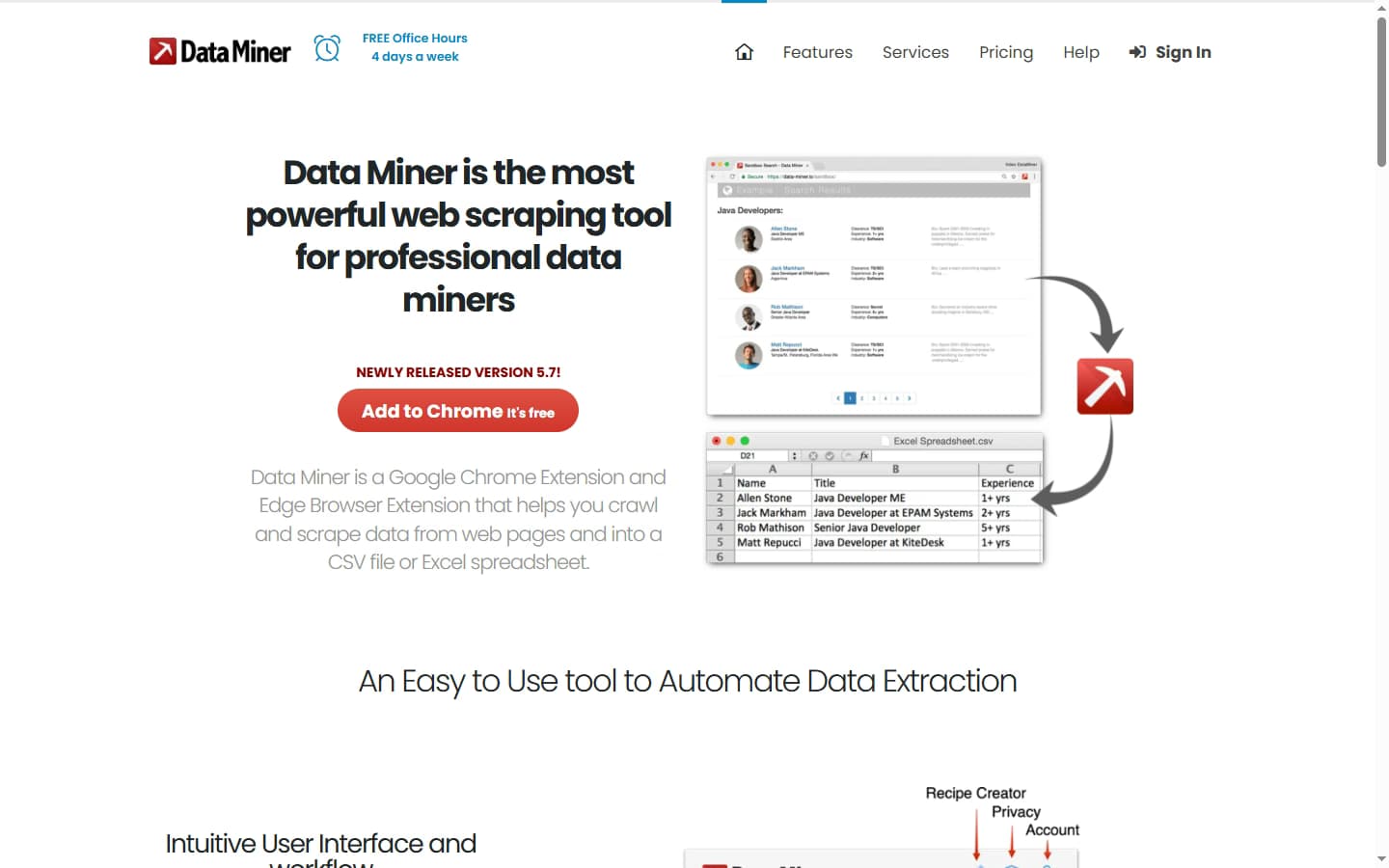
DataMiner homepage — a one-click Chrome and Edge extension that scrapes data from any website into a spreadsheet.
DataMiner Pricing: Plans, Costs, and What You Actually Pay
DataMiner pricing is built around one metric: monthly page scrapes. The free tier covers 500 pages. Four paid tiers raise that cap, and an Enterprise plan adds custom limits and server-based scraping. Critically, every paid plan shares the same feature set — you are buying volume, not capability.
| Plan | Price | Pages / Month | Key Inclusions |
|---|---|---|---|
| Free | $0 | 500 | Public recipes, create recipes, next-page automation. Account locks if the monthly cap is exceeded. |
| Solo | $19.99/mo | 500 | Custom JavaScript, automated crawls, all-domain scraping, Google Sheets export, email support |
| Small Business | $49/mo | 1,000 | Everything in Solo — only the page cap increases |
| Business | $99/mo | 4,000 | Everything in Solo — only the page cap increases |
| Business Plus | $200/mo | 9,000 | Everything in Solo — only the page cap increases |
| Enterprise | Custom (contact sales) | Custom | Higher limits, server-based scraping, and API access — pricing undisclosed |
The most important pricing reality: the cap is in pages, not usable records. Most real scraping jobs touch multiple pages per result — paginated listings, detail pages behind a search, infinite-scroll feeds. A 4,000-page Business plan can translate to far fewer than 4,000 finished rows once you account for navigation pages, retries, and broken pulls.
The second reality: API access and server-based scraping are gated to Enterprise, and Enterprise pricing is not published. Teams that want to automate beyond a browser session — schedule runs, pipe results into a pipeline, or scrape at scale without leaving a tab open — cannot do it on the $19.99–$200/month plans.
The third reality: DataMiner charges for extraction effort, not for a usable result. Navigation pages, failed pulls, and rows you later discard all count toward the cap, and unused page scrapes do not carry over to the next month. The free plan is also restricted on some domains, and going past its 500-page limit locks the account until you upgrade.
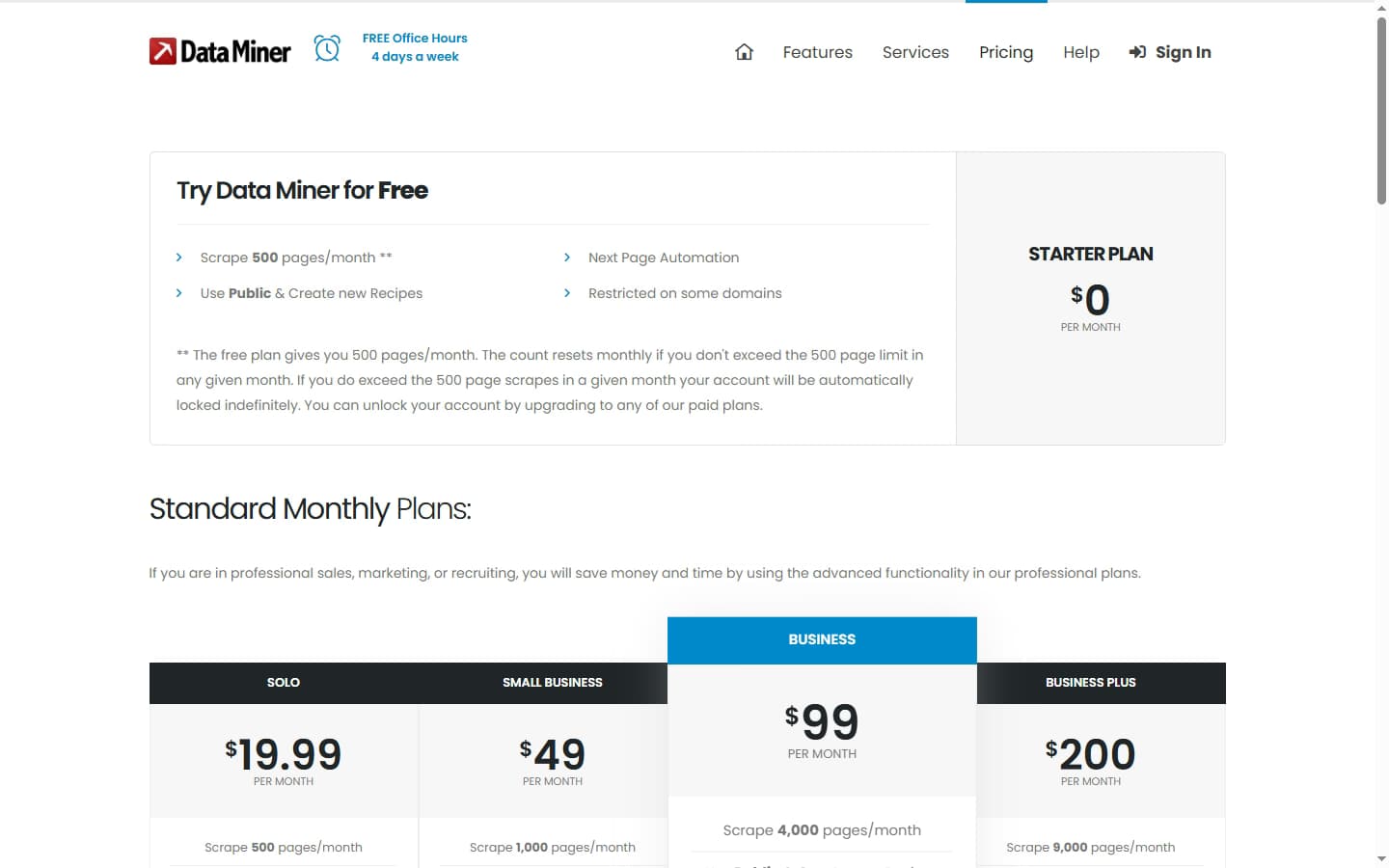
DataMiner pricing 2026 — a free 500-page tier plus paid plans that scale on monthly page-scrape volume, not verified records.
DataMiner Key Features
Point-and-Click Recipes
The headline feature is the recipe builder. You highlight elements on a page — a product name, a price, a row in a table — and DataMiner learns the pattern, then extracts every matching element into columns. Recipes are saved and reusable, so a list-building job on one site becomes repeatable.
DataMiner also ships a public library of 60,000+ community recipes for common sites. For popular targets, you may not need to build anything — you load an existing recipe and run it. This is a genuine time-saver for standard sources, and one of the main reasons DataMiner is so widely installed.
Next-Page Automation and Crawls
DataMiner can follow pagination automatically — clicking through “next” links and scraping each page in sequence. Paid plans add automated scrape crawls that walk a set of URLs. This handles multi-page listings without manual clicking, within your monthly page cap.
The limitation is where it runs. These crawls execute in your live browser session on your own IP address. There is no managed proxy pool, so high-volume crawls against protected sites get rate-limited or blocked, and there is no cloud scheduling to run jobs while your machine is off.
Custom JavaScript and Google Sheets Export
Solo and above unlock custom JavaScript execution, letting more technical users transform or clean data during the scrape. Output exports to CSV and Excel on all tiers, with direct Google Sheets integration on paid plans — convenient for pushing results straight into a working spreadsheet.
What It Does Not Do
It is worth being explicit about the missing layers, because they are the ones B2B teams need most. DataMiner does not find or verify emails and phone numbers, does not enrich firmographic data, does not push records into a CRM, and does not run outreach. It is the first step of a pipeline — raw extraction — and nothing after it. If lead generation is the goal, our guide to B2B sales prospecting tools covers the tools built for that job.
How DataMiner Works: From Install to First Export
DataMiner runs inside your own browser tab, and the vendor describes it as behaving “as if you were clicking on the page yourself.” A typical job runs in five steps, and plan limits show up at specific points along the way.
- Install the extension. Add DataMiner to Chrome or Edge and create an account. The free plan allows 500 page scrapes a month but is restricted on some domains; paid plans unlock scraping on all domains.
- Pick or build a recipe. On the page you want to extract, check whether a public recipe already exists. DataMiner cites 50,000+ free pre-made queries covering 15,000+ popular websites. If nothing fits, build your own by clicking the rows and fields you want as columns.
- Preview and scrape one page. Run the recipe on the current page and check the preview for missing or misaligned columns before you scale up. Fixing a recipe here is far cheaper than cleaning a broken export later.
- Scale across pages.Turn on Auto Pagination to click through “next” links, or run a bulk scrape job from a list of URLs (automated scrape crawls need a paid plan). DataMiner can also click buttons and links, follow sub-pages, open pop-ups, and fill forms from a pre-filled CSV.
- Export the results. Download the table as CSV or Excel, or send it to Google Sheets on paid plans.
Two practical points decide how far this goes. First, every page the job loads counts toward your monthly cap, including pagination and sub-pages, so estimate a job's page count before running it. On the free plan, going past 500 pages locks the account until you upgrade. Second, because scrapes run on your own browser session and IP, keep crawls modest on sites with rate limits, and re-test recipes whenever a target site changes its layout.
For small, repeatable extraction jobs on popular sites, this workflow is quick: a shared recipe can take you from install to spreadsheet without writing any code. For anything that needs to run unattended, on a schedule, or at high volume, the browser-bound design becomes the main constraint.
DataMiner Data Coverage and Accuracy
DataMiner has no data coverage figure and no accuracy rate — and that is not a knock, it is the nature of the tool. A scraper does not own data. It copies whatever is on the page you aim it at, in whatever state that page is in at the moment you scrape.
That means coverage equals the source. If you scrape a directory with 10,000 listings, your coverage is 10,000 listings minus whatever the recipe misses on broken or oddly formatted rows. Accuracy equals the source too: if the site has stale phone numbers, you scrape stale phone numbers. There is no verification step to catch it.
For B2B contact data specifically, this is the core problem. Decision-maker emails are rarely sitting in plain text on a public page, and when they are, they are often outdated. Scraping gets you names and maybe a generic company email — not the verified, deliverable personal business email that outreach needs. That gap is what email finders and waterfall enrichment tools exist to close.
Industry data backs the freshness concern. B2B contact data decays at roughly 30% per year as people change jobs and companies restructure — so any scraped snapshot starts going stale immediately, and a scraper has no mechanism to refresh or re-verify it.
DataMiner Pros: What It Does Well
- Genuinely useful free tier. 500 page scrapes a month, with recipe creation and next-page automation, is enough for real one-off jobs. Most people can evaluate the tool — and finish small projects — without paying anything.
- Low entry price. Solo at $19.99/month is cheap for what it does. For occasional scraping, the cost is trivial compared to hiring a developer to write and maintain a custom scraper.
- No-code recipe builder. Point-and-click extraction means non-technical users can build a working scrape in minutes. The learning curve is shallow for basic tables and listings.
- 60,000+ public recipes. For common sites, someone has likely already built the recipe. Loading a shared recipe skips setup entirely — a real accelerator for standard sources.
- Flexible export. CSV, Excel, and Google Sheets cover most downstream workflows. Pushing scraped data straight into Sheets is smooth on paid plans.
- Widely trusted and supported. One of the most-installed scraping extensions, with a long track record, active community, and responsive email support on paid tiers.
DataMiner Cons: Where It Falls Short
- No verified contact data. DataMiner scrapes whatever is on the page — it does not find or verify emails and phone numbers. For B2B prospecting, you end up with raw text that still needs a separate enrichment and verification step before it is usable for outreach.
- No proxy or anti-block support on standard plans. Scrapes run inside your own browser using your own IP. Sites with rate limits or bot detection will block you, and there is no built-in IP rotation to get around it. Competitors like Octoparse and Apify include proxies natively.
- No API on standard plans. Automation beyond the browser requires the Enterprise tier, which is quote-only and undisclosed. Teams that want to pipe scraped data into a workflow programmatically cannot do it on the $19.99–$200/month plans.
- Page caps, not value caps. Pricing scales on monthly page-scrape volume, not on usable records. A single lead often requires scraping several pages, so the effective cost per clean record is much higher than the headline page count suggests.
- Brittle recipes. Scraping recipes break whenever a target site changes its layout. Maintenance is ongoing, and custom recipe development is a paid add-on. What works today can silently return wrong data tomorrow after a site redesign.
- Output needs cleaning. Scraped data comes back inconsistent — mixed formatting, partial fields, duplicates. The workflow is scrape, export, clean, then verify, which front-loads manual work before any of the data is usable.
- No CRM sync or downstream workflow. DataMiner stops at extraction. There is no native CRM integration or outreach, so it can feed raw input into a sales workflow but cannot replace one.
- Page credits reset monthly. Unused page scrapes do not carry over, and going past 500 pages on the free plan locks the account until you upgrade, so irregular or bursty jobs are awkward to budget.
DataMiner vs Octoparse vs Apollo
The comparison below covers DataMiner against Octoparse (a heavier-duty scraper) and Apollo (a B2B contact database). These are the tools teams most often weigh when they realize a browser extension may not be the right layer.
| Feature | DataMiner | Apollo | Octoparse |
|---|---|---|---|
| Starting Price | $19.99/mo (Solo) — Free for 500 pages | $59/mo (Basic) | $89/mo (Standard) |
| Tool Type | Chrome extension web scraper | B2B contact database + outreach | Visual web scraper (desktop + cloud) |
| Verified Contact Data | No — scrapes raw HTML only | Yes — 275M+ contact records | No — scrapes raw HTML only |
| Email + Phone Accuracy | N/A — no enrichment, data unverified | 60–75% (own DB) | N/A — no enrichment |
| API Access | No (Enterprise only, undisclosed) | Yes | Yes — on higher tiers |
| Proxy / Anti-Block Support | No proxies — runs in your browser | Managed | Yes — built-in IP rotation |
| Buying Signals | No | Basic intent via Bombora | No |
| Native Outreach | No | Yes — sequences included | No |
| CRM Integrations | Google Sheets export only (paid) | HubSpot, Salesforce native | Via export / API |
| B2B Sales Workflow | None — export, clean, enrich elsewhere | Full sales workflow | None — scraping only |
DataMiner vs Octoparse
Octoparse is the better comparison if you genuinely need scraping, just at more scale. Octoparse is a desktop and cloud scraper with built-in IP rotation, scheduled cloud runs, and an API on higher tiers — the exact capabilities DataMiner lacks below Enterprise. DataMiner wins on simplicity and price for small browser-based jobs; Octoparse wins for volume, scheduling, and sites with bot protection. Neither verifies contact data.
DataMiner vs Apollo for B2B Data
Apollo is the right comparison for anyone reaching for DataMiner to build a B2B lead list. Apollo has 275M+ contacts, verified emails and phones, sales sequences, and native HubSpot and Salesforce integration — none of which a scraper provides. Teams that need higher hit rates than a single database often add waterfall contact providers, which check several sources in sequence. DataMiner is not a competitor in this category — it is a different kind of tool entirely.
Who Should Use DataMiner?
DataMiner is the right fit for:
- Analysts and researchers who need to pull tables, listings, or search results off public pages into a spreadsheet for one-off analysis.
- Ecommerce sellers doing price or catalog monitoring on a handful of competitor sites, where the free or Solo tier covers the volume.
- Non-technical users who want no-code extraction without hiring a developer or maintaining a custom scraper.
- Teams scraping standard sites already covered by the 60,000+ public recipe library, where setup is near-zero.
DataMiner is not the right fit for:
- B2B sales teams. No verified emails or phones, no enrichment, no CRM sync, no outreach. You get raw text that still needs an entire pipeline built around it. See the best waterfall contact providers if you need real B2B data.
- High-volume scraping against protected sites. No proxy rotation means rate limits and bot detection will block you. Octoparse or Apify are better fits for scale.
- Teams that need automation or an API. Both are gated to the undisclosed Enterprise tier. Standard plans run only in a live browser session.
- Anyone who needs clean, verified data out of the box. Scraped output requires cleaning and verification before use — a step an enrichment platform handles automatically.
If DataMiner's raw, unverified output is a dealbreaker for prospecting, SyncGTM is one alternative worth a look: it returns verified emails, phone numbers, and firmographics through waterfall enrichment across 50+ data providers.