


Is Lusha Worth It in 2026? Honest Review With Pricing Breakdown

By Kushal Magar · March 16, 2026 · 14 min read · Last updated: September 30, 2026
Lusha is a B2B contact data tool with a Chrome extension that reveals email addresses and phone numbers from LinkedIn profiles. It is fast for one-off lookups with a free tier of 40 credits per month and paid plans starting at $49.90/mo (as of September 2026). However, phone reveals cost 5x email reveals, data freshness is inconsistent outside North America, and there is no workflow automation or signal-based outreach. Our rating: 3.5/5.
Looking for an honest Lusha review? You have probably seen the Chrome extension in action — a colleague hovers over a LinkedIn profile, clicks a button, and gets a phone number in two seconds. It looks effortless.
Lusha has built a reputation on that speed. Over 300 million business profiles. A 4.3/5 rating on G2 from 1,600+ reviews. It is one of the most popular contact data tools on the market.
But popularity does not mean it is the right fit for your team. This Lusha review breaks down exactly what you get — the Chrome extension, data accuracy, API access, the credit system that frustrates power users — and where the tool falls short for teams that need more than one-off lookups.
If you are evaluating Lusha against tools like Apollo.io or ZoomInfo, this review will help you decide whether Lusha is worth the credits.
Lusha Review: What You Get (and What You Don't)
Lusha is a B2B contact data platform built around a Chrome extension. You browse LinkedIn, find a prospect, and reveal their email address or phone number. That is the core loop. Everything else — the prospecting platform, intent data, API access — is built around that simple action.
Here is a quick-reference table of what is included and what is missing:
| Feature | What's Included | Limitations |
|---|---|---|
| Chrome Extension | One-click contact reveal on LinkedIn and company sites | Each reveal burns credits; phone numbers cost 5x email reveals |
| Prospecting Platform | Search and filter by company, role, location, industry | Filters limited on lower tiers |
| Buyer Intent | Intent signals based on topic monitoring | Topic limits depend on plan tier |
| API Access | REST API for contact and company enrichment | Rate limits apply per plan (per minute, hour, and day) and vary by account |
| CRM Integration | HubSpot, Salesforce, Outreach, SaleLoft | Automation depth varies by plan tier |
| Workflow Automation | Not available | No outreach triggers, no signal-based sequences, no automated enrichment pipelines |
The takeaway: Lusha is excellent at one thing — revealing contact data fast. It is not a GTM platform. There is no outreach automation and no signal-triggered sequencing.
Lusha Chrome Extension: Fast but Limited
The Chrome extension is Lusha's best feature — and the main reason teams compare it to tools like Kaspr. Install it, navigate to a LinkedIn profile, and click the Lusha icon. Within seconds you get an email address and, if available, a direct phone number. No context switching. No copy-pasting between tabs.
For SDRs doing manual prospecting on LinkedIn, this saves real time. You can reveal contacts, push them to your CRM, and move on. The extension also works on company websites, pulling contact data for employees listed on about pages and team directories.
The credit math changes everything
Here is where the convenience breaks down. Every email reveal costs 1 credit. Every phone number reveal costs 5 credits (as of September 2026). The free plan gives you 40 credits per month.
That sounds reasonable until you do the math. If an SDR needs phone numbers for 20 prospects per day, that is 100 credits per day — about 2,000 credits per month. The free tier covers eight phone reveals, less than half a day of work, and the Professional plan's 600 monthly credits last about six working days. Even on a paid plan, credit consumption spikes fast when you prioritize phone outreach over email.
Multiple Capterra reviewers flag this as their top frustration: "The credit system punishes you for wanting phone numbers, which are the most valuable data point for sales."
No bulk enrichment from the extension
The Chrome extension is designed for one-at-a-time lookups. If you need to enrich a list of 500 leads, you cannot do that from the extension. You need the prospecting platform or API — both of which have their own limitations depending on your plan tier.
Data Accuracy: How Reliable Is Lusha Really?
Lusha claims access to over 300 million business profiles. Users report email accuracy rates between 80-90% and phone number accuracy around 70-80%. Those numbers are solid by industry standards — most B2B data providers hover around 60-70% accuracy for phone numbers.
North America is strong. Everything else is hit or miss.
Lusha's database skews heavily toward North America and the UK. If your team prospects in these markets, accuracy is above average. But if you sell into Europe (outside UK), APAC, or Latin America, expect higher bounce rates and more outdated records.
G2 reviewers consistently note this gap: coverage drops significantly outside English-speaking markets. For global sales teams, this is a deal-breaker unless you supplement Lusha with regional data providers.
Data freshness is the real issue
The accuracy numbers look good on paper. The problem is freshness. Multiple reviewers report finding contacts who changed companies 6-12 months ago but still show at their old employer in Lusha. When you are burning 5 credits per phone reveal, getting a stale number for someone who left the company hurts twice — wasted credits and a dead lead.
Stale records are the main argument for waterfall enrichment, which checks several providers in sequence instead of relying on one database. With Lusha alone, the practical fix is to spot-check job titles and employers on LinkedIn before spending phone credits.
Lusha platform interface — March 2026
Lusha API: Developer Access and Rate Limits
Lusha offers a REST API for contact and company enrichment. You send a name, company, or LinkedIn URL and get back email addresses, phone numbers, and company metadata. The API is clean and well-documented — no complaints on the developer experience side.
The problem is the rate limits. Lusha's API docs say limits apply per plan across per-minute, per-hour, and per-day windows and vary by account (as of September 2026). These were the limits reported under Lusha's earlier plan lineup:
| Plan | Rate Limit | Daily Cap |
|---|---|---|
| Lite | 5 requests/min | 25 requests/day |
| Pro | 50 requests/min | Not published |
| Premium | 300 requests/min | Not published |
At 5 requests per minute on the old Lite plan, enriching a list of 1,000 leads took over 3 hours. Even at 300/min, a 50,000-record enrichment job runs for nearly 3 hours. Lusha has since renamed its plans, so confirm the limits on your tier before you build around them. For GTM engineers building automated enrichment pipelines, these rate limits are a bottleneck.
Each API call also consumes credits from your plan allocation. So rate limits and credit limits compound: you are throttled on speed and volume simultaneously.
Lusha Pricing Breakdown
As of September 2026, Lusha pricing starts at $0/mo for a free plan with 40 credits and scales through three paid plans with published prices, plus a custom Scale plan. Unlike most competitors, Lusha publishes its prices publicly — which is a plus. But the credit system makes actual costs much harder to predict than the sticker prices suggest.
- --Free: 40 credits/mo, browser extension, basic prospecting features, and CRM integrations
- --Starter ($49.90/mo, or $449.10/yr billed annually): 400 credits/mo
- --Professional ($69.90/mo, or $629.10/yr billed annually): 600 credits/mo
- --Premium ($399.90/mo, or $3,599.10/yr billed annually): 3,400 credits/mo
- --Scale (custom): Fully customizable; teams larger than five users are routed to Lusha's sales team
Every email reveal costs 1 credit and every phone reveal costs 5. On monthly plans, unused credits roll over and can accumulate up to twice the plan's limit; on annual plans, they reset at the end of the annual cycle.
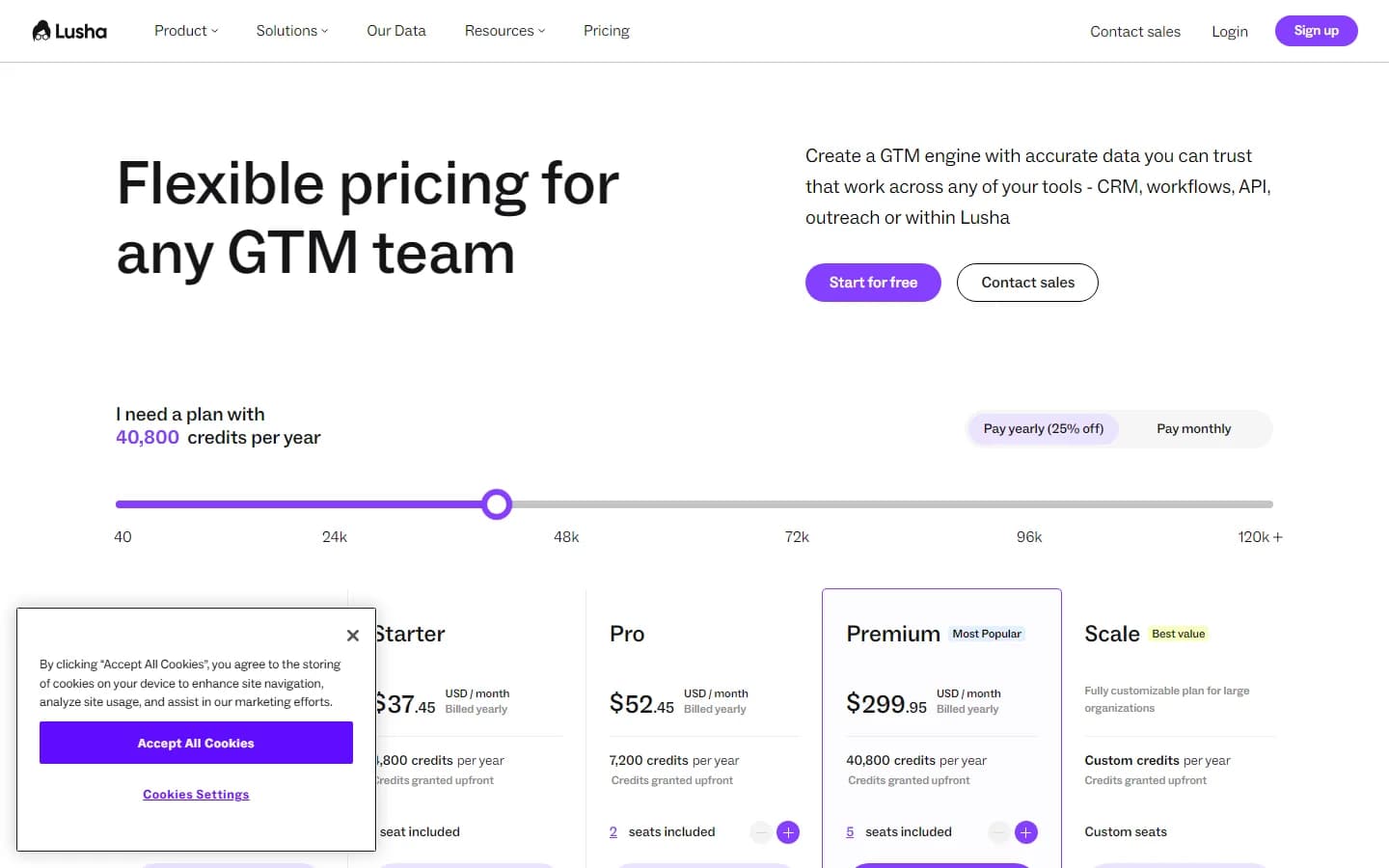
Lusha pricing page — March 2026
The real cost: credits per contact
Here is a realistic scenario for a 3-person SDR team:
- Each SDR prospects 30 contacts per day (mix of email and phone)
- Average credit cost per contact: ~3.5 credits (assuming 50% email-only at 1 credit, 50% phone + email at 6 credits)
- Per SDR daily burn: 105 credits
- Per SDR monthly burn: 2,310 credits (22 working days)
- Team total: ~6,930 credits/mo
- Against current plans: more than 11 times Professional's 600 monthly credits and about twice Premium's 3,400, so budget for a custom Scale plan or check how credits scale with seats on your plan
The sticker price looks affordable. The per-contact cost is where the math gets expensive. And if your team prioritizes phone outreach — which most outbound teams do — the 5x credit multiplier on phone reveals can more than triple your effective cost per contact.
Hidden costs to watch
- Phone number premium: At 5 credits per reveal, phone lookups cost 5x as much as emails — the single biggest budget surprise
- Renewal price increases: Capterra reviewers report 8-15% price increases at renewal without any usage changes
- Stale data = wasted credits: Credits spent on outdated contacts are gone. No refunds for bad data reveals
- Feature gates: SSO, advanced compliance, and Do Not Call lists locked to the Scale tier
- Annual plans reset credits: Unused credits roll over only on monthly plans (up to twice the plan limit); on annual plans they reset at the end of the cycle
What Are the Downsides of Using Lusha?
The biggest downsides of Lusha are the credit system that punishes phone-heavy workflows, outdated contact data that wastes credits on stale reveals, no workflow automation for triggering outreach based on buying signals, and CRM features locked behind higher-tier pricing.
The credit system penalizes power users
This is the single biggest complaint across every review platform. The 5:1 ratio between phone and email credits creates a perverse incentive: teams avoid phone lookups to conserve credits, even when a phone call would be the most effective outreach method. A data tool should not discourage you from using the best data it offers.
No workflow automation
Lusha tells you who to contact. It does not tell you when to contact them or automatically start the outreach. There is no signal-based triggering. No automated sequences when a prospect changes jobs, their company raises funding, or they install a competitor's product. You find the contact, then you manually move them into a separate outreach tool.
For teams running high-volume outbound, that manual handoff between data discovery and outreach execution becomes the bottleneck.
Data freshness problems burn credits
When you reveal a contact and the data is stale — wrong company, wrong number, person retired — you do not get those credits back. Multiple G2 reviewers report this frustration: "Found contacts who changed companies six months ago but still showed at their old employer."
Geographic coverage gaps outside North America
Lusha is strong in the US, Canada, and UK. Coverage drops significantly in continental Europe, APAC, and emerging markets. If your ICP is global, you will need to supplement Lusha with regional data providers like Cognism (which has stronger European coverage) — adding cost and complexity to your stack.
CRM integration depth varies by tier
Basic CRM integration is available on the free plan. Automated workflows, credit usage controls, and team management have historically sat on higher tiers, and teams larger than five users are routed to Lusha's sales team. If your team runs on Salesforce and needs contacts to sync automatically with deduplication, price the upper tiers or a custom Scale plan rather than the entry plans.
Lusha credit system and plan comparison — March 2026
Lusha Plans Compared: Which Tier Fits
Lusha's plan names and credit allowances have changed since this review was first published. Here is the lineup as of September 2026, with how many phone reveals each plan buys at 5 credits apiece.
| Plan | Monthly Billing | Annual Billing | Credits / Month | Phone Reveals / Month | Best For |
|---|---|---|---|---|---|
| Free | $0 | $0 | 40 | 8 | Testing the Chrome extension |
| Starter | $49.90/mo | $449.10/yr (~$37.45/mo) | 400 | 80 | One rep doing light, email-first prospecting |
| Professional | $69.90/mo | $629.10/yr (~$52.45/mo) | 600 | 120 | One rep who needs a steady flow of phone numbers |
| Premium | $399.90/mo | $3,599.10/yr (~$299.95/mo) | 3,400 | 680 | Phone-heavy prospecting at volume |
| Scale | Custom | Custom | Custom | Custom | Teams larger than five users |
Three things stand out once you run the per-credit math:
- Professional is the cheapest paid plan per credit. On monthly billing, a credit costs about 11.7 cents on Professional, 11.8 cents on Premium, and 12.5 cents on Starter. Premium buys volume, not a lower unit price.
- Phone data adds up fast. At 5 credits, a phone reveal costs roughly 58 to 62 cents on monthly billing, so a rep revealing 20 numbers a day spends about $12 a day on phone data and works through Professional's allowance in six working days.
- Annual billing trades flexibility for price. It saves 25% on every paid plan, but unused credits reset at the end of the annual cycle, while monthly plans let them roll over up to twice the plan limit.
Teams larger than five users are asked to contact Lusha's sales team, which is where the customizable Scale plan comes in. The practical takeaway: start on Free to test data quality in your market, pick Professional over Starter if you need any phone numbers, and choose monthly billing if your usage is uneven enough to benefit from rollover.
Is Lusha Worth It?
Lusha is a good fit for individual SDRs and small sales teams that do most of their prospecting on LinkedIn. The Chrome extension is fast, the free tier is generous enough to test, and the data accuracy for North American contacts is above average. If your workflow is "find prospect on LinkedIn, get their number, call them" — Lusha does that well.
Lusha is not a good fit for GTM teams running automated workflows, RevOps leaders who need scalable CRM enrichment, or anyone who needs to act on buying signals automatically. The credit system punishes volume. The API rate limits throttle automation. And the complete absence of outreach triggers means you are always doing the last mile manually.
The verdict: Lusha is a solid contact lookup tool trapped inside a credit system designed to slow you down. For quick lookups, it delivers. For GTM at scale, you will outgrow it fast.
If Lusha's coverage gaps outside North America and the UK are a dealbreaker, SyncGTM is one alternative worth a look: it runs waterfall enrichment across 50+ data providers for verified emails and phone numbers.