

BitScale Review 2026: Features, Pricing, Pros and Cons

By Kushal Magar · March 15, 2026 · 12 min read · Last updated: September 30, 2026
BitScale is an AI-powered GTM platform that combines a 300M+ contact database with data enrichment, intent signals, and outbound automation in a spreadsheet-like interface. As of September 2026, paid plans start at $349/mo (Growth) and scale to $799/mo for Salesforce integration on Booster, both billed monthly. Our verdict: BitScale delivers solid enrichment for mid-market teams with budget, but CRM integrations are locked behind expensive plans and credits burn faster than expected.
You're probably here because you've seen BitScale pop up in every "best outbound tools" list this year and want to know if it actually delivers. Fair question. With paid plans starting at $349/mo and a credit system that can quietly drain your budget, you need real answers before committing.
We spent two weeks testing BitScale across lead enrichment, outbound personalization, and CRM workflows. This BitScale review covers what the platform actually does well, where it falls short, real pricing breakdowns, and how it compares to Clay and Apollo.
No fluff. No affiliate incentives. Just what a GTM practitioner needs to make a decision.
BitScale Review: What You Get (and What You Don't)
BitScale is an AI-powered GTM platform built for RevOps and sales teams running outbound at scale. It combines a 300M+ contact and company database with multi-source enrichment, intent signals, and AI-generated outreach copy. The interface is spreadsheet-like, similar to Clay, and the workflow follows what BitScale calls the GEO Framework: Generate leads, Enrich them, then run Outreach.
Here's what's included versus what's gated or missing:
| Feature | What's Included | Limitations |
|---|---|---|
| Contact Database | 300M+ contacts and companies | Grids capped at 50K rows (Free) or 100K rows (Growth, Booster) |
| Data Enrichment | 100+ data sources, verified emails and phones | Each enrichment burns credits; costs scale fast |
| AI Agent (BitAgent) | Visits websites, runs Google searches, fills gaps | Heavy credit consumption per research task |
| Intent Signals | 50+ signals: hiring, funding, tech changes, social | Signal accuracy varies by data source freshness |
| CRM Sync | 2-way HubSpot (Growth+), Salesforce (Booster+) | No CRM on the Free plan |
| Outreach | AI-written email and LinkedIn copy | Limited customization; no built-in sending |
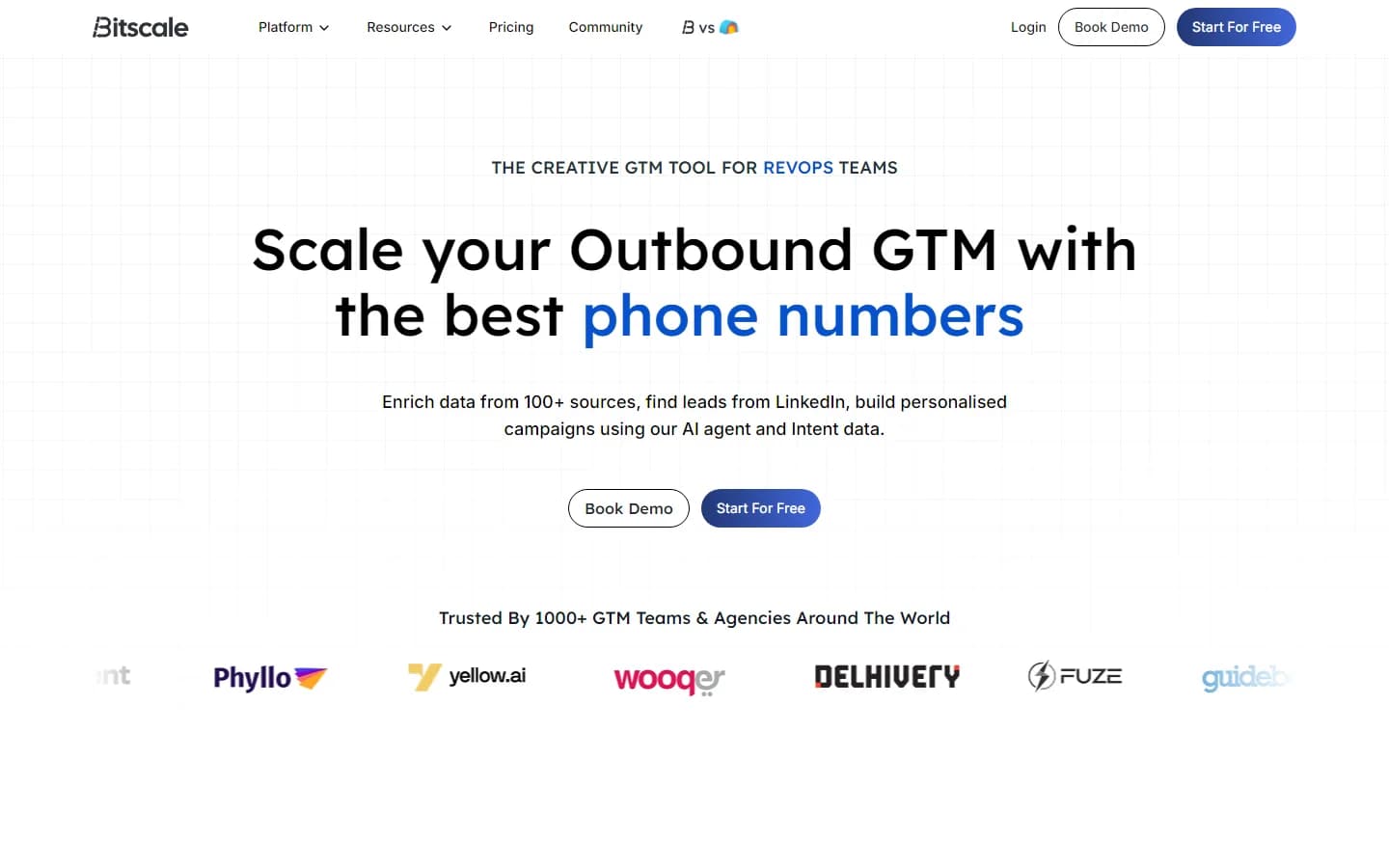
BitScale's homepage showcasing the GEO Framework: Generate, Enrich, Outreach
BitScale Pricing: What You Actually Pay
As of September 2026, BitScale pricing ranges from free (200 lifetime credits) to $799/mo for the Booster plan with Salesforce integration, plus custom Enterprise contracts. BitScale no longer lists a low-cost Starter tier, so Growth at $349/mo is the entry paid plan, and annual billing takes 10% off every paid plan. Here's the full breakdown, pulled directly from their pricing page:
- Free: $0/mo. 200 lifetime credits (not monthly). 50+ intent enrichments, 10+ B2B data sources, 20 action columns and 50,000 rows per grid. No credit card required.
- Growth ($349/mo, or about $314/mo billed annually): 15,000 credits/month. 30 action columns, 100,000 rows per grid, credit rollover up to 3x, 100+ data sources, 2-way HubSpot integration, webhook and HTTP API access, inbound integrations.
- Booster ($799/mo, or about $719/mo billed annually): 50,000 credits/month. Everything in Growth plus 50 action columns, Salesforce integration, curated scraping scripts, private Slack channel, custom API integration support.
- Enterprise ($15K+/year minimum): Custom credits, unlimited rows, SOC 2/SSO, data privacy certification, priority support, collaborative workspace, private playbooks, custom 2-way CRM integrations, a dedicated GTM engineer.
One policy works in your favor: BitScale only spends credits when a data provider returns a valid result. Failed lookups, formula columns, and CRM syncs are free.
Real-world cost scenario: A team of 2 SDRs enriching 500 leads/week with email, phone, company data, and AI research works through about 2,000 leads a month. Growth's 15,000 monthly credits (as of September 2026) only cover that if the full enrichment averages under 7.5 credits per lead, so price a small test batch before you commit. Either way, you're paying $349/mo before you send a single email. Add Salesforce sync and you jump to $799/mo.
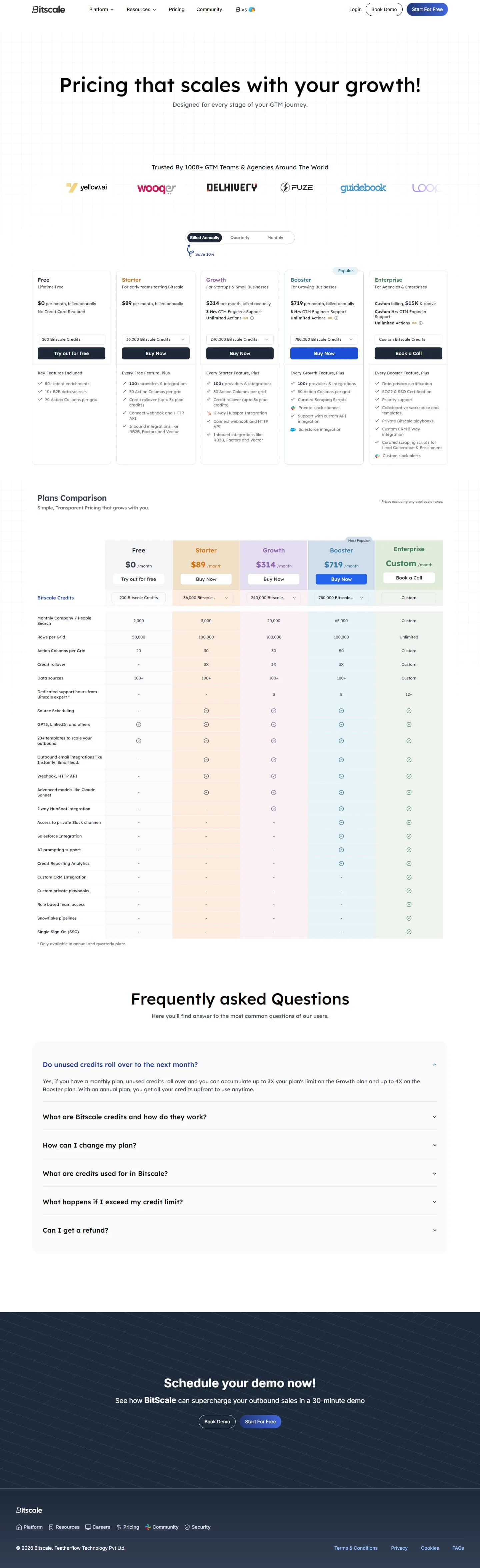
BitScale pricing page as of March 2026 (the Starter tier shown here has since been removed)
BitScale Data Quality: How Accurate Is It?
BitScale claims 94% email coverage and 89% phone match rates across its 300M+ database. Those numbers are competitive with tools like Apollo and ZoomInfo. In our testing, email accuracy held up well for mid-market and enterprise contacts in the US and Europe.
Where it gets inconsistent is with smaller companies and non-US markets. Phone numbers for APAC contacts had lower match rates, and some company enrichment fields (tech stack, employee count) were outdated by 3–6 months. This isn't unusual for database tools, but it's worth knowing if you're targeting international markets.
Does BitScale Verify Email Addresses?
Yes. BitScale runs email verification through multiple providers. Bounce rates in our test batch of 500 enriched emails were under 4%, which is solid. However, verification uses credits, so factor that into your cost calculations.
BitScale vs Apollo: Data Accuracy Compared
Apollo's database (275M+ contacts) is slightly smaller but its email accuracy is comparable. The main difference: Apollo includes built-in email sequences, so you don't need a separate sending tool. BitScale's advantage is deeper enrichment from 100+ sources versus Apollo's more limited enrichment capabilities.
BitScale Ease of Use: Setup and Learning Curve
BitScale's spreadsheet-like interface will feel familiar if you've used Clay or Google Sheets. You create grids, add action columns for enrichment tasks, and the system populates data from its sources. The concept is straightforward.
The reality is more complex. Review sites consistently rate BitScale's setup as "Advanced," and most teams need the included GTM engineer onboarding to get workflows running properly. Expect 1–2 weeks before your team is fully productive.
The 75+ pre-built playbooks help. These are template workflows for common tasks like "enrich a HubSpot list" or "find decision-makers at funded startups." They save time on setup, but customizing them beyond the defaults still requires trial and error.
BitScale Integrations: CRM, Outreach, and Beyond
BitScale supports integrations with HubSpot, Salesforce, Instantly, SmartLead, and Google Sheets. Webhook and HTTP API access is available from the Growth plan, BitScale's entry paid tier. If CRM data enrichment is your primary use case, integration depth matters more than feature count.
Does BitScale Integrate with HubSpot?
Yes, on the Growth plan ($349/mo as of September 2026) and above. The 2-way HubSpot sync is one of BitScale's strongest features — it keeps your CRM data fresh without manual imports, and CRM syncs don't consume credits. The Free plan has no CRM integration at all.
Does BitScale Integrate with Salesforce?
Salesforce integration requires the Booster plan at $799/mo (about $719/mo billed annually). That's a $450/mo step up from Growth on monthly billing just to sync with your CRM. Teams on other CRMs need Enterprise, which adds custom 2-way CRM integrations.
Outreach Tool Integrations
BitScale connects to Instantly and SmartLead for email sending, which covers the two most popular cold email platforms. There's no native email sending built into BitScale, so you'll always need a separate tool for the actual outreach execution.
BitScale AI Features: What's Real vs. What's Marketing
BitScale leans heavily on AI branding. Here's what's genuinely useful versus what's overhyped.
BitAgent: The Research AI
BitAgent is the standout feature. It visits company websites, runs Google searches, and pulls public data to fill gaps in your leads. Think of it as a research assistant that automates the manual work of checking LinkedIn profiles, reading company pages, and pulling news mentions. It works well for generating personalization hooks like recent funding rounds, product launches, or leadership changes.
The catch: each BitAgent research task consumes credits. Run it on 1,000 leads and you'll feel it in your balance.
AI Outreach Copy
BitScale generates personalized email lines and LinkedIn openers using the enriched data. The output quality is decent for first drafts but generic enough that most experienced SDRs will rewrite 30–50% of the copy. It's a time-saver, not a replacement for human judgment.
What Are the Downsides of Using BitScale?
Every tool has tradeoffs. Here are the real pain points we found and that users consistently report on G2 and review forums.
- No paid plan below $349/mo, and Salesforce sync requires the $799/mo Booster plan (monthly prices as of September 2026)
- 200-credit free plan is lifetime, not monthly — barely enough to test the platform
- Learning curve rated "Advanced" by review sites — most teams need onboarding help
- Credit burn can spike unpredictably depending on enrichment depth per lead
- Outreach message customization options are limited compared to dedicated sequencing tools
- Enterprise plan starts at $15K+/year minimum with no transparent pricing
Credit Burn Is the Biggest Risk
BitScale's credit system is the most common complaint. Every successful enrichment, research task, and verification consumes credits. Failed lookups, formula columns, and CRM syncs are free, which helps, but users report that costs can spike unpredictably when running complex workflows with multiple enrichment columns and BitAgent research. Unlike flat-rate tools, you're always doing math on whether an action is worth the credits.
CRM Gating Hurts Small Teams
With no CRM integration on the Free plan, HubSpot starting at $349/mo on Growth, and Salesforce requiring $799/mo on Booster (monthly billing, as of September 2026), small teams can't use BitScale as a connected part of their GTM stack without a significant budget commitment.
Who BitScale Is NOT For
BitScale works best for mid-market teams running 10,000+ leads per month with budget for the Growth or Booster plan. It's not the right fit for everyone.
- Solo founders or 1–2 person teams: With no paid tier below $349/mo, the minimum spend is hard to justify at low volume. Compare BitScale alternatives before committing.
- Teams needing full-cycle outbound: BitScale enriches and personalizes but doesn't send emails. You need Instantly or SmartLead alongside it, adding cost and complexity.
- GDPR-first organizations: BitScale doesn't offer GDPR/DNC screening as a native feature outside the Enterprise plan. Cognism is a better fit for compliance-heavy teams.
- Budget-conscious teams testing outbound: The 200-credit lifetime free plan is not enough to evaluate the tool properly. You'll burn through it in one test run.
BitScale vs Clay and Apollo: Which Fits Your Team?
BitScale's closest competitor is Clay. Both use a spreadsheet-style grid where each column runs an enrichment, an AI research step, or a formula. Apollo takes a different approach, pairing its own contact database with built-in email sequences. Here is how BitScale and Clay compare on plans and limits, using monthly prices as of September 2026.
| Feature | BitScale | Clay |
|---|---|---|
| Free plan | 200 lifetime credits, 50,000 rows per grid | 100 data credits + 500 actions per month, 200 rows per table |
| Entry paid plan | Growth, $349/mo | Launch, $167/mo |
| HubSpot sync | Growth ($349/mo) | Growth ($446/mo) |
| Salesforce sync | Booster ($799/mo) | Growth ($446/mo) |
| Webhooks and HTTP API | Growth and above | Growth and above |
| Credit rollover | Up to 3x plan credits | Up to 2x monthly data credits; actions reset |
| Failed lookups | Not charged | Not charged |
| AI research agent | BitAgent | Claygent |
| Built-in email sending | No (connects to Instantly, SmartLead) | Sequencer from Launch |
| Annual billing discount | 10% | 10% |
Credits are not interchangeable between the two tools, so compare them on the same test batch rather than on headline numbers. The practical differences are price and CRM access. Clay's entry plan costs less than half of BitScale's, and Clay puts Salesforce sync on the same tier as HubSpot, while BitScale charges $450/mo more on monthly billing to add Salesforce. BitScale's advantages are larger grids at the entry tier (100,000 rows versus Clay Launch's 50,000), a more generous credit rollover, and GTM engineer support, which matters given the learning curve covered above.
Apollo is the better fit if you want data and sending in one place. Its 275M+ contact database comes with built-in email sequences, so you don't need Instantly or SmartLead alongside it. BitScale wins when you need deeper enrichment from 100+ sources, BitAgent research, and intent signals layered on top of the contact data.
The short version: pick BitScale for high-volume enrichment with hands-on onboarding, Clay for the most flexible workflow builder at a lower entry price, and Apollo if you want one tool to find and email prospects. For the full field, see our BitScale alternatives guide.
Is BitScale Worth It?
BitScale is worth it for mid-market GTM teams (5+ SDRs) running high-volume outbound who have budget for the $349/mo Growth plan or higher. With 15,000 credits a month on Growth and 50,000 on Booster (as of September 2026), map your monthly lead volume to credits on a test batch before you pick a tier. It is not worth it for startups, small teams, or anyone who needs CRM integrations without spending $349+/mo.
Who It's Good For
BitScale is a solid choice for mid-market GTM teams (5+ SDRs) running high-volume outbound campaigns who need deep enrichment, intent signals, and AI research in one platform. If you're processing high lead volumes and have budget for the Growth or Booster plan, BitScale's 100+ data sources and pre-built playbooks save real time.
Who Should Look Elsewhere
If you're a startup, small team, or anyone who needs CRM integrations without spending $349+/mo, BitScale isn't the right fit. The credit burn is unpredictable, the free tier is too limited to evaluate, and the learning curve adds friction. If you mainly need verified emails and phone numbers rather than BitScale's workflow grid and AI research, read our guide to waterfall enrichment before committing to a $349/mo minimum.
Bottom line: BitScale is a capable platform for teams with budget and volume. For everyone else, the price-to-value ratio doesn't hold up against modern alternatives.
BitScale Pros
- 300M+ contact and company database with 100+ enrichment sources
- AI-powered BitAgent automates research across Google, LinkedIn, and company websites
- 75+ pre-built playbooks for common GTM workflows
- Credit rollover (up to 3x your plan) prevents waste
- Failed lookups, formula columns, and CRM syncs don’t consume credits
- GTM engineer support on paid plans
- Intent signals from hiring, funding, tech stack, and social activity
BitScale Cons
- No paid plan below $349/mo, and Salesforce sync requires the $799/mo Booster plan (monthly prices as of September 2026)
- 200-credit free plan is lifetime, not monthly — barely enough to test the platform
- Learning curve rated "Advanced" by review sites — most teams need onboarding help
- Credit burn can spike unpredictably depending on enrichment depth per lead
- Outreach message customization options are limited compared to dedicated sequencing tools
- Enterprise plan starts at $15K+/year minimum with no transparent pricing
If BitScale reserving Salesforce sync for its Booster plan is a dealbreaker, SyncGTM is one alternative worth a look: it pairs waterfall enrichment across 50+ data providers with native Salesforce and HubSpot integrations, and it is free to start.