

Deepline Review 2026: Claude Code GTM Tools, Pricing, Fit

By Kushal Magar · October 28, 2026 · 13 min read
Key Takeaway
Deepline is a GTM data platform that Claude Code, Codex, and other agents run through an npm CLI, the /deepline-gtm skill, an SDK, or a remote MCP server. Workflows are versioned TypeScript Plays with waterfall enrichment, email validation, and monitors. Pay as you go has no platform fee and bills $0.10 per credit; Growth is $395/mo plus usage with $200 of credits. BYOK calls are free up to 50K a month. Catches: it is developer-only, CRM sync needs Growth, entry-plan data is kept 60 days, and nearly all performance claims are vendor-reported. Our rating: 3.8/5.
Deepline is betting that GTM teams will stop clicking through enrichment tables and start asking an agent to do the work. This Deepline review checks whether the product behind that bet is ready for your team.
We read Deepline's homepage, pricing page, docs, CLI install guide, and npm registry data on October 28, 2026. We did not run paid enrichment jobs, so coverage and accuracy numbers below are labeled as vendor claims.
One finding up front: almost every public write-up about Deepline is published by Deepline. We found no G2, Capterra, or Product Hunt reviews, which shapes how much weight its claims deserve.
TL;DR: Deepline Review 2026
- What it is: A GTM data and workflow platform that coding agents operate through a CLI, skills, an SDK, or MCP.
- How it works: Your agent writes and runs versioned TypeScript workflows called Plays, with waterfall enrichment, email validation, monitors, and a workspace database.
- Pricing: $0 platform fee on Pay as you go, $0.10 per credit. Growth is $395/mo plus usage. BYOK calls are free up to 50K a month, then $0.005 each.
- Biggest strengths: Published unit prices, workspace and per-run spend caps, and workflows you can read, diff, and version.
- Biggest catches: Terminal-first, CRM sync only on Growth, 60-day retention on the entry plan, and almost no independent reviews.
- Best for: GTM engineers and technical founders who already work in Claude Code or Codex.
- Rating: 3.8/5.
What Is Deepline?
Deepline is a GTM data platform built for AI agents, sold by Aero AI Labs, Inc. Its homepage pitch is "Every GTM motion. One system." with the subhead "Build your GTM Factory with your favorite agents."
In practice, it bundles four things: a catalog of data provider tools, a workflow engine for code-based Plays, a workspace database, and monitors that watch for account signals. Your agent is the user interface.
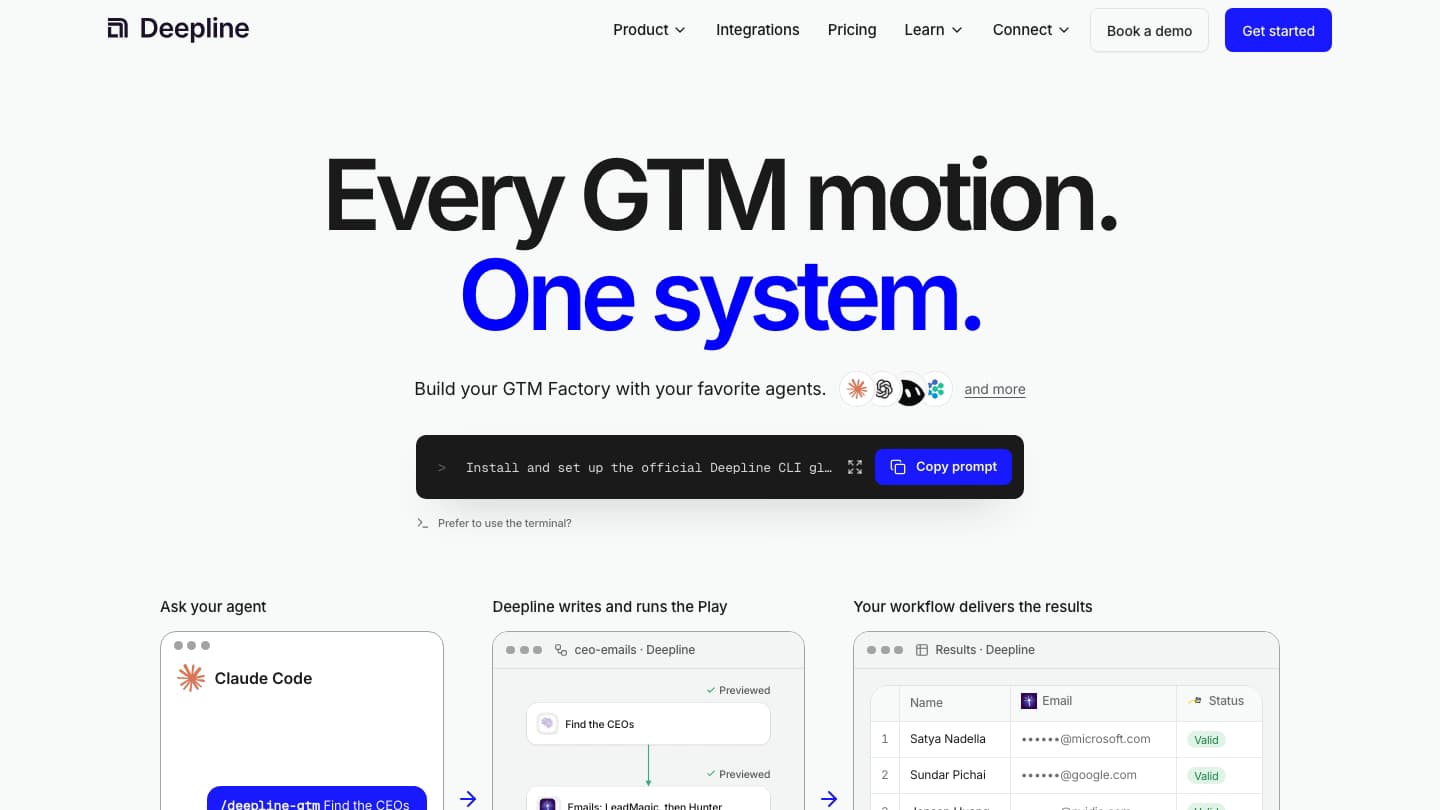
Deepline's homepage, October 28, 2026. The main call to action is a prompt you paste into your agent, not a sign-up form.
That last point matters. Deepline is not a spreadsheet tool with an AI feature added. It assumes you already work in a coding agent, a pattern we cover in our Claude Code GTM engineering guide.
How Deepline Works in Claude Code
Deepline works by giving your agent a CLI plus skills that tell it how to plan, pilot, and scale GTM jobs. The agent writes a Play, runs a small sample, and only then runs the full list.
Step 1: Install the CLI
The official install guide uses the deepline package on npm. You need Node.js with npm or pnpm.
npm install -g deepline@latest
# npm 11.16+: npm install -g --allow-scripts=esbuild deepline@latest
# pnpm:       pnpm add --global deepline@latest

deepline setup --json        # opens a browser approval step
deepline auth status --json  # confirm you are signed in
The homepage also offers a prompt you paste into Claude Code, which then runs these steps for you. Codex may need elevated permissions for the global install, per the guide.
Step 2: Call a skill
Deepline's skills docs list nine skills. The default is /deepline-gtm for prospecting, enrichment, research, and outreach.
- deepline-start: interviews you to find a concrete GTM problem and proposes a workflow.
- deepline-research: plans sources, queries, and cost estimates before paid work.
- deepline-engine and deepline-plays-review: build an orchestrator Play with a bounded paid pilot, then add a human review loop.
- deepline-scoring: finds signals that separate closed-won from closed-lost accounts.
- deepline-crm-cleaning, deepline-analytics, deepline-ads-audiences: CRM audits, warehouse questions (Snowflake first), and ad audience building.
Skills are optional. They plan and check the job; the CLI does the searching, enriching, and exporting. If you are new to skills, our roundup of the best Claude skills for B2B sales explains how they load.
Step 3: Pilot, then scale
Every Deepline guide pushes a sample-first loop. The email waterfall docs suggest a three-row pilot: a likely match, a typical row, and a hard row.
# validate without spending credits
deepline plays check prebuilt/name-and-domain-to-email-waterfall-batch

# pilot a few rows, then run the full file
deepline plays run prebuilt/name-and-domain-to-email-waterfall-batch \
  --csv leads-pilot.csv --watch
We like this default. It is the same discipline we recommend in our Claude Code lead enrichment walkthrough, and it stops an agent from burning budget on a bad input file.
Deepline Key Features
Deepline's core features are Plays, waterfall enrichment, monitors, a workspace database, and spend controls. Here is what each one does, based on the docs.
Plays: GTM workflows as versioned code
The Plays docs define a Play as "versioned code that Deepline executes for a GTM task." Plays are authored as TypeScript files, and each run gets its own run ID and recorded outcome.
Plays can start from a manual call, a schedule, a webhook, or a database listener. Editing a draft never replaces the published version other triggers use.
One honest detail from the docs: durable execution does not guarantee exactly-once effects. Deepline tells you to use idempotency keys for CRM writes, which is good advice and a sign you are expected to think like an engineer.
Waterfall enrichment and email validation
The prebuilt email waterfall takes a CSV of first name, last name, and domain. It tries configured providers in order until one meets the result rule.
The provider order lives in the live Play contract, so you check it with deepline describe. The homepage demo shows "LeadMagic, then Hunter" as an example route.
Emails marked email_validated passed Deepline's validation gate. The docs say plainly this is not a delivery guarantee. For how waterfall tools compare on hit rate, see our best waterfall email finders guide.
Monitors for account signals
A monitor is a provider event feed that writes accepted events into a database stream. A SQL listener then starts a Play once per matching event.
The homepage example is a target account hiring SDRs. The monitors docs page does not list every supported signal type, so confirm your signal exists before you plan around it.
Workspace database
Every run saves to a workspace database you can query through the API or SDK. Later runs can reuse completed results when the inputs match, which avoids paying twice for the same lookup.
Spend caps
The cost control docs describe two caps. A workspace monthly cap is set with deepline billing set-limit. A per-run cap is set in the Play or with --max-credits.
Calls that would exceed a cap are refused before provider work starts. There is no dedicated cost estimate command, so you price a job by reading each tool's pricing unit and running a pilot.
Deepline Pricing: Plans, Credits, What You Pay
Deepline pricing has three plans: Pay as you go at $0 per month plus usage, Growth at $395 per month plus usage, and custom Enterprise. Usage is billed in credits at $0.10 each on every plan.
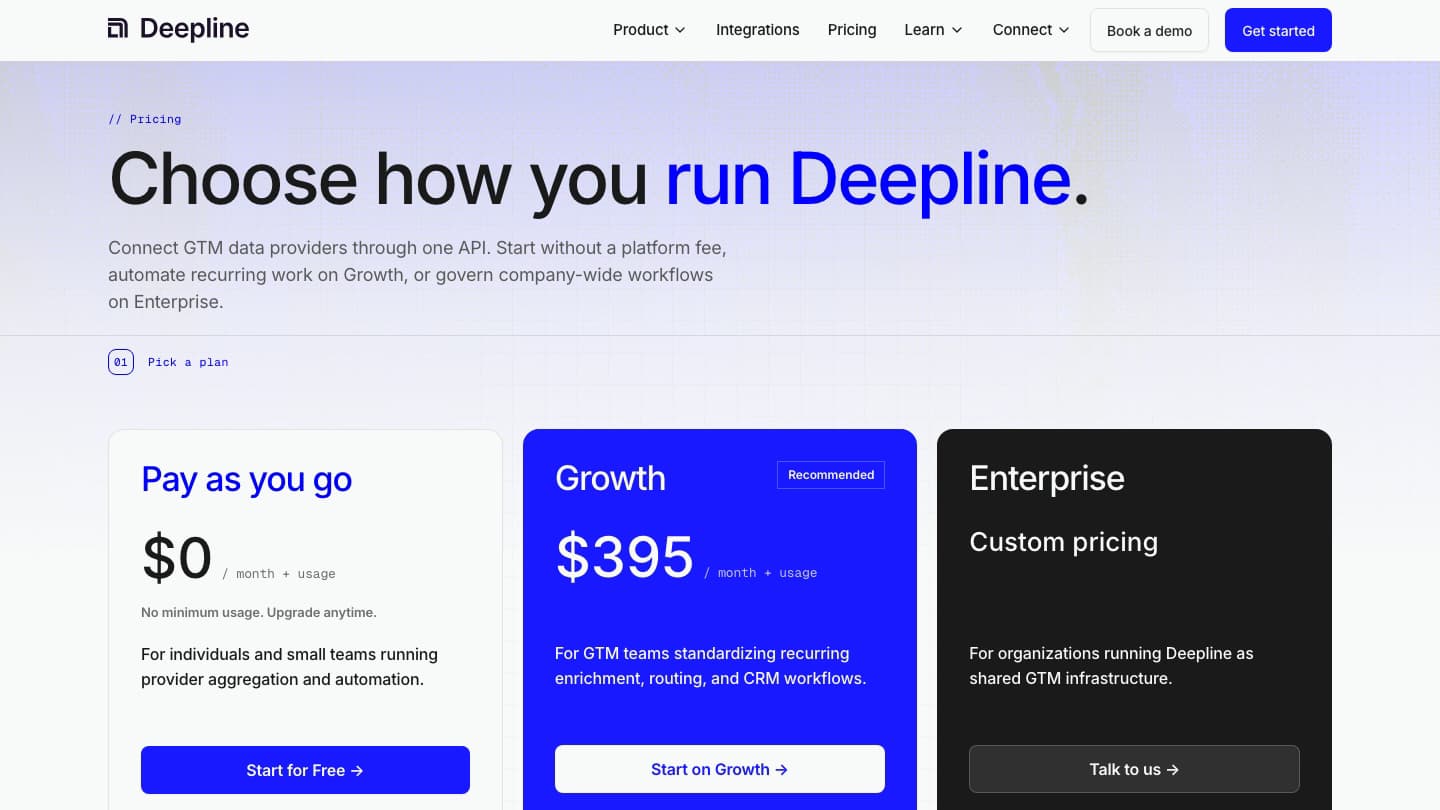
Deepline's pricing page, checked October 28, 2026. No per-seat fees on any plan.
| Feature | Pay as you go | Growth | Enterprise |
|---|---|---|---|
| Platform fee | $0 + usage | $395/mo + usage | Custom |
| Included usage | None | $200/mo in credits | Contracted |
| Credit rate | $0.10 per credit | $0.10 per credit | Volume pricing |
| BYOK enrichment calls | 50K/mo, then $0.005/call | Higher capacity | Contracted |
| Scheduled Plays + monitors | Up to 15 combined | 50 Plays, 500 monitors | Custom, full account list |
| Data retention | 60 days | 180 days | Custom |
| CRM sync (Salesforce, HubSpot, Attio) | Not included | Real-time, read-replica | Real-time and custom |
| Website visitor identification | Not included | Included | Included |
| SSO, audit logs, HIPAA | Not included | Not included | Available |
| Support | Community | Dedicated Slack |
Managed data prices
If you use Deepline's managed provider accounts, each returned data point has a listed price. These are the starting prices shown on the pricing page.
| Task (provider) | Starting price |
|---|---|
| Company or person search (Crustdata) | from $0.002 |
| Email verification (Icypeas) | from $0.002 |
| Email finding (Icypeas) | from $0.014 |
| Phone finding (LeadMagic) | from $0.17 |
| Deepline native company and people database | $0 |
What 1,000 contacts might cost
At starting prices, finding and verifying 1,000 work emails on managed data is about $14 for finding plus $2 for verification, or roughly $16. Treat that as a floor, not a quote.
Two things push it up. Managed waterfalls may pass through costs for attempted lookups that miss, and phone numbers start at $0.17 each, so 1,000 phones is about $170.
BYOK math
Bring your own keys and you pay providers directly, with no Deepline markup. On Pay as you go, the first 50,000 paid provider calls a month are free, then $0.005 per call.
So 100,000 BYOK calls in a month adds about $250 in Deepline fees on top of your provider bills. CRM, database, retry, and webhook activity do not count toward the allowance.
Watch the Growth jump. CRM sync for Salesforce, HubSpot, and Attio, plus website visitor identification, only start on Growth. If you need either, plan on $395 a month minimum.
Deepline Integrations and Agent Support
Deepline says it connects 125+ integrations and 3,889 tools as of October 2026. Named providers on its pages include Crustdata, Icypeas, LeadMagic, Hunter, AI Ark, Smartlead, Google Sheets, and ad audience destinations for Google, Meta, and LinkedIn.
Treat the headline count with care. Older Deepline pages cite 79, 95+, and 97+ integrations, so the number moves with the catalog.
Agent surfaces
- CLI and skills: Claude Code, Codex, Cursor, Gemini CLI, Antigravity, Devin, and other shell-capable agents, per the homepage.
- Remote MCP: for clients without shell access, connected over OAuth via the MCP setup guide. No provider keys go into the OAuth fields.
- TypeScript SDK and API: for embedding Plays in your own services.
If you are weighing MCP against a CLI for enrichment, our data enrichment MCP guide covers the trade-offs.
Deepline Reviews: What Is Verified vs Claimed
Independent Deepline reviews are scarce. In October 2026 we found no G2, Capterra, or Product Hunt listing with ratings, and no Reddit threads reviewing the product directly.
What we could verify is adoption of the CLI. The deepline npm package was first published on April 16, 2026, has 810 versions, and logged 74,567 downloads in the 30 days to October 26, 2026.
| Claim | Source | Status |
|---|---|---|
| MIT-licensed CLI on npm, 810 versions since April 2026 | npm registry | Verified |
| 74,567 npm downloads, Sep 27 to Oct 26, 2026 | npm download stats | Verified (downloads include CI and updates) |
| 125+ integrations and 3,889 tools | deepline.com homepage and pricing page | Vendor claim; older Deepline pages say 79, 95+, or 97+ |
| 30% win-rate lift, 10 hours saved per rep weekly | Deepline customer case studies | Vendor-reported |
| Accounts hiring SDRs won 3.1x as often | Deepline homepage | Illustrative; the page says it uses sample accounts |
| Independent G2, Capterra, or Product Hunt rating | Searched October 2026 | None found |
Deepline shows logos from Modal, Composio, Mixmax, Owner.com, Prove, Attention, and Adapt, plus testimonials from named GTM engineers. Those are real signals of use, but the performance figures attached to them are reported by Deepline.
810 releases in about six months also cuts both ways. Fixes ship fast, but command names and docs change often, so pin a CLI version for production Plays.
Deepline Pros and Cons
Pros
- $0 platform fee to start, with no seat pricing and no credit card required.
- Published per-task prices, from $0.002 for verification.
- BYOK with no markup and 50K free provider calls a month.
- Workspace and per-run spend caps that refuse calls before they cost money.
- Workflows are versioned code you can review, diff, and roll back.
- Works across Claude Code, Codex, Cursor, MCP clients, and an SDK.
- Sample-first defaults built into the skills and docs.
Cons
- No visual builder; the interface is a terminal or an agent.
- Quality of results depends on how well your agent writes and runs Plays.
- CRM sync and website visitor identification need the $395/mo Growth plan.
- 60-day data retention and 15 combined Plays and monitors on Pay as you go.
- Integration counts vary across Deepline's own pages.
- Performance claims are vendor-reported, with no independent review base yet.
- Validated emails are not a delivery guarantee, per the docs.
Who Should Use Deepline (and Who Shouldn't)
Deepline fits teams with at least one person who is comfortable in a terminal and wants GTM workflows treated like software.
Good fit
- GTM engineers who already build in Claude Code or Codex.
- Technical founders running outbound without an ops hire.
- Teams that hold their own provider keys and want one routing layer.
- RevOps teams that want signal-triggered Plays with audit history.
Poor fit
- SDR teams that want a point-and-click list builder.
- Teams that need CRM sync but cannot justify $395 a month.
- Buyers who need third-party proof of data accuracy before signing.
If you are still deciding whether agent-driven GTM is right for you, start with our Claude Code GTM automation guide and Claude Code lead generation playbook.
Deepline Alternatives
The right Deepline alternative depends on which part you need: the waterfall, the workflow engine, or the database.
- FullEnrich: a dedicated waterfall email and phone finder with a web app and API, for teams that only need contact data.
- n8n: a self-hostable workflow automation tool with a visual editor, if you want orchestration without writing TypeScript.
- Apollo.io: an all-in-one contact database and sequencer, for teams that want data and sending in one seat-based tool.
- Direct provider APIs: Icypeas, LeadMagic, or Crustdata called straight from your own scripts, if you only use one or two sources.
For a full breakdown, see our Deepline alternatives roundup.
Deepline Review: Final Verdict
Our rating: 3.8/5. Deepline is one of the most complete GTM backends built for coding agents, and it is cheap to try.
It earns points for transparent unit pricing, real spend caps, versioned Plays, and a sample-first workflow that keeps agents from wasting budget. The npm adoption numbers show real usage.
It loses points for being developer-only, putting CRM sync behind $395 a month, and having almost no independent reviews. Start on Pay as you go, set a workspace cap, and pilot one Play before you commit a team to it.
If maintaining TypeScript Plays is a dealbreaker, SyncGTM is one alternative worth a look: its MCP server gives Claude Code people and company search, work email finding, verification, and buying signals without writing workflow code.