

Instant Data Scraper Review 2026: B2B Data Coverage, Pricing & Alternatives

By Kushal Magar · June 8, 2026 · 11 min read · Last updated: September 30, 2026
Key Takeaway
Instant Data Scraper is a free, highly-rated Chrome extension for quick no-code extraction of page tables into CSV or Excel. It is great for grabbing visible listings — but it finds zero verified emails or phones, has no API, is browser-bound, breaks on protected sites, and is no longer supported by its original developer. B2B sales teams that need verified contact data, buying signals, and outreach need a different category of tool.
Instant Data Scraper is a free Chrome and Edge extension that uses AI to auto-detect tables and lists on any web page, then exports them to CSV or Excel in one click. It is fast, no-code, and genuinely useful for quick research — 4.9/5 across 7,400+ reviews and 1,000,000+ users. But it finds no verified emails, no phone numbers, and no firmographic data, has no API, and is no longer supported by its original developer. Our rating: 4/5 for quick page extraction; 1.5/5 for B2B sales prospecting.
Most people land on an Instant Data Scraper review from one of two angles. Researchers and analysts want to know if it can quickly pull tabular data off a page without writing code. Sales teams evaluate it while searching for B2B sales prospecting tools — and quickly discover it grabs the page but never finds the contact.
This review covers both angles honestly. For quick scraping: what the extension actually delivers, where it shines, and where it breaks. For sales teams: why a free page scraper is not an enrichment tool, and which tools handle the waterfall enrichment and buying-signal use cases the extension cannot touch.
Key facts upfront: Instant Data Scraper is completely free with no paid tier. It only extracts data already visible on the page — no enrichment, no API, no scheduling. It is browser-bound, so it cannot scale. And it is no longer developed by its original creator, Web Robots. For outbound B2B sales, it is simply not the right tool.
What Is Instant Data Scraper?
Instant Data Scraper is a free browser extension that uses AI heuristics to analyze a page's HTML and automatically identify tabular or list-style data — product grids, directory rows, search results, marketplace listings. You open a page, click the extension icon, and it presents a structured preview of what it detected. One more click exports the result to CSV, XLSX, or XLS. No coding, no configuration, no account required.
The extension was created by Web Robots and is one of the most popular scraping tools on the Chrome Web Store, with a 4.9/5 rating across more than 7,400 reviews and over 1,000,000 users. It is marked “Featured” on the store, and the current listing is published under Flavr Technology, LP. For broader category context, the web scraping software category on G2 lists dozens of paid platforms that add the API access, scheduling, and proxy infrastructure a free extension lacks.
The important nuance: Web Robots states it “no longer owns, develops or supports Instant Data.” The tool still works, and as of September 2026 the Chrome Web Store listing shows an August 2026 update (version 1.7.1) from the current publisher. But its scope has stayed narrow: it is a table-extraction utility, not a platform. That matters most for anyone hoping to build a repeatable workflow on top of it.
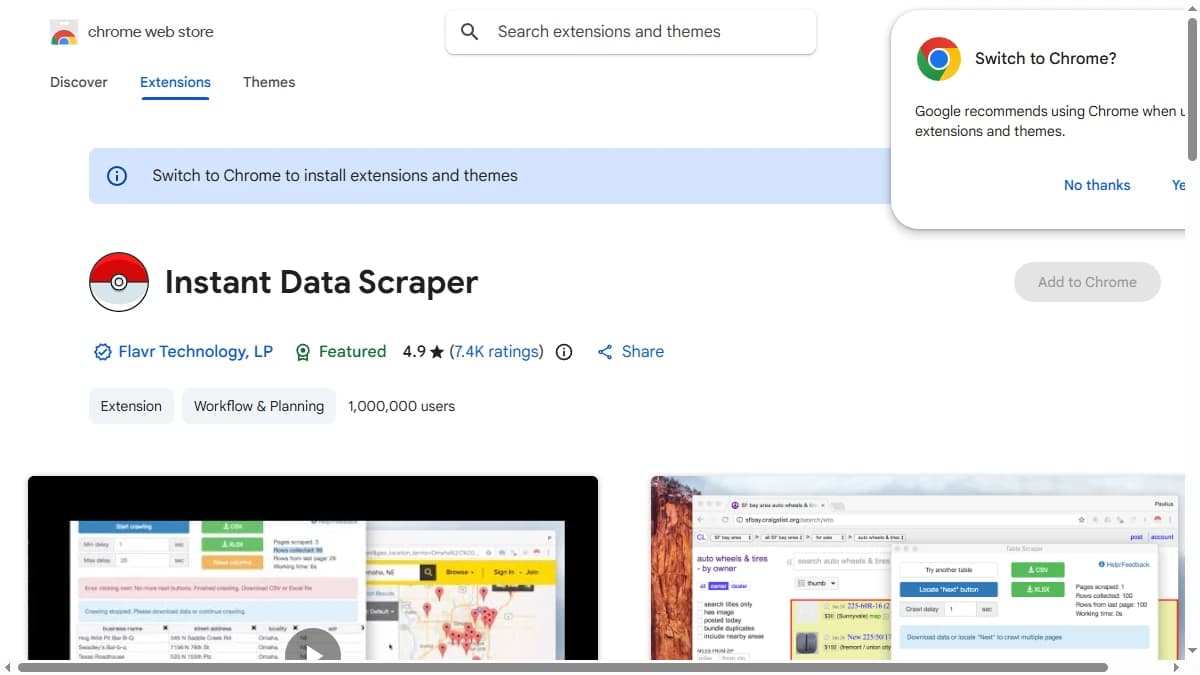
Instant Data Scraper on the Chrome Web Store — 4.9★ from 7,400+ ratings, 1,000,000+ users, published under Flavr Technology, LP.
| Capability | What Instant Data Scraper Provides | Notable Gaps |
|---|---|---|
| Data Detection | AI heuristics auto-detect tables and lists. Live preview before export. | Guesses table boundaries — often needs manual “Try another table” and cleanup. |
| Export | One-click export to CSV, XLSX, and XLS. | No API, no scheduled export, no direct CRM push. |
| Pagination | Locates “Next” buttons and crawls multiple pages automatically. | Browser-bound — fails or slows after dozens of pages. |
| Contact Data | Extracts only what is visible on the page. | No verified emails, no phone numbers, no enrichment. |
| B2B Sales Workflow | Not available. | No waterfall enrichment, no buying signals, no sequences. |
Instant Data Scraper Pricing: What You Actually Pay
Instant Data Scraper is completely free. There is no paid tier, no subscription, no credit cap, and no account required. Install it from the Chrome or Edge web store and start extracting immediately. For a tool with over a million users, that is a genuinely strong value proposition — for the right job.
| Plan | Price | What You Get |
|---|---|---|
| Free | $0 — the only plan | AI table detection, pagination crawl, infinite-scroll support, delay controls, column rename/filter, CSV/XLSX/XLS export |
The cost is not money — it is everything the free model does not include. There is no API to build on, no scheduling for recurring scrapes, no cloud execution to scale past a single browser tab, no proxy rotation to handle protected sites, and no enrichment to turn names into contactable leads. The price you pay is in time spent cleaning exports and in the ceiling on what the tool can do.
Compare that to a paid B2B data platform such as Apollo, whose paid plans start at $59/month: what you pay for there is verified contact data and outreach tooling, not just a CSV of whatever was already on the page. Free page scraping and paid enrichment are not substitutes; they are different stages of the workflow.
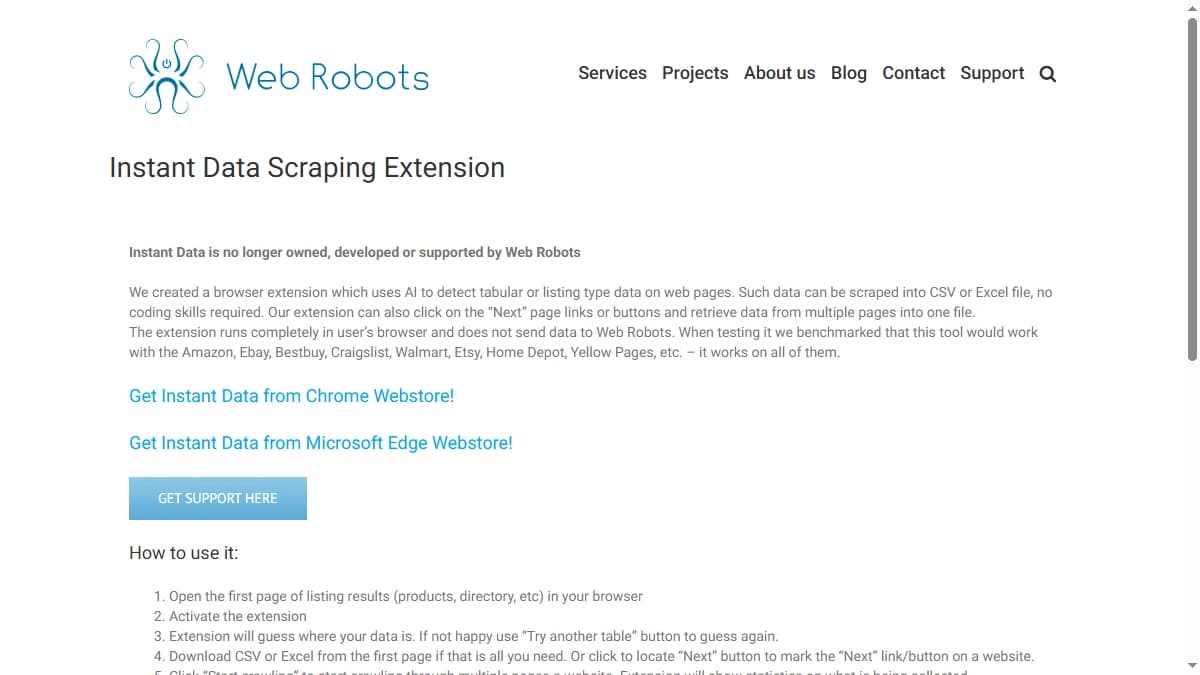
The Instant Data Scraping Extension page — note the disclaimer that Web Robots no longer owns, develops, or supports the tool.
Instant Data Scraper Key Features
AI Heuristic Data Detection
The core feature is automatic detection. Instead of pointing at fields manually, the extension analyzes the page's HTML and guesses where the repeating structured data sits, then shows a live preview. When the guess is wrong, a “Try another table” button cycles through alternative detections. For clean, well-structured listing pages, the first guess is usually right.
One-Click Export to CSV and Excel
Detected data exports to CSV, XLSX, or XLS with a single click. You can rename columns and filter rows before exporting, which trims some of the cleanup work. The output is a flat spreadsheet — exactly what you want for quick analysis, and exactly what you do not want if you need it piped into a CRM or enrichment pipeline.
Pagination and Infinite Scroll
The extension can locate a “Next” button or link and crawl through multiple pages automatically, and it supports infinite-scroll pages that load more content as you scroll. Delay and maximum-wait controls let you slow the crawl to avoid overwhelming a site. This is the feature that turns a one-page grab into a multi-page list — within the limits of a single browser tab.
Speed and Delay Controls
Adjustable minimum delay and maximum wait time let you tune crawl speed. Slower settings reduce the chance of a site rate-limiting or breaking the scrape mid-run. It is a thoughtful touch for a free tool, though it does not change the fundamental ceiling on scale.
Local, In-Browser Operation
The extension runs entirely in your browser and, per Web Robots, does not send scraped data back to a server. For privacy-conscious users that is a plus. The trade-off is the absence of any cloud component — no remote execution, no scheduled jobs, no shared team workspace.
How to Use Instant Data Scraper: Step by Step
The whole workflow happens inside one browser tab. Here is the sequence Web Robots documents for the extension, with notes on where scrapes tend to go wrong.
- Install the extension.It is available from the Chrome Web Store and Microsoft Edge's add-on store. No account or payment is needed.
- Open the listing page and activate it. Go to the search results, directory, or product grid you want, then click the extension icon. It analyzes the page and shows a preview of the table it thinks you want.
- Correct the detection if needed.If the preview picked the wrong element, click “Try another table” to cycle through alternative guesses until the right rows appear.
- Export a single page, or mark pagination.For one page, download CSV or Excel straight away. For multi-page lists, click “Locate ‘Next’ button” and then click the site's own next-page control so the extension knows how to advance.
- Set delays and start crawling.Adjust the crawl delay (one second by default) and the maximum wait time, then click “Start crawling.” Infinite-scroll pages are detected automatically.
- Download at any point. You can download the file while the crawl is still running, which protects you if the session breaks partway through a long list.
- Clean up the output. Rename columns, delete the ones you do not need, and remove duplicates before the data goes anywhere else.
Two habits make a big difference. First, test on two or three pages before launching a long crawl: if the column layout looks wrong on page one, it will be wrong on page fifty too. Second, raise the delay on sites that start returning empty pages or errors. A slower crawl that finishes beats a fast one that gets rate-limited halfway.
For sales teams, remember what the final file is: a list of whatever the page displayed, usually names, companies, titles, and profile links. Turning that list into contactable leads is a separate step that needs a contact data or enrichment tool.
Instant Data Scraper Pros: What It Does Well
- Completely free. No paid tier, no credit cap, no account. For a tool used by over a million people, the price is hard to argue with — for quick, one-off extraction.
- Zero learning curve. Install, click the icon, export. No code, no field mapping, no configuration. A non-technical user can pull a spreadsheet off a listing page in under a minute.
- Strong auto-detection. On clean, well-structured pages — marketplaces, directories, search results — the AI guesses the right table on the first try more often than not.
- Handles pagination and infinite scroll.It crawls “Next” buttons and scroll-loaded content automatically, turning a single page into a multi-page list without manual clicking.
- Runs locally. Scraping happens in your browser and data is not sent to a third-party server, which appeals to privacy-conscious users.
- 4.9/5 across 7,400+ reviews. Years of overwhelmingly positive feedback from a million-plus user base — strong social proof that it does its narrow job well.
Instant Data Scraper Cons: Where It Falls Short for B2B
- No contact data — finds zero emails or phones. The extension only extracts what is already rendered on the page. There is no enrichment engine, no waterfall lookup, and no contact database behind it. A scraped list of company names is just names. For B2B outreach you still need a separate tool to find and verify emails and phone numbers.
- Browser-bound scale. Because it runs inside a single Chrome tab, throughput is limited — typically dozens of pages before the browser struggles or the session breaks. There is no cloud execution, no parallel runs, and no way to scrape at the volume a hosted scraper or data API delivers.
- No API and no automation. Every scrape is a manual sequence of clicks. There is no API, no scheduling, and no way to trigger a recurring extraction. Teams that need a data feed or programmatic access cannot build on this tool.
- Breaks on protected and JavaScript-heavy sites. Modern sites with anti-bot protection block the extension outright, and content loaded dynamically after the initial render is often missed. When a site updates its HTML structure, existing scrapes break — with no guarantee of a fix.
- Uncertain long-term support. Web Robots states it no longer owns, develops, or supports Instant Data. The listing now sits under Flavr Technology, LP, which shipped an update in August 2026, but support no longer comes from the team that built the tool. It is not a platform you should build a critical workflow around.
- Messy output requiring cleanup. Auto-detection guesses at table boundaries, so results often need column renaming, filtering, and de-duplication before they are usable. The quality of the export is only as good as the page structure allows.
- No CRM sync or buying signals. There is no native HubSpot or Salesforce integration, no firmographic data, and no buying signals. The output is a flat CSV that you must manually clean, enrich, and import elsewhere.
Instant Data Scraper vs Octoparse vs Apollo
The comparison below covers Instant Data Scraper against Octoparse (full web-scraping platform) and Apollo (B2B contact database). These are the tools teams weigh when they outgrow a free browser extension.
| Feature | Instant Data Scraper | Apollo | Octoparse |
|---|---|---|---|
| Starting Price | Free (no paid tier) | $59/mo (Basic) | $99/mo (Standard) |
| Format | Chrome / Edge browser extension | Cloud platform + Chrome extension | Desktop app + cloud |
| What You Get | Raw page tables (names, listings) | 275M+ contact database | Raw scraped page data |
| Verified Emails | No — extension finds none | Yes — 60–75% (own DB) | No — only what is on the page |
| Phone Numbers | No | Yes — limited credits | No |
| Buying Signals | No | Basic intent via Bombora | No |
| API / Automation | No — manual clicks only | Yes — API on paid plans | Yes — scheduling + cloud runs |
| Anti-Bot / JS Handling | None — blocked by protected sites | Provider-side data | Proxies + IP rotation (paid) |
| CRM Sync | No — manual CSV export | HubSpot, Salesforce native | No |
| Maintained? | Original developer ended support; new publisher | Actively developed | Actively developed |
Instant Data Scraper vs Octoparse
Octoparse is the closest direct competitor for actual scraping at scale. Where Instant Data Scraper is a free, browser-bound extension, Octoparse is a desktop and cloud platform with proxy rotation, IP rotation, scheduling, and cloud runs — built to crawl far more pages and survive anti-bot protection. The trade-off is cost and complexity: Octoparse starts around $99/month and has a real learning curve. For a quick one-off grab, the free extension wins. For production scraping, Octoparse does what the extension cannot.
Instant Data Scraper vs Apollo for Sales Teams
Apollo is the right comparison for sales teams who tried scraping directories to build a list. Apollo skips scraping entirely — it has a 275M+ contact database with verified emails, a free tier, built-in sequences, and native CRM integrations. Teams that need more coverage than a single database can add waterfall enrichment, which queries several providers in sequence. Instant Data Scraper has no contact data at all, so it is not a competitor in this category. At most, a scraped directory list becomes the input that a contact tool then enriches. For SDR tooling and sales prospecting, the free extension is a starting point, not the destination.
Who Should Use Instant Data Scraper?
Instant Data Scraper is the right fit for:
- Researchers and analysts who need to pull a visible table or listing off a page into a spreadsheet quickly, without writing code or paying for a tool.
- One-off, low-volume scrapes — a few dozen pages of marketplace listings, directory rows, or search results where the data is already on screen.
- Non-technical users who want the simplest possible extraction experience and do not need an API, scheduling, or CRM integration.
- Privacy-conscious users who prefer scraping that runs locally in the browser rather than sending data to a remote server.
Instant Data Scraper is not the right fit for:
- B2B sales teams. No verified emails, no phone numbers, no enrichment, no buying signals, no sequences. The wrong tool category entirely. See Instant Data Scraper alternatives if you need contactable B2B leads.
- High-volume or production scraping. Browser-bound throughput and no cloud execution mean it cannot scale. Octoparse, ParseHub, or a hosted scraping API are the right tools.
- Anyone targeting protected or JavaScript-heavy sites. Anti-bot protection blocks the extension, and dynamically loaded content is often missed entirely.
- Teams that need automation. No API and no scheduling mean every scrape is manual. There is no way to build a recurring data feed on top of it.
- Workflows that must be reliable long term. With the original developer no longer maintaining it, there is no guarantee broken scrapes will get fixed.
Verdict: Is Instant Data Scraper Worth It in 2026?
For quick, no-code extraction of visible page data, yes. It costs nothing, needs no account, handles pagination and infinite scroll, and keeps scraped data in your browser. A 4.9/5 rating from more than a million users reflects a tool that does its narrow job well: turning a listing page into a spreadsheet in about a minute.
The limits are just as clear. It only captures what the page already shows, it has no API or scheduling, it runs out of road after a few dozen pages in one tab, and support no longer comes from the team that built it. None of that matters for a one-off research task. All of it matters if you want a repeatable data pipeline.
If you arrived here while researching B2B sales prospecting tools, treat the extension as a list-building helper at most. Our rating: 4/5 for quick page extraction and 1.5/5 for B2B sales prospecting.
If Instant Data Scraper returning no emails or phone numbers is a dealbreaker, SyncGTM is one alternative worth a look: it runs waterfall enrichment across 50+ data providers to turn scraped names and companies into verified emails and phone numbers.