

PhoneBurner Review 2026: Power Dialer Pricing and Features

By Kushal Magar · October 31, 2026 · 14 min read
Key Takeaway
PhoneBurner is a single-line power dialer for teams calling US and Canadian numbers. It dials one contact at a time, connects live answers with no delay (a vendor claim), drops prerecorded voicemails in one click, and logs every call to HubSpot or Salesforce. Plans cost $140, $165, or $183 per user a month billed annually ($165 to $215 billed monthly). Numbers, Local Presence, ARMOR, and Connect Scores are add-ons with no public price. PhoneBurner claims up to 80 dials an hour. Our rating: 4.2/5 for compliance-minded North American phone teams.
This PhoneBurner review is for sales leaders deciding whether a single-line power dialer is worth $140 to $215 per rep each month. Most of the reviews ranking today are written by competing dialers, so they quote the price and then pitch their own product.
We read PhoneBurner's homepage, pricing page, power dialer, Local Presence, ARMOR, Connect Scores, integrations, and Responsible Communications pages, plus its support articles, in October 2026. We did not run a paid dial session, so speed and answer-rate figures are labeled as vendor claims.
What the other reviews skip is how the dialer actually connects your rep, what the compliance features really cover, and what a five-rep team pays in a year. That is what this review covers.
TL;DR: PhoneBurner Review 2026
- What it is: A single-line power dialer with a built-in CRM, voicemail drop, email follow-up, and call recording.
- Speed: Up to 80 dials an hour, per PhoneBurner. It dials one number at a time, so there is no connect delay and no abandoned calls.
- Price: $140, $165, or $183 per user a month billed annually; $165, $195, or $215 billed monthly. Add-ons are quote-only.
- Best for: Insurance, real estate, financial services, and B2B teams calling US and Canadian numbers who care about answer rates and spam flags.
- Biggest gaps: No parallel dialing, no calls outside the US and Canada, and opaque add-on pricing.
- Rating: 4.2/5.
What Is PhoneBurner?
PhoneBurner is a cloud power dialer for outbound phone teams. It dials one contact after another from a list, connects the rep the moment a person answers, and handles voicemail, email, and CRM logging with one click.
The homepage headline is "Get more calls answered." PhoneBurner claims 3,000+ customers, 15 years in business, 1 billion calls, and 150+ million live conversations.
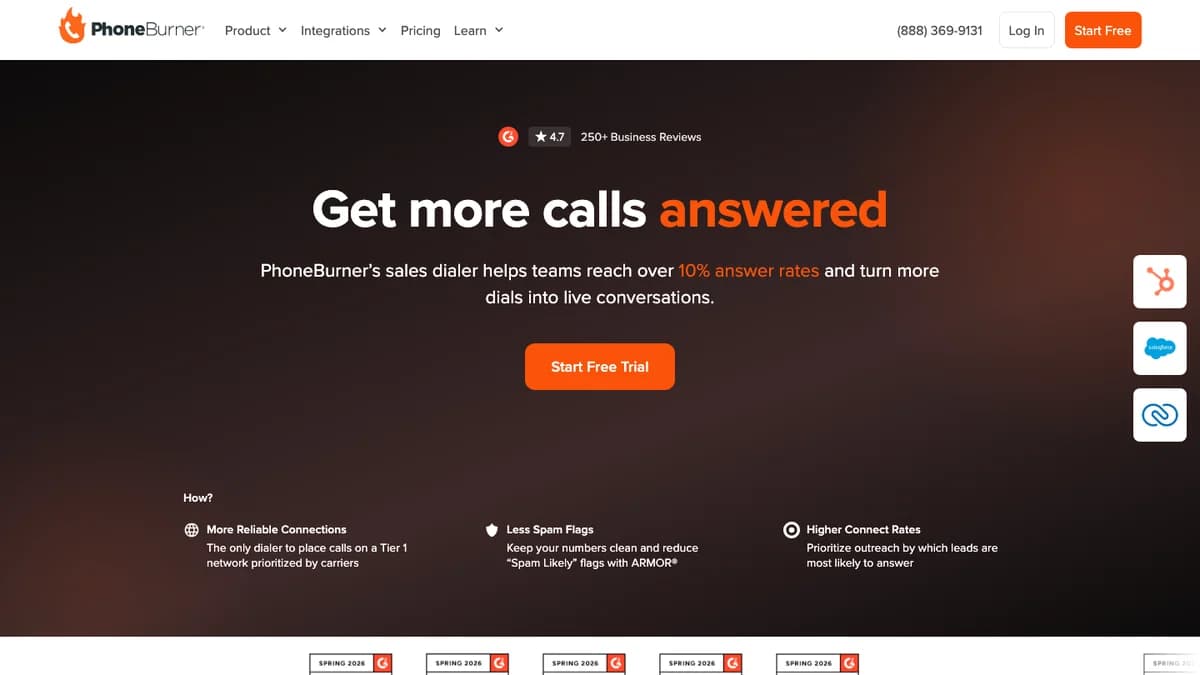
PhoneBurner homepage, October 2026: the pitch is answer rates, not raw dialing speed.
PhoneBurner does not sell itself as the fastest dialer; it sells cleaner connections, fewer spam flags, and better answer rates. The homepage claims customers reach "over 10% answer rates."
Our rating: 4.2/5. PhoneBurner is one of the most mature single-line power dialers for North American teams, with real compliance plumbing, but it loses points for price, quote-only add-ons, and a hard US and Canada limit.
How PhoneBurner Works
PhoneBurner works in dial sessions. A rep picks a list, a script, and a prerecorded voicemail, then starts the session and the dialer calls each contact in order.
The rep connects to the session in one of three ways. The default is a phone bridge: the rep dials into PhoneBurner from any landline, mobile, or VoIP line and stays on that call all session.
- Phone bridge: Works on every plan. Your rep uses their own phone and headset.
- ConnectMe: PhoneBurner calls the rep instead, which helps when the bridge number is long distance. It is listed on Professional and Premium.
- Softphone: Calling in the browser over the internet. Also Professional and Premium only.
Once the session runs, each call ends in a disposition. One click can log the outcome, send a follow-up email, schedule a callback, leave a voicemail, update the CRM, and start the next call.
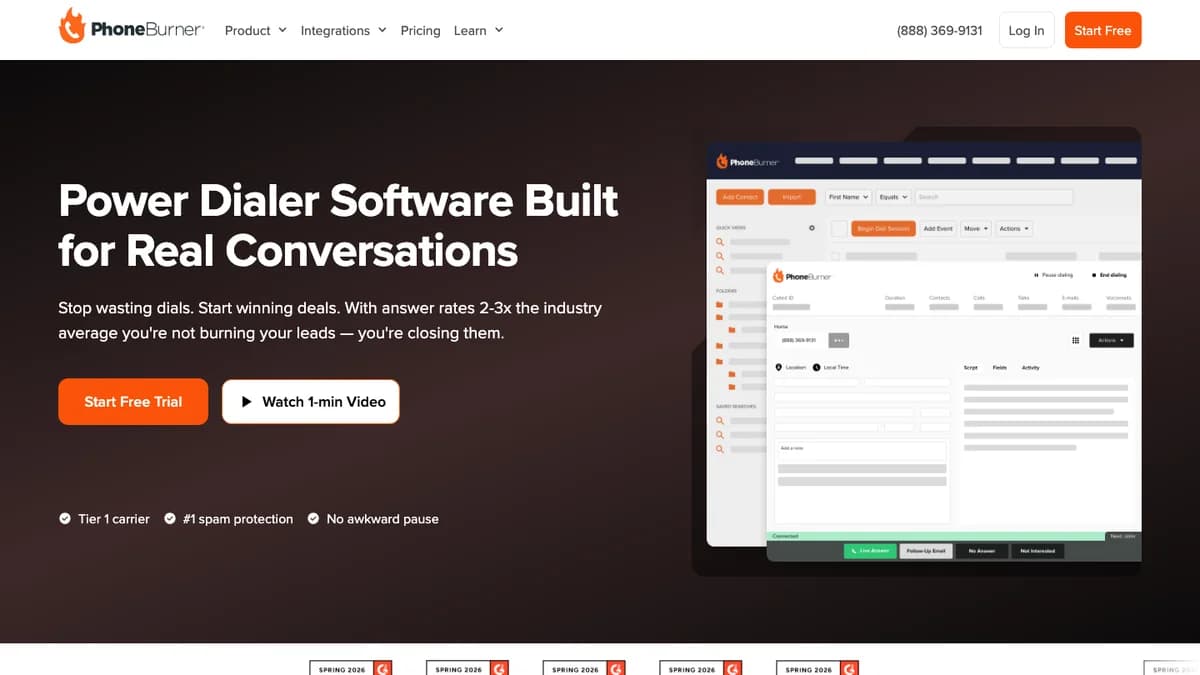
PhoneBurner power dialer page, October 2026: dial session window with one-click dispositions along the bottom.
There are two dial modes. Power mode moves straight to the next number; "pause and preview" stops between calls so reps can read the record first.
PhoneBurner's power dialer page says it "dials one line at a time" and calls its connections "100% delay free." That is the core design choice, and it explains both the strengths and the limits in the rest of this review.
PhoneBurner Dials per Hour: What the Claim Means
PhoneBurner says its power dialer handles up to 80 dials an hour and lets reps "dial up to 4x faster than manual dialing." Older PhoneBurner FAQ pages put the typical range at 60 to 80 contacts an hour.
The ceiling exists because PhoneBurner dials one line. A parallel dialer calls several numbers at once and connects whoever answers first, so it can push far more dials per hour.
The trade-off is the connect delay. When a parallel or predictive dialer connects an answered call, the prospect can hear a pause, and calls nobody is free to take get dropped.
Here is what 60 dials an hour means in conversations. This is illustrative math, not measured data.
| Connect rate | Live conversations per hour | Per 3-hour call block |
|---|---|---|
| 3% (stale list) | About 2 | About 5 |
| 5% | 3 | 9 |
| 10% (PhoneBurner's homepage claim) | 6 | 18 |
The lesson: past a point, speed matters less than list quality. A rep dialing switchboards and dead numbers at 80 an hour still has very few conversations, which is why direct dials and mobile numbers matter so much (see our guide to waterfall phone finders).
PhoneBurner Key Features
PhoneBurner bundles the dialer with a lightweight CRM, email, and reporting. These are the features that matter most for an outbound team.
Voicemail drop
Reps record voicemails once, then drop them with one click when a call hits voicemail. The dialer moves to the next contact while the message plays, so a voicemail costs the rep no time.
Every plan includes 1-click voicemails. Premium adds a voicemail greeting and playback for inbound calls.
Local presence
PhoneBurner's Local Presence picks a number from your inventory that matches the contact's area code and routes callbacks to the right rep. You need approval for Local Presence dialing, and the numbers are bought separately.
Notably, PhoneBurner only says local numbers "may improve answer rates" and that results "vary by audience." That is more honest than most local presence marketing.
Call recording
Recording storage is 30 days on Standard, 90 days on Professional, and unlimited on Premium. Per PhoneBurner's support docs, admins can record inbound, outbound, or both.
Agent recording is off by default, and only calls marked as live answers are saved. Premium adds call transcription and an AI note-taker.
Email and SMS follow-up
Dispositions can send a templated email the moment a call ends, and PhoneBurner tracks opens and clicks. Professional adds branded email templates.
SMS is Premium only: 1,000 outbound texts a month, unlimited inbound, and $15 for each extra 1,000. Texting requires A2P 10DLC carrier registration.
Connect Scores
Connect Scores is an add-on that rates each phone number Low, Medium, or High by how likely it is to reach a live person. You can score a list in bulk before a session or skip low scores automatically while dialing.
PhoneBurner says High-score numbers are about 80% more likely to reach a live person than Low-score numbers. The scores use carrier signals and call engagement data.
Coaching, reporting, and lead distribution
Every plan includes dial session reports, custom reports, a live dashboard, leaderboards, and lead distribution. Live call monitoring and coaching start on Professional.
PhoneBurner Pricing 2026: Plans and Add-Ons
PhoneBurner costs $140 to $183 per user a month billed annually, or $165 to $215 billed monthly. Every plan includes unlimited calling, and the pricing page includes a free team admin account.
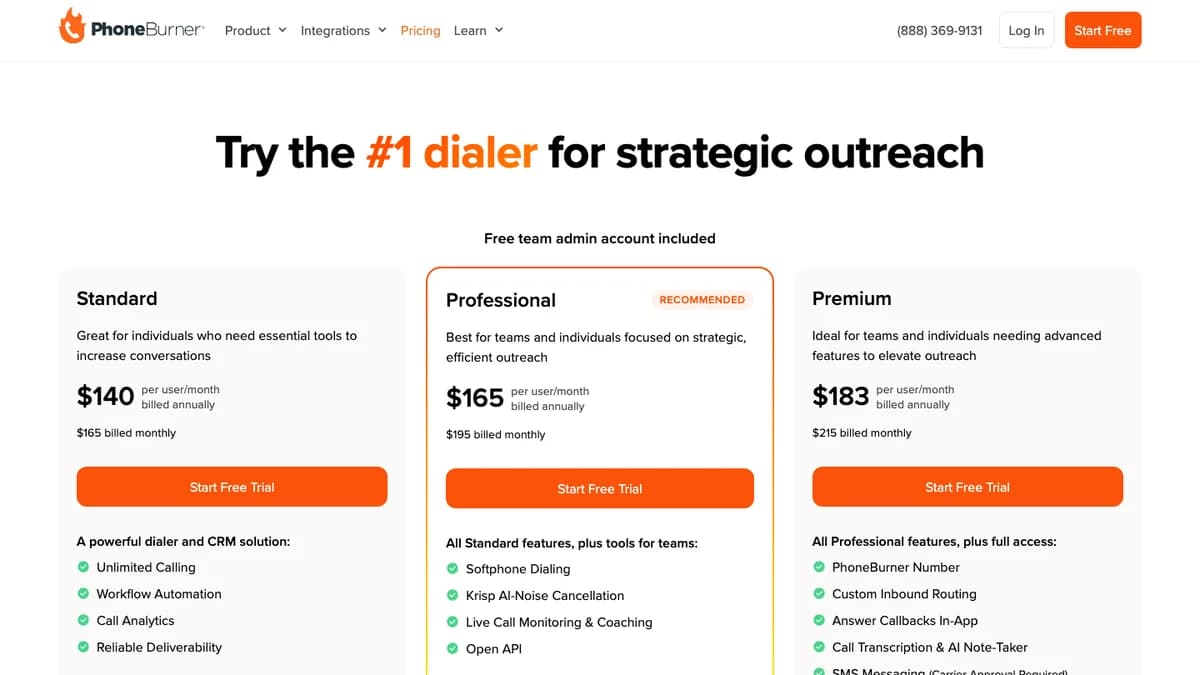
PhoneBurner pricing page, October 2026. Monthly billing costs $25 to $32 more per user.
| Plan | Annual (per user/mo) | Monthly (per user/mo) | Imports/mo | Recordings | What it adds |
|---|---|---|---|---|---|
| Standard | $140 | $165 | 10,000 | 30 days | Unlimited power dialing, built-in CRM, 1-click voicemail, email, workflows, reports |
| Professional | $165 | $195 | 20,000 | 90 days | Softphone, Krisp noise cancellation, ConnectMe, live monitoring and coaching, open API |
| Premium | $183 | $215 | 50,000 | Unlimited | PhoneBurner number, inbound routing, transcription and AI note-taker, SMS (1,000 outbound a month) |
The tier split is sharp. Standard has no softphone, no live coaching, and no API, so most teams end up on Professional.
Add-ons PhoneBurner does not price
Several features that drive answer rates sit outside the seat price, and the pricing page lists no number for any of them.
| Add-on | What it does | Published price |
|---|---|---|
| Phone numbers | Callback management, call quality, number analytics | Not published |
| Local Presence | Matches a local caller ID from your number inventory; approval required | Not published; numbers are purchased |
| ARMOR | Spam-flag monitoring and done-for-you remediation | Not published |
| Connect Scores | Rates each number Low, Medium, or High for answer likelihood | Not published |
| DNC.com scrubbing | Real-time national DNC and known-litigator scrub | Separate DNC.com subscription |
| Extra SMS (Premium) | Outbound texts beyond 1,000 a month | $15 per 1,000 |
What a five-rep team pays
Here is the seat cost alone for five reps over 12 months, before any add-ons.
| Plan | Billed annually | Billed monthly |
|---|---|---|
| Standard | $8,400 | $9,900 |
| Professional | $9,900 | $11,700 |
| Premium | $10,980 | $12,900 |
Add numbers, Local Presence, ARMOR, and Connect Scores, and the real bill climbs further. Get a written quote for every add-on before you sign an annual plan.
PhoneBurner's FAQ mentions free trial minutes without saying how many; some third-party reviews cite 60. Teams can also ask for a custom demo and an extended trial.
Compliance: DNC, TCPA, STIR/SHAKEN, and Spam Flags
PhoneBurner provides compliance tools, not compliance itself. It covers the technical side well, but consent, calling hours, and state rules stay with you.
No abandoned calls
Because PhoneBurner dials one line and only connects a call when a rep is ready, it does not create abandoned calls. The FTC's Telemarketing Sales Rule caps abandoned calls at 3% of answered calls per campaign, which is a real risk with predictive dialers.
DNC scrubbing
PhoneBurner keeps an internal DNC list you can add to from any call. National registry scrubbing runs through a DNC.com integration that checks numbers against the national Do-Not-Call list and known litigators in real time as you dial.
That integration is a separate DNC.com subscription, with discounted rates for PhoneBurner customers. You can also block or allow specific area codes.
STIR/SHAKEN and caller ID verification
PhoneBurner requires you to verify every caller ID you own or are authorized to use. Its carrier partners then sign calls under STIR/SHAKEN, the FCC-mandated caller ID authentication framework.
PhoneBurner's support docs warn that calls without A or B attestation are more likely to be flagged as spam or blocked. Verification is a small setup step that protects answer rates.
Call reputation with ARMOR
ARMOR monitors your PhoneBurner numbers across 10+ US carriers, alerts you when one is flagged, and works with carriers to remove false "Spam Likely" labels. PhoneBurner claims ARMOR numbers average 15% higher answer rates than numbers without it.
PhoneBurner argues against rotating flagged numbers and prefers fixing them. That fits its Responsible Communications program, which also covers business verification and a SOC 2 Type II report.
What you still own
- Recording consent: Recording settings do not describe an automatic consent announcement, so script one for all-party consent states such as California.
- Calling hours and state rules: PhoneBurner links to state DNC hour guides but does not describe enforcing them.
- Consent for mobiles and texts: SMS needs opt-in and A2P 10DLC registration. Cold texting purchased lists is not allowed.
This is not legal advice. B2B calling rules differ from consumer telemarketing, so have counsel review your program.
PhoneBurner CRM Integrations
PhoneBurner lists HubSpot and Salesforce as native integrations. Calls, notes, dispositions, and recordings log back to the contact record automatically, so reps can dial straight from CRM lists and views.
The integrations page also names Zoho CRM, Close, monday.com, SugarCRM, HighLevel, Outreach, Zoom, and DNC.com. Pipedrive and Follow Up Boss do not appear.
- Chrome extension:For CRMs without a native connector. It follows along as you dial so you can update the record. One competitor's pricing analysis reports that HubSpot dialing also runs through this extension rather than a native calling widget.
- Zapier: Pushes call outcomes and notes to other apps after each call.
- API and webhooks: Full access to call data, contacts, and session history, but only on Professional and Premium.
PhoneBurner's own pages disagree on scale: the pricing page says 100+ integrations and the homepage says 150+. Either way, HubSpot and Salesforce teams get the deepest sync.
What PhoneBurner Users Say
PhoneBurner's homepage shows a 4.7 rating on G2 from 250+ reviews. Search snippets show Capterra at about 4.8 from roughly 176 reviews; we could not load either site directly to confirm.
What users praise:
- Much higher call volume than manual dialing.
- Voicemail drop and one-click dispositions that save time.
- Responsive, US-based support and onboarding.
What users complain about:
- The contact's name does not always show before the call connects, which one Capterra reviewer said hurts credibility.
- Price, especially once add-ons are included.
- Limited customization and a dated interface in places.
- Friction calling a single contact outside a dial session.
The pattern is clear. People like the core dialer and support, and they push back on cost and flexibility.
PhoneBurner Pros and Cons
Pros
- Single-line power dialing with no connect delay and no abandoned calls.
- One-click voicemail drop and dispositions that trigger email, notes, callbacks, and CRM updates.
- Native HubSpot and Salesforce logging of calls, notes, and recordings.
- Real compliance plumbing: caller ID verification, real-time DNC scrubbing, and ARMOR spam-flag remediation.
- Unlimited calling on every plan, with monthly billing.
- A built-in CRM for teams that do not have one yet.
Cons
- $140 to $215 per user a month before add-ons.
- Numbers, Local Presence, ARMOR, and Connect Scores have no published price.
- Calls to US and Canadian numbers only.
- No parallel dialing, so throughput tops out near 80 an hour.
- Softphone, live coaching, and the API need Professional; SMS and AI notes need Premium.
- National DNC scrubbing is a separate DNC.com subscription.
Who Should Use PhoneBurner (and Who Shouldn't)
PhoneBurner fits teams that call North American numbers all day and care more about answer rates and clean connections than raw dial counts.
- Good fit: Insurance, mortgage, real estate, and financial services teams with strict compliance needs.
- Good fit: B2B SDR and account management teams on HubSpot or Salesforce calling warm or mid-quality lists.
- Good fit: Small teams without a CRM that want dialer, CRM, and email in one place.
- Poor fit: Teams calling Europe, Asia-Pacific, or Latin America.
- Poor fit: High-volume SDR floors that want parallel dialing to maximize conversations per hour.
- Poor fit: Solo reps on a tight budget who make only a few dozen calls a day.
If you are still deciding whether the phone deserves this budget, read does cold calling B2B still work first.
PhoneBurner Alternatives
The right alternative depends on which PhoneBurner limit hurts most. Check each vendor's current pricing page, since dialer prices change often. For a side-by-side of six dialers, see our cold calling software roundup.
- Orum: An AI parallel dialer for SDR teams that want more conversations per hour. See our Orum review.
- Nooks: A parallel dialer with a virtual sales floor and AI coaching, built for B2B SDR teams.
- Kixie: Power and multi-line dialing plus business texting, aimed at SMB teams on HubSpot or Pipedrive.
- Aircall: A cloud phone system with a power dialer and international numbers, better for mixed inbound and outbound teams.
- CloudTalk: A cloud call center with international coverage for teams that call outside North America.
Whichever dialer you pick, the first message after a missed call matters. Our guides on follow-up calls and subject lines for cold call emails cover that step.
PhoneBurner Review: Final Verdict
PhoneBurner is a mature, compliance-first power dialer. It does one thing well: it keeps a rep talking to one prospect at a time with no connect delay, no abandoned calls, and clean CRM logging.
The price is high, and the add-ons that drive answer rates are quote-only. It also stops at the US and Canadian border and will never match a parallel dialer on raw volume.
Rating: 4.2/5. Buy it if your team calls North America, runs on HubSpot or Salesforce, and values answer rates and compliance over maximum dials.
Before you sign, run one real session on the trial and get written quotes for numbers, Local Presence, and ARMOR.
PhoneBurner dials fast, but it cannot fix a list full of switchboards and dead numbers. If that is the bottleneck, SyncGTM is not a dialer; it fills the list. Waterfall lookups find mobile numbers (10 credits) and work phones (12 credits), billed only on a hit, plus email verification, enrichment, and buying signals, with two-way sync to HubSpot and Salesforce. Credit costs are on the pricing page.