

Quicklead Review 2026: LinkedIn Automation and Smart Inbox

By Kushal Magar · November 28, 2026 · 14 min read
Key Takeaway
Quicklead is cloud LinkedIn automation priced per account: Starter $59, Scale $79, and Agency $690 a month for 10 accounts, with 20% off yearly. Every plan gets AI openers, Open Profile detection for free InMails, and a Smart Inbox that merges replies from all your accounts. The 0-100 ICP scores, social signals, and HubSpot or Zoho sync start on Scale. Salesforce is only planned, email steps are early access, and purchases are non-refundable. Our rating: 3.8/5.
This Quicklead review looks at what the tool actually ships in November 2026: campaign limits, AI-written openers, Open Profile detection, the Smart Inbox, CRM sync, and what you pay per LinkedIn account. The short version is a lot of product for $59 to $79 an account, with a few marketing claims that run ahead of the docs.
We read Quicklead's homepage, pricing page, feature pages, integrations page, security page, changelog, and terms on 28 November 2026. We did not run a paid campaign, so every reply-rate and safety figure below is labeled as Quicklead's claim.
One warning before you compare listings: some third-party directories still show older, cheaper Agency pricing. Quicklead's own pricing page now lists Agency at $690 a month for 10 accounts, so budget from that.
TL;DR: Quicklead Review 2026
- What it is: Cloud LinkedIn automation with AI openers, ICP scoring, Open Profile InMails, and a shared inbox.
- Best for: Founders, small sales teams, and agencies that want LinkedIn-first outreach without a browser extension running campaigns.
- Price: Starter $59, Scale $79 per account a month; Agency $690 a month for 10 accounts. Yearly billing saves 20%.
- Standout: Free Open Profile InMails on every plan, and lead scores on every inbox thread from Scale up.
- Biggest gaps: No native Salesforce sync yet, email steps in early access, no refunds, and a small G2 review base.
- Rating: 3.8/5.
What Is Quicklead?
Quicklead is a cloud-based LinkedIn automation tool for B2B sales teams, founders, and agencies. It finds prospects, writes openers from their profiles, and follows up on LinkedIn until someone replies.
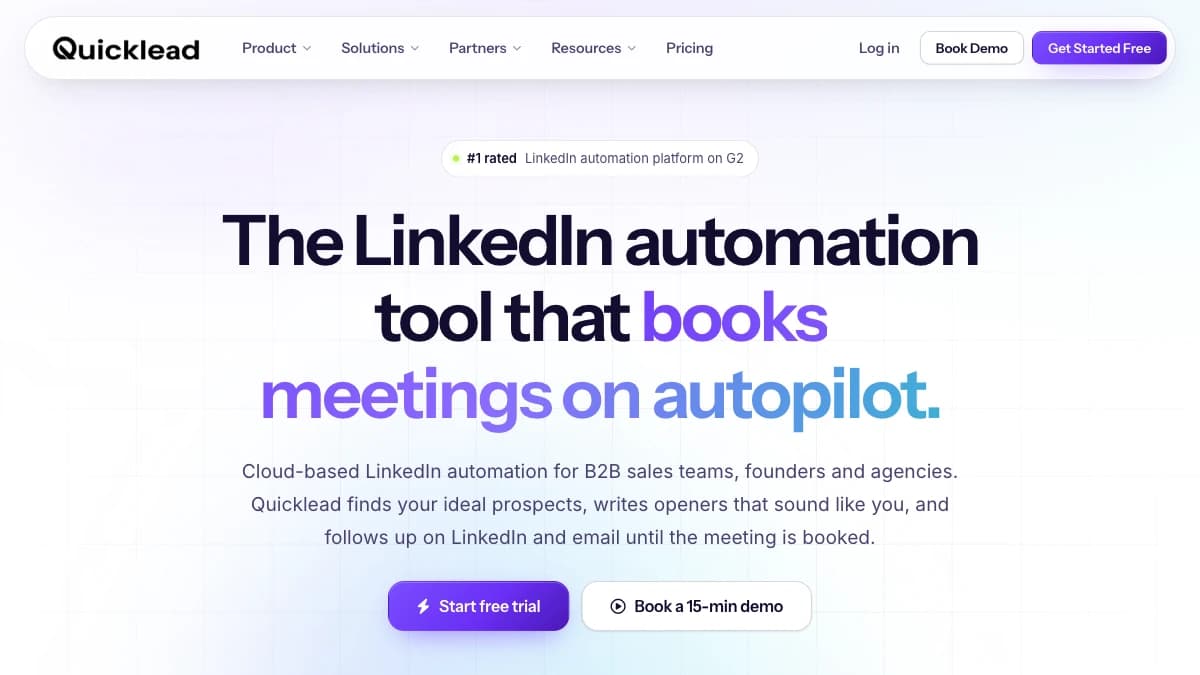
Quicklead homepage, November 2026.
Its about page says the company started in 2023, has 1,800+ daily active users, and splits its team between Ahmedabad, India and California. Those are vendor numbers.
The changelog lists 48 releases, the latest being v3.9.5 on 17 Sep 2026. Recent ones added workspaces, custom fields, and editing a sequence while it runs.
How Quicklead Works: Cloud Sessions and Campaign Limits
Quicklead runs campaigns on its own servers, not in your browser. Each LinkedIn account gets an isolated cloud session with a dedicated country-based IP, so sequences keep running when your laptop is closed.
Its security page mentions one exception: a small Chrome helper connects your LinkedIn account and syncs profile data. Quicklead says it does not run campaigns and can be removed once the account is connected.
The safety envelope
- Daily caps: Separate limits for connection requests, messages, and profile visits, set per account.
- Working hours: Activity stays inside business hours in the account's own timezone.
- Randomized timing: No two actions are spaced identically.
- Warm-up ramp: New accounts start well below the ceiling and ramp over roughly four weeks.
Quicklead's automation page puts LinkedIn's practical ceiling at roughly 100 invites a week for most accounts. Its agency example starts a new client account at 12 invites a day and ramps to 25 over four weeks.
The pricing table allows up to 100 LinkedIn messages a day per account, within your own caps. You can raise limits, and Quicklead says it shows you the risk when you do.
Campaign limits by plan
Every plan lets you build unlimited campaigns with unlimited steps. The limit is how many run at once: one on Starter, unlimited on Scale and Agency.
That single running campaign is the main reason to skip Starter if you sell more than one offer or test messaging side by side. Sequences support conditional branches for accepted, ignored, and replied, timezone-aware sends, and automatic stop on reply.
AI-Personalized Messages and ICP Scoring
Quicklead's AI reads each prospect's headline, role, company, recent public posts, and mutual connections, then writes an opener for that person. One prompt produces five variants that rotate across your list.
You can approve every message, spot-check a sample, or let approved variants send on their own. Tone shifts by seniority, and a brand voice brief sets your style once.
The AI messages page claims up to three times the reply rate of merge-tag messaging. We could not test that, so treat it as marketing until your own campaign proves it.
AI ICP scoring (Scale and Agency)
You describe your ideal customer in one plain-English sentence, and Quicklead scores every imported lead from 0 to 100 with a line of reasoning. Set a floor, and only leads above it enter the sequence.
The ICP scoring page suggests starting at 80. This is the feature that makes a limited weekly invite budget go further, and it is not on Starter.
If you are new to scoring, our guide to lead scoring models explains how to pick fit criteria before you write that one sentence.
AI tokens: the hidden meter
Openers, ICP scores, and AI sequence steps all spend AI tokens. Per the pricing FAQ, Starter includes 1M, Scale 2M, and Agency 2M per account; top-ups cost $5 per 1M tokens inside the app.
Open Profile InMail Detection
Open Profile is a LinkedIn Premium setting that lets anyone message that member for free, with no connection request and no InMail credit. Quicklead checks every imported lead for it and flags the reachable ones.
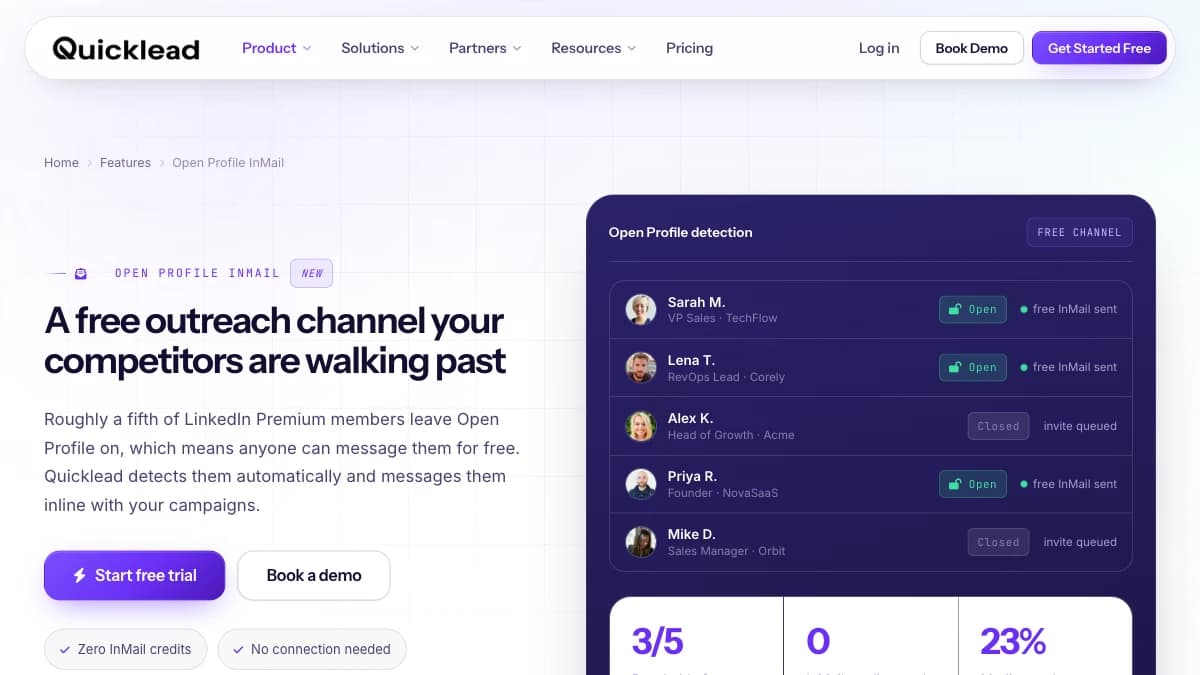
Quicklead's Open Profile InMail page, November 2026.
You add an Open Profile InMail step to a sequence, either as a parallel branch or as the fallback when an invite sits unaccepted for five days. It is on every plan and uses the same AI openers.
Vendor claims, not our tests: The Open Profile page cites a 23% median reply rate and 100-150 extra prospects per seat per month. Further down, the same page says 300 to 400.
That mismatch does not sink the feature. Free InMails to people who opted into being contacted are a real extra channel, especially for senior lists.
Quicklead markets detection as an industry first. You can message Open Profile members by hand too, as our guide to LinkedIn InMail explains; the value here is checking every lead at import.
Quicklead Smart Inbox: Every Reply, Scored
The Smart Inbox pulls conversations from every connected LinkedIn account into one view. It is on every plan and switched on by default.
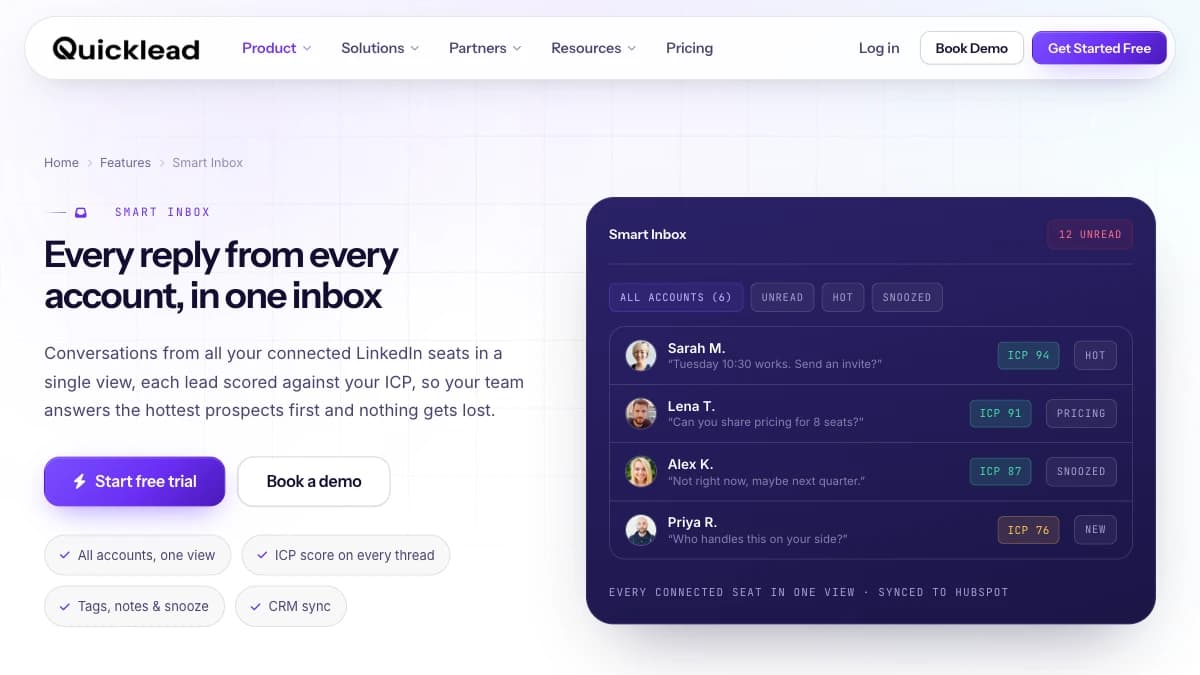
Quicklead's Smart Inbox page, November 2026. The ICP 94 and ICP 91 badges need Scale or Agency.
What the inbox does
- All accounts, one view: No logging in and out of each LinkedIn profile.
- Tags, notes, and reminders: Context stays on a thread that runs for weeks.
- Snooze and resurface: "Next quarter" replies come back on the day you pick.
- Team hand-off: Assign a warm thread to a closer with notes attached.
- Stop on reply: A human reply removes that person from the sequence.
- Sales Navigator messages: Added in v3.5.0 on 28 Apr 2026, per the changelog.
The 0-100 lead score, and its plan gate
The Smart Inbox page shows an ICP score on every thread so your team answers the 94 before the 58. That score comes from AI ICP Scoring, which the pricing table marks as Scale and Agency only.
On Starter you get the merged inbox without scores. That is the detail most listings skip.
An AI Reply Assistant drafts answers from your knowledge base, and nothing sends until someone approves it in Quicklead or Slack. For a deeper look at inbox workflows, see our LinkedIn inbox management system and what to automate in a LinkedIn inbox.
HubSpot, Salesforce, and Other Integrations
Quicklead has native connectors for HubSpot, Zoho CRM, and GoHighLevel. Salesforce and Pipedrive are marked "planned" on its integrations page, so today they run through Zapier or webhooks.
| Integration | Status (November 2026) |
|---|---|
| HubSpot | Native: leads, replies, and campaign activity to contacts and deals |
| Zoho CRM | Native two-way sync of contacts and notes |
| GoHighLevel | Native: leads, replies, campaign events |
| Salesforce | Planned; Zapier or webhooks today |
| Pipedrive | Planned; Zapier or webhooks today |
| Zapier, webhooks, REST API | Available |
| Make | Planned; webhooks today |
| Slack, Google Sheets, Calendly | Available |
You can map fields and pick which events sync, including the ICP score as a custom field. All of this, plus the API and an MCP server for AI assistants, starts on Scale.
If your team lives in Salesforce, test the Zapier route during the trial. Field mapping through Zapier is more work to maintain than a native sync.
The Email Channel: Read the Fine Print
Quicklead's pricing table lists email sends, mailboxes, and mailbox warm-up on every plan. Its multichannel page tells a more careful story.
- Pricing page: 3,000, 15,000, or 50,000 email sends a month by plan, and connections for Google Workspace, Microsoft 365, or any SMTP and IMAP mailbox.
- Multichannel page: Email steps are in early access, only Google mailboxes connect today, and mailbox warm-up is not built in yet.
Treat email as a beta add-on to a LinkedIn tool, not a cold email platform. If email is half your volume, pair Quicklead with a dedicated sender.
The Email Finder is a paid add-on on every plan, priced at 2,000 credits for $39 on the pricing page. It only looks up prospects you have already imported.
Quicklead Pricing 2026: Starter, Scale, Agency
Quicklead charges per LinkedIn account: $59 on Starter, $79 on Scale, and $69 on Agency with a 10-account minimum ($690 a month). Quarterly billing saves 10% and yearly saves 20%, per its pricing page.
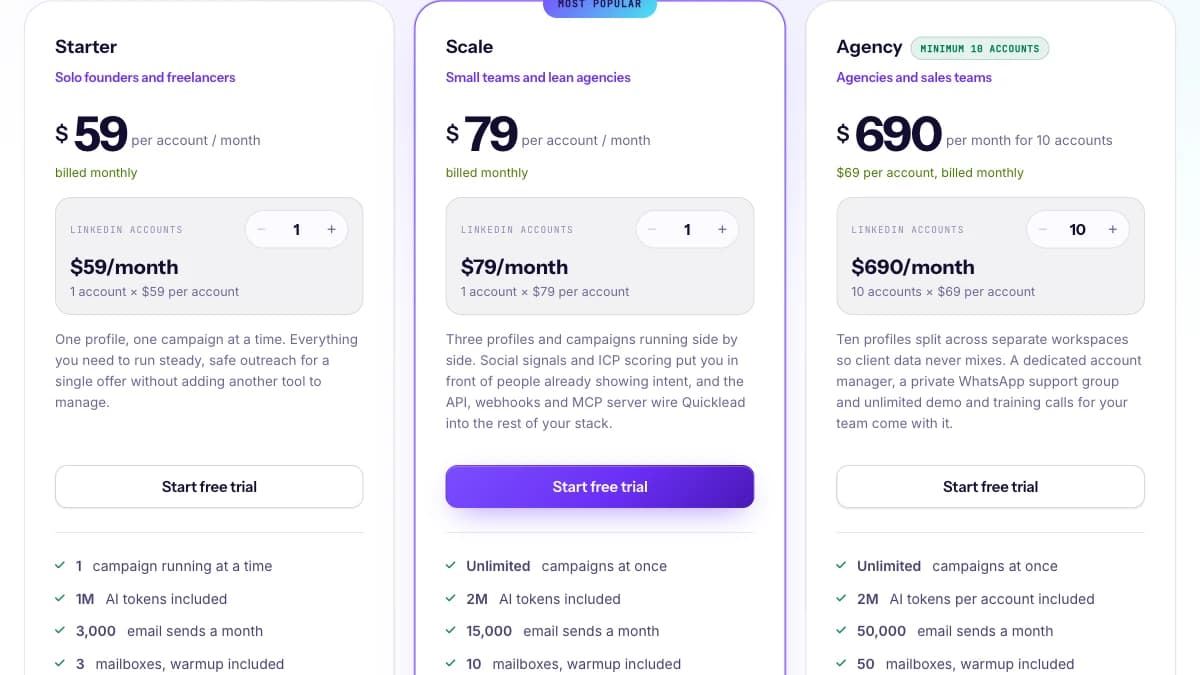
Quicklead pricing page on monthly billing, November 2026.
| Plan | Monthly | Quarterly (per account) | Yearly (per account) | Campaigns running | AI tokens | |
|---|---|---|---|---|---|---|
| Starter | $59 per account | $53 | $47 | 1 running at a time | 1M | 3,000 sends, 3 mailboxes |
| Scale | $79 per account | $71 | $63 | Unlimited | 2M | 15,000 sends, 10 mailboxes |
| Agency (10-account minimum) | $690 for 10 ($69 per account) | $62 per account | $55 per account | Unlimited | 2M per account | 50,000 sends, 50 mailboxes |
Source: quicklead.io/pricing, regular prices checked 28 November 2026. A Black Friday code was running at the time; we left promo prices out.
What each plan unlocks
| Feature | Starter | Scale | Agency |
|---|---|---|---|
| Cloud sessions, dedicated IP, daily caps, warm-up | Yes | Yes | Yes |
| AI openers (5 variants per prompt) | Yes | Yes | Yes |
| Open Profile detection and free InMails | Yes | Yes | Yes |
| Smart Inbox (all accounts, tags, notes, snooze) | Yes | Yes | Yes |
| AI ICP scoring (0-100, shown on inbox threads) | No | Yes | Yes |
| Social signals | No | Yes | Yes |
| CRM integrations, API, webhooks, MCP server | No | Yes | Yes |
| Client workspaces, roles, white-label reports | No | No | Yes |
What you actually pay
- Solo founder: Starter at $59 a month, or $47 a month billed yearly. Fine for one offer and one campaign.
- Three-rep team: Scale at 3 × $79 = $237 a month on monthly billing, before Email Finder credits.
- Agency: $690 a month for 10 accounts, or $55 per account on yearly billing, plus workspaces and a WhatsApp support group.
One inconsistency to ask about: Scale's plan copy and FAQ describe it as running three profiles, but the calculator prices it from one account. Confirm the minimum with sales before you budget.
Add-ons are the Email Finder ($39 for 2,000 credits) and AI token top-ups ($5 per 1M), both listed on the pricing page. The trial is 7 days with no credit card.
Security, Data Hosting, and Refunds
Quicklead's security page is unusually specific. Primary hosting, including the database, is on DigitalOcean in the United States, and the company, Quicklead Technology Private Limited, is established in India.
- Encryption: TLS 1.2+ in transit and AES-256 at rest.
- GDPR: A published DPA, DPIA, records of processing, and an EU and UK representative.
- Passwords: Quicklead says it stores the session token from your login, not your LinkedIn password.
- Certifications: The page names no SOC 2 or ISO 27001 report, and EU data residency is only offered for enterprise deals.
Refunds are the bigger catch. The terms (last updated January 2026) say all purchases are non-refundable and subscriptions renew automatically, so run a real campaign inside the 7-day trial.
Is Quicklead safe for your LinkedIn account?
Quicklead's own security FAQ says no tool can promise an account won't be restricted, and to be sceptical of any that does. We agree, and LinkedIn's prohibited software page says it doesn't permit third-party software that automates activity on its website.
Cloud sessions, caps, and warm-up lower the odds; they do not remove them. Our guide to a restricted LinkedIn account covers what to do if it happens.
What Quicklead Users Say
Quicklead's site shows a 4.8/5 rating on G2. A Salesforge review counted 9 G2 reviews behind that score and found no Trustpilot or Capterra page.
Praise centers on easy campaign setup, the dashboard, and the Smart Inbox. Complaints cited in the same review include credits running out quickly, early glitches, and requests for a mobile app.
A 4.8 from a handful of reviews tells you early customers are happy. It does not tell you how the product holds up at 20 seats.
Quicklead also publishes benchmarks: a 30% average cold reply rate and 38% connection acceptance across Q1 2026 campaigns, per its automation page. Those are vendor averages, not independent tests.
Quicklead Pros and Cons
Pros
- Cloud execution with a dedicated country-based IP per account.
- Free Open Profile InMails, detected at import, on every plan.
- 0-100 ICP scoring with reasons, gating who enters a sequence (Scale and up).
- Smart Inbox across all accounts on every plan.
- AI openers with five variants and manual approval.
- Low per-account entry price and a no-card trial.
- Specific, published security and GDPR documentation.
Cons
- Starter runs one campaign at a time and has no ICP scoring.
- No native Salesforce or Pipedrive sync yet.
- Email steps are early access, Google-only, with no warm-up.
- All purchases are non-refundable.
- Site copy contradicts itself on Open Profile volume and Scale seats.
- Small public review base.
Who Should Use Quicklead (and Who Shouldn't)
Good fit
- Founders and small teams selling to senior buyers, where Open Profile InMails and ICP gating stretch a small invite budget.
- HubSpot or Zoho teams that want LinkedIn replies and scores in the CRM without Zapier.
- Agencies at 10+ accounts that need isolated client workspaces.
Look elsewhere
- Salesforce-first teams that need native sync today.
- Teams where cold email carries most of the volume.
- Buyers who need a SOC 2 report or a refund window before they commit.
Quicklead Alternatives
Most Quicklead alternatives are other cloud LinkedIn tools. Here is how they compare on entry price and reply handling.
| Tool | Entry price | Reply inbox | Best for |
|---|---|---|---|
| Quicklead | $59 per account a month (Starter) | Smart Inbox on every plan; ICP scores on Scale and Agency | Solo sellers and small teams who want AI scoring and Open Profile InMails |
| Expandi | $99 per account a month on monthly billing | Global Inbox for every connected account | Teams that want a longer track record and LinkedIn plus email steps |
| Waalaxy | From €19 per user a month | LinkedIn Inbox is a €20/month add-on | Budget-conscious beginners |
| Botdog | From $79 a month | AI-powered Unified Inbox | LinkedIn-only outreach with per-action limit controls |
| HeyReach | Per sender (Black Friday promo live at time of writing) | Unified Inbox across senders | Agencies rotating many LinkedIn senders |
- Expandi: $99 per account a month on monthly billing, with a Global Inbox. Read our Expandi review.
- Waalaxy: From €19 per user a month with a 14-day trial; the LinkedIn Inbox is a €20/month add-on. See our Waalaxy review.
- Botdog: Pricing starts at $79 a month, with an AI-powered Unified Inbox. Read our Botdog review and our list of cheap Botdog alternatives.
- HeyReach: Built for agencies rotating many senders, with a Unified Inbox. See our HeyReach review.
- Kondo: Not an automation tool, but an inbox manager for people who mainly need to handle replies. See our Kondo review.
For a wider shortlist, see our best LinkedIn automation tools for lead generation.
Quicklead Review: Final Verdict
Our rating: 3.8/5. Quicklead packs ICP scoring, free Open Profile InMails, and a scored inbox into a Scale seat, but the best parts start on that plan and a few claims need checking.
Scale is the plan to judge it on. ICP scoring that gates the sequence, scores on every inbox thread, free Open Profile InMails, and native HubSpot or Zoho sync make a strong LinkedIn-first stack.
It loses points for planned-not-shipped Salesforce sync, an email channel still in early access, no refunds, and site copy that contradicts itself. Use the 7-day trial to run one real campaign on Scale before you pay.
Quicklead scores and messages the people you import, but it does not build the list for you. If sourcing is the slow part, SyncGTM finds, enriches, and verifies those contacts first, then pushes them to HeyReach, Instantly, or your CRM; plans are on the pricing page.