

Hublead Review 2026: LinkedIn-to-HubSpot Sync Tested (Pricing and Verdict)

By Kushal Magar · March 18, 2026 · 11 min read
Key Takeaway
Hublead is a Chrome extension that bridges LinkedIn and HubSpot with one-click contact import, conversation logging, and basic email enrichment. It has 8,000 plus users and a 4.9-star G2 rating across 141 plus reviews. Pricing starts free for basic contact import, with Professional at $32 per month per seat offering 50 to 600 email credits, Business at $64 per month per seat with auto-sync and 500 to 6,000 email credits, and Scale at $112 per month per seat adding phone numbers. Key features include LinkedIn-to-HubSpot contact sync with deduplication, conversation and InMail logging to HubSpot timeline, Sales Navigator bulk export, and message templates. The main limitations are HubSpot-only CRM support with no Salesforce or Pipedrive, shallow single-provider enrichment with no waterfall logic, no buying signal monitoring, no outbound automation, and per-seat pricing that scales poorly for larger teams. For teams needing more than a LinkedIn-HubSpot bridge, SyncGTM offers waterfall enrichment across 20 plus sources, multi-CRM support, and buying signal monitoring from $99 per month.
Looking for an honest Hublead review? You are probably here because your sales reps are copy-pasting LinkedIn profiles into HubSpot. One contact at a time. First name, last name, job title, company, LinkedIn URL. Repeat 200 times a week. It is the kind of admin work that makes good reps quit.
Hublead is a Chrome extension that promises to fix this. One click, and your LinkedIn contact lands in HubSpot with all their profile data. Conversations sync. Duplicates get caught. It has 8,000+ users and a 4.9-star rating on G2. The pitch is compelling.
But here is the question most Hublead review posts skip: does it actually solve your GTM problem, or does it just solve one narrow piece of it? If your team needs enrichment, buying signals, and CRM sync across more than just HubSpot, the answer gets complicated fast.
This review covers what Hublead actually does, what it costs at each tier, where it falls short, and whether a dedicated LinkedIn-HubSpot bridge is enough for your sales workflow.
Hublead Review: What You Get (and What You Don't)
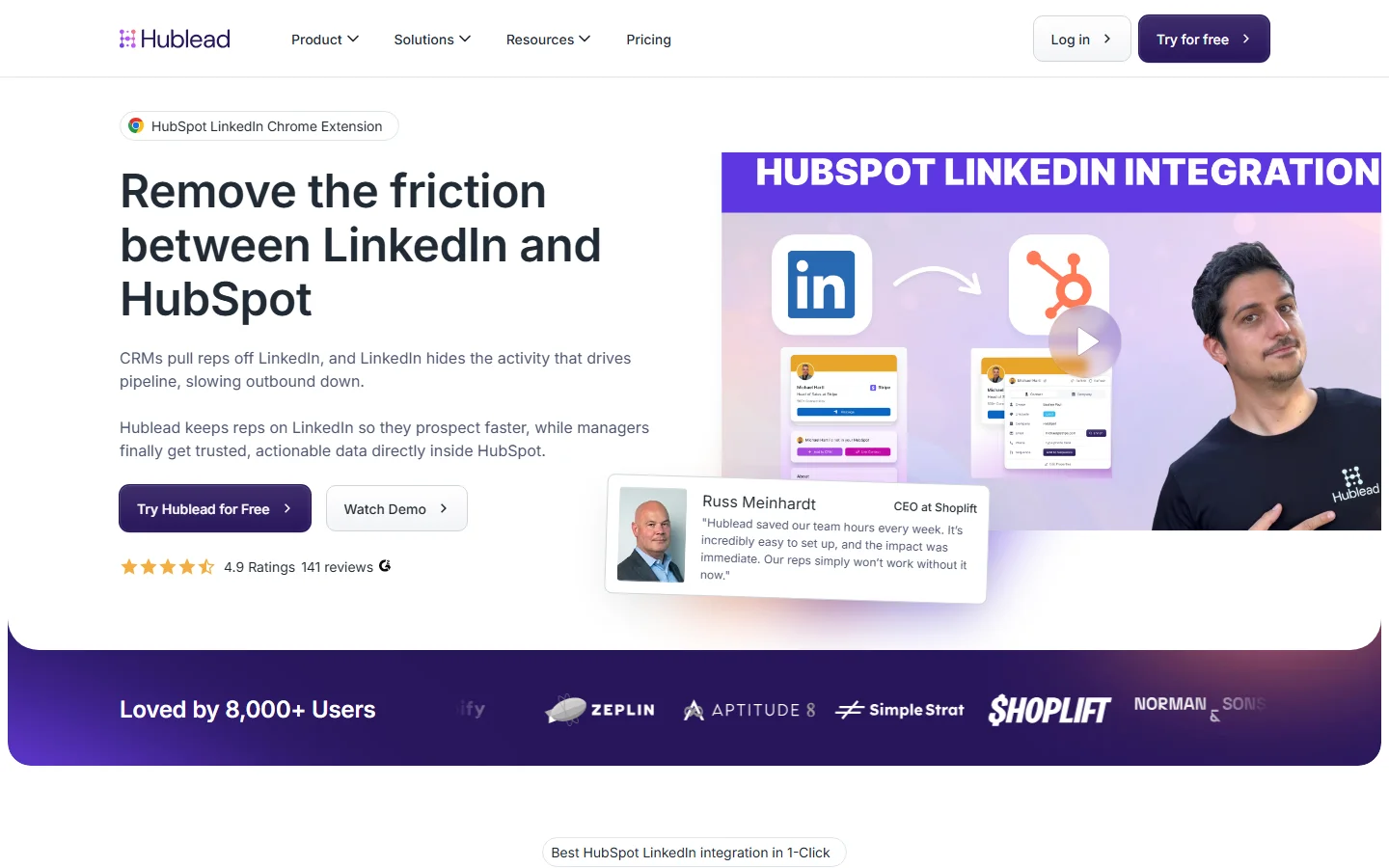
Hublead is a Chrome extension that bridges LinkedIn and HubSpot. It imports contacts, syncs conversations, and offers basic email enrichment through third-party credit systems. Think of it as a one-way data pipe: LinkedIn profiles flow into HubSpot with minimal manual effort.
Here is a quick-reference table of what is included and what is missing:
| Feature | What's Included | Limitations |
|---|---|---|
| Contact Import | One-click LinkedIn-to-HubSpot sync with deduplication | HubSpot only — no Salesforce, Pipedrive, or Attio support |
| Message Sync | LinkedIn conversations and InMails logged to HubSpot timeline | Auto-sync requires Business plan ($64/mo); manual on Professional |
| Email Enrichment | Verified email addresses via third-party providers | Credit-based; 0 credits on free plan, 50 on Professional |
| Phone Enrichment | Phone numbers available on Scale plan | Only available on Scale ($112/mo) — not on lower tiers |
| Sales Navigator | Works with all Sales Navigator plan levels | Bulk export from Sales Navigator lists available |
| Buying Signals | Not available | No job change alerts, funding signals, or intent data |
| Outbound Automation | Not available | No email sequences, no automated outreach workflows |
The takeaway: Hublead does one thing well — moving LinkedIn data into HubSpot. It does not enrich contacts beyond basic email lookup, does not monitor buying signals, and does not automate outbound. If your workflow starts and ends with LinkedIn-to-HubSpot sync, that is fine. If you need a full GTM stack, Hublead covers about 15% of what you need.
LinkedIn Contact Sync: One-Click Import Tested
This is what Hublead is built for, and it works well. Visit any LinkedIn profile, click the Hublead sidebar button, and the contact lands in HubSpot with their first name, last name, job title, company, LinkedIn URL, website, city, country, and language. The import takes about 2 seconds.
The deduplication is smart. If the contact already exists in HubSpot, Hublead flags it before creating a duplicate. You can view and edit HubSpot properties directly from the LinkedIn sidebar without switching tabs. For reps who live in LinkedIn all day, this is a genuine time saver.
Company records sync too
When you import a contact, Hublead also creates or matches the associated company record in HubSpot. It pulls in the company website, employee count, and industry. This means your CRM stays organized without manual company-level data entry.
Sales Navigator bulk export
On the Business and Scale plans, you can export contacts directly from Sales Navigator search results and saved lists. This is useful for prospecting sessions where you identify 50+ leads and want them all in HubSpot without clicking through each profile individually.
One limitation: Hublead does not offer LinkedIn automation features like automated connection requests or message sequences. It is strictly a data sync tool. If you want automation, you need a separate tool — and you need to be careful about LinkedIn's terms of service.
Message Logging: Conversations in HubSpot
Hublead syncs LinkedIn conversations and InMails to the HubSpot contact timeline. Every message — sent and received — shows up as a logged activity. Your sales managers can finally see what reps are saying on LinkedIn without asking for screenshots.
On the Professional plan ($32/mo), message sync is manual. You click to sync each conversation. On the Business plan ($64/mo), auto-sync kicks in and conversations flow to HubSpot automatically. The difference matters if you have 10+ active conversations daily — manual sync adds friction that defeats the purpose.
Message templates save time
Hublead includes LinkedIn message templates that you can trigger from the sidebar. These are useful for standardizing outreach across your team. But they are basic text templates — no personalization variables, no AI-generated variations, no A/B testing. If you need advanced message personalization, you will need a dedicated outreach tool.
Reporting on LinkedIn activity
Once conversations are in HubSpot, you can build reports and dashboards around LinkedIn activity. Track response rates, conversation volume, and pipeline attribution from LinkedIn outreach. This is the real value of message logging — it makes LinkedIn activity measurable for the first time.
Contact Enrichment: Email and Phone Credits
Hublead offers email enrichment through third-party data providers like Apollo, Hunter, and RocketReach. You get a set number of credits per month depending on your plan, and each enrichment attempt uses one credit.
Here is the credit breakdown by plan:
- --Starter (Free): 0 email credits, 0 phone credits
- --Professional ($32/mo): 50–600 email credits, 0 phone credits
- --Business ($64/mo): 500–6,000 email credits, 0 phone credits
- --Scale ($112/mo): 1,000–12,000 email credits, 100–1,200 phone credits
This is not waterfall enrichment
Hublead's enrichment is basic compared to dedicated CRM data enrichment tools. There is no waterfall logic that cascades through multiple data providers to maximize hit rates. You get one lookup per credit. If the first provider does not have the email, you burn the credit and get nothing.
Platforms like SyncGTM use waterfall enrichment across 20+ data sources — if one provider misses, it automatically tries the next. Hit rates jump from 40–60% to 85–95%. Hublead does not offer anything close to this.
Phone numbers are expensive
Phone number enrichment is locked behind the Scale plan at $112/mo per seat. For a team of 5 SDRs, that is $560/mo just to get phone numbers alongside LinkedIn imports. Most dedicated data providers offer phone numbers at a fraction of that cost.
Hublead Pricing Breakdown
Hublead pricing starts at $0/mo for the Starter plan and scales to $112/mo per seat on the Scale plan. All paid plans offer annual billing discounts. Monthly billing adds roughly 25% to the per-seat cost.
- --Starter (Free): View HubSpot on LinkedIn, edit properties, import contacts, sync messages manually, 0 enrichment credits, no seat limit
- --Professional ($32/mo per seat, annual): Everything in Starter plus 1-click message syncing, 50–600 email credits/mo, premium support — $40/mo if billed monthly
- --Business ($64/mo per seat, annual): Everything in Professional plus auto-sync messages and InMails, 500–6,000 email credits/mo, message analytics — $80/mo if billed monthly
- --Scale ($112/mo per seat, annual): Everything in Business plus phone credits (100–1,200/mo), funding enrichment, advanced analytics — $140/mo if billed monthly
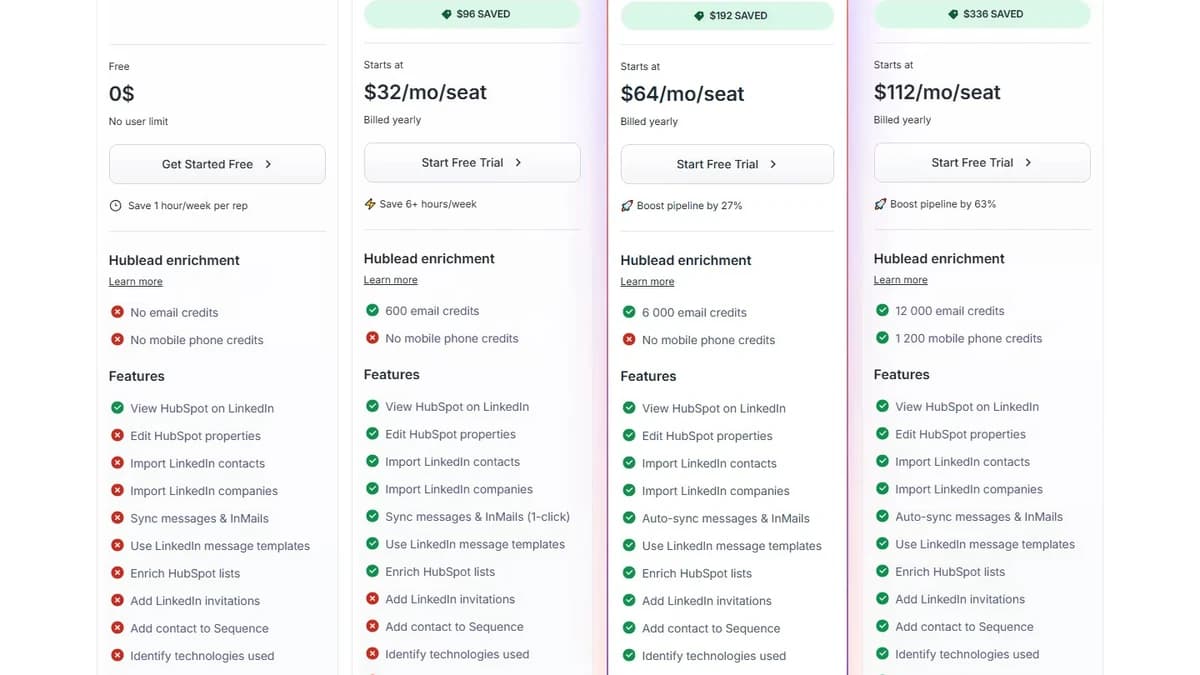
Hublead pricing page — March 2026
What you actually pay
Here is a realistic scenario. A sales team of 3 SDRs who each import 40+ LinkedIn contacts per week and need email enrichment:
- 3 seats on the Business plan: 3 x $64 = $192/mo (annual billing)
- Each rep needs ~200 email credits/mo for enrichment
- Business plan provides 500–6,000 credits — sufficient for most teams
- If you need phone numbers, upgrade to Scale: 3 x $112 = $336/mo
- Monthly billing instead of annual: 3 x $80 = $240/mo on Business
Compare this to LinkedIn's native Sales Navigator integration which requires the Advanced Plus plan at $16,000/year. Hublead delivers most of the same functionality at a fraction of the cost. That is its strongest selling point.
Hidden costs to watch
- Per-seat pricing stacks up: At $64/seat on Business, a 10-person team pays $640/mo for what is essentially a browser extension
- Enrichment credits run out: 50 email credits on Professional is not enough for active prospectors — you will hit the limit in week one
- Phone numbers need Scale: Locking phone enrichment behind the highest tier forces unnecessary upgrades
- Monthly billing penalty: 25% more per seat if you cannot commit to annual billing upfront
What Are the Downsides of Using Hublead?
Hublead's biggest downsides are HubSpot-only CRM lock-in, shallow enrichment capabilities, no buying signal monitoring, and per-seat pricing that scales poorly for larger teams.
HubSpot-only lock-in
This is the dealbreaker for many teams. Hublead works exclusively with HubSpot. If you use Salesforce, Pipedrive, Attio, Close, or any other CRM, Hublead is not an option. Period. And if you ever migrate away from HubSpot, you lose the integration entirely. Competitors like Surfe support multiple CRMs, which gives teams more flexibility.
Enrichment is too shallow
Hublead's enrichment is a single-provider lookup. No waterfall. No cascading fallback. If your first enrichment attempt fails, you lose the credit. Dedicated enrichment platforms like waterfall enrichment tools try 5–10 providers per contact and get 85%+ hit rates. Hublead does not come close.
One G2 reviewer noted: "While this integration streamlines HubSpot and LinkedIn collaboration, it lacks advanced features of Sales Navigator." The enrichment gap is real and limits the tool's value for teams that need more than basic email lookup.
No buying signals or intent data
Hublead does not monitor job changes, funding rounds, hiring surges, or any other buying signals. It imports the data that exists on a LinkedIn profile right now — nothing more. If a prospect changes jobs, raises funding, or shows intent on your website, Hublead will not tell you. You need a separate buying intent data tool for that.
No outbound automation
Hublead gets contacts into HubSpot. That is it. It does not send follow-up emails, trigger sequences, or automate outbound workflows. You still need a separate outreach tool — whether that is HubSpot's own sequences, an email platform, or a full GTM automation tool. Hublead is a data bridge, not an execution engine.
Per-seat pricing does not scale well
At $64/seat on the Business plan, a 10-person sales team pays $640/mo. A 20-person team pays $1,280/mo. For a Chrome extension that syncs contacts, that is a significant line item. Volume-based or flat-rate pricing would make more sense for larger teams, but Hublead does not offer it.
SyncGTM vs. Hublead: Feature-by-Feature
Hublead solves one problem: getting LinkedIn data into HubSpot. SyncGTM solves the full GTM workflow — from data sourcing to enrichment to signals to CRM sync. Here is how they compare:
| Feature | SyncGTM | Hublead |
|---|---|---|
| CRM Support | HubSpot, Salesforce, Pipedrive, Attio | HubSpot only |
| Enrichment | Waterfall across 20+ providers | Single-provider credit-based lookup |
| Buying Signals | Job changes, funding, hiring, intent | Not available |
| Outbound Automation | AI-powered sequences and workflows | Not available |
| LinkedIn Data Sync | Automated sync to any CRM | Chrome extension, HubSpot only |
| AI Research Agents | Automated company and contact research | Not available |
| Starting Price | Free (with AI agents and CRM sync) | Free (limited to contact import only) |
Waterfall Enrichment
SyncGTM cascades through 20+ data providers per contact. If one source misses, the next one picks up. Hit rates reach 85–95% compared to Hublead's single-provider lookup.
Any CRM, Not Just HubSpot
SyncGTM syncs enriched data to HubSpot, Salesforce, Pipedrive, and Attio. No CRM lock-in. Switch CRMs without losing your data pipeline.
Signal Monitoring
Track job changes, funding rounds, hiring surges, and buying intent automatically. Get alerted when prospects are ready to buy — something Hublead cannot do.
Full GTM Workflow
Source leads, enrich data, monitor signals, personalize outreach, and sync to CRM — all in one platform. No need to stitch together 5 separate tools.
Is Hublead Worth It?
Hublead is a good fit for small sales teams (1–5 reps) that use HubSpot exclusively and prospect primarily on LinkedIn. If your workflow is simple — find prospects on LinkedIn, sync them to HubSpot, log conversations — Hublead does this well. The 4.9-star G2 rating across 141+ reviews is earned. Users love the simplicity.
Hublead is not a good fit for teams that use any CRM other than HubSpot, need deep data enrichment beyond basic email lookup, want buying signal monitoring, or need to automate outbound workflows. If you are running a full go-to-market motion — not just contact imports — Hublead covers one small piece of the puzzle. You will need additional prospecting tools for enrichment, signals, and outreach.
The verdict: Hublead is a well-built LinkedIn-HubSpot bridge that saves reps hours of manual data entry. But it is a bridge, not a platform. For teams that need the full GTM stack — enrichment, signals, outbound, and multi-CRM support — a platform like SyncGTM delivers more value at a comparable price point.