

Narrow Review 2026: LinkedIn Inbox, AI Screener and Pricing

By Kushal Magar · November 26, 2026 · 12 min read
Key Takeaway
Narrow is a LinkedIn inbox and lightweight CRM that adds labels, follow-up reminders, a Kanban pipeline board and snippets on top of your DMs, and never sends on its own. Pro is $15/mo billed yearly ($19 monthly). Super Pro, at $22/mo yearly ($29 monthly), adds the Sales Navigator inbox, the AI Auto Screener and an MCP connection for Claude and ChatGPT. Gaps: a young product with few reviews, Chrome only, no native CRM sync and no shared team inbox. Our rating: 3.9/5.
This Narrow review covers a LinkedIn inbox that costs less than most of its rivals and refuses to automate anything. It adds labels, reminders and a pipeline board to your DMs, then leaves every send to you.
We read Narrow's homepage, pricing page, MCP page, privacy policy, Chrome Web Store listing and its own comparison posts on November 26, 2026. We did not run a paid account test, so vendor claims are labeled as claims.
One correction up front: third-party listings show two plans and put the AI screener on the top one. Narrow's live pricing page now has three plans, and the screener sits on the middle one.
TL;DR: Narrow Review 2026
- What it is: A LinkedIn and Sales Navigator inbox with labels, reminders, a Kanban pipeline, snippets and notes.
- Sends on its own? No sequences, scraping or auto-send. Its MCP can send one reply on request if you grant permission.
- Price: $15, $22 or $35 a month billed yearly; $19, $29 or $45 billed monthly, per Narrow's pricing page.
- AI Auto Screener: On Super Pro, not the top tier. It sorts new messages into Lead, Network, Cold or Broadcast.
- Biggest gaps: Small review record, Chrome only, no native CRM sync, no shared team inbox.
- Rating: 3.9/5.
What Is Narrow?
Narrow is a LinkedIn inbox and CRM workspace for people whose deals, hires and partnerships start in DMs. Its homepage headline is "Your LinkedIn inbox, organized."
It does not prospect or send for you. Narrow sits on top of the conversations you already have and gives each one a label, a stage and a next step.
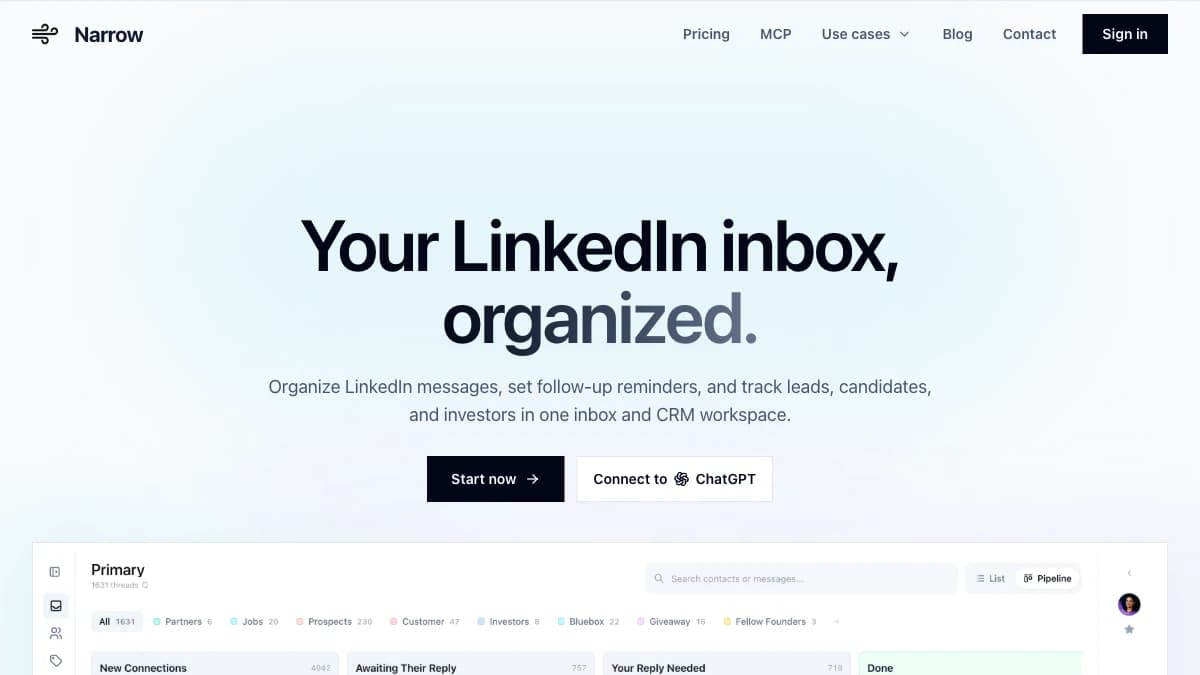
Narrow homepage, November 2026: inbox, follow-up reminders and a lead tracker in one workspace, with a Connect to ChatGPT button.
Narrow targets founders, recruiters, sales teams, investors, coaches and creators, with a use-case page for each. Its inbox tools comparison is bylined to founder Yash Gupta and discloses "We build Narrow" before ranking rivals.
It is a young product. The Chrome Web Store listing showed 123 users and version 1.0.31, updated November 18, 2026, when we checked.
How Narrow Works and Reads Your Messages
Narrow connects to LinkedIn through a Chrome extension that uses the session you already have open. You then open the Narrow web app to read, label and reply to your conversations.
You never give Narrow your LinkedIn password. The extension is the bridge, and the web app is where the inbox, board and reminders live.
Where your messages are stored
Narrow's homepage calls it local-first and says your message history stays on your device. The privacy policy is more careful: some conversation data may be stored locally, while cloud storage may be used for account settings, AI features and backups.
The policy lists what the extension may process: conversation history, timestamps, participant names, profile URLs, your labels and notes, prospect status and AI summaries. It also names AI model providers among the services that may receive data, and says Narrow does not sell your conversation data.
Browser support
Narrow names Chrome everywhere: the extension is on the Chrome Web Store, and the MCP page tells you to keep Narrow open in Chrome for LinkedIn tasks. Saved labels, snippets and follow-ups stay available with the web app closed.
Narrow Key Features
Narrow's features cover four jobs: sort the inbox, track each relationship, reply faster and bring in AI. Here is what each one does, based on Narrow's own pages.
Labels
You create your own conversation labels, such as Prospect, Customer, Investor or Candidate. Label filters run across the top of the inbox, so each group becomes a view you can open in one click.
Follow-up reminders
Set a reminder on a conversation for tomorrow, in 3 days, in a week or a custom date. The reminder stays attached to the person and the thread, so you reopen it with the earlier messages in view.
Pipeline board
The pipeline is a Kanban board of your DMs. The product shot shows columns for New Connections, Awaiting Their Reply, Your Reply Needed, Follow Up and Done.
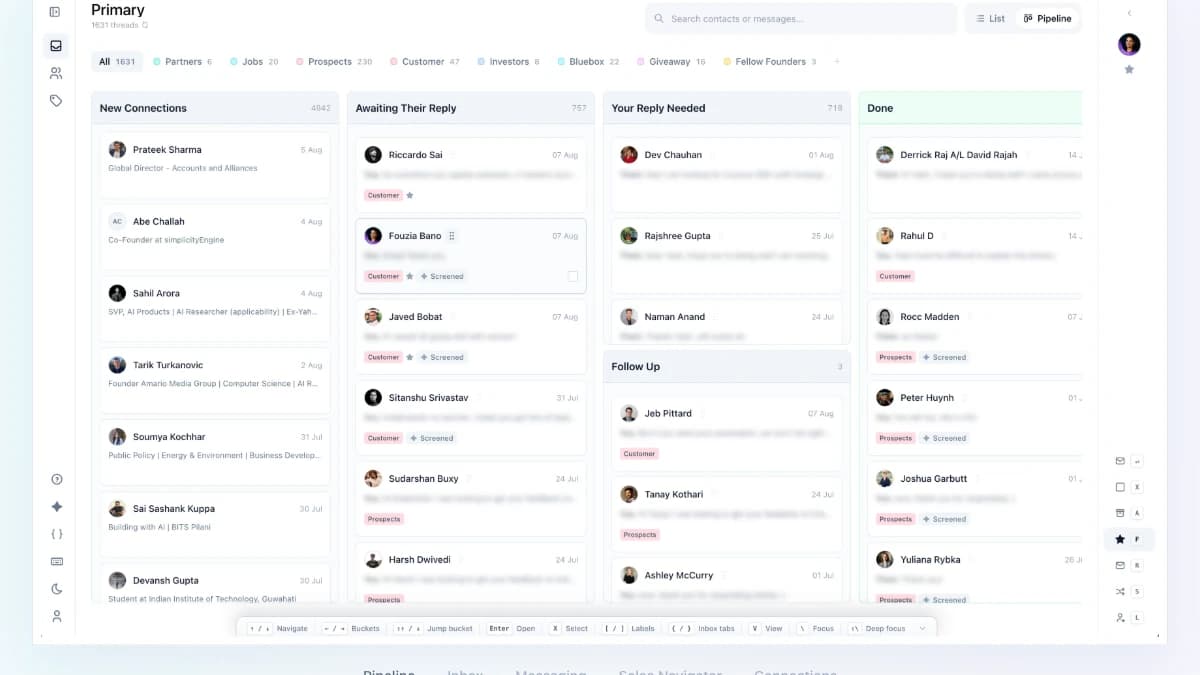
Narrow's pipeline view from its homepage, with label filters across the top, Screened badges on cards and a keyboard shortcut bar.
This board is Narrow's best idea. It answers the question a plain inbox cannot: who owes whom a reply right now.
Snippets, notes and search
Snippets store replies you send often, which you insert, edit and send yourself. Notes sit on each contact's profile and autosave, and fast search covers contacts and messages.
Connections browser
A Connections view lets you search your LinkedIn network and filter by persona, label or relationship status. It is useful for finding people you are connected to but have never messaged.
Sales Navigator inbox (Super Pro)
Super Pro pulls Sales Navigator conversations into the same workspace as your LinkedIn messages. The same labels, reminders and pipeline stages apply to both.
AI Auto Screener (Super Pro)
The Auto Screener classifies each new message as Lead, Network, Cold or Broadcast, according to Narrow's own comparison post. It does not reply or send; it only sorts.
Screening runs on credits, and the pricing page does not say how many credits one message uses. Heavy inboxes should watch the meter in the first month.
MCP connection (Super Pro)
Narrow's MCP page connects your inbox to Claude, ChatGPT, Gemini, Cursor, Codex and Claude Code. You can ask an AI app to find chats that need a reply, draft replies, search connections, pull details from shared files, and update labels or notes.
You choose the permissions. Depending on what you allow, the app can read your inbox, send messages, respond to invitations or update contacts and labels.
Audio and video messages (Super Pro)
Super Pro lets you record and send voice notes and videos from the Narrow inbox. Pro covers text replies only.
Narrow Pricing: Which Plan Each Feature Sits On
Narrow has three paid plans, and yearly billing cuts each one by about a fifth. Prices below come from Narrow's pricing page on November 26, 2026.
| Plan | Billed yearly | Billed monthly | What it includes |
|---|---|---|---|
| Pro | $15/mo ($180 a year) | $19/mo | LinkedIn inbox workspace, conversation labels, follow-up reminders, Kanban board, snippets and fast search, in-app text messaging |
| Super Pro | $22/mo ($264 a year) | $29/mo | Everything in Pro, plus Sales Navigator inbox, audio and video messages, MCP for AI tools, AI Message Screening, priority support |
| Max Pro | $35/mo ($420 a year) | $45/mo | Everything in Super Pro, plus custom integrations with your team's tools. Sold through a Contact us button |
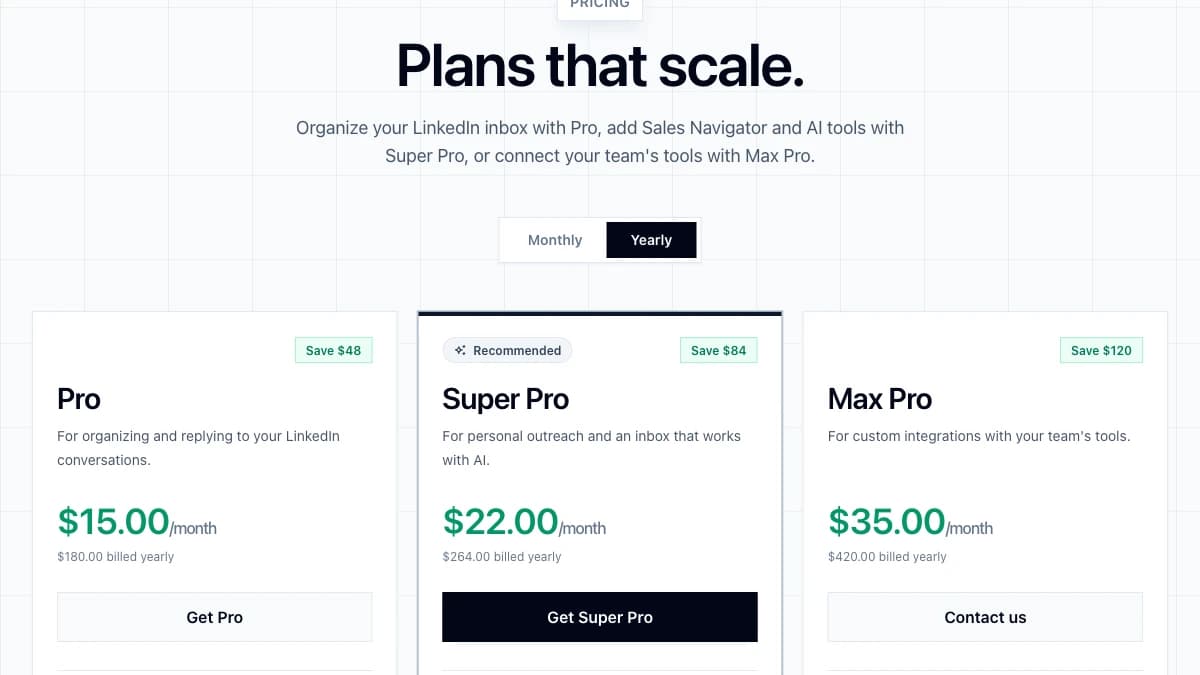
Narrow pricing page on the Yearly toggle, November 2026. The Monthly toggle shows $19, $29 and $45.
Feature by plan
| Feature | Pro | Super Pro | Max Pro |
|---|---|---|---|
| Labels, reminders, Kanban pipeline, snippets, search | Yes | Yes | Yes |
| Sales Navigator inbox | No | Yes | Yes |
| Audio and video messages | No | Yes | Yes |
| AI Auto Screener | No | 24,000 credits a year (yearly) or 2,000 a month (monthly) | Yes, via Super Pro |
| MCP for Claude, ChatGPT, Codex and others | No | Yes | Yes |
| Priority support | No | Yes | Yes |
| Custom integrations | No | No | Yes |
What you actually pay
- Solo seller on LinkedIn only: Pro at $180 a year. The pricing page shows that as a $48 saving over paying monthly.
- Seller on Sales Navigator or who wants AI: Super Pro at $264 a year, an $84 saving over monthly on the pricing page. This is the plan most sales users will need.
- Team that wants Narrow wired into other tools: Max Pro at $420 a year on the pricing page, sold through a contact form.
The pricing page quotes each plan per month without a seat count, and we found no team plan or shared inbox on Narrow's site. Budget one plan per person.
Why third-party listings disagree
Listings such as Gappsy say plans start at $15 a month and show only Pro and Super Pro. That made Super Pro the top tier, so the screener looked like a top-tier feature.
Narrow has since added Max Pro above it. On Narrow's pricing page, the $15 entry price is the yearly rate; month to month, Pro is $19.
On free use, the homepage says you can start without a credit card, but the pricing page lists no free plan. Treat the free start as a trial of the inbox, not a tier to stay on.
Does Narrow Send Messages? Automation and Account Safety
Narrow sends nothing on its own. Its homepage says there is no scraping, no sequences and no auto-sending, and every message is written and sent by you.
The site footer repeats the pitch: "No automation. Human-led messaging." That is a real design choice, not marketing gloss.
The MCP exception
Super Pro's MCP connection is the one place sending can happen. Narrow's LinkedIn MCP server post says that with send permission off, an AI app reads, labels and drafts in the chat.
Turn send permission on and it sends a single reply only when you ask, with Claude or ChatGPT showing the tool call for approval. The same post says there is no bulk send, no sequences and no messages to people you are not connected to.
Kondo and several other inbox tools take a drafts-only line. Narrow lets you choose, which suits people who trust their AI app and worries people who do not.
LinkedIn account safety
LinkedIn's prohibited software page bans third-party tools, including browser extensions, that scrape, modify the appearance of, or automate activity on its site. A tool that never sends on its own sits far from the bots that policy targets.
It still reads your inbox through an extension, so the risk is low, not zero. If you have been restricted before, read our guide to LinkedIn account restrictions before adding any extension.
Narrow's privacy policy says it aims to comply with GDPR and CCPA where required. The pages we read mention no SOC 2 or similar audit, which may matter to buyers with a security review.
What Narrow Users Say
There is not much independent feedback yet. Most of what exists is short and positive, and it comes from a small user base.
- Chrome Web Store: 5.0 stars from 5 ratings and 123 users on the store listing.
- Product Hunt: 263 followers and no written reviews on the reviews page. It was ranked #5 of the day on June 2, 2025.
- Vendor testimonials: Founders on Narrow's homepage praise the combined inbox. One CEO says having LinkedIn and Sales Navigator in one place "has been a huge time-saver."
Homepage quotes are chosen by the vendor, and five store ratings is too few to judge reliability. Treat Narrow as promising but unproven at scale.
Narrow Pros and Cons
Pros
- Low entry price for a LinkedIn inbox with a pipeline board.
- The Kanban pipeline shows who owes a reply at a glance, which a plain inbox cannot.
- Sales Navigator inbox, screener and MCP all sit on one plan, Super Pro.
- Never sends on its own: no sequences, scraping or auto-send.
- Local-first inbox; no LinkedIn password shared.
- MCP works with Claude, ChatGPT, Gemini, Cursor, Codex and Claude Code.
- Card-free start, per the homepage.
Cons
- Young product with 5 store ratings and no Product Hunt reviews.
- Chrome only, based on Narrow's own pages.
- No native CRM sync; integrations are a contact-sales Max Pro add.
- No shared team inbox or team plan on the site.
- Screener runs on credits, with no stated cost per message.
- AI features send message content to AI providers.
- An MCP with send permission is a risk if you hand it too much.
Who Should Use Narrow (and Who Shouldn't)
Narrow fits individuals whose pipeline lives in LinkedIn DMs and who want a board, not a feed. It is a poor fit for teams that need a shared inbox, CRM logging or outreach automation.
Good fit
- Founders: Buyers, investors and hires mix in one feed. Labels and the pipeline split them on the entry plan.
- Sellers on Sales Navigator: Super Pro merges both inboxes and screens inbound. Pair it with a daily LinkedIn inbox management system so the board stays current.
- Recruiters and investors: Reminders and notes keep long relationships warm across months.
- Claude or ChatGPT power users: The MCP turns "who is waiting on me?" into a single prompt.
Not a fit
- Teams that want automated outreach: Narrow sends nothing on its own. Look at outreach tools instead.
- Teams that need CRM logging: There is no native HubSpot or Salesforce sync.
- Agencies juggling many senders: The site describes no shared or multi-account inbox.
- Low DM volume: A handful of messages a week fits LinkedIn's free inbox. Our LinkedIn message inbox guide covers its filters and archive.
Narrow Alternatives
The right Narrow alternative depends on the gap that bothers you most: CRM sync, multi-account inboxes or outreach. Our full ranking of Narrow alternatives compares six of them on AI, team seats and price.
- LinkedIn's inbox and Sales Navigator: Free or already paid for, with filters and archive but no pipeline or reminders. See our Sales Navigator review.
- Kondo: A keyboard-first DM inbox with native CRM sync and a drafts-only MCP. Basic is $28 per user a month billed yearly, and CRM sync starts on Business at $36. Read our Kondo review.
- Waalaxy: An outreach tool whose LinkedIn Inbox is an optional add-on at €20 a month. See our Waalaxy review.
- HeyReach: Multi-sender outreach with a unified inbox, at $79 per sender a month for 1 to 9 senders. Read our HeyReach review.
For a side-by-side of seven inbox tools on filters, tags, AI triage and price per seat, see our LinkedIn inbox managers comparison.
Narrow Review: Final Verdict
Our rating: 3.9/5. Narrow is one of the cheapest ways to turn a busy LinkedIn inbox into a pipeline, and its no-automation design is a real strength.
Solo founders, recruiters and investors should start on Pro. Sellers on Sales Navigator should go straight to Super Pro, because the merged inbox and the Auto Screener are the reason to buy.
The rating loses points for a thin review record, Chrome-only support, no native CRM sync and no team inbox. Use the card-free start to run one week of follow-ups from the board; if you stop losing threads, Narrow earns its place.
If an AI app that can send replies is a dealbreaker, syncIn by SyncGTM is one option worth a look: it is in early access, sends only when you click, and its Claude connector has no send tool.