

Scrap.io Review 2026: Google Maps Lead Scraper Pricing and Data

By Kushal Magar · October 23, 2026 · 12 min read
Key Takeaway
Scrap.io is a Google Maps lead scraper that pulls local business listings (plus Apple Maps and Bing Maps) across 195 countries and 4,000+ categories, then adds emails and social links from each business website. Plans: Basic $49/mo (10K export credits), Professional $99 (20K), Agency $199 (40K), Company $499 (100K), or about 30% less billed yearly. Cost per record stays near $0.005 on every plan, so higher tiers buy geography (county, state, country, radius, polygon), not cheaper data. Filters run before you spend credits and there is a 7-day, 100-lead trial. The catch: emails are mostly generic inboxes, there are no decision-maker names, and broad categories cannot be narrowed by keyword. Our rating: 4.0/5.
Scrap.io is a Google Maps lead scraper for teams that sell to local businesses. In this Scrap.io review we rate it 4.0/5: fast, cheap per record, and strong on filters, but light on named contacts.
Most Scrap.io reviews that rank today are written by vendors selling a competing tool. They skip the pricing math and say little about what the data looks like once it lands in your CRM.
This review covers how Scrap.io works, its category and city filters, the email and social fields, export credits, data accuracy for local businesses, and the four pricing plans.
We did not run a paid Scrap.io account for this post. Findings come from Scrap.io's homepage, pricing page, and FAQ (checked October 2026), plus user reviews on Capterra and Trustpilot. Vendor claims are labeled as claims.
What Is Scrap.io?
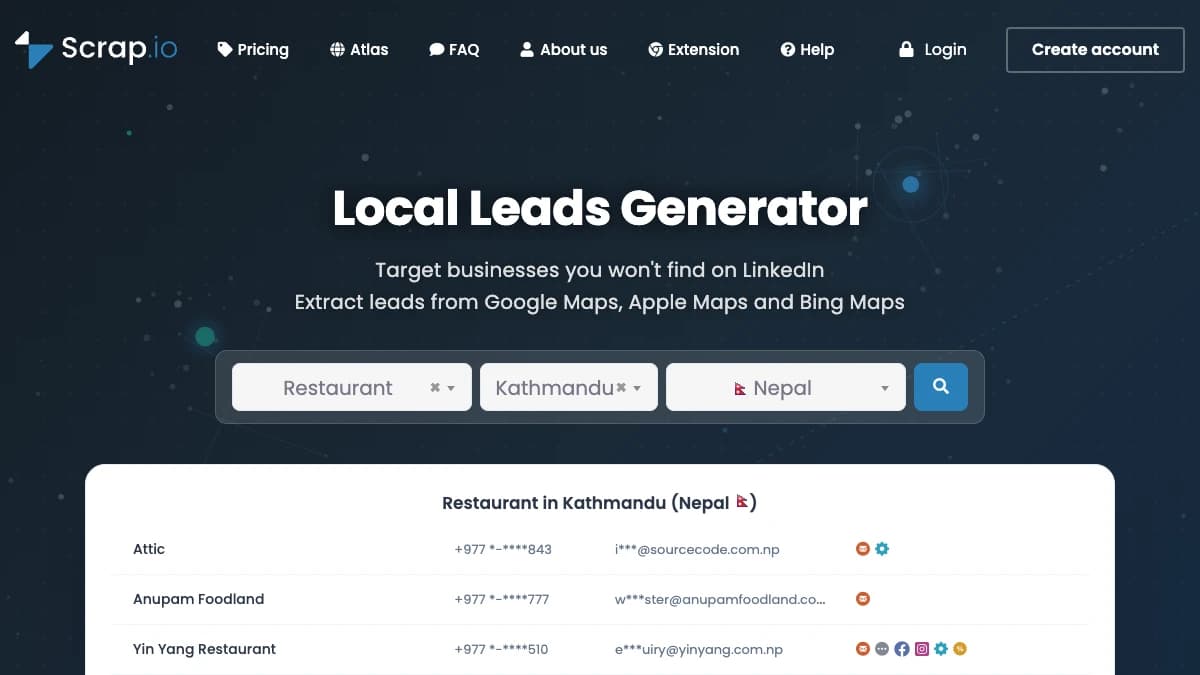
Scrap.io is a self-serve tool that extracts business listings from Google Maps, Apple Maps, and Bing Maps. Its homepage headline is “Local Leads Generator” with the tagline “Target businesses you won't find on LinkedIn.”
Scrap.io claims coverage of 195 countries and 4,000+ business categories, and says 50,000+ professionals use it. It does not publish a total record count.
The audience is clear. Agencies, SaaS companies, and distributors that sell to restaurants, clinics, salons, contractors, and other local businesses that rarely show up in B2B contact databases.
How Scrap.io Works
Scrap.io works in four steps: choose categories, choose a location, filter the results, then export the records you keep.
- Pick categories.Choose from Google Maps business types such as “dentist” or “roofing contractor.” Your plan caps how many types you can search at once (5 on Basic, 200 on Company).
- Pick a location. Search a city, a county-level division, a state-level division, or a whole country depending on plan. Higher plans add radius and polygon search.
- Filter. Keep only listings that have a website, phone, mobile, email, or Facebook and Instagram profiles, or that meet a rating and review-count threshold.
- Export. Download to CSV or Excel, or pull the same records through the REST API or the MCP server. Each exported business uses an export credit.
The key detail is that filtering happens before export. You do not pay credits for listings without an email if you filter them out first.
Third-party listings also report that a business is counted once per 30-day period, so re-exporting the same list within a month should not double-charge. Scrap.io's own FAQ does not spell this out, so confirm it during your trial.
Scrap.io Key Features: Filters, Fields, and Exports
Scrap.io's core value is a category-plus-location search over map listings, enriched with contact data scraped from each business website.
Category and city filters
Search by any of 4,000+ categories and by city on every plan. Level 2 divisions (counties, French departments) unlock on Professional, level 1 divisions (states, regions) on Agency, and whole-country search on Company.
One limit stands out. You cannot narrow a broad category by keyword, so “restaurant” returns every restaurant, not just the vegan ones.
Email and social fields
Each record combines the map listing with what Scrap.io finds on the business website. Scrap.io lists these fields:
- Listing data: name, address, phone, website, rating, review count, opening hours, photos, and attributes.
- Website data: emails, social profile links (Facebook, Instagram, and others), contact pages, meta tags, and ad pixels.
The ad pixel field is underrated. It tells you which local businesses already spend on Facebook or Google ads, which is a strong buying signal for agencies.
Reverse search and file enrichment
Reverse search finds a business from a phone number, email, domain, or URL. File enrichment takes a CSV of emails, phones, or websites and returns it with listing data attached.
API, MCP, and extension
Every plan includes REST API access and an MCP server, so you can run searches from Claude, ChatGPT, or Gemini in plain language. A third-party review reports an API limit of 300 requests per minute.
Scrap.io also ships a browser extension and a Telegram bot. If you are building agent workflows, our guide to a Google Maps scraper MCP shows how these servers fit into prospecting.
Export limits
Export volume is capped by monthly credits: 10,000 to 100,000 depending on plan. Credits reset each month and do not roll over, so unused volume is lost.
Scrap.io Pricing: Plans, Credits, What You Pay
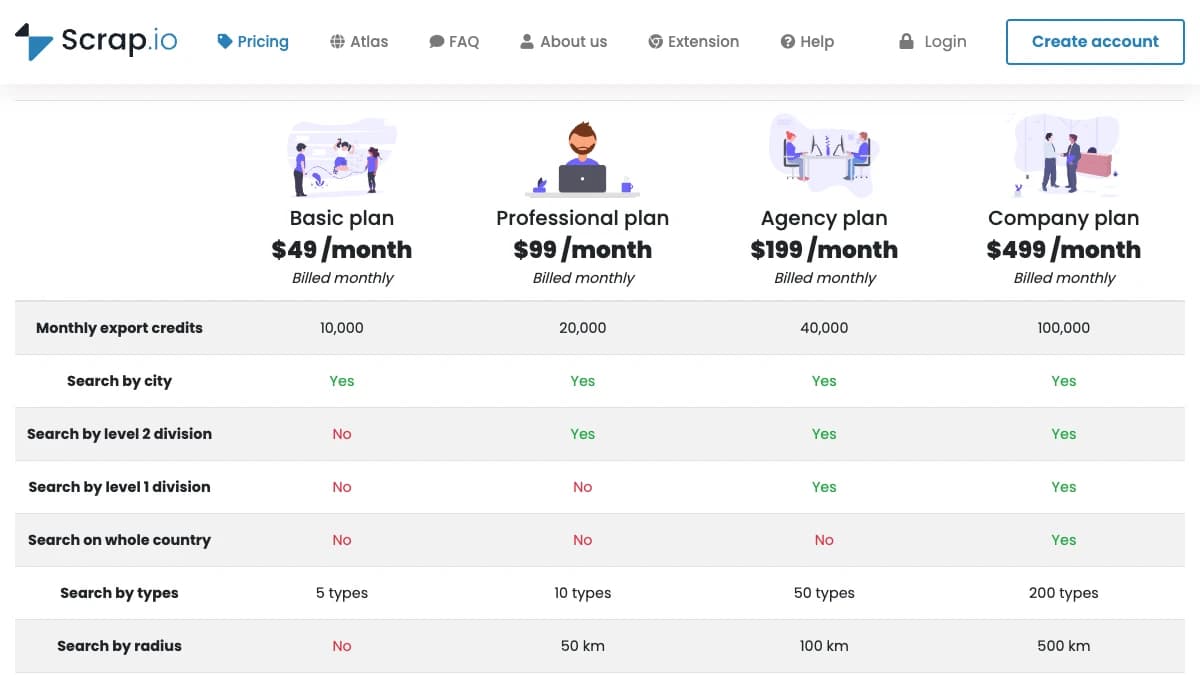
Scrap.io pricing runs from $49 to $499 a month, or $35 to $350 a month billed yearly, with 10,000 to 100,000 export credits.
All four plans include reverse search, file enrichment, API, and MCP access. Here is the full breakdown from the Scrap.io pricing page.
| Plan | Monthly | Yearly (per mo) | Export credits | Location search | Types | Radius |
|---|---|---|---|---|---|---|
| Basic | $49 | $35 | 10,000 | City only | 5 | No |
| Professional | $99 | $69 | 20,000 | City + level 2 (county) | 10 | 50 km |
| Agency | $199 | $139 | 40,000 | City + level 2 + level 1 (state) | 50 | 100 km |
| Company | $499 | $350 | 100,000 | All levels + whole country | 200 | 500 km + polygon |
Polygon search (up to 1,000,000 km²) is Company-only. Above that, Scrap.io Atlas starts at $5,000 a month under contract and adds custom credits, SSO, team roles, an SLA, and HubSpot or Salesforce integrations.
Cost per record
Divide price by credits and something odd shows up. Every plan costs about the same per record.
| Plan | Per record (monthly) | Per record (yearly) | Per 1,000 records |
|---|---|---|---|
| Basic | $0.0049 | $0.0035 | $4.90 |
| Professional | $0.0050 | $0.0035 | $4.95 |
| Agency | $0.0050 | $0.0035 | $4.98 |
| Company | $0.0050 | $0.0035 | $4.99 |
So upgrading does not buy cheaper data. It buys geography: bigger search areas, more categories per search, and radius or polygon targeting.
Pick your plan by the largest area you need to search in one go. A single-city agency is fine on Basic; a team covering a whole state needs Agency.
Trial, cancellation, and refunds
- 7-day free trial with up to 100 leads.
- No commitment; cancel anytime and keep access until the paid period ends.
- Upgrades are charged immediately, with the old plan refunded pro rata.
- No custom plans and no alternative payment methods beyond card.
Scrap.io Data Quality for Local Businesses
Scrap.io data is as accurate as the map listing and the business website behind it, which is good for addresses and phones and weaker for emails and contact names.
Map listings are maintained by owners through Google Business Profile, so phones, hours, and addresses are usually current. Closed or duplicate listings still slip through, so filter by review count to drop dead entries.
Email quality is the bigger question. Three patterns to expect:
- Generic inboxes. Most local business sites list info@, contact@, or booking@ addresses. These reach a front desk, not an owner.
- No decision-maker names.Scrap.io returns businesses, not people. One Reddit user called its email-to-name matching “not very accurate” compared with manual research.
- Uneven country depth.A Trustpilot reviewer wrote that for Ireland “you just don't get the data.” Density depends on how well a country is mapped.
Scrap.io does not say it verifies emails. Run every export through an email verifier before sending, or bounce rates will hurt your domain.
On compliance, Scrap.io says it only collects public business data and is GDPR and CCPA compliant. Your outreach still needs a lawful basis, which in the EU usually means legitimate interest under GDPR Article 6 and a working opt-out.
What Scrap.io Users Say
Users rate Scrap.io highly for ease of use and local coverage, with complaints clustered on price, billing, and thin data in some countries.
| Platform | Rating | Reviews |
|---|---|---|
| Capterra | 4.8 / 5 | 22 |
| Trustpilot | 4.4 / 5 | 77 |
On Trustpilot, 79% of reviews are 5-star and 8% are 1-star. Scrap.io replies to every negative review, usually within a day.
What users praise:
- “The best source of leads for local businesses.”
- “The platform is excellent and very easy to use.”
- Country-wide extraction in one search, which few tools offer.
- No hidden fees.
What users criticize:
- “A little pricey” for small teams.
- Occasional billing issues.
- Thin results in less-mapped countries.
- A wish for smoother spreadsheet exports and a more polished UI.
The review base is small: under 100 reviews across platforms. Treat ratings as directional and test your own category and city.
Scrap.io Pros and Cons
Pros
- Covers Google Maps, Apple Maps, and Bing Maps in 195 countries.
- Filters run before export, so credits go to usable records.
- About $0.005 per record, or $0.0035 billed yearly.
- Website fields include emails, socials, and ad pixels.
- API, MCP server, reverse search, and file enrichment on every plan.
- 7-day trial with 100 leads and no annual lock-in.
Cons
- Emails are mostly generic inboxes, not decision makers.
- No keyword filter inside broad categories.
- State and country search locked behind $199 and $499 plans.
- Credits reset monthly with no rollover.
- No built-in email verification or sending.
- Coverage thins out in less-mapped countries.
Who Should Use Scrap.io (and Who Shouldn't)
Scrap.io fits teams that sell to local businesses at volume and can work with business-level contacts.
Good fit
- Marketing and web agencies prospecting local businesses by city.
- Vertical SaaS selling to restaurants, clinics, salons, or trades.
- Distributors and field sales teams building territory lists.
- Builders who want Maps data inside Claude or an AI agent via MCP.
Poor fit
- Teams selling to mid-market or enterprise buyers.
- Outbound programs that need named owners or managers.
- Anyone needing a few hundred records a quarter; pay-as-you-go is cheaper.
For a wider view of local prospecting tools, see our ranking of AI lead generation tools for local businesses.
Scrap.io Alternatives
The main Scrap.io alternatives are Outscraper, Apify, PhantomBuster, and Leads Sniper.
| Tool | Best for | Key difference |
|---|---|---|
| Outscraper | Pay-as-you-go Google Maps pulls without a monthly plan | Per-record pricing and a large free starter allowance; no geography tiers |
| Apify | Technical teams that want to customize the scraper itself | Marketplace of Google Maps actors billed on compute; more setup, more control |
| PhantomBuster | Teams already automating LinkedIn who want a Maps extractor too | Time-based plans across many automations; Maps is one of dozens of phantoms |
| Leads Sniper | Solo operators who prefer a one-time license | Desktop-style tool with one-time pricing; smaller support footprint |
For a full side-by-side, read our list of the best Google Maps scrapers or our Outscraper alternatives breakdown.
Scrap.io Review: Final Verdict
Our rating: 4.0/5. Scrap.io is one of the easiest ways to turn Google Maps into a filtered local lead list, held back by generic emails and plan tiers that gate geography.
The strengths are real. Pre-export filters, 195-country coverage, ad pixel data, and about half a cent per record make it a solid engine for local prospecting.
The weaknesses show up at the outreach stage. You get the business, not the buyer, and you still need verification and a sender.
Start with the 7-day trial in your best city and category. Check how many records have an email, then pick the cheapest plan that covers your territory.
If generic info@ inboxes are a dealbreaker, SyncGTM is one alternative worth a look: it pulls Google Maps listings and finds decision-maker emails and phones through waterfall enrichment across 50+ providers.