

LeadDelta Review 2026: LinkedIn Connections CRM and Pricing

By Kushal Magar · November 26, 2026 · 14 min read
Key Takeaway
LeadDelta is a LinkedIn connections CRM with an AI inbox. Its best parts are the connection filters, tags, notes, CSV export and a HubSpot sync that logs LinkedIn messages. It now sells one Growth plan at $69.30 per user a month billed yearly or $99 monthly, bundled with campaigns, a contact database and 500 enrichment credits. For sellers who live in DMs, the gaps are price, Chrome only, no seniority filter or inbox folders, and campaign automation that sits awkwardly with its no-bots pitch. Our rating: 3.8/5.
This LeadDelta review looks at a tool that started as a CRM for your LinkedIn connections and now sells itself as an AI GTM platform. We focus on what most buyers come for: importing, searching and tagging your network, then working the DMs.
We read LeadDelta's homepage, pricing page, product pages, help center and Chrome Web Store listing on November 26, 2026. We did not run a paid account test, so vendor claims are labeled as claims.
One correction up front: most ranking reviews still quote Starter, Pro and Business plans. LeadDelta's live pricing page now has one self-serve plan, Growth, and it costs far more than the old entry tier.
TL;DR: LeadDelta Review 2026
- What it is: A LinkedIn connections CRM with tags, notes, filters, tasks, Kanban pipelines and an AI inbox.
- Price: One Growth plan at $69.30 per user a month billed yearly, or $99 monthly, per LeadDelta's pricing page. 7-day trial, no card.
- Best feature: Connection filters and tags, plus a HubSpot sync that logs LinkedIn messages.
- Sends on its own? The CRM and inbox don't. AI Campaigns can, from your browser or the cloud.
- Biggest gaps for DM-heavy sellers: Bundled price, Chrome only, no seniority filter or inbox folders in its docs.
- Rating: 3.8/5.
What Is LeadDelta?
LeadDelta is a LinkedIn CRM that turns your 1st-degree connections into a searchable, taggable database, with an inbox for your DMs on top. Its homepage headline reads "The #1 LinkedIn CRM with an AI inbox."
It has grown well past a contact list. The pricing page now calls its plan an "AI GTM platform" that bundles campaigns, a contact database, enrichment, warm intros and buying signals.
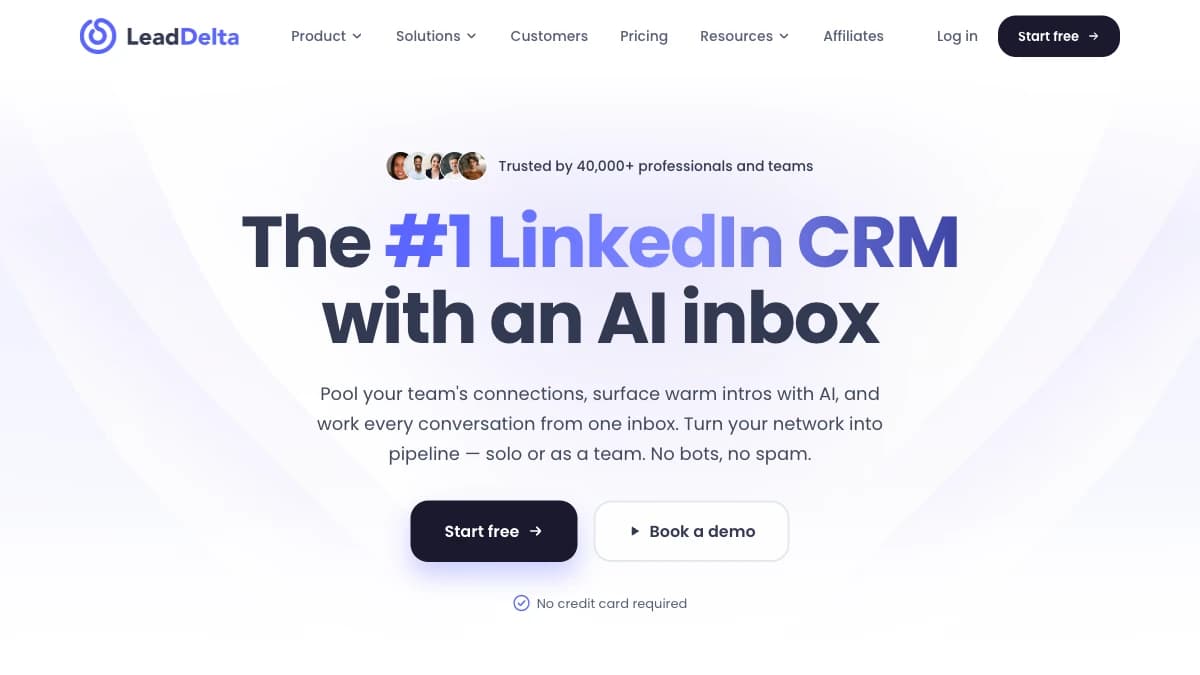
LeadDelta homepage, November 2026. The vendor says 40,000+ professionals and teams use it.
The Chrome Web Store listing showed 10,000 users, a 4.8 rating from 114 ratings, and version 6.3.6 updated November 24, 2026, when we checked. That user count is lower than the homepage figure, so treat the 40,000+ claim as marketing.
LeadDelta targets founders, sales teams, recruiters, coaches, consultants and agencies. It is an established product with years of feature releases behind it, not a new launch.
How LeadDelta Imports, Syncs and Exports Your Network
You install the LeadDelta Chrome extension, sign in, and it pulls your LinkedIn connections into the LeadDelta web app. From then on, the app is your connections list, and the extension adds a sidebar on LinkedIn pages.
Import and sync
LeadDelta's sync guide says Auto Sync runs every 24 hours when you log in. You can also sync by hand every 15 minutes, though the guide warns against syncing too often.
The auto-sync page says each sync catches people who left your network and pulls in profile changes. You can also import a CSV of LinkedIn profile URLs to add people you aren't connected to.
Sidebar capture from search and Sales Navigator
The sidebar runs on LinkedIn search, Sales Navigator, event pages and your inbox. On the Chrome extension page, LeadDelta says you can save a Sales Navigator search of up to 1,000 profiles to a list and enrich it on the way out.
Export
Export works on any filtered view. The export guide lets you export selected or all matching connections to CSV, with your tags and notes as extra columns.
One limit to know before you buy: a LeadDelta account manages one LinkedIn account, per its multiple-accounts article. A second profile needs its own registration, joined through a team workspace.
LeadDelta's Connections CRM: Search, Tags, Notes and Filters
The connections CRM is the reason to buy LeadDelta. The CRM page says you can sort by 15+ data points, tag in bulk, add notes and tasks, and move people through Kanban pipeline stages.
Filters
LeadDelta's filters guide lists these options. Combined, they answer questions like "which founders in fintech did I connect with this year but never message?"
| Filter group | Filters in LeadDelta's guide |
|---|---|
| Search fields | Company, Headline, Location, Job Title, Note search |
| Relationship | Date Connected, Last Messaged Date (incoming or outgoing), Shared connections in a team |
| Profile data | Industry, Languages, Date of Birth, Number of Followers, Contact Info (with or without) |
| Your own labels | Tags with AND/OR logic, Exclude Tag, Has note, Hidden connections |
One gap stands out. The guide lists no seniority or department filter, so finding "all VPs" means a Job Title keyword search rather than a clean field.
Tags and notes
Tags support AND/OR logic and an Exclude Tag filter, so you can pull "Investor AND Fintech, NOT Customer" in one view. Notes attach to each contact and are searchable.
In a team workspace, each tag and note can be public or private. Only the workspace admin can add users and manage billing.
Tasks, pipelines and network cleanup
Tasks and reminders sit on each relationship, and a Kanban view tracks deals, hires or fundraising. LeadDelta also offers scheduled bulk removal of connections, which users quoted on its site praise for cleaning up a noisy feed.
Buying signals
The buying signals page says LeadDelta tracks job and company changes, birthdays and the last time you messaged someone. You can filter your network by "changed jobs" and save that as a list that updates itself.
LeadDelta's AI Inbox for LinkedIn DMs
LeadDelta's inbox replaces LinkedIn's messaging window with a full-page view. The Smart AI Inbox page says every incoming message gets an AI label, such as Introductions, Awaiting reply, Action items or Marketing.
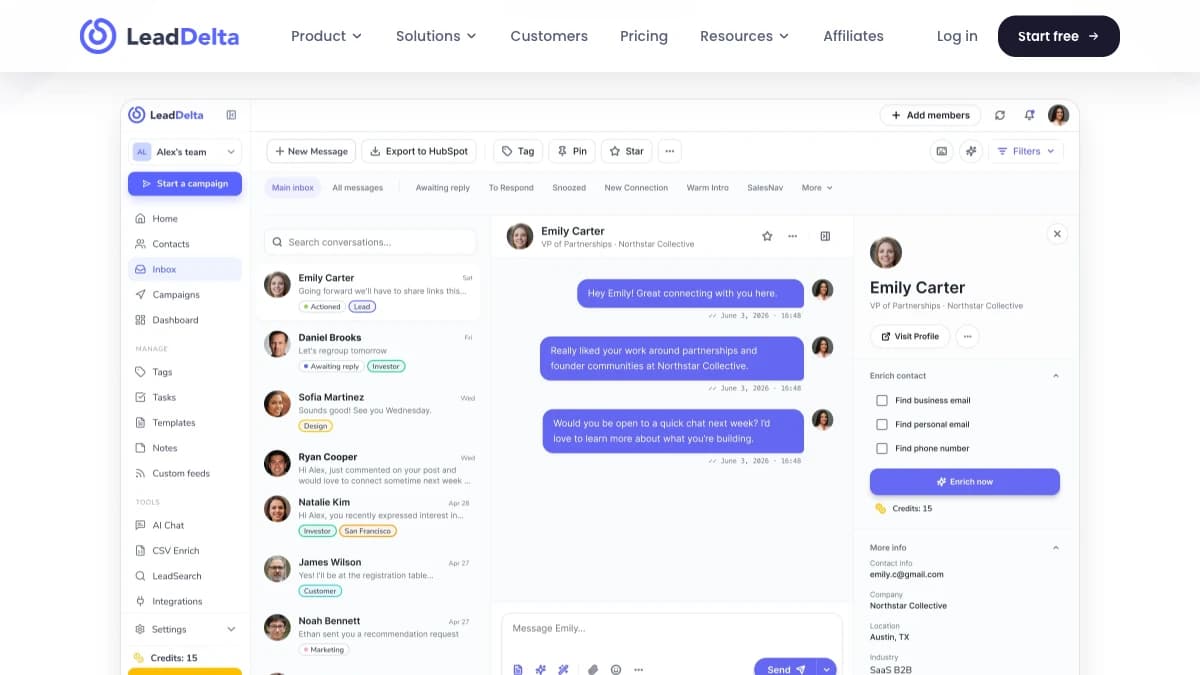
LeadDelta's inbox product shot: label tabs across the top, Export to HubSpot, tags on each thread and an enrichment panel on the right.
What the inbox does
- AI labels and views: You choose which labels reach your Main inbox; the rest wait in All Messages.
- Tags, pins, stars and snooze: The same tags you use on contacts apply to threads, and you can snooze a chat until later.
- AI drafts: LeadDelta says drafts are trained on your recent threads. You edit and send each one yourself.
- Templates and bulk actions: Saved replies, bulk archive and bulk tagging. The features overview also lists bulk send to 100 connections.
- Contact context: A sidebar shows the person's role, your tags, notes and history next to the chat.
Sales Navigator messages
Sales Navigator chats appear in the same inbox, color-coded and taggable, per the Smart Inbox page. An older help article from December 2024 says this is read and reply only and works with Sales Navigator Core, with Advanced and Advanced Plus due later.
We could not confirm whether that has changed. If you are on Advanced or Advanced Plus, test it during the trial.
Where your messages live
LeadDelta's inbox guide says it does not store or host your LinkedIn messages. If you log out of LinkedIn, the conversations disappear from LeadDelta.
That is good for privacy. It also means the inbox is a live view of LinkedIn, not an archive you can search when LinkedIn is down or logged out.
LeadDelta Integrations: HubSpot, Zapier, CSV and MCP
LeadDelta's strongest integration is HubSpot, and it is a real differentiator. The rest are general-purpose connectors.
HubSpot
The HubSpot integration page says you can push connections into HubSpot as contacts, lists, workflow enrollments or deals, with custom field mapping. You can also log a single LinkedIn message to a contact's timeline, or auto-sync every new message.
LeadDelta points out that HubSpot's own LinkedIn sync needs a Sales Navigator Advanced Plus seat, while LeadDelta works with a regular LinkedIn account. For a HubSpot team that sells in DMs, that alone can justify the trial.
Zapier, Pabbly and API
LeadDelta's Zapier guide lists triggers such as New Connection, New Message, New Note and Applied Tag, plus actions to create tags, apply tags and add notes. It requires a paid LeadDelta plan.
The pages we read don't mention native Salesforce or Pipedrive sync. Those teams would go through Zapier, Pabbly or the API.
MCP for Claude, ChatGPT and Perplexity
The MCP page connects your synced network to Claude, ChatGPT or Perplexity, so you can ask "who do we know at this account?" in plain English. LeadDelta says the MCP reads its own copy of your data and makes no LinkedIn calls at query time.
Two caveats. The MCP page says it works on the Business plan, which no longer appears on the pricing page, and it advertises running campaigns from your AI app alongside a "read-only by design" label.
LeadDelta Pricing: One Growth Plan in 2026
LeadDelta sells one self-serve plan, Growth, and two custom options. Prices below come from LeadDelta's pricing page on November 26, 2026, without the Black Friday code.
| Plan | Billed yearly | Billed monthly | What it includes |
|---|---|---|---|
| Growth | $69.30 per user/mo ($831.60 a year) | $99 per user/mo | LinkedIn CRM and shared networks, AI LinkedIn Inbox, LinkedIn and email campaigns, LeadSearch database, 500 enrichment credits, Warm Intro AI, buying signals, MCP and API |
| Done-for-you | Custom | Custom | GTM strategy setup, optional dedicated GTM engineer, campaign setup and reporting. Minimum 3-month commitment |
| Enterprise | Custom | Custom | For 100 to 10,000-person organizations: SSO, custom integrations, onboarding and a customer success manager |
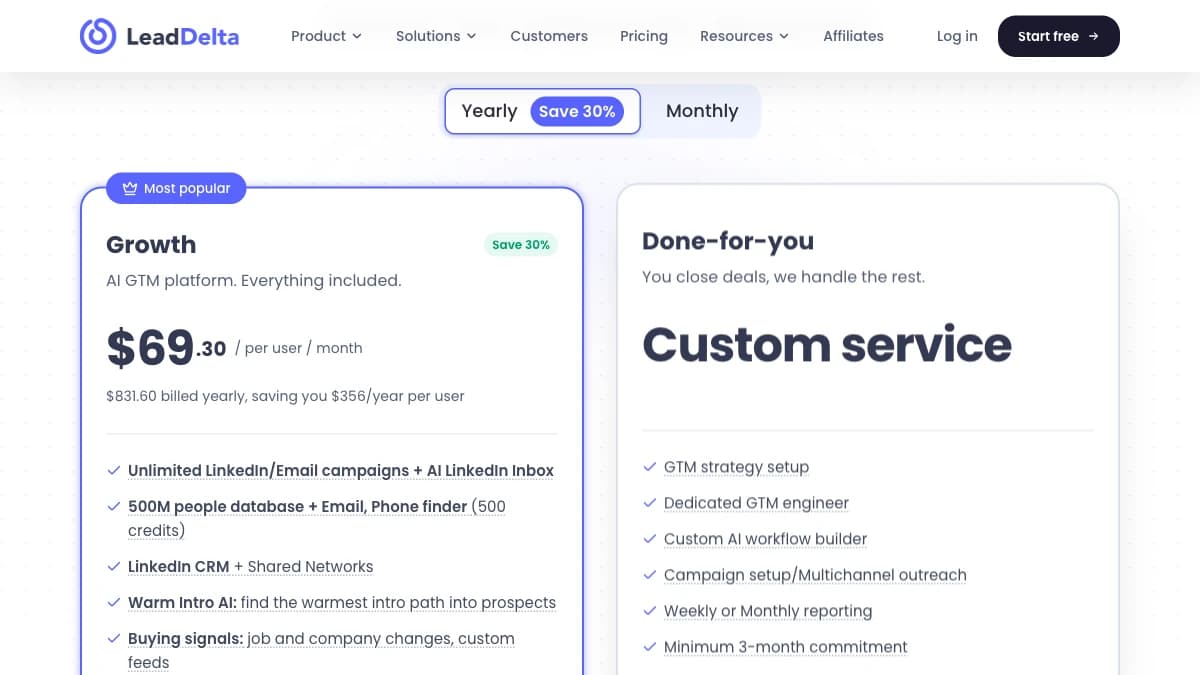
LeadDelta pricing page on the Yearly toggle, November 2026. The Monthly toggle shows $99 per user.
Enrichment credits
Growth includes 500 credits. Per LeadDelta's credits guide, you pay only when a verified result is found, and credits are shared across your workspace.
| Result | Credit cost |
|---|---|
| Business email found | 1 credit |
| Personal email found | 3 credits |
| Phone number found | 10 credits |
So 500 credits cover 500 business emails or 50 phone numbers. The same guide says credits on a monthly plan expire after 2 months, and on an annual plan after 12 months.
What you actually pay
- One seller, yearly: $831.60 a year. The pricing page shows that as a $356 saving over paying monthly.
- One seller, monthly: $99 a month on the pricing page, or $1,188 over a year by our math.
- Team of five, yearly: $4,158 a year by our math from the per-user price on the pricing page.
That price buys the whole bundle, including campaigns and a contact database. If you only want a connections CRM and a better inbox, you pay for parts you won't use.
Why other reviews show cheaper plans
Older reviews list three tiers. Kondo's June 2025 LeadDelta review shows Starter at $11.67, Pro at $24.17 and Business at $82.50 a month.
Those plans are gone from LeadDelta's pricing page. Existing customers may still be on them, but a new buyer starts at Growth.
Trial, refunds and pausing
The trial article promises 7 days of full access with no card. Use all of it, because LeadDelta's refund policy says it does not process refunds case by case.
You can pause instead of cancelling. The pause article allows 1, 2 or 3 months with billing stopped.
Does LeadDelta Automate? Campaigns and Account Safety
LeadDelta sends two messages about automation, and buyers should read both. Its CRM page says it "never automates actions on your behalf", and the sidebar page promises no auto-connecting or auto-messaging.
AI Campaigns
LeadDelta's AI Campaigns guide, updated August 2026, describes sequences of connection requests, messages, post likes and comments. They run from your Chrome browser or "in the cloud 24/7".
Cloud campaigns ask you to connect a LinkedIn account with its email and password. The same guide caps each profile at 25 connection requests, 40 messages, 15 likes and 15 comments a day, with 100 connection requests a week.
LinkedIn account safety
LinkedIn's prohibited software page bans third-party tools, including browser extensions, that scrape, modify the appearance of, or automate activity on its site. LeadDelta's pricing FAQ answers "Will LeadDelta keep my LinkedIn account safe?" with "Absolutely," which is a vendor claim, not a guarantee.
If you use only the CRM and inbox, your risk is lower. If you have been restricted before, read our guide to LinkedIn account restrictions before turning on campaigns.
On security, the pricing page says SOC 2 and ISO 27001 are "in progress", and SSO sits on Enterprise. Buyers with a vendor security review should ask for status in writing.
Where LeadDelta Falls Short for DM-Heavy Sellers
LeadDelta is built around the connections list first and the inbox second. If most of your selling happens in DMs, these are the gaps we found in its own docs.
- Inbox filters are basic in the docs. The inbox filters guide lists Pinned, Starred, Read, Tag and Archived. LeadDelta's site doesn't mention filtering chats by the sender's title, seniority or department.
- No inbox folders. LeadDelta's site doesn't mention folders, and a review quoted on its own pricing page asks for one in the inbox.
- Messages depend on your LinkedIn session. Log out of LinkedIn and the conversations disappear from LeadDelta, per the inbox guide.
- Sales Navigator limits. The help article still says read and reply only, on Core. Verify Advanced support in the trial.
- Chrome only. The extension is on the Chrome Web Store, and LeadDelta's site doesn't mention Edge, Brave or Firefox.
- No shared DM inbox. The team workspace shares connections, tags and notes, but its page says "private conversations stay private." The site doesn't mention a shared inbox for DMs.
- You pay for the bundle. An inbox-first buyer still pays for campaigns, a contact database and warm intro AI at $69.30 a month billed yearly, per the pricing page.
For a DM-first workflow, our LinkedIn inbox management guide walks through the tags, follow-up rules and daily routine that matter more than any single tool.
What LeadDelta Users Say
LeadDelta has a longer review record than most LinkedIn inbox tools. Most feedback praises filters, tags and support, while the recurring complaints are price and sync lag.
- Chrome Web Store: 4.8 stars from 114 ratings and 10,000 users on the store listing.
- G2: Search results showed 4.7 out of 5 from 40 reviews on LeadDelta's G2 page. G2 blocked our direct check, so confirm the current score there.
- Reviews LeadDelta shows on its own pages: Users praise the filters, bulk tagging and bulk disconnect. One says contact sync "is often very delayed," and another asks for inbox folders.
Competitor-written reviews add complaints about the learning curve and the jump between old tiers. Read them knowing the author sells a rival inbox.
LeadDelta Pros and Cons
Pros
- Deep connection filters, including date connected and last messaged.
- Tags with AND/OR and exclude logic, plus searchable notes.
- CSV export with tags and notes, and CSV import of profile URLs.
- HubSpot sync that logs LinkedIn messages without Advanced Plus.
- AI inbox with labels, snooze, pins, templates and drafts.
- Team workspace that pools and dedupes everyone's network.
- 7-day trial with no card, and a pause option.
Cons
- One bundled plan at $69.30 a month yearly or $99 monthly, per the pricing page.
- No seniority or department filter in its filter guide.
- No inbox folders or shared DM inbox mentioned.
- Chrome only, one LinkedIn account per LeadDelta account.
- Mixed messaging: no-automation pitch next to cloud campaigns.
- Strict no-refund policy.
- Docs and plan names lag the product in places.
Who Should Use LeadDelta (and Who Shouldn't)
LeadDelta fits people whose network is the asset and who want it organized, searchable and synced to HubSpot. It fits less well if you only need a faster DM inbox.
Good fit
- Founders and VCs with large networks: Filters by date connected, last message and tags turn thousands of connections into usable lists.
- HubSpot teams that sell on LinkedIn: Message logging without a Sales Navigator Advanced Plus seat is the standout feature.
- Teams chasing warm intros: The shared workspace shows who on your team knows a prospect.
- Buyers who also want outreach: If you'd otherwise pay for a separate sequencer and database, the bundle starts to make sense.
Not a fit
- Sellers who only want a better DM inbox: Inbox-first tools cost less per seat. Our LinkedIn inbox managers comparison covers seven of them.
- Edge or Brave users: The site names only Chrome.
- Teams that want no automation anywhere: Campaigns are part of the plan, even if you never switch them on.
- Light LinkedIn users: A few DMs a week fit LinkedIn's free inbox. Our LinkedIn message inbox guide covers its filters and archive.
LeadDelta Alternatives
The right LeadDelta alternative depends on which half you use: the connections CRM or the inbox.
- Kondo: A keyboard-first DM inbox with labels, reminders and CRM sync on higher plans. Basic is $28 per user a month billed yearly. Read our Kondo review.
- Narrow: A low-cost LinkedIn inbox with labels, reminders and a Kanban board, from $15 a month billed yearly. Read our Narrow review.
- Breakcold: A sales CRM with one inbox across LinkedIn, email, WhatsApp and Telegram, from $49 per seat a month. Its 14-day trial needs a card.
- Surfe: Syncs LinkedIn contacts into HubSpot, Salesforce or Pipedrive, with a free plan and paid plans from €29 a month billed annually. It is a CRM sync layer, not an inbox, as our Surfe review explains.
For a side-by-side of inbox tools on filters, tags, AI triage and price per seat, see our LinkedIn inbox manager roundup.
LeadDelta Review: Final Verdict
Our rating: 3.8/5. LeadDelta is one of the most complete CRMs for LinkedIn connections, and its HubSpot message sync is a genuine edge.
Founders, investors and HubSpot sales teams with big networks should run the 7-day trial. Filter your network, export a tagged CSV, and log a week of DMs to HubSpot.
The rating loses points for a single bundled plan that costs far more than the old tiers, Chrome-only support, thin inbox filters in the docs, and an automation story that contradicts itself. If you mostly work in DMs, compare an inbox-first tool before you commit.
If cloud campaigns that need your LinkedIn password are a dealbreaker, syncIn by SyncGTM is one option worth a look: it is in early access with a waitlist, and it sends a message only when you click.