

Leadinfo Review 2026: Website Visitor Identification and Pricing

By Kushal Magar · October 21, 2026 · 13 min read
Key Takeaway
Leadinfo is a European, company-level website visitor identification tool. It claims around 40% identification of B2B traffic in Europe but publishes no US match rate. Pricing runs by identified companies per month: Starter from €69/mo (annual) for 50 companies, Scale from €159/mo for 250, and Pro from €359/mo for 750, with a 14-day free trial. Lead scoring is built in, automated CRM sync starts on Scale, and Salesforce needs Pro. GDPR posture is well documented (legitimate interest, no IPs shown to customers, ISO 27001 badge). Our rating: 3.9/5. Best for Benelux, DACH, and UK traffic; weaker for US-heavy sites.
Leadinfo is a company-level website visitor identification tool built for European B2B traffic. In this Leadinfo review we rate it 3.9/5: strong in the Benelux and DACH markets, easy to use, and priced transparently, but unproven on US traffic and gated hard by plan.
Most Leadinfo reviews that rank today are either thin feature lists or written by vendors selling a competing tool. None of them dig into match rate by region, which CRM syncs each plan unlocks, or what the tier pricing does once your traffic grows.
This review covers all of that. We did not run a paid Leadinfo account for this post: findings come from Leadinfo's homepage, pricing page, help center, and GDPR documentation (checked October 2026), plus reviews on G2, Capterra, and OMR. Vendor claims are labeled as claims.
What Is Leadinfo?
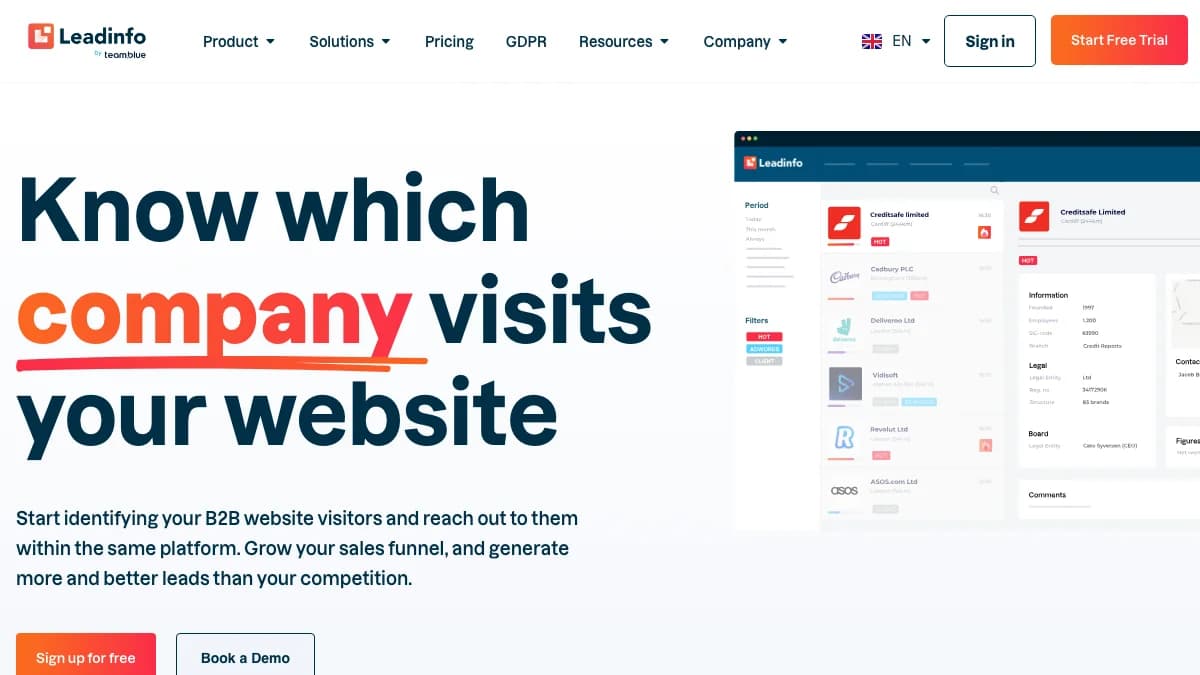
Leadinfo is a B2B website visitor identification platform headquartered in Rotterdam, the Netherlands. Its homepage headline reads “Know which company visits your website.”
Leadinfo has been part of the hosting group team.blue since 2022. It says it serves 8,000+ businesses on its homepage, and a January 2026 press release puts the figure above 9,000.
In January 2026 Leadinfo acquired Visitor Queue, a Canadian visitor ID tool, to add a North American footprint. We covered that product separately in our Visitor Queue review.
Leadinfo claims a database of 220M companies across 195 countries, 45 data points per company, and 70+ one-click integrations. The product is split into modules: Identify, Contacts, Leadbot, Autopilot, and Integrations.
How Leadinfo Works
Leadinfo works by matching each visitor's IP address to its company database, then showing you the company, the pages it viewed, and a lead score. You install one tracking script, and identified companies start appearing in a shared inbox.
The flow has four steps. Each one maps to a module you will see in the app.
- Identify. The script reads the visit, and Leadinfo matches the IP against business registers and its own data. Internet service provider traffic is filtered out, and automatic bot detection removes junk visits.
- Enrich. Each match gets a company profile: size, sector, location, website, business phone, and registration data.
- Score and route. A built-in lead score ranks companies by engagement. Triggers tag, assign, or notify based on rules you set.
- Act. You push leads to your CRM, look up decision-makers in Contacts, or start an email and LinkedIn sequence with the Autopilot add-on.
The key limitation sits in step one. IP matching names the organization, not the person, so remote workers on home broadband and small firms on shared networks often go unidentified. Our guide to how website visitor identification works explains why every IP-based tool hits this ceiling.
Leadinfo Match Rate: EU vs US Coverage
Leadinfo claims it identifies roughly 30% of website visitors as companies, and around 40% of B2B traffic in Europe. No independent test of those numbers is public, and Leadinfo publishes no US match rate at all.
The figures come from different Leadinfo pages, so it helps to see them side by side. All are vendor claims.
| Region | Leadinfo's claim | Source |
|---|---|---|
| All traffic (pricing guidance) | Identified companies are “roughly 30%” of visitors | Leadinfo homepage and pricing page |
| Europe | “Around 40% of your B2B traffic is recognised” | Leadinfo blog |
| Benelux and DACH | 35–40% identification | Leadinfo blog |
| United States and Canada | No figure published | Visitor Queue acquisition aimed at this gap |
What the EU vs US gap means for you
Leadinfo grew up matching Dutch, Belgian, and German companies against national business registers. That is where its claims are strongest, and where OMR reviewers (mostly German users) are most positive.
For US traffic, treat the match rate as unknown until you test it. The Visitor Queue deal signals that Leadinfo knew it needed North American data, but the press release does not say when or how that data merges into Leadinfo.
Use the 14-day free trial to check this yourself. Compare identified companies against total B2B sessions in your analytics, split by country, before you pick a tier.
Leadinfo Key Features and Lead Scoring
Leadinfo's core features are the visitor inbox, an automatic lead score, rule-based triggers, and a decision-maker database. Add-ons cover outreach (Autopilot), chat (Leadbot), and website personalization.
Lead scoring
According to Leadinfo's help center, every company gets a lead score shown as a colored bar (red, orange, yellow, or green). It is calculated from pages visited, number of visits, and time on site.
You can sort the inbox by lead score instead of date, which puts the most engaged companies on top. For custom scoring, Triggers can tag companies Cold, Warm, or Hot based on your own thresholds.
The built-in score is engagement-only. It does not weigh fit (size, industry, tech stack), so pair it with segments or personas if you only want ICP accounts surfacing.
Triggers, segments, and personas
Triggers fire on rules such as “visited the pricing page and has 50+ employees.” They can tag a company, assign it to a colleague, notify your team, or push it to a connected tool.
Personas (from Scale) filter Contacts by job title. Starter allows 3 automations, Scale 10, and Pro unlimited.
Contacts
Contacts suggests decision-makers at an identified company, with LinkedIn profiles, emails, and phone numbers. Leadinfo's pricing page cites a database of 300M+ decision-makers, and personal mobile numbers are a Pro-only feature.
Add-ons and extras
- Autopilot: email and LinkedIn sequences aimed at visiting companies, from €59 per seat.
- Leadbot Business: a website chatbot, from €59 per seat.
- Liquid content: website personalization by visiting company, from €39/mo.
- Screen recordings: 7-day retention on Scale and 14-day on Pro.
Leadinfo CRM Integrations by Plan
Leadinfo lists 70+ integrations, but which ones you get, and whether they sync automatically, depends on your plan. This is the detail most Leadinfo reviews miss.
| Plan | Integrations unlocked | Sync behavior |
|---|---|---|
| Starter | 67 CRM integrations, Google Ads | Manual sending only |
| Scale | Adds HubSpot, Microsoft Dynamics, GA4, Looker Studio, LinkedIn Ads | Automated CRM sync |
| Pro | Adds Salesforce, Marketo, Matomo | Automated CRM sync |
The practical result: a Salesforce shop pays at least €359/mo (annual) for Pro, even with low traffic. HubSpot users can sync from Scale at €159/mo.
Reviewers praise how cleanly the HubSpot integration works. A few OMR reviews also mention integrations disconnecting, so check sync status during your trial.
Leadinfo Pricing by Traffic Tier
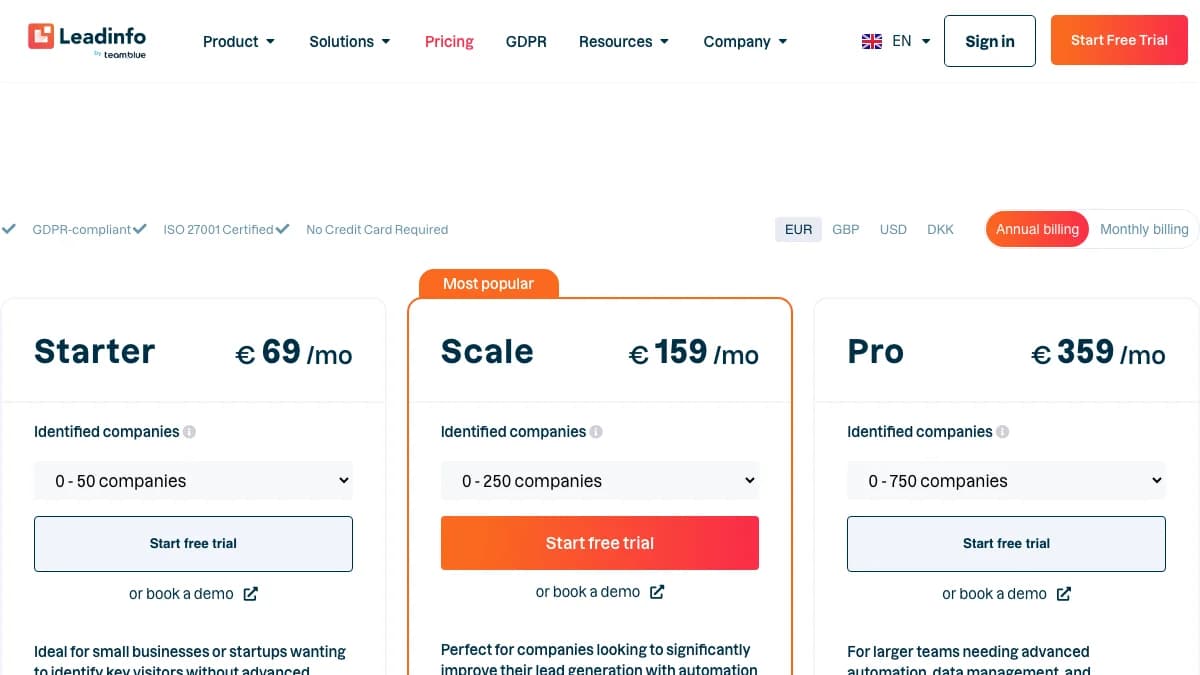
Leadinfo pricing starts at €69/mo billed annually ($73) for up to 50 identified companies a month, and every plan scales by how many unique companies it identifies. There is a 14-day free trial with no credit card required.
The table below copies every tier from Leadinfo's pricing page as of October 2026. Prices are per month.
| Plan | Identified companies / mo | EUR annual | EUR monthly | USD annual | USD monthly |
|---|---|---|---|---|---|
| Starter | 0–50 | €69 | €99 | $73 | $107 |
| Starter | 51–100 | €99 | €129 | $105 | $140 |
| Scale | 0–250 | €159 | €209 | $172 | $226 |
| Scale | 251–500 | €209 | €279 | $226 | $302 |
| Scale | 501–750 | €259 | €339 | $280 | $367 |
| Scale | 751–1,000 | €309 | €409 | $334 | $442 |
| Scale | 1,001–1,500 | €359 | €469 | $388 | $507 |
| Scale | 1,501–2,000 | €399 | €519 | $431 | $561 |
| Scale | 2,001–3,000 | €459 | €599 | $496 | $647 |
| Scale | 3,001–4,000 | €499 | €649 | $539 | $701 |
| Scale | 4,001–5,000 | €539 | €709 | $583 | $766 |
| Pro | 0–750 | €359 | €469 | $388 | $507 |
| Pro | 751–1,000 | €429 | €559 | $464 | $604 |
| Pro | 1,001–1,500 | €499 | €649 | $539 | $701 |
| Pro | 1,501–2,000 | €559 | €729 | $604 | $788 |
| Pro | 2,001–3,000 | €679 | €889 | $731 | $961 |
| Pro | 3,001–4,000 | €789 | €1,029 | $853 | $1,112 |
| Pro | 4,001–5,000 | €889 | €1,159 | $961 | $1,252 |
What you actually pay
- Annual billing saves 23–30%. Starter drops from €99 to €69 (30%), while Scale and Pro drop by about 23–24%.
- Traffic converts to tiers at roughly 30%.Using Leadinfo's own guidance, a site with about 1,000 monthly B2B visitors would identify around 300 companies. That lands on Scale 251–500 at €209/mo, or about €2,508 a year billed annually.
- Pro is a feature upgrade, not a volume one. At every volume, Scale costs less than Pro. You pay for Pro to get Salesforce, Marketo, unlimited users, personal mobile numbers, and a dedicated success manager.
- Unit cost falls with volume. Starter works out to about €1.38 per identified company at 50. Scale at 5,000 works out to about €0.11.
- Going over your limit hides leads. Leadinfo keeps collecting them, but you cannot see them until you upgrade. Repeat visits from the same company count once, and ISP traffic is excluded.
- Add-ons stack. Autopilot and Leadbot are priced per seat on top of the plan.
Compared with Snitcher ($49/mo for 50 companies) and Albacross (€59/mo billed yearly for 100), Leadinfo's entry price is a little higher. Its tiers stay transparent all the way to 5,000 companies, which many rivals hide behind a sales call.
Leadinfo and GDPR
Leadinfo says it is GDPR-compliant and processes visitor IP addresses under legitimate interest, GDPR Article 6(1)(f). Its GDPR posture is one of the best documented in the category, but it is still the vendor's own position.
Here is what Leadinfo states in its GDPR explainer and help center:
- Company data only. Customers see company-level information and never see visitor IP addresses.
- No visitor consent needed, per Leadinfo. It says you do not need consent from visitors to use Leadinfo, because legitimate interest applies.
- Privacy statement required. You must mention Leadinfo in your privacy statement, and Leadinfo supplies sample text in eight languages.
- Outside review.Leadinfo cites a legal opinion from Dutch IT law firm ICTRecht and a review by Privacy Verified. Its pricing page also shows an “ISO 27001 Certified” badge.
- Opt-out. Visitors can opt out of recognition via a public opt-out page.
One inconsistency is worth raising with sales. The GDPR blog says IP addresses are not stored after use, while Leadinfo's GDPR whitepaper describes keeping business visitor IPs and linked profiles for up to three years.
Our take: Leadinfo is a safer bet for EU-based teams than most US-built tools. Still, legitimate interest needs your own balancing test, so loop in your DPO before you install the script.
What Leadinfo Users Say
Leadinfo user reviews are mostly positive on ease of use and HubSpot integration, and mostly negative on data freshness, contact depth, and price at higher traffic. Here is how the main review sites compare.
| Platform | Rating | Reviews |
|---|---|---|
| G2 | 4.3/5 | 835 |
| OMR Reviews | 4.5/5 | 51 |
| Capterra | 3.7/5 (support scored 2.5/5) | 3 |
| Google (claimed on Leadinfo's site) | 4.8/5 | 330+ |
Ratings and counts were checked in October 2026 on G2, OMR Reviews, and Capterra. The Capterra sample is too small to read much into.
Common praise
- Clear dashboard and quick setup.
- HubSpot integration that “plugs straight in,” per one OMR reviewer.
- Responsive support and onboarding, mostly from DACH users.
- Lead scoring that makes the inbox easy to prioritize.
Common complaints
- Company records that are “often not complete and current” (translated from German).
- No way to know which person visited, and missing phone numbers for contacts.
- Costs that rise quickly as traffic grows.
- Small companies and startups in coworking spaces identified less reliably.
- Occasional unanswered tickets, inbox connection drops, and lost integrations.
An older TechRadar Netherlands review also notes that one account covers one website. Confirm current multi-domain terms if you run several sites.
Leadinfo Pros and Cons
Pros
- Strong European coverage, with a claimed 35–40% identification in Benelux and DACH.
- Every tier priced publicly, from 50 to 5,000 identified companies.
- Built-in lead score plus custom Cold/Warm/Hot triggers.
- Well-documented GDPR position, with an ISO 27001 badge and sample privacy text.
- 14-day free trial, no credit card required.
- Smooth HubSpot integration from the Scale plan.
Cons
- No published US match rate; North American data is still being built out.
- Company-level identification only, no person-level visitors.
- Salesforce and Marketo locked to Pro (from €359/mo annual).
- Starter has manual CRM sending only.
- Leads above your tier limit stay hidden until you upgrade.
- User reports of outdated company records and patchy contact phones.
Who Should Use Leadinfo (and Who Shouldn't)
Leadinfo fits European B2B teams that want company-level visitor identification, scoring, and CRM sync in one tool. It fits US-first or person-level use cases poorly.
Good fit
- B2B companies with most traffic from the Netherlands, Belgium, Germany, Austria, Switzerland, the UK, or the Nordics.
- HubSpot users who want automated sync at mid-tier pricing.
- Teams that need a clear GDPR story for their legal or procurement review.
- Marketing teams that want to see which ad campaigns bring in target accounts.
Poor fit
- US-heavy sites that need a proven US match rate today.
- Teams that need person-level identification of who visited.
- Salesforce shops with low traffic and a tight budget.
- High-traffic sites where per-company tiers climb past what the pipeline is worth.
Leadinfo Alternatives
The closest Leadinfo alternatives are Leadfeeder (Dealfront), Snitcher, Albacross, and RB2B. Each one is stronger on a different axis.
| Tool | Best for | Our review |
|---|---|---|
| Leadfeeder (Dealfront) | Company-level visitor ID with a long track record | Leadfeeder review |
| Snitcher | Low entry price ($49/mo) and a GA4 enricher | Snitcher review |
| Albacross | EU visitor ID with email and LinkedIn sequences included | Albacross review |
| RB2B | Person-level identification of US visitors | RB2B review |
| Dealfront | Full European prospecting database plus visitor ID | Dealfront review |
Visitor Queue is now owned by Leadinfo, so it no longer counts as an independent option. For a ranked comparison, see our list of the best B2B website visitor identification tools.
Leadinfo Review: Final Verdict
Our rating: 3.9/5. Leadinfo is one of the best company-level visitor identification tools for European B2B traffic, held back by an unproven US match rate, plan-gated CRM syncs, and prices that climb fast with volume.
The strengths are real. Transparent tiers, a clear GDPR position, a usable lead score, and a clean HubSpot sync make it easy to adopt.
The weaknesses are about reach and gating. US teams should test match rate on the free trial first, and Salesforce teams should budget for Pro from day one.
If your traffic is mainly European and you live in HubSpot, start with Scale on monthly billing. Move to annual once the trial numbers hold up.
If company-level matches without verified contacts are a dealbreaker, SyncGTM is one alternative worth a look: it runs waterfall enrichment across 50+ data providers for verified emails and phone numbers.