

QuickMail Review 2026: Cold Email Platform Pricing and Features

By Kushal Magar · October 25, 2026 · 13 min read
Key Takeaway
QuickMail is a cold outreach platform for email and LinkedIn that sends from your own inboxes and puts most of its effort into deliverability: inbox rotation, free MailFlow warmup, daily checks on 96 blacklists, and Deliverability AI that swaps weak senders out of campaigns. Pricing: Starter $49/mo, Growth $99/mo, Agency $299/mo (2 workspaces, +$49 per extra). Every plan includes unlimited email senders, LinkedIn accounts, and users, so you pay by contacts and emails sent, not per inbox. Starter's 1,000 contacts and 5,000 emails a month are tight, so most teams land on Growth. Gaps: no lead database, no white label, API only from Growth. Our rating: 4.2/5.
This QuickMail review answers one question: is QuickMail the right cold email platform to scale outreach across many inboxes in 2026? For deliverability-focused teams and agencies, it is one of the stronger picks.
We read QuickMail's pricing, product, and deliverability pages and its help center in October 2026, then checked user reviews on G2 and Capterra. We did not run a paid sending test, so vendor claims are labeled as claims.
Many QuickMail reviews still quote old plan names and prices. This one uses the live pricing page and shows what you pay per inbox, per email, and per client workspace.
TL;DR: QuickMail Review 2026
- What it is: A cold email and LinkedIn outreach platform that sends from your own Gmail, Outlook, or SMTP inboxes.
- Best for: Growth teams and lead gen agencies running 5+ inboxes who care most about deliverability.
- Price: $49, $99, or $299 a month. No per-inbox or per-seat fees on any plan.
- Standouts: Inbox rotation, Deliverability AI, free MailFlow warmup, and email plus LinkedIn in one sequence.
- Biggest gaps: Tight Starter caps, no lead database, no white label, and a learning curve.
- Rating: 4.2/5.
What Is QuickMail?
QuickMail is a cold outreach platform that automates email and LinkedIn sequences from your own sending accounts. Its homepage pitches it as "cold email for markets you can't afford to burn," which tells you the focus: protecting sender reputation while you scale.
QuickMail says it has been running since 2014. It sells to two groups: in-house growth teams and lead generation agencies that run outbound for clients.
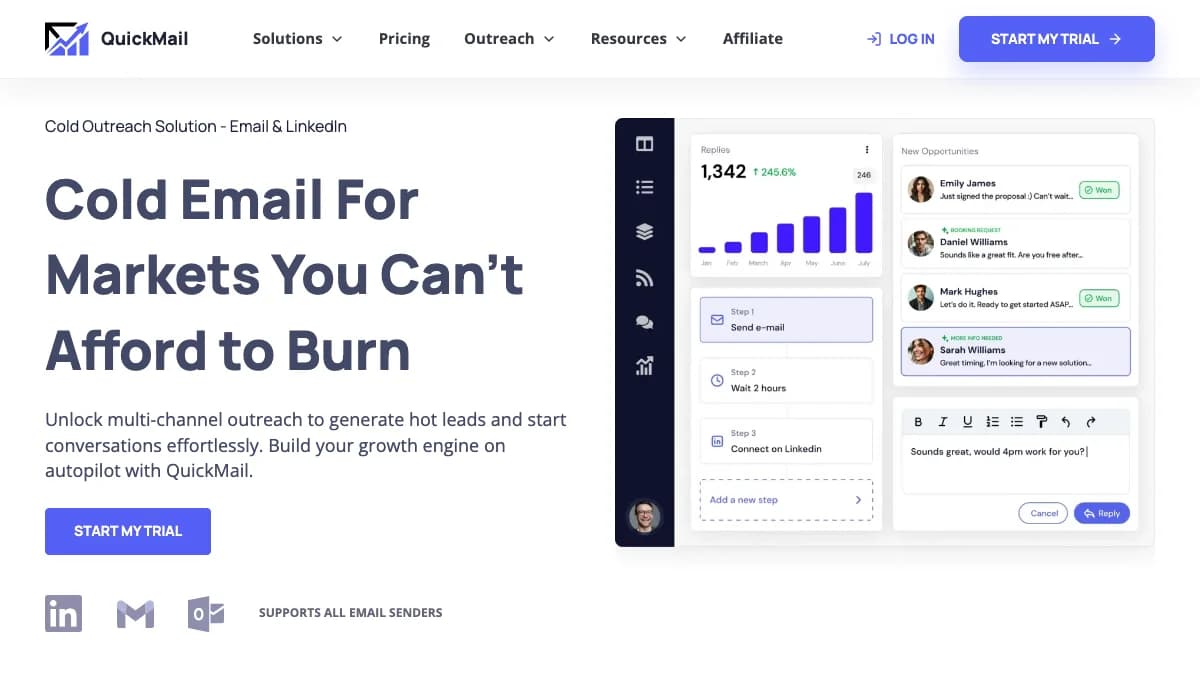
QuickMail homepage, October 2026: one campaign builder for email and LinkedIn steps.
How QuickMail Works
QuickMail does not send through its own servers. It automates your existing inboxes, so a Gmail inbox sends from Google IPs and an Outlook inbox sends from Microsoft.
That design matters for deliverability. Your mail looks like normal one-to-one email, and your reputation stays tied to your own domains, not a shared pool.
A typical QuickMail campaign
- Connect Gmail, Outlook, or SMTP inboxes and turn on warmup.
- Connect one or more LinkedIn accounts if you want social steps.
- Import prospects from CSV, Google Drive, HubSpot, or Pipedrive.
- Build steps: emails, LinkedIn actions, calls, SMS, or tasks.
- Turn on inbox rotation and set send windows and wait times.
- Handle replies from email and LinkedIn in one inbox.
Each email step gets a default 3-day wait, which you can change. Business-day waits keep follow-ups from landing on weekends.
QuickMail Inbox Rotation
QuickMail inbox rotation spreads one campaign across many sending accounts, and every follow-up to a prospect comes from the same inbox that sent the first email. That keeps threads intact while keeping per-inbox volume low.
Per the QuickMail help center, each new prospect is randomly assigned an inbox when they start the campaign. You turn rotation on per campaign under Options and Settings.
Match prospect email provider
An optional setting pairs Google prospects with Google senders and Microsoft prospects with Microsoft senders. If no match exists, the prospect goes to another inbox in the campaign.
Same-provider sending is a common deliverability tactic. Treat it as one lever, not a fix for weak copy or a dirty list.
What rotation does not do
You cannot pick which prospects go to which inbox. The help docs also give no recommended daily volume per inbox, so you still set safe limits yourself.
Most teams keep each cold inbox at 30 to 50 emails a day. Our guide to avoiding spam filters covers the volume, copy, and list rules that sit on top of rotation.
Deliverability Monitoring and Warmup
Deliverability is QuickMail's strongest area: free warmup, daily blacklist checks, authentication monitoring, and automatic sender swaps on every plan. Here is what its deliverability page lists.
- Deliverability AI:QuickMail says it analyzes "hundreds of data points daily" to protect sender performance.
- Smart sender groups:When an inbox's deliverability drops, QuickMail swaps it for a stronger sender and moves the weak one into recovery.
- Blacklist monitoring: Checks 96 blacklists daily and alerts you when a domain is listed and when it is cleared.
- SPF and DKIM monitoring: Flags authentication problems before they hurt placement.
- Gmail Sending API: Google inboxes send through the Gmail API, which QuickMail claims improves placement compared with SMTP.
- Plain-text sends: Emails go out with randomized metadata so there is no repeated pattern for filters to catch.
Warmup through MailFlow
Every plan lists a free AutoWarmer through MailFlow, a QuickMail partner. It warms inboxes by exchanging threaded conversations with a network of real users.
Some older reviews say QuickMail's original warmup tool was discontinued. The current pricing page lists MailFlow warmup on all three plans, so warmup is included today.
New inboxes still need time. See our roundup of the best cold email warmup tools for schedules and benchmarks.
What's missing
We did not find a built-in seed-list placement test on QuickMail's deliverability page. Run an outside email deliverability test before each new campaign or domain.
You also still own DNS. Google's email sender guidelines require SPF, DKIM, and DMARC for bulk senders and a spam rate under 0.3%.
Multichannel Steps: Email, LinkedIn, Calls, SMS
QuickMail campaigns can mix email, LinkedIn, call, SMS, and task steps in one sequence. Email and LinkedIn are native, while calls and SMS run through Aircall and Twilio.
| Step | What it does | What you need |
|---|---|---|
| Automated email with variations, wait times, and send windows | Any connected inbox | |
| Manual email | Draft lands in a review queue so you can edit before it sends | Nothing extra |
| Connection requests and messages in the same sequence as email | LinkedIn account via browser extension or 2FA login | |
| Call | Creates a call to-do for a rep | Aircall integration or your own phone |
| SMS | Sends a text message to the prospect | Twilio and a prospect phone number |
| Task | Offline to-do for you or a teammate, such as a research or call reminder | Nothing extra |
LinkedIn steps
Every plan includes unlimited LinkedIn accounts. You connect them through QuickMail's browser extension for quick setup, or with a 2FA login for a persistent cloud connection.
Sends rotate across connected LinkedIn accounts so no single profile carries the load. When a prospect accepts a connection request, QuickMail can create a lead and start a campaign automatically.
Replies from email and LinkedIn land in one inbox. If LinkedIn is your main channel, compare QuickMail with dedicated LinkedIn automation tools before you commit.
QuickMail for Agencies: Workspaces and Client Access
The $299 Agency plan includes two workspaces, extra workspaces at $49 each, and guest access so clients can see their own campaigns. Each workspace keeps one client's inboxes, prospects, and campaigns separate.
How client guest access works
Per QuickMail's agency help docs, you invite a client as a guest from Settings, Team, Guests. Guests see only their own workspace and never your billing or plan.
- Edit access on: The client can change campaigns, handle replies, and check stats.
- Edit access off: The client can only view campaigns, replies, and reporting.
- Sign-in: Guests log in with Google, Microsoft, or LinkedIn, and invite links expire after 24 hours.
No white label
QuickMail's pricing and agency pages do not mention custom domains, client branding, or a white-label portal. Clients see a QuickMail login, not your brand.
If branded client access matters, our roundup of white label cold email software lists the platforms that document it.
Agency workspace math
- 2 clients: $299 a month.
- 5 clients: $299 + 3 × $49 = $446 a month.
- 10 clients: $299 + 8 × $49 = $691 a month.
Those totals cover the platform only. Each client still needs its own domains and mailboxes.
Reporting and Integrations
QuickMail reporting ties results back to the day each email went out, so you can spot a deliverability drop before replies dry up. Agencies can share key graphs with clients in one click.
Reporting is also where some users push back. Some reviewers call analytics a weak spot compared with the sending engine.
Integrations
- Sending: Gmail and Google Workspace, Outlook and Exchange, custom SMTP and IMAP, Amazon SES, Postmark, Mailjet, Mailgun, and Zoho.
- CRM: Two-way sync with HubSpot and Pipedrive.
- Verification: NeverBounce, ZeroBounce, BriteVerify, Bouncer, Hunter, and Dropcontact.
- Calls, SMS, and alerts: Aircall, Twilio, and Slack.
- Other: Calendly, Hyperise, Google Drive, and Zapier.
The API is on Growth and Agency, and webhooks are on Agency only. Starter users get Zapier but no direct API access.
Verification is an integration, not a built-in credit pool. You bring your own verifier account and pay that vendor directly.
QuickMail Pricing: Plans, Limits, and Cost per Inbox
QuickMail pricing is $49 a month for Starter, $99 for Growth, and $299 for Agency, with unlimited inboxes, LinkedIn accounts, and users on every plan. You pay by uploaded contacts and emails sent, not by inbox or seat.
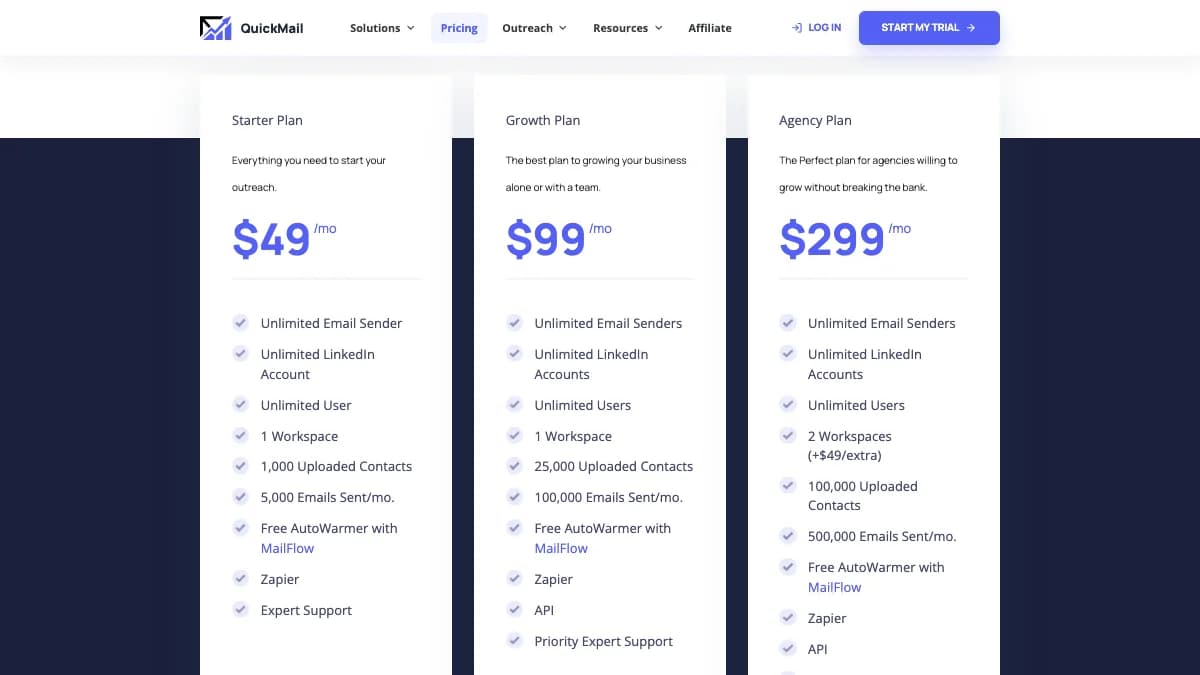
Source: QuickMail pricing page, US pricing, checked October 2026.
| Plan | Price | Uploaded contacts | Emails/mo | Workspaces | Extras |
|---|---|---|---|---|---|
| Starter | $49/mo | 1,000 | 5,000 | 1 | Zapier, Expert support |
| Growth | $99/mo | 25,000 | 100,000 | 1 | Zapier, API, Priority Expert support |
| Agency | $299/mo | 100,000 | 500,000 | 2 (+$49 each extra) | Zapier, API, webhooks, Priority Expert support |
All three plans include unlimited email senders, unlimited LinkedIn accounts, unlimited users, and free MailFlow warmup. The pricing page lists monthly prices only, with no annual discount.
Why other reviews show different prices
Older QuickMail reviews list Basic, Pro, and Expert plans at $49, $89, and $129. Those plans no longer appear on QuickMail's pricing page, which now shows Starter, Growth, and Agency.
Cost per inbox
Because inboxes are unlimited, your platform cost per inbox falls as you add senders. Growth with 10 inboxes works out to $9.90 per inbox a month, and with 20 inboxes to $4.95.
The mailboxes themselves are extra. You pay Google, Microsoft, or another host per mailbox, plus domains; our guide to email hosting for cold email compares the options.
QuickMail also runs QuickMail Agent, which sells Google Workspace inboxes for AI agents at $5 per inbox a month. That price covers DNS setup for SPF, DKIM, and DMARC, blacklist monitoring, and MCP access; domain costs are not listed.
Cost per 1,000 emails at the cap
| Plan | Math | Per 1,000 emails |
|---|---|---|
| Starter | $49 / 5,000 emails | $9.80 |
| Growth | $99 / 100,000 emails | $0.99 |
| Agency | $299 / 500,000 emails | $0.60 |
The Starter catch
Starter's 5,000 emails a month fill up with about six inboxes sending 40 emails a day on weekdays. Its 1,000 uploaded contacts run out even sooner, since a 3-step sequence to 1,000 people is only 3,000 emails.
The pricing page does not say whether the contacts cap counts total uploads or active prospects. Ask QuickMail how it resets before you plan a full quarter on Starter.
What a real setup costs
- Founder with three inboxes: Starter at $49 a month, plus three mailboxes and a spare domain.
- SDR team with 15 inboxes: Growth at $99 a month. At 40 a day, 15 inboxes send about 13,200 emails a month, well under the 100,000 cap.
- Agency with six clients: Agency at $299 plus four extra workspaces, or $495 a month before mailboxes.
Free trial
Every plan has a 14-day free trial. QuickMail asks for a card at signup but says it will not charge you or start a paid plan when the trial ends.
There is no contract. Plan changes are prorated, and you can downgrade or cancel anytime from account settings.
What QuickMail Users Say
QuickMail averages 4.7/5 on both G2 (about 119 reviews) and Capterra (about 26 reviews), as of October 2026. Those counts are small next to bigger cold email platforms.
What users like
- Deliverability tools and inbox rotation come up most often.
- Support gets frequent praise in reviews.
- No per-seat or per-inbox fees as a team grows.
- Email and LinkedIn in one campaign and one reply inbox.
What users complain about
- The initial setup and interface take time to learn.
- Analytics feel weaker than the sending engine.
- Occasional glitches with scheduled imports and automations.
- Pricing feels high for very small teams.
Capterra's featured reviews go back to 2019. Weight recent G2 reviews more heavily, since the product and plans have changed.
QuickMail Pros and Cons
Pros
- Unlimited inboxes, LinkedIn accounts, and users on every plan.
- Inbox rotation that keeps each thread on one sender.
- Deliverability AI swaps weak senders out automatically.
- Free MailFlow warmup and daily checks on 96 blacklists.
- Email, LinkedIn, call, SMS, and task steps in one sequence.
- Agency workspaces with view-only or edit guest access.
- Two-way HubSpot and Pipedrive sync.
Cons
- Starter caps of 1,000 contacts and 5,000 emails are tight.
- API only from Growth; webhooks only on the $299 Agency plan.
- No built-in lead database or verification credits.
- No white label or custom client domain.
- No annual discount listed on the pricing page.
- Learning curve and analytics complaints in user reviews.
Who Should Use QuickMail (and Who Shouldn't)
QuickMail is a good fit if you
- Run 5 to 50 sending inboxes across several domains.
- Want email and LinkedIn in the same sequence.
- Sell into markets where a burned domain is expensive.
- Run outbound for a handful of agency clients.
- Already have a list source and a verifier.
Skip QuickMail if you
- Send from one inbox and want the cheapest option.
- Need a built-in B2B contact database.
- Need white-label client portals on your own domain.
- Want heavy image or video personalization.
Before you scale any platform, benchmark your numbers against typical cold email response rates. A tool cannot fix a weak offer or a wrong list.
QuickMail Alternatives
The best QuickMail alternatives depend on which gap hurts most: lead data, white label, personalization, or price.
| Tool | Best for | Key difference |
|---|---|---|
| Instantly | High-volume email teams that want warmup and lead data in one tool | Flat plans with unlimited inboxes and a large built-in warmup network |
| Smartlead | Agencies that need white-label client access | Unlimited mailboxes, client workspaces, and a documented white-label option |
| lemlist | Multichannel sequences with heavy personalization | Email, LinkedIn, and calls with image and video personalization |
| Woodpecker | Careful, condition-based email sequences | Condition-based follow-ups and built-in deliverability safety checks |
| GMass | Solo senders who want to stay inside Gmail | Gmail extension with Google Sheets mail merge, priced from $20/mo yearly |
If you send from Gmail only, our list of GMass alternatives covers lighter tools. For a wider view, see our roundup of cold email automation tools.
QuickMail Review: Final Verdict
Our rating: 4.2/5. QuickMail is a deliverability-first cold email platform that scales across many inboxes without per-inbox or per-seat fees.
The strengths are real. Rotation, Deliverability AI, free warmup, and email plus LinkedIn in one sequence cover what most outbound teams need.
The limits are real too. Starter is tight, the API sits on Growth, and agencies get workspaces but no white label.
Start the 14-day trial on Growth if you run five or more inboxes. Pick Agency only once you manage more than one client.
If QuickMail's lack of a built-in lead database is the gap, SyncGTM is one alternative worth a look: it builds lead lists and finds verified work emails through waterfall enrichment across 50+ providers.