

Replygrow Review 2026: LinkedIn Outreach and Unified Inbox

By Kushal Magar · November 29, 2026 · 13 min read
Key Takeaway
Replygrow is cloud LinkedIn automation at $79 per connected account a month, with every feature in every seat and discounts from 5% at five accounts to 50% at fifty. Each account gets its own residential proxy and an automatic warm-up, and all replies land in one inbox you filter by campaign, status, or unread. There is no email step, no AI writer, and no native CRM, only Zapier or Make. Its terms disclaim liability for banned accounts and fees are non-refundable. Our rating: 3.7/5.
This Replygrow review covers what the tool ships in November 2026: campaign setup, the account safety controls, the unified inbox, CRM sync, and what you pay per LinkedIn account. The short version is a simple, flat-priced tool with a $79-per-account seat that bundles a residential proxy, and an inbox and CRM story that stay basic.
We read Replygrow's homepage, pricing page, feature pages, help center, terms, and data processing agreement on 29 November 2026. We did not run a paid campaign, so every reply-rate and acceptance figure below is labeled as Replygrow's claim.
A note on older reviews: some still say Replygrow has no white-label and only quotes volume discounts on request. The live pricing page now publishes both, so budget from that.
TL;DR: Replygrow Review 2026
- What it is: Cloud LinkedIn automation for agencies, sales teams, and recruiters running several accounts from one login.
- Price: $79 per LinkedIn account a month, or $790 a year; 5% to 50% off from five accounts up. 7-day trial, no card.
- Standout: A dedicated residential proxy and warm-up on every account at no extra cost, plus de-duplication so two of your accounts never message the same prospect.
- Inbox: One inbox for every account, filtered by campaign, status, or unread. No tags, saved replies, or snooze on a thread.
- Biggest gaps: No email step, no AI writer, CRM sync only through Zapier or Make, non-refundable fees, and about a dozen public reviews.
- Rating: 3.7/5.
What Is Replygrow?
Replygrow is a cloud-based LinkedIn automation tool for agencies, sales teams, and recruiters. It loads leads from LinkedIn searches, posts, or spreadsheets, sends invites and follow-ups from every connected account, and pulls the replies into one inbox.
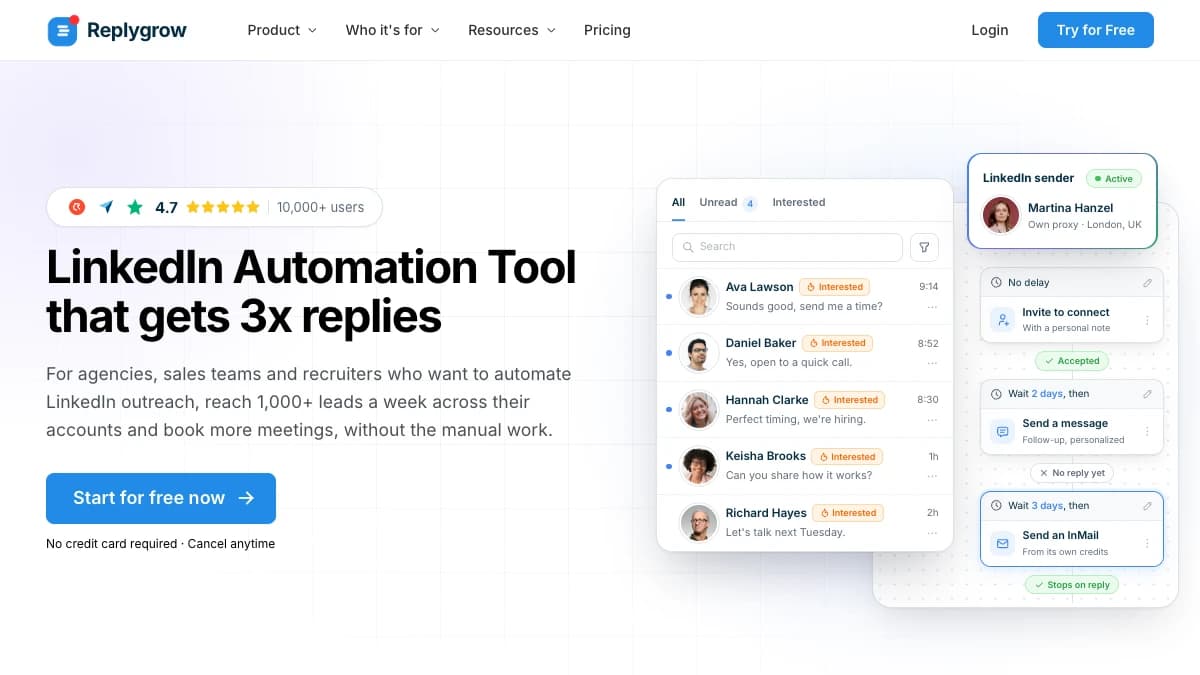
Replygrow homepage, November 2026.
The homepage promises a tool that “gets 3x replies” and claims 10,000+ users. Neither figure comes with a published method, so treat both as marketing.
Replygrow's own Capterra badge links to a listing whose URL still reads Icereach, which points to an earlier product name. The oldest help article we found, on reverse webhooks, was first published in November 2022.
How Replygrow Works: Campaign Setup in Three Steps
A Replygrow campaign has three steps: Leads, Sequence, and Review. The create-a-campaign guide walks through each one, and campaigns run in the cloud, so nothing needs to stay open in your browser.
Step 1: Leads
Marketing pages say “five lead sources,” but the help center lists seven options in the campaign builder. Here is what each one pulls.
| Source | Limit per import | What you need |
|---|---|---|
| LinkedIn Basic search | Up to 1,000 people per search | Any LinkedIn account |
| Sales Navigator search or saved list | Up to 2,500 leads | Sales Navigator on the connected account |
| Recruiter or Recruiter Lite search | Up to 2,500 candidates | Recruiter on the connected account |
| Post engagement | People who reacted to or commented on a post | Any LinkedIn account |
| Google Sheet or CSV | Your own list | LinkedIn profile URLs |
| Existing search list | A search you saved earlier | Nothing extra |
| Integration with webhook | Leads pushed in from Zapier, Make, or a CRM | A per-account API key |
Replygrow does not resell Sales Navigator or Recruiter. The connected account must hold that subscription itself to run those searches.
Step 2: Sequence
Sequences use four step types: view a profile, invite to connect, send a message, and send an InMail. InMail spends the connected account's own credits, and a reply pauses only that person's sequence.
- Personalization: Merge fields, spintax, fallbacks for empty fields, and IF/ELSE conditions inside the message.
- A/B tests: Add a version B and Replygrow rotates prospects across versions, with results per variant.
- Templates: Start from a ready-made sequence or build from a blank first step.
Two things are missing. Replygrow's FAQ says there is no email step and no AI writer, and that sequences do not fork on what a prospect does.
Step 3: Review and launch
The Review step shows the sending schedule from the account's active hours. You can set a future start date and a campaign language, which controls placeholders such as the weekday.
Replygrow's claims, not our test results: Personalized messages get a “15–35% higher response rate,” and a profile visit before the invite gives “2x connection acceptance,” per the homepage. No study or sample size is linked.
Replygrow Account Safety: What It Discloses
Replygrow is more upfront about LinkedIn's rules than most tools in this category. That still does not make automated sending safe: any tool that sends on your behalf puts the account at risk.
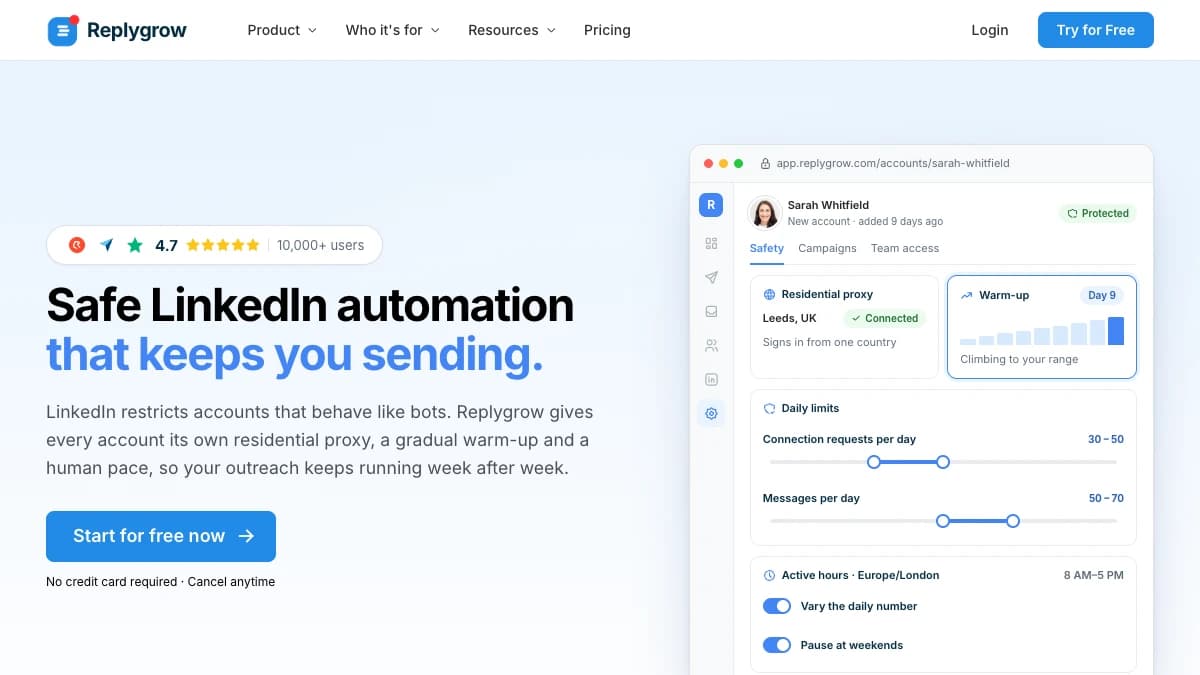
Replygrow account safety page, November 2026.
The controls it ships
- Dedicated residential proxy: Each account connects from its own proxy in the country you pick, not shared with other customers, per the safety page. It is included, trial too.
- Warm-up: New accounts climb from 5 to 30 invitations a day over 14 days by default, per the campaign guide.
- Randomized daily range: You set a lower and upper bound, and Replygrow picks a new number inside it each day.
- Working hours and weekends off: Sends only go out in the account's own active hours.
- Caps: The software allows up to 100 invites a day per account, and Replygrow recommends staying under 300 a week, per its safety FAQ.
What it admits
The safety FAQ cites section 8.2 of LinkedIn's User Agreement, which bans “bots or other unauthorized automated methods” to send messages or add contacts. It also says LinkedIn can restrict any account that suddenly changes pace, and that its answer is not legal advice.
LinkedIn's help center goes further: members who use such tools “risk having their accounts restricted or shut down.” No proxy or warm-up changes that rule.
What it leaves out, or puts in the fine print
- No restriction data: Replygrow publishes no ban or restriction rate for its users.
- Your password: You connect an account by entering your LinkedIn email and password, which Replygrow says it encrypts, per its setup guide.
- Liability: The terms say Replygrow is not responsible or liable if your account is banned because of activity you ran.
- Refunds: The same terms say subscription fees are non-refundable unless the law requires otherwise.
- Data handling: The DPA is governed by Slovak law and lists Amazon Web Services, Cloudflare, Google, and Bright Data as subprocessors; the list was last updated in May 2024.
Our take: Replygrow's pacing controls are sensible, and its honesty about LinkedIn's rules is better than average. Still, the risk sits with you, so start slow and read our guide to LinkedIn account restrictions before you scale.
The Replygrow Unified Inbox
The Replygrow inbox puts every connected account's LinkedIn conversations in one list. Each thread shows which account and campaign it came through, so you answer without logging in and out.
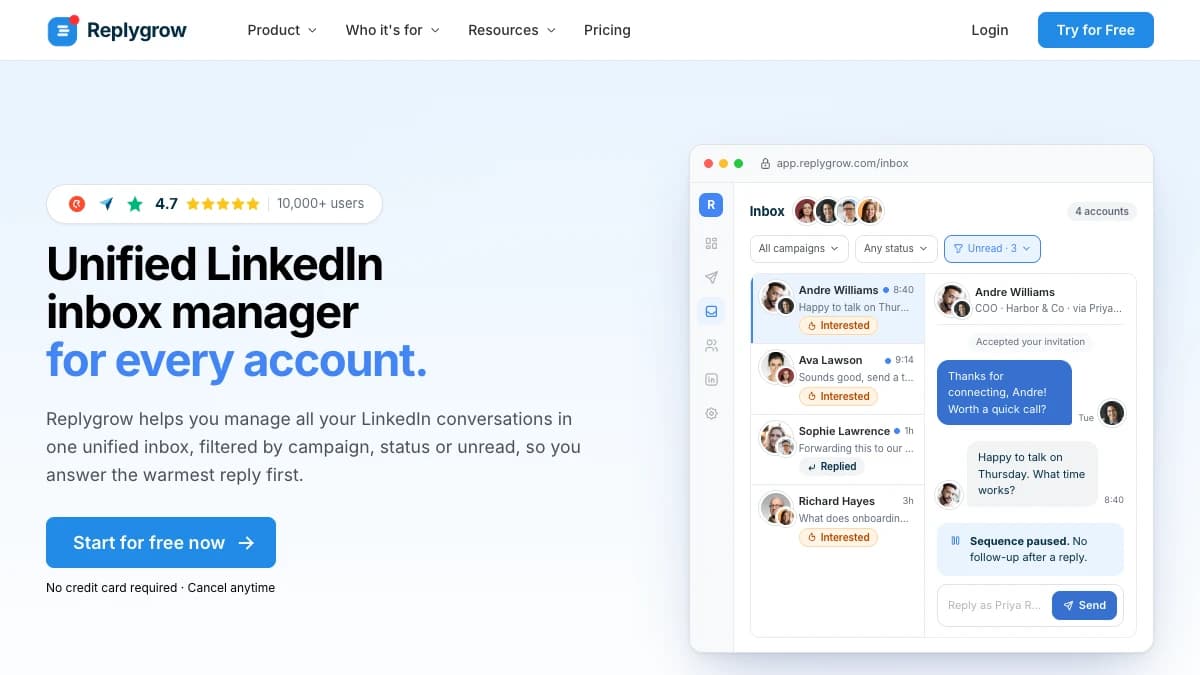
Replygrow LinkedIn inbox page, November 2026.
What works
- Filters: By campaign, by status, or unread only, plus a name search. Agencies use the campaign filter to work one client at a time.
- Team replies: Invited teammates reply from any account they can access, as the person the prospect accepted.
- Pause on reply: The sequence stops for that person the moment they answer, and you can send them back in later.
- Stays in LinkedIn: Messages sent from the inbox show up in LinkedIn as if you typed them there.
What is missing
Replygrow's inbox FAQ is blunt: there are no tags, saved replies, or snooze on a thread, and the inbox holds LinkedIn conversations only. Tags and notes live on saved contacts instead.
The marketing mockups tag replies as “Interested,” but the help article only describes status filters such as replied or accepted. Nothing in the docs says an AI sorts replies by intent, so test that in the trial if you need it.
Multi-Account and Agency Features
Multi-account work is where Replygrow is strongest. There is no cap on connected accounts, and each one keeps its own proxy, limits, warm-up, and schedule.
- Companies per client: Group accounts into a company that shares searches, campaigns, and blocklists.
- De-duplication by default: Accounts in the same company skip a prospect another account already contacted.
- Several accounts on one campaign: Limits count per account, so three senders work a list about three times as fast.
- Free logins: Teammates get full or view-only access, and clients see a live dashboard of their own accounts, all without your LinkedIn password.
- White-label: Free on request from 10 accounts, per the pricing FAQ. It covers the app interface, not a custom domain.
- DPA: Available to sign on every plan.
One oddity: the terms still say each Replygrow account is valid for only one LinkedIn account. That reads like older wording next to the multi-account product, so ask support how it applies before an agency rollout.
CRM Sync: Zapier, Make, and Webhooks
Replygrow has no native CRM connector. Everything runs through webhooks that you wire up in Zapier or Make, which you pay for separately.
Outbound webhooks
The webhook guide lists three events: connection request sent, accepted, and replied. From there, a Zap can push the person to HubSpot, Pipedrive, Salesforce, Copper, Slack, or Google Sheets.
Watch the matching logic. The Pipedrive example finds or creates a person by exact first and last name, so two contacts with the same name can collide.
Reverse webhooks
A reverse webhook adds a lead to a campaign from your CRM. You POST a LinkedIn profile URL, campaign ID, and optional placeholders to Replygrow's endpoint with an API key, and each LinkedIn account has its own key.
That corrects another common claim: Replygrow does have an API-key endpoint, but it is a single action for adding leads, not a documented public API.
Replygrow Pricing 2026: Per LinkedIn Account
Replygrow has one plan, billed per connected LinkedIn account: $79 a month, or $790 a year on yearly billing, which Replygrow calls two months free. Every feature is in every seat, and teammate or client logins cost nothing.
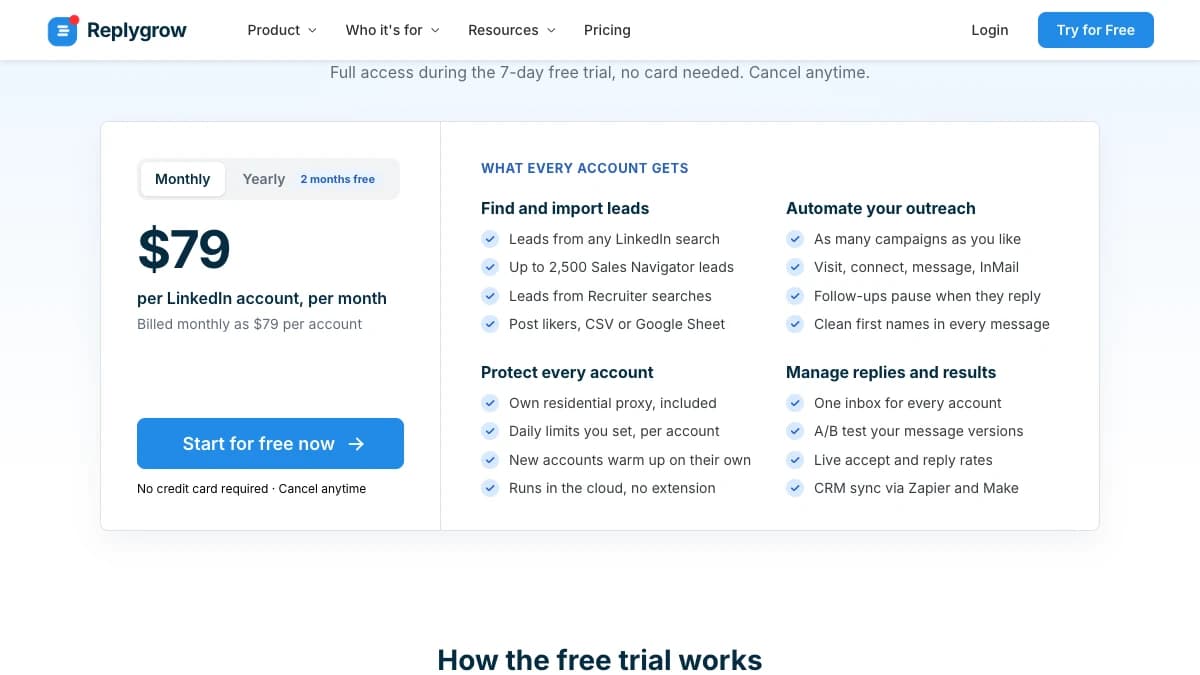
Replygrow pricing page, checked 29 November 2026.
Volume discounts apply to every account once you pass a tier, on monthly and yearly billing alike. The per-account and total figures below are our math from the published discount tiers on monthly billing.
| Connected accounts | Discount | Per account / month | Example monthly total |
|---|---|---|---|
| 1 to 4 | None | $79 | $79 for one account |
| 5+ | 5% off | About $75 | $375 for five (shown in the calculator) |
| 10+ | 10% off | About $71 | About $711 for ten |
| 25+ | 25% off | About $59 | About $1,481 for 25 |
| 50+ | 50% off | About $40 | About $1,975 for 50 |
What the price leaves out
- Zapier or Make: Needed for any CRM sync and billed by those vendors.
- LinkedIn seats: Sales Navigator or Recruiter on any account that runs those searches or sends InMail.
- Contact data: Replygrow does not find emails or phone numbers, so enrichment is a separate tool.
The trial runs 7 days with every feature on and no card. Stripe handles payments, and cancelling keeps your plan active until the paid period ends.
What Replygrow Users Say
Public reviews are positive but thin. Replygrow's site shows a 4.7 average across three review sites; here is what each listing showed when we checked.
| Site | Score | Reviews | Note |
|---|---|---|---|
| G2 | 4.9 / 5 | 4 reviews | G2 says there are not enough reviews for buying insight |
| Capterra | 5.0 / 5 | 3 reviews | Listing URL still reads Icereach |
| Trustpilot | TrustScore 4.1 | 5 reviews | All dated February 2025; none in the last 12 months |
G2 and Capterra block automated fetches, so their figures come from search listings and may lag. The Trustpilot page notes the company has not recently invited customers to review.
Common themes
- Ease of use: Reviewers call the setup simple and the dashboard easy to read.
- Support: Several mention fast, hands-on help, including help wiring up a CRM connection.
- Agency fit: One agency founder says clients like filtering replies by campaign.
With about a dozen reviews and no recent ones on Trustpilot, the trial will tell you more than the ratings.
Replygrow Pros and Cons
Pros
- One flat price per account with every feature included.
- Dedicated residential proxy and automatic warm-up at no extra cost.
- Published volume discounts up to 50% at 50+ accounts.
- Default de-duplication across a company's accounts, plus free teammate and client logins.
- Seven lead sources, including post engagers and Recruiter searches.
- White-label from 10 accounts at no extra cost.
- Clear about LinkedIn's rules in its own FAQ.
Cons
- No email step and no AI writer.
- Sequences do not branch on prospect behavior.
- Inbox has no tags, saved replies, or snooze on threads, and no documented AI reply sorting.
- No native CRM; Zapier or Make costs extra, and the documented Pipedrive match is by name.
- Terms disclaim liability for banned accounts, and fees are non-refundable.
- LinkedIn login uses your email and password, and the review base is small.
Who Should Use Replygrow (and Who Shouldn't)
Good fit
- Agencies running 10+ client accounts that want flat pricing, white-label, and client dashboards.
- Recruiting teams that source from Recruiter and want one reply inbox.
- Sales teams that write their own copy and only need LinkedIn steps.
Look elsewhere if
- You need email and LinkedIn in one sequence.
- You want AI to write openers or sort replies by intent.
- You need native HubSpot or Salesforce sync without Zapier.
- You cannot accept any risk of a LinkedIn restriction.
Replygrow Alternatives
Most Replygrow alternatives are other cloud LinkedIn tools billed per account. Here is how they compare on entry price and reply handling.
| Tool | Entry price | Reply inbox | Best for |
|---|---|---|---|
| Replygrow | $79 per account a month | One inbox for every account | Agencies that want a proxy and every feature in one flat seat |
| HeyReach | $79 per sender a month (1 to 9 senders, monthly) | Unified Inbox | Agencies rotating many senders that want more native integrations |
| Expandi | $99 a month on monthly billing | Global Inbox | Teams that want LinkedIn and email steps in one tool |
| Quicklead | $59 per account a month (Starter) | Smart Inbox | Small teams that want AI openers and ICP scoring |
| SalesRobot | $59 per account a month (Basic, monthly) | Unified inbox (LinkedIn + email) | Sellers who want an AI appointment-setter agent plus email |
| Botdog | $79 per account a month (Solo, list price) | AI-powered Unified Inbox | LinkedIn-only outreach with AI help in the inbox |
- HeyReach: $79 per sender a month for 1 to 9 senders on monthly billing, dropping to $59 from 10. Read our HeyReach review.
- Expandi: $99 a month on monthly billing, with a Global Inbox. See our Expandi review.
- Quicklead: Starter at $59 per account a month, with a Smart Inbox and AI openers. Read our Quicklead review.
- LinkedNav: Sender-based plans with a shared Unibox, signal monitoring and an AI SDR tier. Read our LinkedNav review.
- SalesRobot: $59, $79, or $99 per account a month on monthly billing. Compare it with others in our SalesRobot alternatives list.
- Botdog: Solo lists at $79 per account a month. See our list of cheap Botdog alternatives.
- Kondo: Not an automation tool, but an inbox manager for people who mainly need to handle replies. Read our Kondo review.
Replygrow Review: Final Verdict
Our rating: 3.7/5. Replygrow is a clean, flat-priced pick for agencies running many LinkedIn accounts, but it stops at LinkedIn steps and a basic inbox.
The residential proxy, warm-up, and de-duplication in every seat are real value, and the volume discounts make 25+ accounts competitive. White-label and free client logins make it easy to run for clients.
It loses points for no email, no AI help, Zapier-only CRM sync, an inbox without tags or snooze, and terms that leave account risk and refunds with you. Use the 7-day trial on one low-stakes account before you connect a client's.
Replygrow messages the leads you load, but it does not rank them by buying signals or add verified contact data. If that is the gap, SyncGTM builds signal-based, enriched lists that any LinkedIn sender can work from, and pushes them to HeyReach, Instantly, or your CRM.