

SendPilot Review 2026: LinkedIn Outreach Automation Pricing

By Kushal Magar · October 30, 2026 · 15 min read
Key Takeaway
SendPilot is a cloud LinkedIn outreach tool priced per connected sender: $79 a month for 1 sender, $329 for 5, $699 for 25 on Agency, and $29 per extra Agency sender. It runs multi-sender sequences with voice notes and ICP score checks, comment-triggered inbound campaigns, and a shared Unibox. Its AI scores leads and writes posts, but outreach DMs are still templates. Gaps: no email channel, conflicting limit docs, no refunds, and recent support complaints. Our rating: 3.8/5.
This SendPilot review starts with a naming problem. Two products share the name, and some review pages ranking for it describe a social media tool, not the LinkedIn outreach platform at sendpilot.ai.
The second problem is price drift. One top-ranking review, written by a competitor, still lists a $66 Solo plan and a $199 Team plan, while SendPilot's pricing page now shows $79 and $329.
We read SendPilot's homepage, pricing page, feature pages, help center, and API docs in October 2026. We did not run a paid account test, so vendor claims are labeled as claims.
TL;DR: SendPilot Review 2026
- What it is: A cloud LinkedIn outreach tool that runs connection, message, and voice note sequences across many LinkedIn accounts, with one shared inbox.
- Best for:Agencies and SDR teams running 5 to 50+ LinkedIn senders who don't need email in the same tool.
- Price: $79 a month for 1 sender, $329 for 5, $699 for 25. Yearly billing saves two months.
- AI: Scores leads 0 to 100 and writes posts and lead magnets. Campaign DMs are templates with variables.
- Biggest gaps: No email channel, connection limits that differ across its own pages, no refunds, and recent support complaints.
- Rating: 3.8/5.
What Is SendPilot?
SendPilot is a cloud LinkedIn outreach tool that sends connection requests, messages, voice notes, and follow-ups from several LinkedIn accounts in parallel. Its homepage headline is "Book more meetings from LinkedIn. Automatically."
The company spells it Sendpilot and is registered as Sendpilot AI AB. It pitches agencies, SDR teams, and founders, and claims more than 3,000 teams.
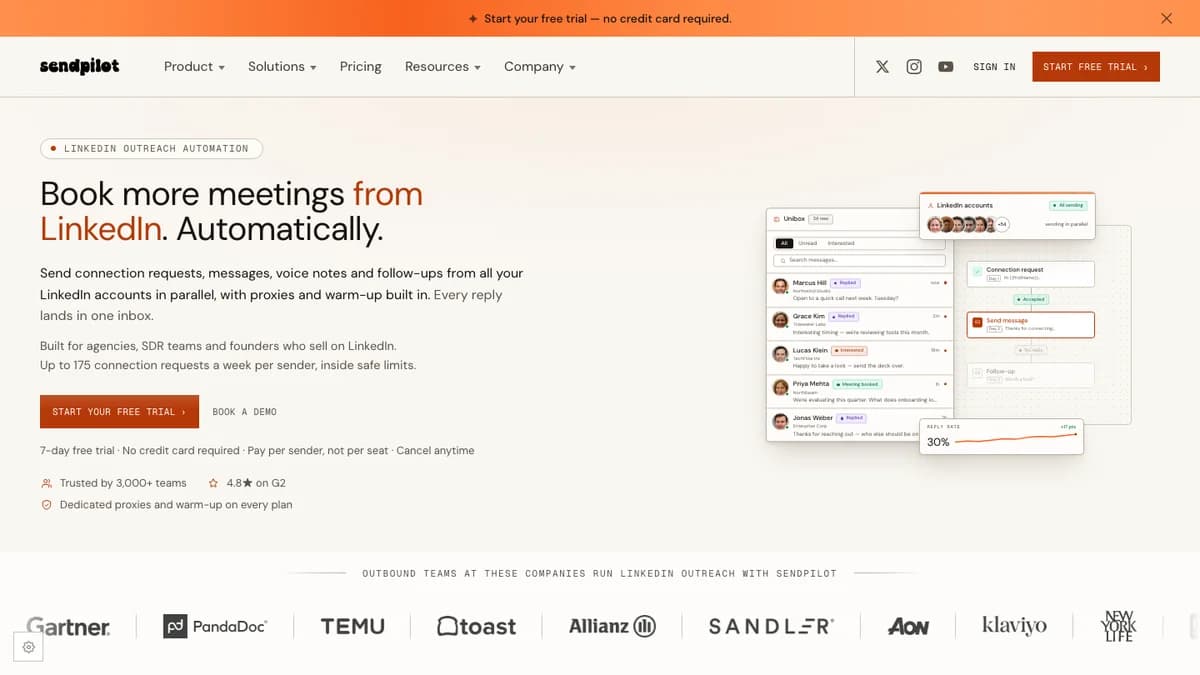
SendPilot homepage, October 2026: built for agencies, SDR teams, and founders, with a 7-day trial and no card required.
Beyond outbound campaigns, SendPilot bundles a lead database, comment-triggered inbound automation, a post scheduler, and an AI post writer. That mix makes it closer to a LinkedIn growth suite than a plain sequencer.
SendPilot Pricing 2026: Plans, Senders, and Credits
SendPilot pricing is per connected LinkedIn sender, not per team seat. Launch costs $79 a month for 1 sender, Growth $329 for 5, Agency $699 for 25, and Enterprise starts at $1,000 for unlimited senders.
| Plan | Price | Senders | Credits | Includes |
|---|---|---|---|---|
| Launch | $79 / month ($66 billed yearly) | 1 sender, +$79 per extra sender | 800 / month | 1 workspace, 1 member, Unibox, voice notes, data enrichment, lead database |
| Growth | $329 / month ($274 billed yearly) | 5 senders, +$49 per extra sender | 4,000 / month | 3 workspaces, 5 members, API and webhooks, MCP server, bring-your-own proxies, roles, HubSpot and Slack, 1 custom domain |
| Agency | $699 / month ($583 billed yearly) | 25 senders, +$29 per extra sender | 20,000 / month | Unlimited workspaces and members, 1-on-1 onboarding, dedicated Slack channel, custom branding, 3 custom domains |
| Enterprise | From $1,000 / month | Unlimited senders | Custom | Custom pricing, dedicated account support, 24/7 support, account manager |
Source: sendpilot.ai/pricing, checked October 2026. USD, excluding taxes.
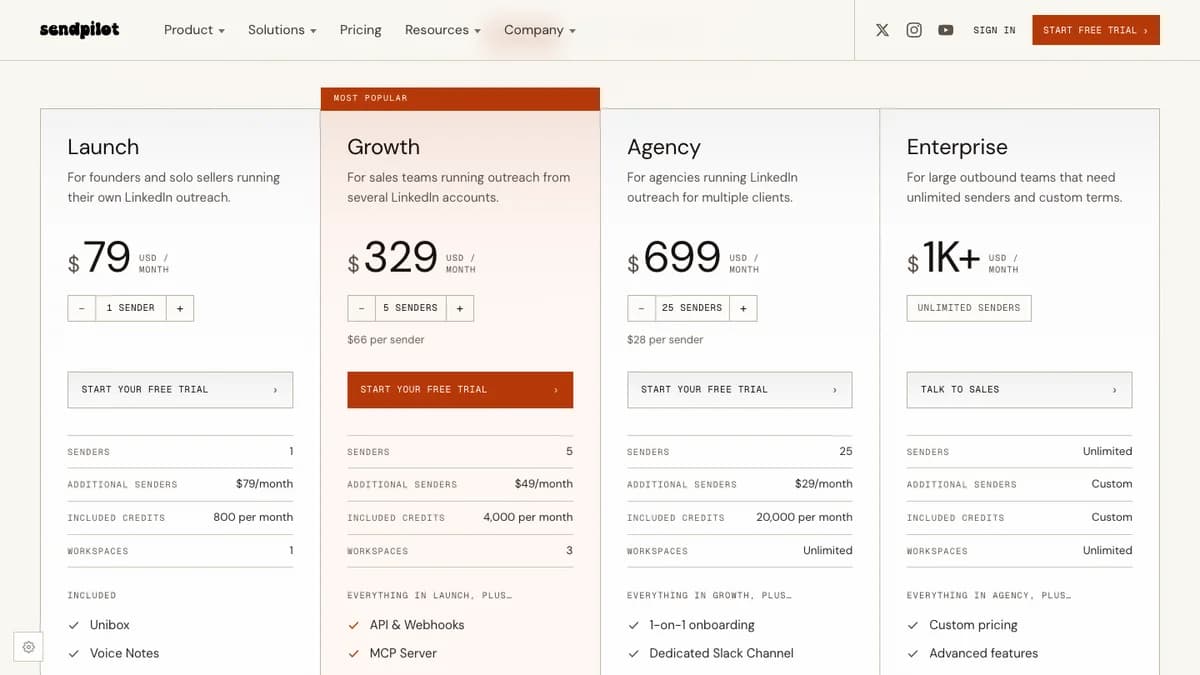
SendPilot pricing cards: Growth works out to $66 per sender and Agency to $28 per sender on monthly billing.
What you actually pay per LinkedIn sender
Extra senders get cheaper as you move up: $79 on Launch, $49 on Growth, and $29 on Agency. Growth beats stacking Launch senders from 5 accounts, and Agency beats Growth from 13 accounts.
| Senders | Launch | Growth | Agency | Cheapest |
|---|---|---|---|---|
| 1 | $79 | $329 (5 included) | $699 (25 included) | Launch |
| 3 | $237 | $329 | $699 | Launch, by $92 |
| 5 | $395 | $329 | $699 | Growth, by $66 |
| 10 | $790 | $574 ($329 + 5 x $49) | $699 | Growth, by $125 |
| 13 | $1,027 | $721 | $699 | Agency, by $22 |
| 25 | $1,975 | $1,309 | $699 | Agency, by $610 |
| 50 | $3,950 | $2,534 | $1,424 ($699 + 25 x $29) | Agency (about $28 per sender) |
Price is not the only gate. Launch has no API, webhooks, HubSpot sync, or bring-your-own proxies, and it allows one workspace with one member, even if you add senders.
At 25 senders, SendPilot's $699 Agency plan sits between Aimfox (about $599 at list price, per our Aimfox review) and HeyReach's $999 Agency plan.
How credits work
Credits are a second meter on top of the sender price. Each plan includes 800 credits per sender a month, and per SendPilot's credit system guide, they reset monthly and do not roll over.
- Lead Extractor: 1 credit per lead pulled from Sales Navigator, LinkedIn search, or post engagement.
- Lead Database: 2 credits per exported lead, so 800 credits buy 400 database leads.
- Extra credits: One-off packs with a volume discount. Purchased credits never expire.
The pricing page also lists ICP scoring as a credit cost, while the help guide says only extraction and database exports use credits today. It says AI Reply Manager, AI Agents, and email and phone enrichment are "coming," so expect the meter to grow.
Trial, refunds, and the startup program
The trial is 7 days with no credit card. SendPilot's refund policy says it "does not offer any guarantee or refund" unless a separate contract says otherwise.
Startups with under $200k in revenue, fewer than 5 employees, and less than a year in business can apply for a $99-a-month plan locked for 12 months. The page compares it with a "$499/mo standard plan" that matches none of the listed tiers, so ask what the $99 plan includes.
How SendPilot Campaigns Work
A SendPilot campaign is a sequence of LinkedIn actions with success and fail paths, sent from one or more sender accounts inside the hours you schedule. You build both paths for every two-outcome step.
Sequence actions
SendPilot's sequence actions guide lists these steps:
- If Connected: Checks whether the lead is already a 1st-degree connection and routes them.
- Send Connection Request: Optional note up to 250 characters with variables. The docs say notes only go out from Premium accounts.
- Withdraw Connection Request: Cancels a pending request, usually after about 15 days.
- ICP Score Check: Lets only leads above your fit score continue.
- Like Post and View Profile: Warm-up touches before or between messages.
- Send Message: Only after a connection is accepted. A reply stops the sequence and moves the thread to the inbox.
- Send Voice Note:A native LinkedIn voice note of up to one minute, uploaded or recorded. Voice notes can't be personalized.
We found no InMail step, email step, or A/B testing in the campaign docs. If you want split tests or email in the same flow, compare the smart sequences in our Expandi review.
Lead sources
Leads come from SendPilot's own database (the vendor claims 300M+ enriched contacts), Sales Navigator, LinkedIn search, post engagers, HubSpot, or CSV. Sales Navigator imports assume you pay for that seat too; our LinkedIn Sales Navigator review covers whether it is worth it.
Inbound: comment-triggered campaigns
Inbound campaigns watch your posts for an action word in the comments. SendPilot replies to the comment, DMs commenters you are connected to, and asks the rest to connect first.
This pairs well with lead magnet posts. Our guide on warm leads from LinkedIn posts covers which posts pull the best commenters.
SendPilot AI Features: What the AI Actually Writes
SendPilot's AI scores leads and writes LinkedIn posts and lead magnets, but its campaign docs do not describe AI-written connection notes or DMs per lead. Outreach messages are templates with variables such as {{firstName}}.
- ICP scoring: You describe your ideal customer (industry, size, tech stack, budget), and the AI gives each lead a fit score from 0 to 100.
- AI Post Writer and Lead Magnet Writer: Drafts posts on a topic and the asset you hand out, then schedules them on sender profiles.
- AI draft in the inbox:The reply composer has an "AI draft" button. The feature page doesn't explain how it works.
- Coming soon: The credit guide lists AI Reply Manager and AI Agents as future credit uses.
Some reviews describe SendPilot as "AI-powered sequences." Based on its own docs, the AI filters who gets messaged more than it writes what they read.
The workaround is the MCP server on Growth and above. An assistant such as Claude or ChatGPT can draft a message per lead and send it through SendPilot's API, which can send LinkedIn messages and connection requests.
Multi-Sender Campaigns and Sender Rotation
Multi-sender campaigns are SendPilot's core feature: you pick several LinkedIn accounts when you build a campaign, and SendPilot spreads the sending across them, each inside its own daily limits. All replies land in one inbox.
The sender rotation page puts the math plainly. One account sends about 25 connection requests a day, so ten established accounts "top out around 1,750 connection requests a week."
The docs leave three agency questions open. They don't say how leads are split between senders, whether a lead is locked to the first sender that contacts it, or what happens to queued leads when an account disconnects.
HeyReach and Aimfox document those rules more clearly. Our HeyReach review explains how its sender rotation handles them.
SendPilot Account Safety: Limits, Warm-Up, and Proxies
SendPilot says every connected account gets a dedicated proxy in its own country, automatic warm-up, per-account daily caps, and sending windows. These are vendor claims; we did not test them on a live account.
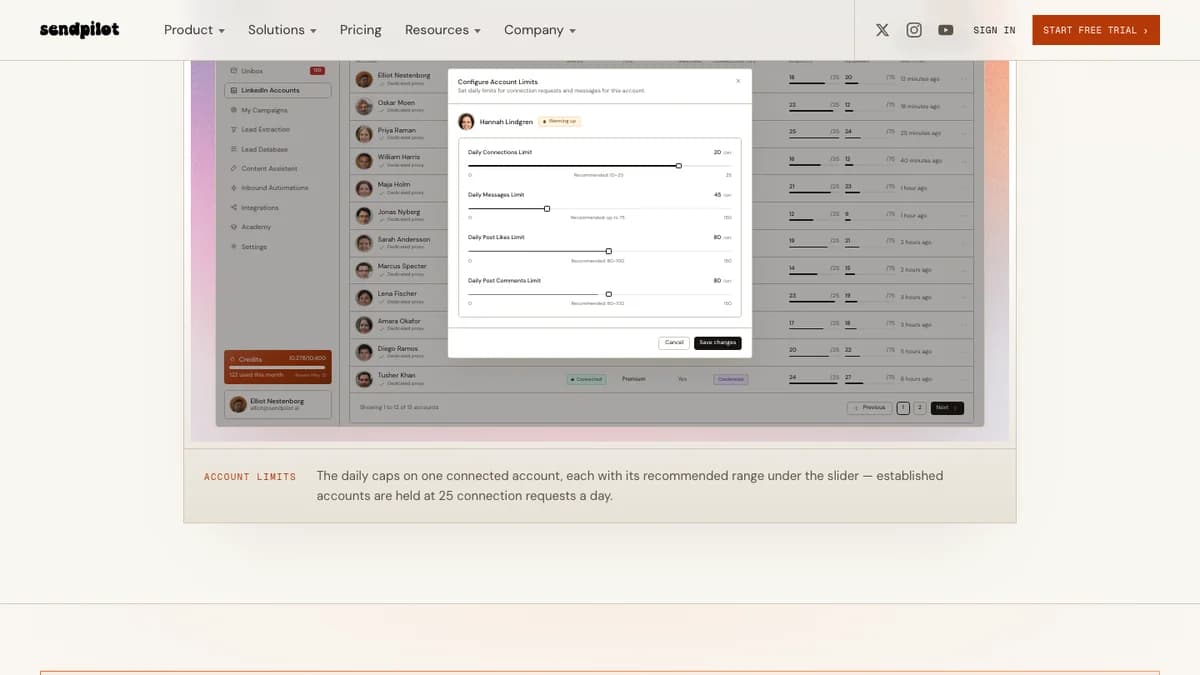
SendPilot account limits panel: daily caps per account, with a recommended range under each slider.
The limits depend on which page you read
SendPilot's own pages give four different answers on volume. The newer marketing pages say 25 connection requests a day (175 a week), while a 2025 help article says 100 a week.
| Source | Connection requests | Messages | Other |
|---|---|---|---|
| Homepage (2026) | Up to 175 a week per sender | Not stated | Per-account daily limits on every plan |
| Account Safety feature page | 25 a day for established accounts (10 to 25 recommended) | Up to 75 a day recommended | Post likes and comments: 80 to 100 a day recommended |
| Help center: Is it safe to use Sendpilot? | 100 a week, hard cap | Counts toward 50 total actions a day | 50 actions a day across messages, views, and invites |
| Help center: free LinkedIn accounts | Ramp 5, 10, 15, then 20 a day over 4 weeks | Not stated | Stay at 20 a day until the account has 1,000+ connections |
Sources: Account Safety page and help center safety article, checked October 2026.
Our read: 25 a day is the current product default for aged accounts, and the 100-a-week article is out of date. Confirm the cap with support before you plan pipeline around 175 invites a week.
Warm-up, proxies, and login
- Warm-up: Accounts that are new to SendPilot, new to automation, or under three months old ramp up on their own. The help center suggests 5, 10, 15, then 20 requests a day over four weeks.
- Proxies: Each account gets a static residential proxy in the country you choose. Bring-your-own proxies need the Growth plan.
- Login: Connect with browser cookies or with your LinkedIn credentials. The Chrome extension login was listed as temporarily unavailable.
- One tool per account: SendPilot says most restrictions come from connecting one account to several automation tools at once.
None of this makes automation risk-free. LinkedIn's User Agreement (section 8.2) prohibits bots and unauthorized automated methods for adding contacts or sending messages. Any tool in this category, SendPilot included, puts the account at some risk.
SendPilot Unified Inbox (Unibox)
SendPilot's Unibox puts replies from every sender account in one list on every plan. You can filter by sender, campaign, or lead status, and search across conversations.
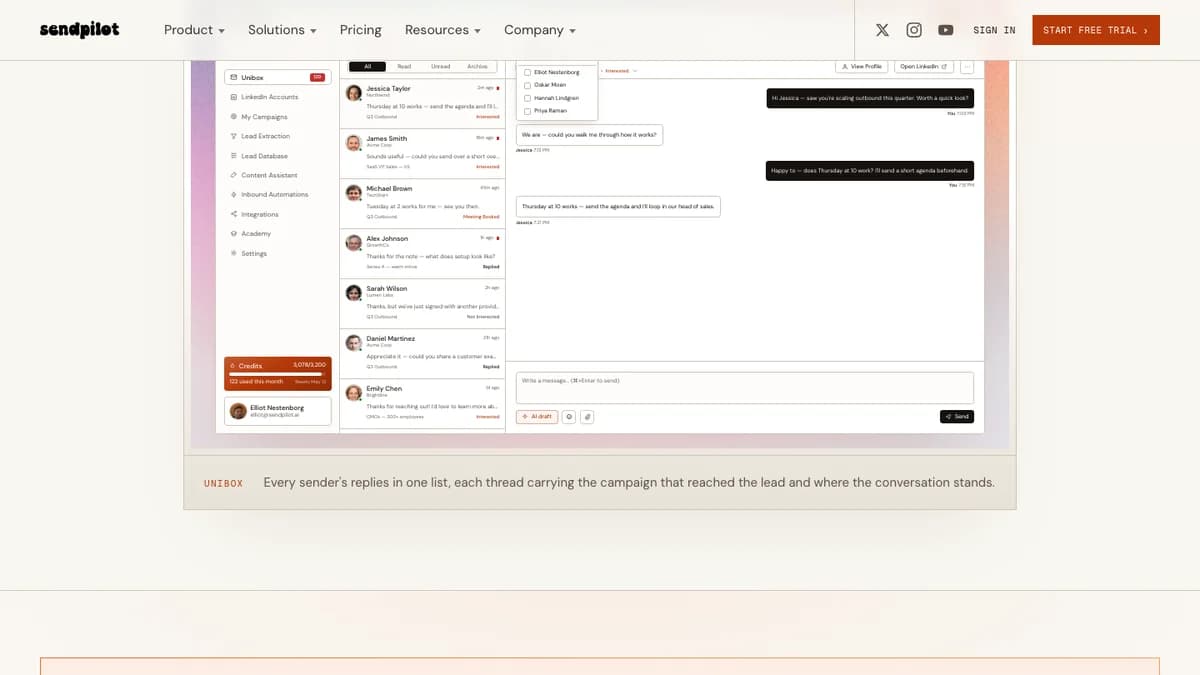
SendPilot Unibox: every sender's replies in one list, with a status per conversation.
- Statuses: Interested, Meeting Booked, or Not Interested on each conversation.
- Views: All, Read, Unread, and Archive tabs.
- Alerts: Reply notifications on every plan; Slack alerts start on Growth.
The inbox page doesn't mention assigning chats to a teammate or internal notes. Teams that need heavier triage often add a dedicated LinkedIn inbox tool, like the one in our Kondo review.
SendPilot for Agencies: Workspaces and White-Label
SendPilot is a good agency fit on price and workspace setup. The $699 Agency plan includes 25 senders, unlimited client workspaces and members, $29 extra senders, custom branding, and three custom domains.
- Client workspaces: Each client gets an isolated workspace with its own data and campaigns, all under one login.
- Client access: Role-based permissions, including view-only access for clients.
- Onboarding: 1-on-1 onboarding and a dedicated Slack channel on Agency.
- White-label program: Run SendPilot on your own domain, set your own client prices, and earn a revenue share agreed per partner. Entry is by application.
Two agency caveats. Support on Agency is not 24/7 and there is no account manager until Enterprise, and the docs don't explain lead locking across senders.
Integrations, API, and MCP Server
SendPilot has a short native integration list: two-way HubSpot sync and Slack alerts. Everything else runs through webhooks, a REST API, n8n, Zapier, or its MCP server, and the API, webhooks, HubSpot, and Slack all start on Growth.
- REST API: List, pause, and resume campaigns; manage leads; send messages and connection requests; check quotas and credits; run lead sourcing jobs.
- Webhooks: Signed event notifications you can route to other tools, with a webhook dashboard on Growth.
- MCP server:22 tools for AI assistants such as Claude, ChatGPT, Claude Code, and Cursor, per SendPilot's API docs.
There is no email channel and no CRM beyond HubSpot. Salesforce or Pipedrive teams will need webhooks or Zapier to push replies into their pipeline.
What SendPilot Users Say
SendPilot's user reviews are split. Ratings on review marketplaces look strong, while its recent Trustpilot reviews are mostly one-star support complaints.
- G2:Search snippets in October 2026 showed about 4.5/5 from roughly 190 to 210 reviews on SendPilot's G2 listing. SendPilot's homepage says 4.8. We could not open G2 directly, so treat both as approximate.
- AppSumo: 4.0 from 156 reviews on its AppSumo page, including 23 one-star ratings. The lifetime deal is sold out and ended around May 2026.
- Trustpilot: 2.2 from 8 reviews on a page listed under sendpilot.co. The reviews describe LinkedIn campaigns, so they appear to be about this product.
Common praise
- Easy setup and a clean interface.
- Good price per sender, especially for agencies.
- Responsive support, according to G2 summaries.
Common complaints
- Trustpilot reviewers from May to September 2026 reported campaigns that stopped sending, lead extraction errors, and slow or missing support replies.
- Lifetime deal buyers reported refund disputes and lost access after cancelling.
- G2 summaries mention occasional bugs, thin analytics, and a limited template library for some niches.
SendPilot Pros and Cons
Pros
- $28 per sender on Agency, $29 per extra sender.
- Unibox on every plan.
- ICP Score Check as a sequence step.
- Comment-triggered inbound campaigns.
- Voice notes, post likes, and profile views in sequences.
- Unlimited client workspaces on Agency.
- REST API, webhooks, and an MCP server.
Cons
- No email channel or InMail step.
- Outreach DMs are templates, not AI-written per lead.
- Connection limits differ across its own pages.
- No API, HubSpot, or Slack on Launch.
- Credits are a second meter that is still expanding.
- No refunds, and a 7-day trial.
- Recent Trustpilot complaints about support.
Who Should Use SendPilot (and Who Shouldn't)
SendPilot fits
- Lead-gen agencies running 13 or more senders, where the $699 Agency plan and unlimited client workspaces pay off.
- SDR teams of 5 to 12 repson HubSpot who want one inbox and the Growth plan's API.
- Founders who post on LinkedIn and want comment-triggered DMs plus scheduled posts in one tool.
Look elsewhere if you
- Need LinkedIn and email in one sequence, or branching beyond connected and ICP checks.
- Want AI to write every DM without wiring up the MCP server yourself.
- Run one account on a tight budget; $79 a month for a single sender is above several rivals.
- Can't risk your LinkedIn account; any automation tool carries that risk.
SendPilot Alternatives
The main SendPilot alternatives are Aimfox and HeyReach for agencies, Expandi and Botdog for branching sequences, and Waalaxy for solo users. Prices below come from our own reviews.
| Tool | Starting price | Pick it if you are |
|---|---|---|
| Aimfox | $49 per seat / month; Agency $499 for 20 seats | Agencies that want the lowest list price at 20+ profiles |
| HeyReach | $79 per sender / month; Agency $999 for 25 senders | Large agencies that want mature sender rotation |
| Expandi | $99 per account / month ($79 yearly) | Teams that want if/then sequences with email steps |
| Botdog | Solo from $79 / month | Users who want per-action daily limits and if/then sequences |
| Waalaxy | From $19 per user / month | Solo founders who want the lowest entry price |
For a wider shortlist, see our best LinkedIn automation tools for lead generation, Dripify alternatives, and LinkedFusion alternatives.
SendPilot Review: Final Verdict
Our rating: 3.8/5. SendPilot is a well-priced LinkedIn outreach tool for agencies and multi-sender teams, held back by thin docs, no email channel, and recent support complaints.
The $699 Agency plan, $29 extra senders, unlimited workspaces, Unibox, and inbound comment campaigns make it a real contender at 13+ senders. The MCP server is a bonus for teams already working in Claude or ChatGPT.
It loses points for template-based DMs, limits that change by page, unclear lead-locking rules, and a no-refund policy. Use the 7-day trial to connect one aged account, run a two-sender campaign, and ask support in writing which weekly cap applies before you pay.
If SendPilot's missing email channel is a dealbreaker, SyncGTM is one alternative worth a look: it finds and enriches leads with verified work emails, then pushes them to HeyReach for LinkedIn or to Instantly and Smartlead for email.