

BetterContact Review 2026: Smart Enrichment Worth the Price?

By Kushal Magar · March 16, 2026 · 13 min read · Last updated: September 30, 2026
BetterContact is a waterfall enrichment tool that finds verified email addresses and phone numbers by routing lookups through 20+ data providers. It uses AI to sequence providers by geography and industry, charges only for verified results, and starts at $15/mo for 200 credits. For pure contact discovery, it is one of the strongest tools on the market.
You are probably here because your current enrichment tool misses too many contacts. Single-provider tools typically find 60-70% of emails. BetterContact claims to push that to 87-95% by cascading through multiple sources. That claim holds up in practice for email addresses. Phone numbers are a different story.
This review breaks down what BetterContact does well, where it stops short, what it actually costs once phone lookups enter the picture, and how it connects to the rest of your stack. If you are also evaluating other enrichment tools, see our Apollo.io review and Clay review.
BetterContact Review: What You Get (and What You Don't)
BetterContact is a B2B contact discovery tool built around waterfall enrichment. You upload a list of prospects (or connect via API), and it queries 20+ data providers in sequence until it finds a verified email or phone number for each contact. The AI engine decides which provider to try first based on the prospect's location, industry, and company size.
Here is a quick-reference table of what you get and where the product stops:
| Feature | What's Included | Limitations |
|---|---|---|
| Email Discovery | Waterfall across 20+ providers with verification | Excludes Gmail and Yahoo addresses entirely |
| Phone Numbers | Mobile and direct dial discovery; phone verification on Pro and above | Costs 10 credits per phone (10x email cost) |
| AI Provider Routing | Automatically selects best provider per prospect | No manual control over provider order or selection |
| Catch-All Verification | Full catch-all verification on Pro and Enterprise | Starter includes basic catch-all checks only |
| Buying Signals | Not available | No job change, funding, or intent data |
| CRM Sync | Native HubSpot and Salesforce integrations, plus Clay, Zapier, and Make | Other CRMs connect through Zapier, Make, the API, or webhooks |
| Outreach Tools | Not available | No built-in sequences; contacts are pushed to tools like Lemlist, Instantly, or Smartlead |
The takeaway: BetterContact is excellent at one thing — finding verified contact information. Signals and sequencing require separate tools, though its native integrations make handing contacts off to them straightforward.
Waterfall Enrichment: How BetterContact Actually Works
Waterfall enrichment is the core of BetterContact's product. Instead of relying on a single data provider (the way tools like Hunter or Lusha work), BetterContact queries multiple providers in sequence. If RocketReach returns nothing for a prospect, the system tries Apollo. Then ContactOut. Then People Data Labs. And so on through 20+ sources.
What makes BetterContact's implementation interesting is the AI routing layer. The system does not query providers in a fixed order. It analyzes each prospect's geography, industry, and company size, then selects the provider most likely to return a valid result first. A prospect at a German SaaS startup gets a different provider sequence than a VP at a Fortune 500 in Texas.
How it compares to manual waterfall stacking
Some teams build their own waterfall by subscribing to three or four data providers and running lookups manually across each one. Tools like FullEnrich and Dropcontact take a similar waterfall approach. BetterContact removes that manual labor. You pay one price, and the system handles the routing automatically. For teams that were previously paying for Apollo, Hunter, and ContactOut separately, BetterContact consolidates that spend.
The downside: you cannot control which providers are queried or in what order. The AI makes that decision. If you have a strong preference for a specific provider's data, you cannot prioritize it.
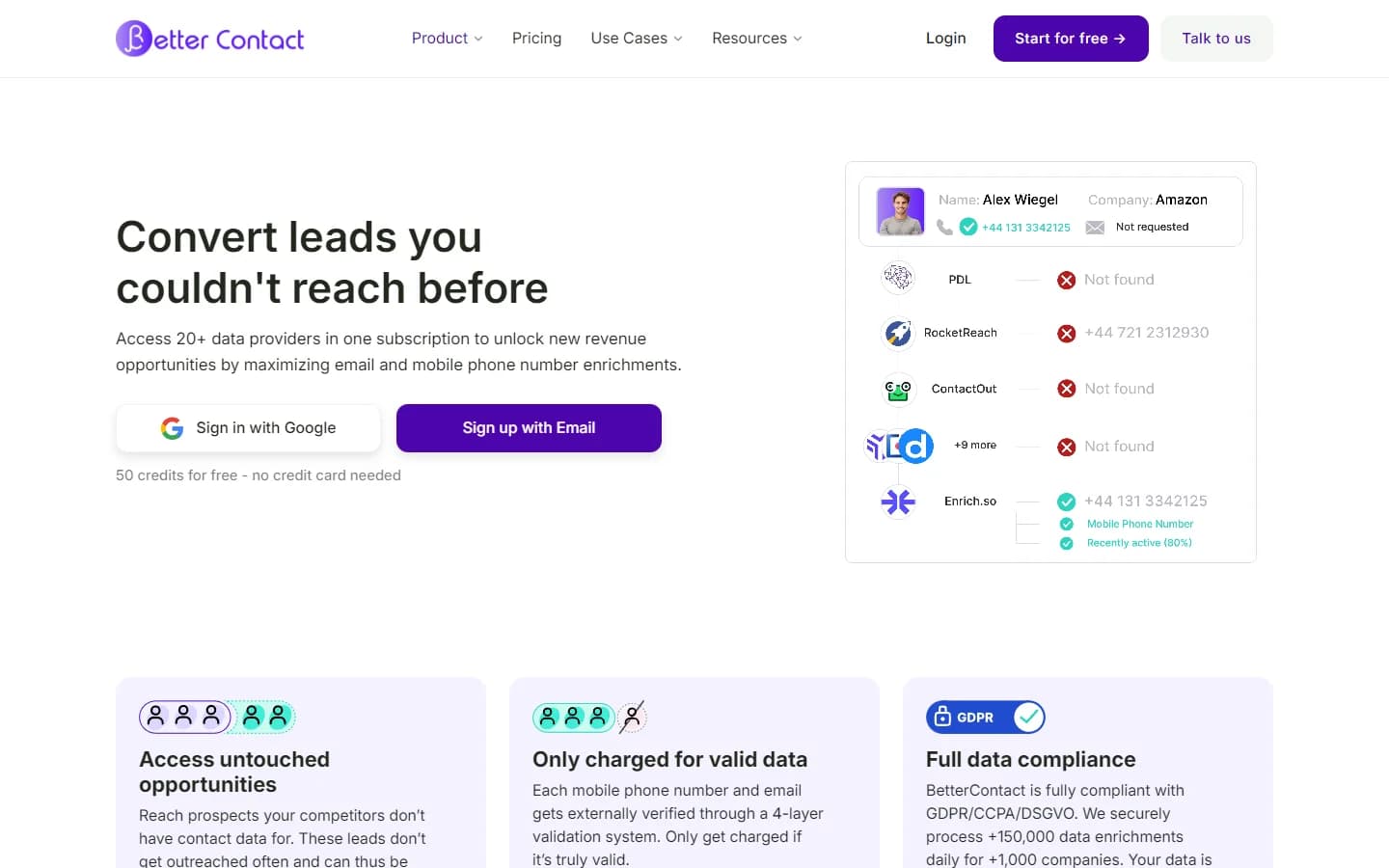
BetterContact homepage — March 2026
The enrichment centers on contact data
The waterfall is built for contact data: work emails and mobile numbers. BetterContact also lists company data enrichment and a Lead Finder for building new lists, but it does not track buying signals such as job changes, funding rounds, or hiring activity, and it offers no intent data.
In practice, that makes BetterContact one component of a prospecting stack rather than the whole stack. It fills in contact details reliably; timing signals and sequencing happen in other tools.
Data Quality: How Accurate Is BetterContact Really?
BetterContact's email accuracy is genuinely strong. Multiple G2 reviewers report find rates of 87-95% for business email addresses — significantly higher than single-provider tools that typically hit 60-70%. The built-in verification means you are charged only for emails that pass validation. Bounce rates stay low.
Where accuracy holds up
- US and UK B2B contacts: Consistently high match rates for companies with 50+ employees
- Corporate email domains: Strong performance finding verified business emails
- Verification quality: Charges only for verified results, keeping bounce rates under 2%
Where accuracy drops
- International markets: Coverage outside US, UK, and Western Europe is noticeably weaker. APAC and LATAM prospects return lower match rates.
- Small companies: Startups and companies under 20 employees have fewer records across all 20+ providers, so the waterfall returns less data.
- Phone numbers: Mobile phone coverage typically reaches 70-85%, which is good but lower than email. And at 10 credits per phone lookup, the cost adds up fast.
- Gmail and Yahoo exclusion: BetterContact excludes personal email domains entirely. If your prospects use personal email for business (common in SMB and freelancer markets), you will get no results.
The data quality story for BetterContact is simple: if you are targeting mid-market and enterprise B2B companies in English-speaking countries, the email find rates are excellent. For European-heavy prospect lists, providers like Datagma may offer better regional coverage. Step outside that sweet spot, and coverage degrades like any other provider.
BetterContact Pricing: What You Actually Pay
As of September 2026, BetterContact pricing is credit-based. One credit equals one valid email, and one mobile number costs 10 credits. Credits are only charged when valid data is found. Unused credits roll over to the next month, capped at your subscribed credit amount (annual billing extends rollover to 12 months), and annual billing gives two months free. Here are the tiers:
- --Free trial: 50 credits, no credit card needed. Enough to test the tool on a small list, not enough to evaluate accuracy at scale.
- --Starter ($15/mo): 200 credits (200 valid emails or 20 mobile numbers). All 20+ data sources. Waterfall enrichment, email verification with basic catch-all checks, API and integrations, chat support. No phone verification.
- --Pro ($49/mo): 1,000 credits (1,000 valid emails or 100 mobile numbers). 20+ data sources. Full catch-all verification included. Mobile phone verification with geo-matching. Premium support. Higher tiers available: 3,000 / 5,000 / 10,000 / 20,000 / 30,000 / 50,000 credits at scaled pricing.
- --Enterprise (from $799/mo): Custom credit volumes. Dedicated account manager. Bring-your-own API keys. Enterprise bulk discounts.
BetterContact waterfall enrichment interface — March 2026
What you actually pay: a realistic scenario
A two-person SDR team enriching 500 leads per week needs roughly 2,000 email credits per month. That puts you on the Pro plan at $49/mo or higher. If those SDRs also need phone numbers for 30% of leads (600 phones/month = 6,000 credits), total credit consumption jumps to 8,000 credits per month. At Pro tier pricing, that costs roughly $200-300/mo depending on the credit tier you select.
That is competitive for pure contact finding. Budget separately for your outreach tool and any signal data you need, since BetterContact does not include sequencing or buying signals.
Hidden costs to watch
- Phone lookups burn credits fast: At 10 credits per phone number, a 1,000-credit plan only covers 100 phone lookups. Most teams underestimate phone credit consumption.
- Credit rollover is capped: On monthly plans, credits roll over but are capped at your subscribed credit amount. Skip a month and anything above one month's allocation is lost; annual billing extends rollover to 12 months.
- Basic catch-all checks on Starter: The $15/mo plan only includes basic catch-all verification. Catch-all domains accept any email address, which makes deliverability hard to confirm. Full catch-all verification (and phone verification) requires Pro ($49/mo).
What Are the Downsides of Using BetterContact?
The biggest downsides of BetterContact are expensive phone lookups, slow processing speeds for large lists, no ability to cancel enrichment once started, and no buying signals or intent data. These are the real limitations that users report on G2 and that matter most for GTM teams.
No buying signals or intent data
BetterContact finds the contact; it does not tell you when to reach out. There is no job change tracking, no funding round alerts, and no intent data. If your outbound depends on timing triggers, that data has to come from another source.
Processing speed can be slow
Because BetterContact queries multiple APIs in sequence, enrichment is inherently slower than single-source tools. Users report that large lists (5,000+ contacts) can take hours to process. For teams running real-time enrichment on form submissions or inbound leads, this latency creates a gap between when a lead comes in and when your SDR has their contact info.
You cannot cancel list processing
Once you submit a list for enrichment, there is no way to stop it. If you uploaded the wrong list, pasted the wrong column, or realized you need to adjust your filters, those credits are spent. Multiple users have flagged this as a frustrating design limitation.
CRM coverage depends on your stack
As of September 2026, BetterContact lists 28 native integrations, including HubSpot and Salesforce. If your CRM is not among them, data moves through Zapier, Make, the API, or webhooks instead, which means building and maintaining that connection yourself.
No analytics or reporting
BetterContact does not offer dashboards, enrichment analytics, or performance reporting. You cannot track enrichment rates over time, compare provider performance, or measure data freshness. For revenue leaders who need to justify tool spend, the lack of reporting makes it harder to demonstrate ROI.
How BetterContact Fits Into Your Stack: Integrations, API, and Compliance
BetterContact is built to sit between your list source and your outreach tool, so how it connects matters as much as its find rates. Here is how it plugs in as of September 2026.
- --CRMs: Native HubSpot and Salesforce integrations, so enriched contacts can land in the CRM without a CSV round trip. Other CRMs connect through Zapier, Make, the REST API, or webhooks.
- --Outreach tools and dialers: Native connections to sequencers including Lemlist, Instantly, and Smartlead, and to dialers such as Nooks and Orum, so verified mobile numbers can go straight into a calling workflow.
- --Clay: A native Clay integration lets teams run BetterContact as the contact step inside Clay tables. In total, BetterContact lists 28 native integrations.
- --API, webhooks, and CSV: The REST API and webhooks cover custom pipelines, and CSV upload handles one-off lists.
- --Lead Finder: Beyond enriching lists you already have, BetterContact offers a Lead Finder, which it describes as “7+ databases in 1,” for building new prospect lists. Contact enrichment remains the core product.
On compliance, BetterContact states that it is GDPR and CCPA compliant and offers EU data residency, which matters for teams prospecting into Europe. Bring-your-own API keys for data providers are limited to the Enterprise plan, so smaller teams cannot plug in provider contracts they already pay for.
A typical setup looks like this: build or import a list, run BetterContact as the enrichment step, and push verified contacts into your CRM or sequencer through a native integration. Before picking a plan, spend the 50 free trial credits on a sample that matches your real market mix of company sizes and regions, since coverage varies most with geography and company size.
Is BetterContact Worth It?
BetterContact is worth it for one specific use case: you need verified email addresses at scale and want higher find rates than any single provider can deliver. If your workflow is “get me the email, I will handle everything else,” BetterContact does that well and does it affordably. The $15/mo entry point is genuinely accessible. The 4.8/5 G2 rating is not inflated — the product delivers on its core promise.
BetterContact is not worth it if your team wants a complete prospecting workflow in one tool. Timing signals, intent data, and outreach sequencing all live elsewhere, and heavy phone usage gets expensive at 10 credits per number. For broader options, see our guide to the best CRM data enrichment tools.
The verdict: BetterContact is a sharp tool with a narrow edge. It finds emails better than most single-provider tools, at an accessible price, and its native integrations make the hand-off to your CRM or sequencer easy. If contact discovery is the gap in your stack, it is worth the 50 trial credits; if you need more than contact data, plan on pairing it with other tools.
If BetterContact's lack of buying signals is a dealbreaker, SyncGTM is one alternative worth a look: it pairs waterfall enrichment across 50+ data providers with real-time buying signals such as job changes, funding rounds, and hiring.