

How to Add Data Enrichment to Zoho CRM (Best Tools & Methods)

By Kushal Magar · March 10, 2026 · 12 min read
Incomplete CRM records are one of the most common reasons outbound campaigns underperform. If your Zoho CRM contacts are missing job titles, phone numbers, or company size, your reps are either researching manually or sending blind.
This guide covers every way to add data enrichment to Zoho CRM — from the native Zia AI feature to the best third-party enrichment tools that sync directly with Zoho. It's written for B2B sales and GTM teams who need accurate, complete records without a full-time data ops person.
Key Takeaways
- Zoho has native enrichment — but it's locked to Enterprise and Ultimate plans and limited to web-crawled company data.
- Third-party tools fill the gaps — email verification, direct-dial phones, intent signals, and LinkedIn data that Zia doesn't cover.
- Automated beats manual — triggering enrichment on record creation keeps your CRM current without rep effort or CSV uploads.
- Waterfall enrichment improves accuracy — querying multiple data providers in sequence (not just one) fills more fields and catches more records.
- The best setup for most teams — Zoho's native Zia for company data, plus a dedicated enrichment tool like SyncGTM for contact-level data and intent signals.
- No coding required — both Zia and most third-party Zoho integrations are configured through UI, not API calls.
What Is Data Enrichment in Zoho CRM?
Data enrichment in Zoho CRM is the process of automatically filling incomplete contact and company records with verified information from external data sources — without manual research or CSV uploads.
When a new lead enters your Zoho CRM with only a name and email address, enrichment pulls in everything else: job title, company size, phone number, LinkedIn URL, industry, and revenue range.
The result is a complete record your reps can use immediately — without spending 20 minutes on LinkedIn and Google before every call.
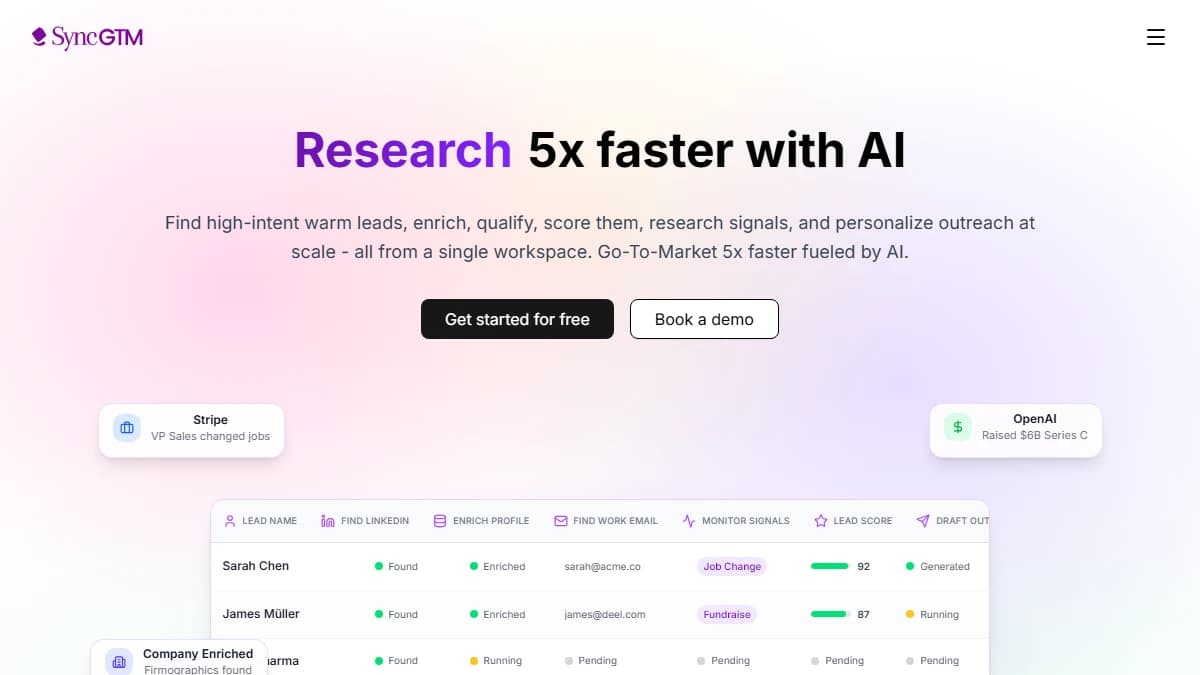
What gets enriched in practice:
- Work email address (verified, not guessed)
- Direct-dial phone number
- Job title and seniority level
- LinkedIn profile URL
- Company name, size, industry, and revenue
- Headquarters location and website
- Technology stack and recent funding rounds
According to Gartner, poor data quality costs organizations an average of $12.9 million per year. For B2B sales teams, that cost shows up as missed calls, bounced emails, and time wasted on prospects who never convert.
Why Does CRM Data Go Stale — and Why Does It Matter?
B2B contact data decays at roughly 25–30% per year according to ZoomInfo (read our full ZoomInfo review). People change jobs, get promoted, and update their contact details constantly — and your CRM records don't update themselves.
By the time a rep books a discovery call, 1 in 4 contacts in a year-old list has already moved to a different company or role.
The most common data quality problems Zoho CRM users face:
- Leads created from web forms with only name and email — no company data
- Contacts imported from LinkedIn exports with missing phone numbers
- Job titles that reflect roles from 2+ years ago
- Company sizes that haven't been updated since initial import
- Duplicate records created when the same contact enters via different channels
Enrichment fixes all of these at the source — before a rep ever touches the record.
Expert take: “The cost of bad data isn't just wasted outreach. It's the compounding loss of rep confidence in the CRM — once reps stop trusting the data, they stop using it.”
— Kyle Coleman, CMO at Copy.ai (formerly VP Revenue at Clari)
How Does Zoho's Native Zia Data Enrichment Work?
Zoho CRM includes a built-in data enrichment feature powered by Zia, its AI engine. When you create or update a lead or contact record, Zia crawls the web to fill in missing company and contact details automatically.
The enrichment triggers on specific input fields. If you configure “Company” as the trigger field in the Leads module, entering a company name will prompt Zia to populate address, phone number, employee count, social handles, and industry type.
What Zia Enriches
- Company name, address, and phone number
- Number of employees and industry type
- CEO name and social media profiles (LinkedIn, Twitter)
- Company website and description
Zia also supports email signature parsing — it extracts contact details from inbound emails and enriches CRM records automatically.
Availability
Zia data enrichment is available on Enterprise ($40/user/month) and Ultimate ($52/user/month) plans only. It is not available on Standard or Professional.
Zoho also supports an optional OpenAI Marketplace connection that can extend enrichment with more contextual data — useful for teams already using OpenAI in their stack.
How Do You Enable Zia Data Enrichment in Zoho CRM?
Enabling Zia data enrichment takes about 5 minutes and requires CRM admin access. Here is the step-by-step setup.
- Go to Setup. In Zoho CRM, click the gear icon in the top right corner and select “Setup.”
- Navigate to Zia > Data Enrichment. In the left sidebar under the Zia section, click “Data Enrichment.”
- Enable for Leads and/or Contacts. Toggle enrichment on for the modules you want to use. You can enable it for both independently.
- Configure the trigger fields. Select which field triggers enrichment — typically “Company” for Leads or “Account Name” for Contacts. Entering a value in this field starts the enrichment.
- Set field mappings. Map Zia's enrichment output to the correct Zoho CRM fields. For example, map enriched “Phone” data to your “Business Phone” field.
- Enable preview mode (recommended). Zoho lets you preview all suggested updates before they're applied. Turn this on to avoid overwriting existing data with incorrect values.
- Save and test. Create a test lead with just a company name and email address. Zia should populate the remaining mapped fields within a few seconds.
Pro tip
Always enable preview mode before applying enrichment at scale. Zia's web-crawling approach can occasionally pull incorrect data — especially for companies with common names or recent rebrands. Reviewing before applying protects your existing clean records.
What Are the Limitations of Zoho's Native Enrichment?
Zia's enrichment is a solid starting point — but it has meaningful gaps that matter for outbound-heavy B2B teams.
No verified email or phone data
Zia enriches company-level data from web crawling. It does not provide verified work email addresses or direct-dial phone numbers — the two fields reps need most for outreach.
Enterprise/Ultimate plan lock
If your team is on a Standard or Professional Zoho plan, Zia enrichment is not available. Upgrading adds $20–$32/user/month per seat — significant cost for a feature that still leaves email and phone gaps.
Limited to company data
Zia focuses on organization-level enrichment: company name, industry, size, address. It does not enrich individual contact attributes like personal LinkedIn URLs, current job tenure, or seniority-level signals.
No intent signals
Zia does not surface buying intent data — job change signals, technology installs, funding events, or website visitor data. These signals are the difference between cold outreach and well-timed, relevant outreach.
For teams that rely on Zoho for outbound, a third-party enrichment tool sitting alongside Zia is not optional — it's the only way to get complete contact records.
What Are the Best Third-Party Data Enrichment Tools for Zoho CRM?
The best third-party enrichment tools for Zoho CRM combine verified contact data with a direct, native Zoho integration — so enriched records land in the right fields without manual work.
1. SyncGTM
Best for: Waterfall enrichment + intent signals + CRM sync on all plans
Starting at $49/mo — free tier available
SyncGTM is a Clay alternative that runs waterfall enrichment across 20+ data providers in sequence — querying each source until a verified result is found. For Zoho CRM teams, it syncs enriched contact and company data directly into CRM fields via its native Zoho integration, available on every plan (not locked behind an enterprise tier).
Where it stands out is intent signals. SyncGTM layers buying intent — job changes, funding events, technology installs, and web visitor data — on top of enriched contact records. That means reps aren't just calling with complete data — they're calling at the right moment.
- Waterfall enrichment across 20+ sources (email, phone, LinkedIn, company)
- Native Zoho CRM integration on all paid plans from $49/mo
- Buying intent signals: job changes, funding, tech installs
- AI research agents for personalized outreach context
- Free tier with 200 credits/month
2. Apollo.io
Best for: All-in-one prospecting and enrichment with a 275M+ contact database
Starting at $49/user/month — free tier available
Apollo.io combines contact database access with built-in enrichment and outreach sequencing. For a full breakdown of the platform, see our Apollo.io review. It integrates with Zoho CRM to push enriched contact and company data directly into your existing records.
Apollo is strong for teams that want a single tool covering prospecting, enrichment, and email outreach. The tradeoff is that its enrichment quality varies by region — European and APAC contact data tends to be thinner than US coverage.
- 275M+ contact database with email and phone coverage
- Native Zoho CRM sync via API or Zapier integration
- Built-in email sequencing (reduces tool count)
- Chrome extension for LinkedIn enrichment
3. Cognism
Best for: GDPR-compliant phone-verified data for European markets
Custom pricing — demo required
Cognism differentiates on data compliance and phone accuracy. Its Diamond Data tier covers phone-verified mobile numbers with global DNC (Do Not Call) list screening built in — critical for teams selling into Europe or regulated industries.
Cognism integrates with Zoho CRM via its Chrome extension and API. It's a strong choice if compliance and call-connect rates are your primary concern, but the custom pricing model and lack of a self-serve tier makes it harder to trial.
4. Findymail
Best for: Affordable email enrichment with a dedicated Zoho integration
Starting at $49/mo
Findymail is specifically designed for email enrichment and has a dedicated Zoho CRM integration. It enriches existing Zoho contact records with verified email addresses and is one of the more affordable options for teams that only need email coverage (not phone or intent).
It's a good fit for smaller teams on tight budgets who are primarily running cold email rather than multi-channel outreach.
How Do You Connect a Third-Party Enrichment Tool to Zoho CRM?
The connection method depends on the tool, but most third-party enrichment tools integrate with Zoho CRM through one of three paths: native integration, Zoho Marketplace, or API.
Method 1: Native Integration (recommended)
Tools like SyncGTM offer a native Zoho CRM integration. Once connected, the tool can push enriched data directly into your CRM fields — no manual export, no Zapier in between.
- In SyncGTM, go to Integrations > Zoho CRM.
- Authenticate with your Zoho account using OAuth.
- Map SyncGTM fields to Zoho CRM fields (e.g., “Verified Email” → “Email”, “Phone” → “Business Phone”).
- Set a trigger: new lead created, record updated, or manual enrichment run.
- Test with a single record before running at scale.
Method 2: Zoho Marketplace
The Zoho Marketplace lists hundreds of integrations you can install directly inside Zoho CRM — including Apollo, Clearbit, and several enrichment providers.
- Go to Zoho CRM > Marketplace (top navigation).
- Search for your enrichment tool by name.
- Click “Install” and follow the OAuth authentication flow.
- Configure field mappings inside the app extension panel.
Method 3: Zoho CRM API
If your enrichment tool doesn't have a pre-built Zoho integration, you can use Zoho's REST API (v8) to push enriched data into any module. This requires developer access and is typically used for custom workflows or tools that don't appear in the Marketplace.
For most sales teams, the native integration or Marketplace route is faster and lower risk than building API connections from scratch.
Manual vs. Automated Enrichment in Zoho CRM: Which Is Right for Your Team?
Automated enrichment is almost always the right answer for active outbound teams. Manual enrichment — where reps research and update records themselves — is only viable at very small scale or for high-value accounts that require bespoke research.
| Factor | Manual | Automated |
|---|---|---|
| Speed | 15–30 min/record | Seconds per record |
| Scale | 50–100 records/week max | Thousands per hour |
| Consistency | Variable — rep-dependent | Uniform across all records |
| Cost | High (rep time) | Low (tool cost per credit) |
| Best for | High-value ABM accounts | All inbound leads, outbound lists |
According to a Salesforce State of Sales report, sales reps spend only 28% of their week actually selling — the rest goes to administrative tasks including manual data entry and research. Automated enrichment directly reclaims that time.
How Do Zoho CRM Teams Use SyncGTM for Data Enrichment?
SyncGTM is built specifically for B2B GTM teams who need enrichment that goes beyond what Zia provides — verified emails, direct-dial phones, LinkedIn URLs, and buying intent signals — all synced back into Zoho CRM automatically.
The typical workflow for a Zoho CRM team using SyncGTM looks like this:
- Inbound lead arrives in Zoho CRM (from web form, LinkedIn, or import) with partial data — name, email, maybe a company name.
- SyncGTM triggers enrichment automatically, running the lead through waterfall enrichment across 20+ data sources to find verified email, phone, LinkedIn URL, company size, and intent signals.
- Enriched data pushes to Zoho CRM fields via the native integration — no CSV, no manual copy-paste, no sync delay.
- Rep opens the record and sees a complete contact profile with context for why now is the right time to reach out (e.g., the company just raised a Series B).
The key difference from Zia is coverage depth and contact-level accuracy. SyncGTM queries multiple providers in waterfall sequence — including sources like Clearbit, Lusha, and Hunter — if Provider A doesn't have a verified phone, it automatically tries Provider B, then C. The result is a higher fill rate on critical fields.
Teams on SyncGTM's Solo plan ($49/mo) get Zoho CRM integration, waterfall enrichment, webhooks, and 2,000 verified emails per month. Enterprise plans include dedicated GTM support and higher volume limits.
SyncGTM vs. Zia: Quick comparison
- Verified email: SyncGTM yes, Zia no
- Direct-dial phone: SyncGTM yes, Zia company phone only
- LinkedIn URL: SyncGTM yes, Zia CEO only
- Intent signals: SyncGTM yes, Zia no
- Plan availability: SyncGTM all plans, Zia Enterprise/Ultimate only
- Waterfall enrichment: SyncGTM yes (20+ sources), Zia single web crawl
Final Thoughts
Adding data enrichment to Zoho CRM is one of the highest-leverage moves a B2B sales team can make. The difference between a half-complete record and a fully enriched one is the difference between a rep spending 20 minutes on research before every call — or picking up the phone immediately with everything they need.
Zoho's native Zia enrichment is a useful foundation if you're on Enterprise or Ultimate — but it leaves critical gaps in verified email, phone, and intent signals. Pairing it with a dedicated enrichment tool like SyncGTM covers those gaps without adding workflow complexity.
The best setup for most outbound-focused Zoho teams: enable Zia for company-level enrichment, connect SyncGTM for contact-level data and intent, and let both run automatically on new record creation. Your reps get complete context — and your CRM stays clean without anyone maintaining it manually.
This post was last reviewed in March 2026.