

Breakout Review 2026: AI Sales Agent Pricing and Features

By Kushal Magar · November 2, 2026 · 14 min read
Key Takeaway
Breakout (getbreakout.ai) is an AI sales agent for your website. It identifies who is visiting, matches them to your CRM, chats with them, answers product questions from your knowledge base, qualifies against your ICP, books meetings, and follows up by email and LinkedIn when they leave. Signals starts at $500 a month with a free trial; the Inbound AI SDR needs Growth, from $2,000 a month. It fits B2B teams with steady site traffic and a HubSpot or Salesforce CRM. Our rating: 4.1/5.
This Breakout review answers one question for B2B revenue teams: can an AI sales agent on your website turn anonymous traffic into qualified meetings without a human SDR watching chat? Based on the product pages and early user reviews, the answer is yes for teams with steady traffic and a clean CRM, with two caveats: the AI agent sits on the $2,000-a-month tier, and Breakout publishes no accuracy benchmarks.
We read Breakout's homepage, pricing page, comparison pages, trust center, and marketplace listings in October 2026, along with its G2 profile and funding coverage. We did not run a paid Breakout workspace, so performance figures below are labeled as vendor claims.
Most pages ranking for "Breakout review" today are written by competing vendors, and several still quote the old $1,500 and $2,500 monthly prices. None maps where Breakout's data lands in your CRM or how to test its answers before launch. This review covers both.
TL;DR: Breakout Review 2026
- What it is: an AI SDR platform at getbreakout.ai that identifies website visitors, chats with them, qualifies them, and books meetings.
- Agents: Signals, Inbound, Outbound, and 1:1 Agents, plus Spoc, a new assistant that runs them from a plan you approve.
- Setup: under three hours, self-serve, per Breakout. Tuning the knowledge base and routing takes longer.
- CRM handoff: Salesforce, HubSpot, and Marketo sync, Slack alerts with session context, in-chat booking.
- Pricing: Signals from $500/mo (free trial), Growth from $2,000/mo for the Inbound AI SDR, Enterprise custom.
- Reviews: roughly 4.9 to 5.0 on G2 from about 30 reviews at time of writing. Small sample, strong sentiment.
- Our rating: 4.1/5.
What Is Breakout?
Breakout is an AI SDR platform that turns website visitors into pipeline. It identifies the person and company behind a visit, engages them with an AI agent in real time, qualifies them against your ICP, and books a meeting or hands them to a rep. Its homepage tagline is "Pageview to pipeline."
The name is crowded, so to be clear: this review covers the AI sales agent at getbreakout.ai. Searches for "Breakout" also return Breakout Ventures (a science-focused venture firm), the Atari game, a 1975 film, and escape rooms. None of those are related.
Breakout was founded by ex-Googlers Sachin Gupta (CEO) and Hitesh Aggarwal (CTO). It came out of stealth in February 2025 with a $3.25M seed round led by Village Global, with Recall Capital and Z21 Ventures participating, according to VC News Daily. In October 2025 it launched Breakout Blocks, which turn static web pages into personalized buyer journeys.
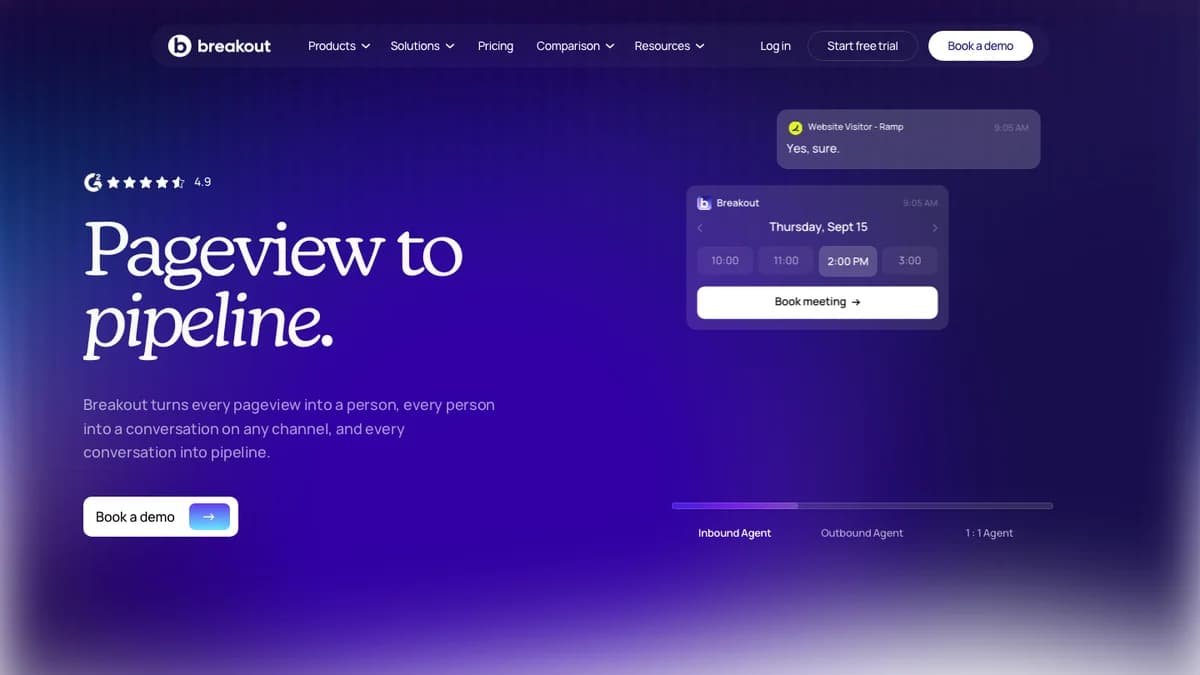
Breakout homepage, October 2026: Inbound, Outbound, and 1:1 Agents, with a free trial and demo booking in the header.
Customer logos on the site include CaptivateIQ, NetApp, MoEngage, Axiom Law, and RevenueGrid, with published case studies from Ketch, Beautiful.ai, Barti, HackerEarth, TeamOhana, and Recruit CRM.
How Breakout Engages and Qualifies Buyers
Breakout works in four steps: identify the visitor, check them against your CRM and ICP, engage them with the AI agent while they are still on the page, then book, route, or follow up. Each step is handled by one of its agents.
| Agent | What it does | Triggered by |
|---|---|---|
| Signals Agent | Identifies the people and accounts behind site visits and watches buying signals | Pageviews, pricing-page and return visits, 700+ third-party signals |
| Inbound Agent | Chats with visitors in real time, answers product questions, qualifies, books meetings | A live visitor on your website |
| Outbound Agent | Writes and sends researched outreach, handles replies | Intent from accounts that showed interest |
| 1:1 Agent | Runs a dedicated play per must-win account with a live dossier and buying-committee tracking | Accounts you name as strategic |
| Spoc (new) | Conversational assistant that puts the other agents to work across your stack once you approve a plan | Your instructions |
1. Identify
A site script deanonymizes visitors at the company and person level, then runs waterfall enrichment across several data providers to fill in contact details. Breakout also surfaces the wider buying group from a single session, so one anonymous visit can point to several stakeholders at the same account.
2. Qualify
Breakout matches each visitor to CRM records: open opportunities, closed-lost deals, current customers, and account owners. It then checks the visitor against your ICP. That CRM context is what separates it from a generic chatbot. A visitor from an open opportunity can go straight to the owning rep instead of getting a discovery script.
3. Engage
The Inbound Agent opens a conversation, answers product questions from the knowledge base you point it at, and runs your qualification questions. Breakout Blocks can also swap on-page content (headlines, case studies, demos, videos, and CTAs) based on the visitor's company, UTM source, and behavior.
4. Book, route, or follow up
Qualified visitors can book a meeting inside the chat. High-value visitors trigger a Slack alert to the right rep, who can take over the conversation. Visitors who leave without booking get warm email and LinkedIn follow-up from the Outbound Agent.
Breakout Key Features
Breakout's core features are visitor deanonymization, an inbound AI agent, CRM-aware routing, signal-based outbound, and per-account plays. Here is what each one covers, based on Breakout's own pages.
- Person and account deanonymization: identifies visitors and matches them to CRM records. A third-party directory reports Breakout claims up to 88% deanonymization; treat that as a vendor ceiling, not an expected rate.
- Buying group identification: maps other stakeholders at the visiting account.
- Inbound AI SDR:24/7 conversations, product Q&A, ICP qualification, and in-chat meeting booking.
- Smart Forms: the scheduler also works on website forms, so form fills can book directly.
- Breakout Blocks: modular on-site experiences (demos, videos, CTAs) personalized per visitor. An AI avatar is listed as coming soon.
- Signals: first-party signals such as pricing-page and return visits, plus 700+ third-party signals including hiring, funding, tech-stack changes, and champion job moves.
- Outbound and nurture plays:"Auto-pounce" sends personalized messages on behalf of reps when intent spikes.
- 1:1 Agent: builds a live dossier per must-win account and tracks its buying committee.
- Security: SOC 2 Type II and GDPR compliance with EU-region processing, documented in the Breakout Trust Center.
Setup: How Long Breakout Takes to Go Live
Breakout says it goes live in under three hours, self-serve, with no implementation project. G2 reviewers also single out ease of implementation, which supports the claim for the technical install.
On its Qualified comparison page, Breakout contrasts this with an 8 to 12 week rollout for Qualified. That is Breakout's framing of a competitor, so weigh it accordingly.
A realistic setup covers five jobs:
- Install the site script and confirm visitors are resolving.
- Connect Salesforce or HubSpot so visitors match to accounts and owners.
- Point the agent at your knowledge base and write its instructions.
- Define ICP rules and the qualification questions the agent asks.
- Connect calendars and set Slack alerts for each rep or territory.
Steps 1 and 2 fit inside an afternoon. Steps 3 and 4 decide whether the agent says the right thing to the right buyer, so budget a week or two of reviewing transcripts before you trust it with your highest-value pages.
CRM Handoff, Routing, and Integrations
Breakout hands off through your CRM, Slack, and calendar: it writes enriched records to Salesforce, HubSpot, or Marketo, alerts the account owner in Slack with full session context, and books meetings in chat. Here is where the data goes at each stage.
| Stage | Where it lands | Source |
|---|---|---|
| Visitor identified | CRM match against open opps, customers, closed-lost, and owner | Breakout homepage |
| Hot visitor or qualified chat | Slack and email alert to the account owner, with session context | Breakout pricing page; GTM Directory listing |
| Meeting booked | Calendar booking inside chat or on website forms (Smart Forms) | Breakout Qualified comparison page |
| Record sync | Salesforce, HubSpot, or Marketo as an enriched record | Breakout Qualified comparison page |
| Visitor leaves without booking | Warm email from the rep's name, LinkedIn follow-up via HeyReach or Breakout's browser extension | Breakout Qualified comparison page |
| Sales engagement | Deanonymized visitors surface as sequenceable contacts in Gong Engage | Gong Collective listing |
Routing
Breakout documents routing for follow-up email by account ownership or round-robin, and Growth includes real-time lead routing and alerting. The GTM Directory notes that Breakout's native scheduling lacks territory and fallback routing rules that dedicated schedulers offer. If you route across regions or segments, ask for a demo of your exact rules.
Integrations
Breakout's homepage claims 55+ GTM apps with read and write actions and names Attio among them. It is also listed on the Gong Collective, where deanonymized visitors appear as sequenceable contacts in Gong Engage. LinkedIn follow-up runs through HeyReach or Breakout's own browser extension.
One gap to check: the same directory reports no public API, so warehouse syncs and custom RevOps workflows depend on native connectors or an Enterprise custom integration.
Accuracy: Visitor ID and AI Answers
Breakout publishes no independent accuracy benchmarks for either visitor identification or AI answers, so you need to test both during the trial or pilot. Accuracy here means two separate things.
Visitor identification
Company-level identification from IP data is mature across the category. Person-level identification is harder and depends on the data providers in the waterfall. The 88% figure is a vendor claim. For context on how identification vendors compare, see our guide to B2B website visitor identification tools.
AI answers
The Inbound Agent answers from the knowledge base you connect. That limits invention, but only if the knowledge base is complete. Docket, a competing vendor, argues Breakout lacks an explicit answer-verification workflow. That is a competitor's view, but it is a fair thing to probe in a demo.
A simple pre-launch accuracy test
- Pull 25 real questions from recent sales calls and chats.
- Include pricing, security, integration, and "do you support X" questions the agent should not guess on.
- Score each answer as correct, safely deflected to a human, or wrong.
- Check 20 identified visitors against your CRM to see if the person and account match.
Breakout Pricing 2026: Plans and What You Pay
Breakout pricing starts at $500 a month for Signals (deanonymization only) and $2,000 a month for Growth, which is the first tier with the Inbound AI SDR. Enterprise is custom. These are the figures on the Breakout pricing page in October 2026.
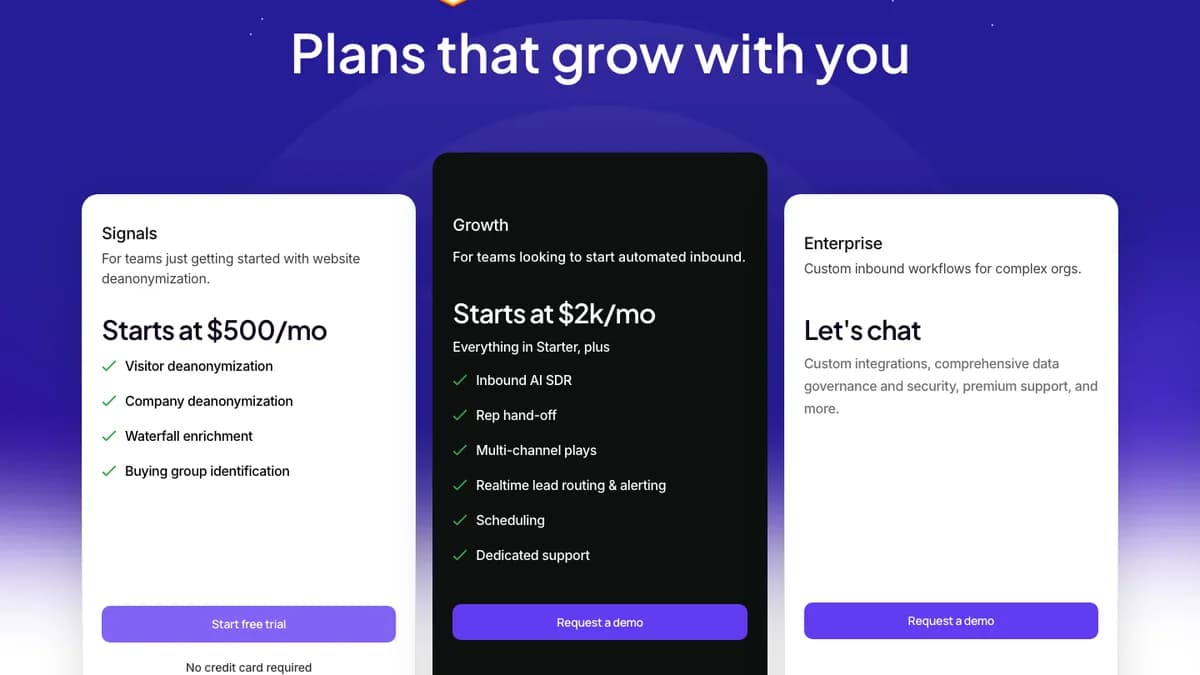
Breakout pricing page, October 2026: Signals, Growth, and Enterprise tiers.
| Plan | Price | Seats | Includes | Trial |
|---|---|---|---|---|
| Signals | From $500/mo | 5 | Person and company deanonymization, waterfall enrichment, buying group identification | Free trial, no credit card |
| Growth | From $2,000/mo (slider-based estimate) | 12 | Everything in Signals plus Inbound AI SDR, rep hand-off, multi-channel plays, real-time routing and alerts, scheduling, dedicated support | Demo required |
| Enterprise | Custom | Unlimited | Custom integrations, data governance and security, SSO, premium support | Demo required |
Seat counts come from the pricing comparison table, which lists 5, 12, and unlimited seats in tier order. Three details matter more than the headline prices:
- The AI agent costs at least $24,000 a year. Signals at $500 a month identifies visitors but does not chat with them.
- Growth is priced on a slider. The page invites you to estimate your Growth price but does not say what the slider measures or publish conversation limits. Ask for the unit, the overage rate, and the contract term in writing.
- Old prices still circulate.The pricing page's own meta description still reads $1,500 a month for deanonymization and $2,500 for the AI SDR, which is why older reviews quote those numbers.
For teams leaving Qualified, Breakout advertises a contract buyout of up to $30,000.
What a meeting costs on Growth
The useful number is cost per qualified meeting. At the $2,000 Growth floor, here is the math at different meeting volumes. These are illustrative calculations, not Breakout data.
| Qualified meetings per month | Cost per meeting at $2,000/mo | Typical situation |
|---|---|---|
| 5 | $400 | Low-traffic site or narrow ICP |
| 10 | $200 | Typical early-stage target |
| 20 | $100 | Healthy inbound volume |
| 40 | $50 | High-traffic site, tight routing |
If your average deal is worth $20,000 or more, even 5 extra meetings a month can pay for Growth. Under $5,000 deals with thin traffic, the math is harder.
What Teams Report After Rollout
Breakout rates between about 4.9 and 5.0 out of 5 on G2 from roughly 30 reviews at time of writing. Breakout's own badge shows 4.9 from 30+ reviews; G2's listing showed 5.0 from 31 when we checked.
Across G2's review summary, three themes repeat:
- Easy implementation. Reviewers consistently call setup quick.
- Smooth integrations. HubSpot and Slack come up most often.
- Pipeline impact. Reviewers report better conversion rates and more leads from existing traffic.
The complaints are minor so far: limited styling options for the chat widget and an early lack of mobile support, both of which reviewers say the team fixed quickly.
Treat the score carefully. About 30 reviews is a small sample next to established chat vendors with hundreds or thousands. Our searches did not surface Breakout reviews on Capterra, TrustRadius, or Reddit, and vendor case studies are not independent evidence. Ask for two reference customers at your company size and traffic level.
Who Should Use Breakout (and Who Shouldn't)
Breakout fits B2B teams with steady website traffic, a HubSpot or Salesforce CRM, and more inbound interest than SDRs can respond to in real time.
Good fit
- Mid-market SaaS with paid traffic and a pricing page that gets real visits.
- Teams whose SDRs miss after-hours or weekend visitors.
- Account-based teams that want reps alerted when target accounts browse.
- Teams replacing a scripted chatbot or a slow, expensive enterprise rollout.
Look elsewhere if
- Your site gets little traffic; the agent has few buyers to talk to.
- You need voice or video conversations today.
- You need a public API or warehouse sync for custom workflows.
- Your main need is outbound to accounts that never visit your site.
Breakout Pros and Cons
Pros
- Visitor ID, AI chat, routing, and follow-up in one product
- CRM-aware: matches visitors to opps, customers, and owners
- Vendor-stated setup in under three hours
- Published starting prices and a free trial on Signals
- Strong early G2 sentiment
- SOC 2 Type II and GDPR with EU-region processing
Cons
- Inbound AI SDR gated behind Growth, from $2,000/mo
- Growth usage unit and conversation limits not published
- No public accuracy benchmarks
- Small review base, few independent reviews
- Text-first; AI avatar still coming soon
- No public API reported
Breakout Alternatives
The closest Breakout alternatives are Qualified, Warmly, and Docket for inbound AI agents, with Drift, RB2B, and Default covering narrower parts of the same workflow.
| Tool | Type | Pick it if |
|---|---|---|
| Qualified | Enterprise inbound pipeline platform with an AI SDR agent | You run Salesforce at scale and want a long-established vendor |
| Warmly | Visitor identification, intent signals, and AI chat | You want signal orchestration across inbound and outbound |
| Docket | AI sales engineer agent for technical inbound questions | Buyers ask deep product and security questions before booking |
| Drift | Conversational marketing chat owned by Salesloft | You already run Salesloft and want rules-based chat |
| RB2B | Person-level visitor identification pushed to Slack | You only need to know who visited, not an AI agent |
| Default | Inbound form enrichment, routing, and scheduling | Your bottleneck is form-to-meeting speed, not chat |
If you want an AI SDR that prospects outbound rather than one that works your website, read our reviews of 11x, Artisan, Monaco, Relevance AI, and Swan AI, or the full roundup of the best AI SDR tools in 2026.
Breakout Review: Final Verdict
Our rating: 4.1/5. Breakout is one of the fastest ways to put an AI sales agent on a B2B website that knows who the visitor is, what they already have in your CRM, and which rep should hear about it.
CRM-aware routing, quick setup, published starting prices, and strong early reviews earn the score. A team with real traffic and a $20,000-plus deal size can justify Growth on a handful of extra meetings a month.
It loses points because the AI agent starts at $2,000 a month, the Growth usage unit is unpublished, and there are no accuracy benchmarks or large body of independent reviews. Start with the Signals trial to see who is visiting, then run the 25-question accuracy test above during a Growth pilot before you sign a longer contract.
Breakout works the buyers who reach your website. If you also need verified contacts and signals for accounts that never visit, SyncGTM can sit alongside it with waterfall email and phone enrichment across 50+ providers, buying signals, and two-way HubSpot and Salesforce sync.