

Linxa Review 2026: AI LinkedIn Inbox and Reply Assistant

By Kushal Magar · November 26, 2026 · 14 min read
Key Takeaway
Linxa is an AI LinkedIn inbox and outreach tool. Its free Inbox plan sorts DMs by intent, matches them to your products and drafts 50 replies a month, and nothing sends without your click. Paid plans (Outreach $39/mo, Team $49 per LinkedIn account/mo) add cloud sequences that can send on autopilot from Linxa's servers, which raises account risk. Linxa publishes no sorting accuracy figure, so test it on the free plan. Our rating: 3.7/5.
This Linxa review looks at a LinkedIn tool that gives away its AI inbox and charges for outreach. The free plan sorts your DMs and drafts replies; the paid plans run campaigns from Linxa's servers.
We read Linxa's homepage, pricing page, Smart Inbox, Deal Maker, extension and MCP pages, its privacy policy and both of its Chrome Web Store listings on November 26, 2026. We did not install Linxa on a live inbox, so vendor claims are labeled as claims, and we show you how to test the sorting yourself.
One correction up front: directory listings still describe a Growth plan and inbox groups called Hot Leads, Follow-up, Hiring and Junk. Linxa's live site uses different names for both, covered below.
TL;DR: Linxa Review 2026
- What it is: A Chrome extension plus cloud app that sorts LinkedIn DMs by intent, links them to your products and drafts replies.
- Free plan: Smart Inbox with 50 AI-drafted replies a month, no card, no trial clock, per Linxa's pricing page.
- Paid plans: Outreach $39/mo, Team $49 and Human Support $79 per LinkedIn account a month, on the same page.
- Sends on its own? The free inbox never does. Outreach sequences can, from Linxa's servers, once you turn on autopilot.
- Biggest gaps: No published sorting accuracy, conversations stored in Linxa's cloud, no native HubSpot sync, and real account risk on the automation plans.
- Rating: 3.7/5.
What Is Linxa?
Linxa is an AI LinkedIn tool for founders and sales teams that combines a smart inbox, outreach sequences and a small CRM. Its homepage headline is "AI LinkedIn outreach that runs 24/7."
That headline matters for this review. The inbox is the free entry point, but the product is built around outreach that runs in the cloud.
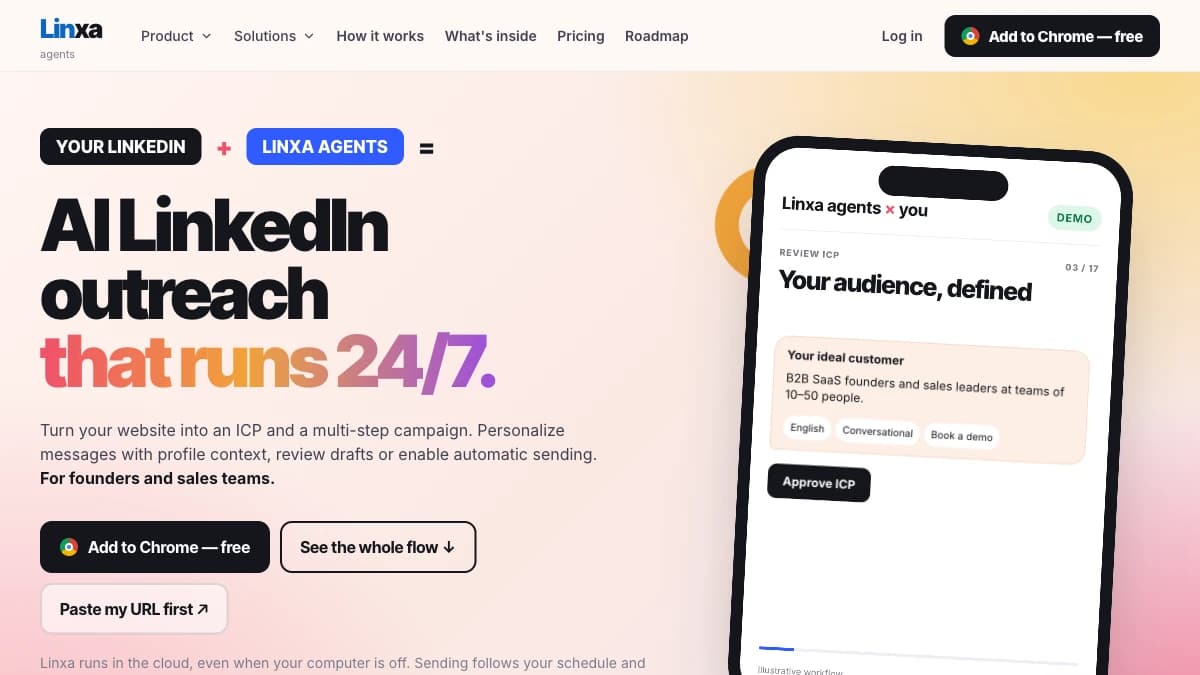
Linxa homepage, November 2026: paste your website, get an ICP and a multi-step campaign, then review drafts or turn on automatic sending.
The company behind it is Talent Scan Toolkit Corporation, named on the privacy policy and on a store listing with a Wilmington, Delaware address. The site footer says Linxa is "built by the team behind Salee," and the old lynxagents.com domain now redirects to uselinxa.com.
The main extension is young. Its Chrome Web Store listing showed 238 users and version 0.21.27, updated November 5, 2026, when we checked.
How Linxa Works: Extension, Cloud and Your Session
Linxa connects to LinkedIn through a Chrome extension that picks up the session you already have open. You never type your LinkedIn password into Linxa.
After that, most of the work happens in Linxa's web app and on its servers. The extension page says outreach runs on Linxa servers through a proxy in your selected country, even when your computer is off.
Three layers, three levels of control
- Smart Inbox (free): Reads, sorts and drafts. Linxa's Smart Inbox page says nothing is sent until you approve it.
- Outreach and Team (paid): Find prospects, send invitations and run sequences. New sequences start in Draft mode, and autopilot is a switch you turn on per sequence.
- Agent and MCP: Ask for a focus list or a draft in plain words, inside Linxa or from Claude, Codex, Cursor or Kiro.
Where each feature runs
| Feature | Plan | Where it runs | Sends on its own? |
|---|---|---|---|
| Smart Inbox sorting | Inbox (free) | Linxa's cloud; AI via Google Cloud Vertex AI | No |
| AI reply drafts | Inbox (free), monthly allowance | Linxa's cloud | No. You click Send |
| Telegram reply alerts | Inbox (free) | Telegram plus Linxa | Only after you confirm |
| Smart Invite | Outreach and Team | Linxa servers, through a proxy in your country | Yes, within your limits and schedule |
| Sequences | Outreach and Team | Linxa servers, through a proxy in your country | Draft mode first; autopilot is optional |
| Deal Maker Autopilot | Rolling out to teams on request | Linxa servers | Optional, off by default |
| MCP write access | Add-on, or included in Outreach and Team | Your AI client plus Linxa | Only after you approve the exact message |
Sources: Linxa's homepage, privacy policy, Deal Maker page and MCP page. Your plan and in-app allowances decide what is switched on.
Linxa Smart Inbox: How the Sorting Works
Smart Inbox is Linxa's conversation intelligence layer: it reads each thread, judges intent and sentiment, and files it by what needs your attention. It also links relevant conversations to the products you set up in Linxa.
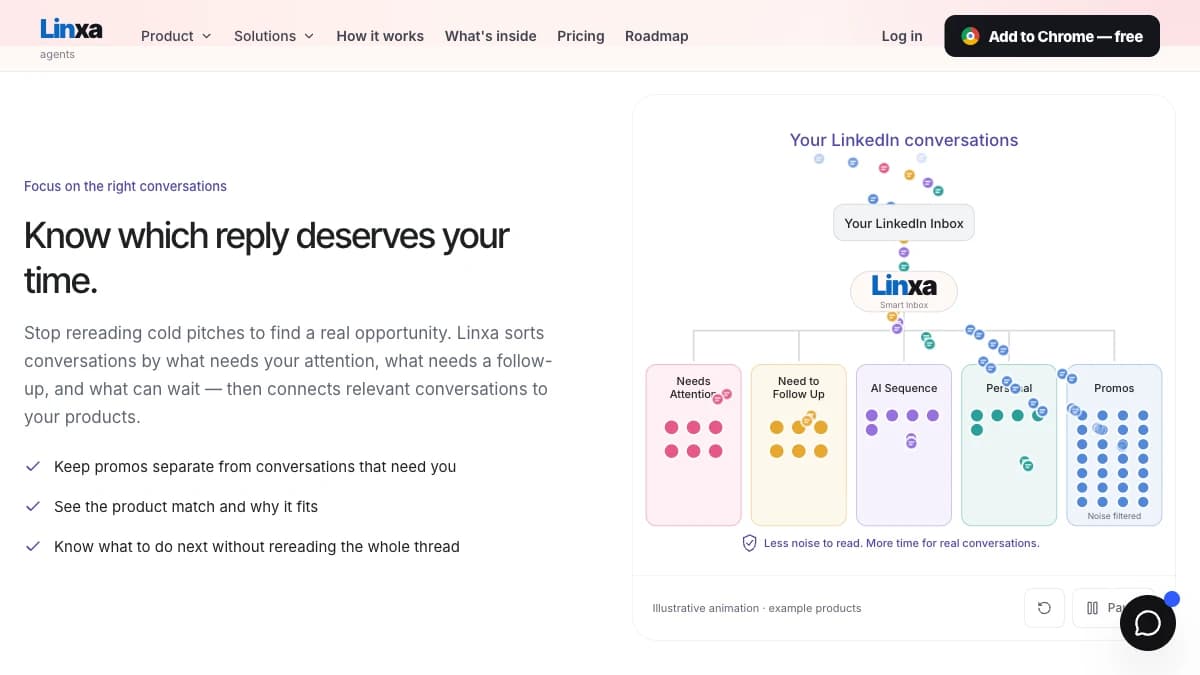
Linxa's Smart Inbox page, November 2026. The animation is illustrative, with example products under each view.
The groups Linxa uses today
The Smart Inbox page shows views named Needs Attention, Need to Follow Up, AI Sequence, Personal and Promos. Its how-to guide adds an All view for searching any thread.
Under Needs Attention and Need to Follow Up, conversations sit under the product they relate to. Promos is where cold pitches and noise go, so you can skip them without reading.
Why other reviews list different groups
Directory listings such as EliteAI Tools say Linxa sorts DMs into Hot Leads, Follow-up, Hiring and Junk, and list a Growth plan with Smart Connect. That copy matches an older version of the product.
On the live site, hot-lead detection is still a free feature, but the views are the five above. Network building now sits on the Outreach plan as Smart Invite, and no Growth plan appears on the pricing page.
What Linxa reads to sort a thread
Linxa's privacy policy says AI analyzes the sentiment, intent and labels of your conversations to organize the inbox. Drafts also draw on the person, the relationship stage, their recent posts and your private notes.
How to test Linxa's sorting on your own inbox
Linxa publishes no accuracy figure for its sorting, and neither does any review we found. The free plan is the cheapest way to measure it yourself.
- Label a week by hand first. Before you connect Linxa, mark each DM from the last seven days as buyer, follow-up, personal or pitch.
- Connect and let it sort. Install the extension, connect LinkedIn and add your product so matching has something to work with.
- Count the costly misses. Look for real buyers filed under Promos or Personal. One missed buyer costs more than ten pitches left in Needs Attention.
- Check the product match. If you sell more than one thing, see whether each thread landed under the right product.
- Read the drafts. Open a batch of AI drafts and note how many you would send after light edits, and how many invent a detail.
If the misses are rare after a week, the sorting works for your inbox. If they are common, keep LinkedIn's own filters, which our LinkedIn message inbox guide covers.
AI Reply Drafts, Follow-Ups and Deal Maker
Linxa starts preparing a reply draft on its own, so you usually skip the Generate button. You edit the draft and choose when to send.
AI reply drafts (free)
Each draft uses the conversation, your product description and goal, the lead's available posts, your comments and your tone of voice. Linxa's Smart Inbox FAQ says generating or saving a draft never sends a message.
The free plan includes 50 AI-drafted replies a month, according to the pricing FAQ. The Inbox card on the same page lists 200 smart follow-ups a month, so check your in-app allowance before relying on either number.
Library, notes and Send & next
You can save a good instruction or example to a Library and reuse it on another thread. Private notes and quick actions update a conversation's next step, such as "Follow up in one month."
A Replies view works across every LinkedIn account you can access. Hotkeys and a Send & next button move you through the queue.
Telegram alerts
Connect Telegram to get alerts on supported sequence replies, with the Linxa draft attached. You confirm the send, edit it or open the thread in Linxa.
Deal Maker and Linxa Check
The Deal Maker page describes a reply queue that puts sequence replies first. Linxa Check reviews each draft for person, goal, voice, facts and context, and flags unsupported links or proposed meeting times.
Linxa says the check can be inconclusive and does not guarantee factual accuracy. Deal Maker is being enabled team by team, so you request access rather than switch it on.
Linxa Pricing: Inbox, Outreach, Team and Human Support
Linxa has one free plan and three paid ones, and the paid plans charge per LinkedIn account rather than per user. Prices below come from Linxa's pricing page on November 26, 2026.
| Plan | Price | What it includes |
|---|---|---|
| Inbox | $0, free forever | Smart Inbox, intent sorting, hot-lead detection, prioritization, product matching, 50 AI-drafted replies a month, Telegram alerts |
| Outreach | $39/mo billed monthly | Everything in Inbox, plus lead sources, Smart Invite, multi-step AI sequences, editable prompts and tone, historical conversation analysis, MCP write access |
| Team | $49 per LinkedIn account/mo | Everything in Outreach, plus a team workspace, shared CRM for deals, contacts and companies, multiple LinkedIn accounts, delegated access, Linxa Agent |
| Human Support | $79 per LinkedIn account/mo | Everything in Team, plus an outreach specialist who reviews your reports and messages once a week |
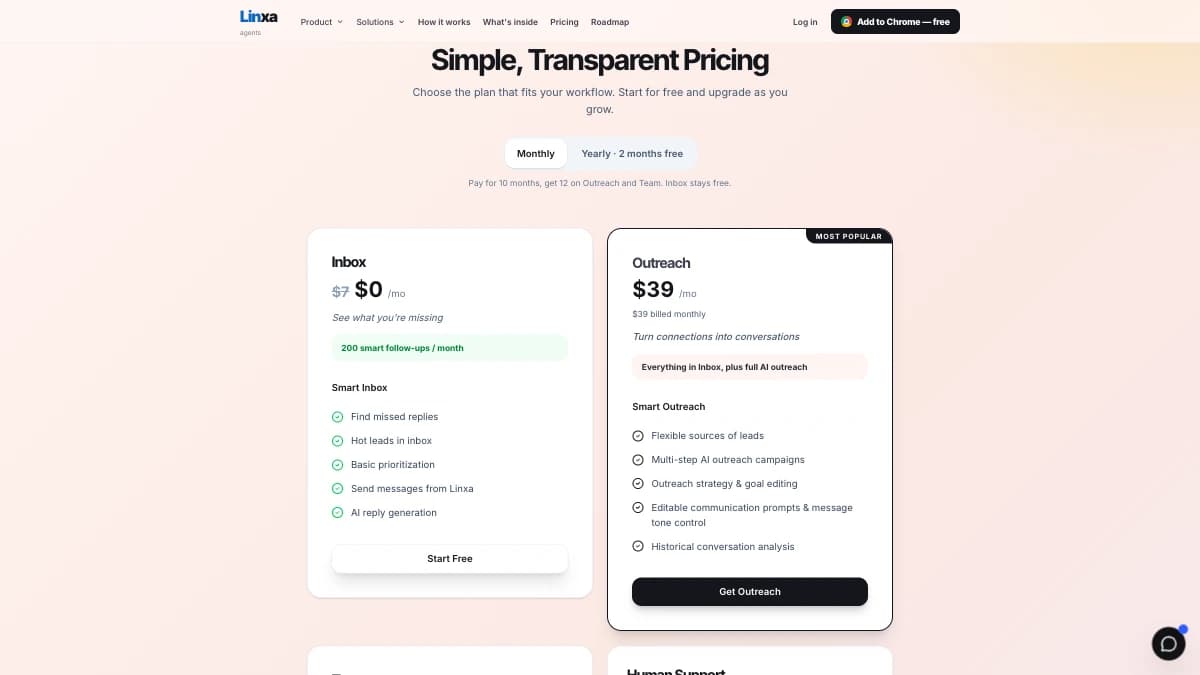
Linxa pricing page on the Monthly toggle, November 2026. Team and Human Support sit below Inbox and Outreach on the same page.
Yearly billing and the MCP add-on
Yearly billing gives 2 months free on Outreach and Team: you pay for 10 months and get 12. Inbox stays free either way.
MCP read access is free on every plan. Per the MCP page and the pricing FAQ, write access costs $70 a year per LinkedIn account as a standalone add-on, and it is included in Outreach and Team.
What you actually pay
Here is what four common setups cost on Linxa's pricing page.
- You only want a smarter inbox: $0 on the Inbox plan. It covers sorting, product matching, drafts and Telegram alerts.
- You also want Claude to save drafts: $0 plus the $70-a-year MCP write add-on per account.
- Solo founder running outbound: Outreach at $39 a month, with MCP write included.
- Co-founders or a small sales team: Team at $49 for each LinkedIn account a month. Teammates who manage an account through delegated access do not need their own seat.
Linxa's pricing FAQ claims Outreach replaces Apollo, Waalaxy and Kondo. Its own homepage says Linxa has no email finder, so that claim does not cover the Apollo side of the stack.
What Data Leaves Your Browser
Your conversations do: Linxa is a cloud service, not a local-only extension. Its privacy policy says it reads, stores and analyzes the content and metadata of your LinkedIn conversations to organize the inbox and write replies.
What Linxa collects
- Messages, invitations and timestamps from your LinkedIn conversations.
- Profile data for you and for the people you talk to or target, such as name, headline, company and location.
- Prospect data you add, plus derived scores and topic summaries.
- Emails Linxa sends for you, if you connect a Google or Microsoft account through OAuth.
Where it goes
AI processing runs on Google Cloud Vertex AI, and the policy says this content is not used to train public AI models. Primary hosting is Google Cloud's EU region, europe-west1.
Named sub-processors are Stripe, Google Cloud, Intercom and analytics tools such as Google Tag Manager. The policy also lists an unnamed infrastructure and proxy provider used to perform LinkedIn actions.
What the Chrome Web Store discloses
The store listing's privacy section says the extension handles personally identifiable information, authentication information and personal communications. The developer declares the data is not sold to third parties outside approved use cases.
Where Linxa is silent
- The proxy provider: Linxa doesn't say who it is.
- Your LinkedIn session: Cloud outreach needs a working session on Linxa's side. Linxa doesn't say how that session is stored or protected.
- Security audits: The pages we read mention no SOC 2 or ISO 27001 report.
- Retention: Conversations, contact data and AI outputs such as scores and embeddings are kept while your account is active. Linxa doesn't give a fixed purge window after you leave.
Linxa Account Risk: Inbox vs Outreach Plans
LinkedIn's prohibited software page bans third-party tools, including browser extensions, that scrape, modify the appearance of, or automate activity on its site. It says members who use them risk having their accounts restricted or shut down.
Every Linxa plan touches that policy, but not to the same degree. The risk climbs as you move from reading to sending.
Free Smart Inbox: lower risk
The inbox reads and syncs your conversations and leaves every send to you. That is the least aggressive way to use Linxa, but it still relies on an extension that reads LinkedIn data, so the risk is low rather than zero.
Outreach and Team: higher risk
Paid plans send invitations and sequence messages from Linxa's servers, through a proxy, while you are offline. That is the kind of automated activity LinkedIn's policy names.
Linxa adds limits, pacing and sending windows, and the store listing describes invites "paced like a human." Its own extension page is honest about the limit: no automation tool can guarantee an account will avoid restrictions.
The companion extension
Linxa also publishes Salee by Linxa, a reply assistant that works inside LinkedIn Messaging. Its store listing says it displays Linxa feature cards on supported LinkedIn pages, which falls under the policy's clause on modifying LinkedIn's appearance.
If you have been restricted before, read our guide to LinkedIn account restrictions before you add any extension. Keep Linxa on the free inbox unless the outreach is worth the exposure.
What Linxa Users Say
Independent feedback on Linxa is thin. We found no G2, Capterra or Product Hunt profile for it, and searches for those sites return a different product called Linx.
- Linxa extension: 5.0 stars from 1 rating and 238 users on the Chrome Web Store listing.
- Salee by Linxa: 4.7 stars from 100 ratings and 5,000 users on its store listing. This is the team's in-LinkedIn reply assistant, not the Smart Inbox itself.
The Salee numbers suggest the team has shipped reply tools that people keep using. One rating on the main extension is too few to judge Smart Inbox, so treat it as promising but unproven.
Linxa Pros and Cons
Pros
- A real free plan, not a trial, with sorting and AI drafts.
- Drafts are prepared before you open a thread.
- Product matching helps founders who sell more than one thing.
- Draft mode is the default; autopilot needs a deliberate switch.
- No LinkedIn password shared with Linxa.
- Clear MCP pricing, with free read access on every plan.
- Per-account billing, and delegated teammates need no seat.
Cons
- Outreach-first product; the inbox is the entry tier.
- Paid plans automate sending from Linxa's servers.
- Conversations are stored and analyzed in Linxa's cloud.
- No published sorting accuracy figure.
- No native HubSpot sync and no email finder, per Linxa.
- Chrome-only, based on Linxa's own pages.
- One rating on the main extension's store listing.
Who Should Use Linxa (and Who Shouldn't)
Linxa fits founders who want free AI triage now and may run LinkedIn outbound later. It is a weaker fit for anyone who wants an inbox tool that never sends and keeps data local.
Good fit
- Founders with a noisy inbox: The free plan separates buyers from pitches and drafts the reply.
- Founders selling several products: Product matching files each thread under the offer it concerns.
- Small teams starting outbound: Outreach and Team bundle sourcing, sequences and a shared CRM. Pair them with a daily LinkedIn inbox management system so replies do not stall.
- Claude or Cursor users: Free MCP read access turns "who needs a reply?" into one prompt.
Not a fit
- People who want zero automation: Linxa's paid plans are built around automated sending, and the free inbox is the on-ramp to them.
- Teams that log everything in HubSpot: Linxa says it has no native HubSpot integration.
- Regulated or security-reviewed buyers: No SOC 2 report appears on the pages we read.
- Accounts with a restriction history: Cloud outreach adds risk you may not want to take.
Linxa Alternatives
The right Linxa alternative depends on whether you want an inbox that never sends, CRM sync or a heavier outreach tool.
- Narrow: A LinkedIn inbox with labels, reminders and a pipeline board that never sends on its own. Pro is $15 a month billed yearly. Read our Narrow review.
- Kondo: A keyboard-first DM inbox. Basic is $28 per user a month billed annually, and CRM integrations start on Business at $36. See our Kondo review.
- Kanbox: Tags, Kanban pipelines and outreach campaigns in one tool. See our Kanbox review.
- Waalaxy: An outreach tool whose LinkedIn Inbox is an optional add-on at €20 a month. Read our Waalaxy review.
- HeyReach: Multi-sender outreach with a unified inbox, at $79 per sender a month for 1 to 9 senders. See our HeyReach review.
Linxa pitches itself to teams moving off Dripify and Expandi, so our Expandi review and Dripify review are useful if outreach is your main job. For inbox tools only, see our LinkedIn inbox managers comparison and Narrow alternatives roundup.
If account safety is your first filter, our ranking of LinkedIn inbox apps by account safety ranks six tools on that question.
Linxa Review: Final Verdict
Our rating: 3.7/5. Linxa's free Smart Inbox is one of the most generous ways to try AI sorting and reply drafts on LinkedIn.
Founders drowning in DMs should install the free plan and run the one-week sorting test above. If buyers stop slipping into Promos, Linxa has earned its place in your browser.
The rating loses points because Linxa is an outreach product first. Paid plans send from its servers, conversations live in its cloud, and the main extension has one store rating.
Upgrade to Outreach only if you accept the account risk that comes with cloud sending.
If cloud sending from your LinkedIn session is a dealbreaker, syncIn by SyncGTM is one option worth a look: it is in early access with a waitlist, and it sends only when you click.