

Apollo Chrome Extension Review 2026: Features, Limits, Credits

By Kushal Magar · October 27, 2026 · 13 min read
Key Takeaway
The Apollo Chrome extension puts Apollo's database and actions on LinkedIn, Sales Navigator, Gmail, Google Calendar, CRMs, and company websites. It has 1,000,000 Chrome users and a 4.6 store rating. Every reveal spends pooled Apollo credits: 1 per verified email, 8 per phone number. Free gives 75 credits a month, Basic is $49/seat/mo annual (30,000 credits a year), Professional is $79 (48,000). The catches: phone reveals drain credits 8x faster, Sales Navigator search results can't be bulk-actioned, credits never roll over, and EU/UK contacts are not filtered. Our rating: 3.9/5.
The Apollo Chrome extension is the fastest way to pull an email or phone number off a LinkedIn profile without leaving the page. The question this review answers is what that convenience really costs in credits, and where the plan limits bite.
We read Apollo's help center articles for the extension, its pricing and credits pages, and the Chrome Web Store listing in October 2026. We did not run a paid accuracy test, so accuracy figures below are labeled as vendor claims or user reports.
One finding up front: the Chrome Web Store listing still promises "unlimited email credits" on the free plan. Apollo's pricing page now caps the free plan at 75 credits a month.
TL;DR: Apollo Chrome Extension Review 2026
- What it is: A free browser extension that shows Apollo contact data and actions on LinkedIn, Sales Navigator, Gmail, Google Calendar, CRMs, and company websites.
- Adoption: 1,000,000 users and 4.6/5 from about 2,200 ratings on the Chrome Web Store (October 2026).
- Credit cost: 1 credit per verified email, 8 credits per phone number, from one pooled team balance.
- Plans: Free (75 credits/mo), Basic $49/seat/mo annual, Professional $79, Organization $119 (min 3 seats).
- Biggest catches: Phone reveals burn credits fast, no bulk actions on Sales Navigator results, credits never roll over, EU and UK contacts are not filtered.
- Best for: Reps who prospect one profile at a time and already run sequences in Apollo.
- Rating: 3.9/5.
What Is the Apollo Chrome Extension?
The Apollo Chrome extension is a browser add-on that brings Apollo.io's B2B database and outreach tools into the sites where reps already work. It is published on the Chrome Web Store as "Apollo.io: Free B2B Phone Number & Email Finder" by ZenLeads Inc., Apollo's legal entity.
It is not a standalone product. You log in with an Apollo account, and every reveal, sequence, and CRM push runs through that account's plan and credits.
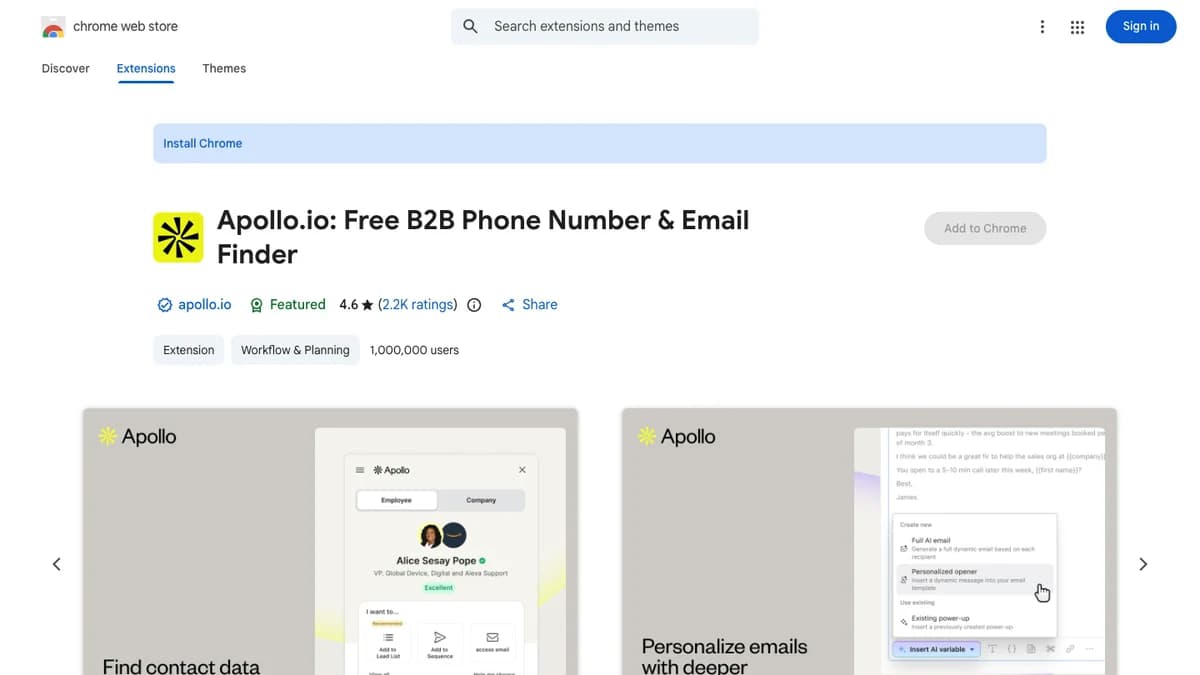
The Apollo.io listing on the Chrome Web Store, October 2026: version 17.2.0, updated October 15, 2026, Featured badge, 1,000,000 users.
The listing describes Apollo's data as 210M contacts and 35M accounts, while apollo.io's own navigation now says 240M contacts and 30M companies. Either way, the extension is a window into the same database covered in our full Apollo.io review.
How the Apollo Chrome Extension Works
The extension reads the page you have open and matches it to a record in Apollo's database. On a LinkedIn profile it identifies the person, on a company website it identifies the company, and in Gmail it identifies whoever you are emailing.
Once matched, it shows Apollo's data for that record next to the actions you can take. Those actions change by site and by which integrations your Apollo account has connected, according to Apollo's extension overview.
A typical LinkedIn workflow looks like this:
- Open a prospect's LinkedIn profile and click the Apollo icon.
- Reveal the email (1 credit) or phone number (8 credits).
- Save the contact to Apollo and add it to a list.
- Add the contact to a sequence, or schedule the add for later.
- Push the record to HubSpot or Salesforce if your team works there.
Everything you save lands in your Apollo workspace, so the extension is really a capture tool for Apollo's sequencer and CRM sync.
Apollo Chrome Extension Features by Platform
The Apollo Chrome extension works on LinkedIn, Sales Navigator, Gmail, Google Calendar, Salesforce, HubSpot, Pipedrive, Salesloft, and company websites, but each surface exposes different actions.
| Surface | What you see | Actions | Catch |
|---|---|---|---|
| LinkedIn profiles | Match the profile to Apollo, reveal email and phone, save the contact | Add to list or sequence, compose email, view colleagues, push to CRM | Reveals and saves spend credits |
| LinkedIn Sales Navigator | Suggested leads based on your search; Apollo data on some profiles | Review suggestions, then open the standard LinkedIn profile to act | No selecting or bulk actions from search results |
| Gmail | Contact details beside the thread you are writing | Open and click tracking, templates, snippets, meeting links, nudges, CRM logging | Mailbox must be linked to your Apollo user |
| Google Calendar | Contact and company insights for meeting attendees | Pre-meeting research, log meeting notes | Only as good as the attendee match |
| Salesforce, HubSpot, Pipedrive, Salesloft | Apollo profile on top of CRM records | Add CRM contacts to sequences, log emails, create tasks | Actions depend on which integrations you connected |
| Company websites | Firmographics and an employee list for the site you are on | Save the company, find employees, start outreach | Not every site matches a record |
LinkedIn profiles
This is the core use case. On a profile you can reveal contact info, save the person, add them to a list or sequence, compose an email, log a call or note, and view their colleagues.
"View colleagues" is handy for multi-threading an account. Apollo's own docs warn that saving a contact from that view may be charged a credit.
LinkedIn Sales Navigator
Sales Navigator support is thinner than most users expect. Per Apollo's Sales Navigator guide, the extension shows suggested leads based on your search, but you can't select leads or take bulk actions from the results page.
Apollo data appears only on some Sales Navigator profiles. When it doesn't, you click through to the standard LinkedIn profile and prospect there. Our guide to finding emails from Sales Navigator covers other routes.
Gmail
The Gmail sidebar is the most underrated part of the extension. It adds open and click tracking, Apollo templates and snippets, meeting links with reserved time slots, follow-up nudges, and one-click logging to HubSpot or Salesforce.
It also surfaces a deliverability panel with mailbox and domain scores, warmup, blocklist checks, inbox placement tests, and SPF, DKIM, and DMARC status, per Apollo's Gmail guide. Two caveats: your Gmail address must be linked to your Apollo user, and attachments don't sync to Apollo.
Google Calendar
In Calendar, the extension pulls contact and company insights for meeting attendees and lets you log notes. It is a light pre-call research tool, not a full meeting assistant.
CRMs and company websites
On Salesforce and HubSpot records, Apollo overlays its contact and company profile, and you can add CRM contacts straight to Apollo sequences. Salesloft and Outreach users can push contacts into their cadences instead.
On any company website, the extension shows firmographics and an employee list, so you can jump from an account to its buyers. If your team sequences in another tool, see how Apollo compares in Apollo vs Outreach.
Apollo Chrome Extension Credits: What Each Reveal Costs
The Apollo Chrome extension spends the same pooled credits as the web app: 1 credit for a verified email and 8 credits for a phone number. There are no separate "extension credits."
| Action | Cost | Notes |
|---|---|---|
| Reveal an email | 1 credit | Charged only if Apollo can verify it; never more than 1 per contact |
| Reveal a phone number | 8 credits | Mobile, direct dial, or office line all cost the same |
| Enrich a record | 1 to 8 credits | Depends on the data type requested |
| AI research | 1 credit per run | AI assistant, AI custom fields, AI email writer |
| US dialer call | 1 credit per 30 seconds | 30-second minimum per connected call |
| Export or push outside Apollo | Varies | Apollo says export credits may only apply to certain or legacy plans |
Source: Apollo's credits page and pricing page, checked October 2026.
Two rules work in your favor. Apollo says it only charges for email addresses it can verify, and never more than 1 credit per contact for email, even if it returns both a personal and business address.
The rule that hurts is phone pricing. A phone number costs 8x an email, so a rep who reveals both for every prospect spends 9 credits per person.
What a month of credits actually buys
| Plan (credits per seat) | Emails only | Phones only | Email + phone |
|---|---|---|---|
| Free (75 / mo) | 75 | 9 | 8 |
| Basic monthly (2,500 / mo) | 2,500 | 312 | 277 |
| Professional monthly (4,000 / mo) | 4,000 | 500 | 444 |
| Organization (6,000 / mo equivalent) | 6,000 | 750 | 666 |
Here is the math that catches reps out. Twenty prospects a day with email and phone is 180 credits a day, or about 3,780 credits over 21 working days.
That burns through Basic's 2,500 monthly credits in 14 working days and nearly all of Professional's 4,000. Email-only prospecting at the same pace uses just 420 credits.
You can track this in Apollo under Settings, Credits & activity, Credit usage. Since February 1, 2026, Apollo tags each charge by surface, so you can filter to see exactly what the extension spent.
Apollo Pricing and Plan Limits for Extension Users
The extension is included on every Apollo plan, including Free; what changes by plan is your credit pool and your limits. Apollo lists "Prospecting, Gmail & Salesforce Extensions" on all four tiers.
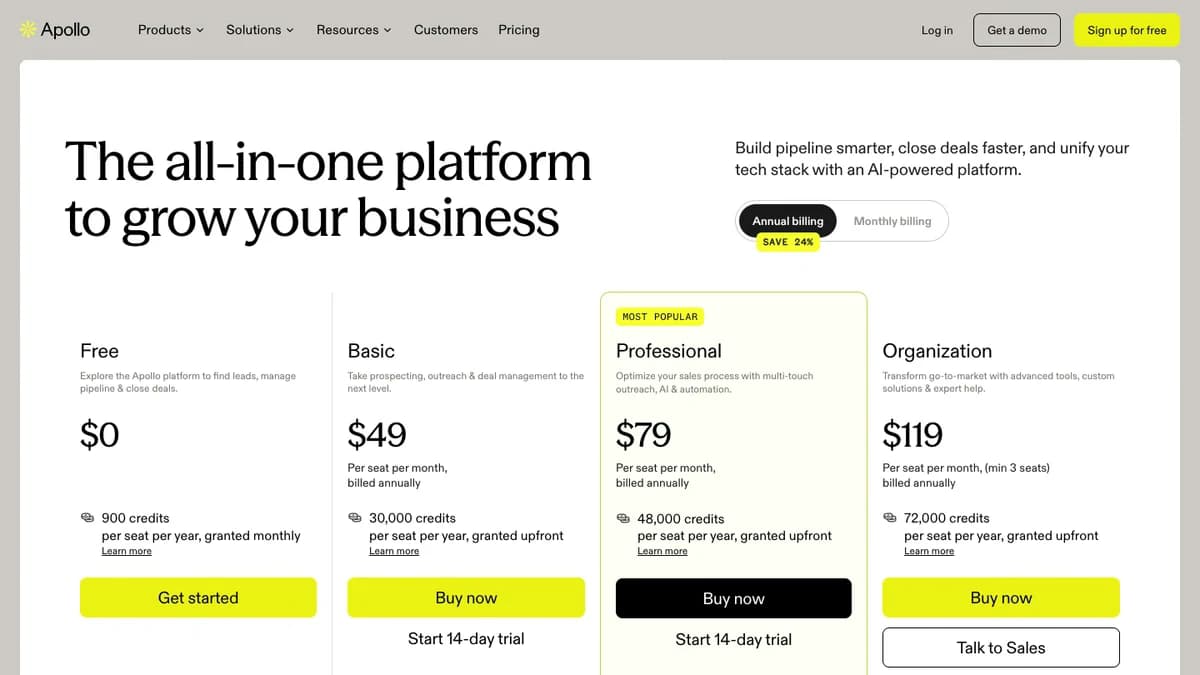
Apollo pricing page with annual billing selected, October 2026.
| Plan | Annual billing | Monthly billing | Credits per seat | Record selection limit | Daily email sends | Sequences |
|---|---|---|---|---|---|---|
| Free | $0 | $0 | 75 / month (900 / year) | 25 records | 250 / day | 2 per team |
| Basic | $49 / seat / mo | $65 / seat / mo | 30,000 / year upfront or 2,500 / month | 1,000 records | 250 / day | Unlimited |
| Professional | $79 / seat / mo | $99 / seat / mo | 48,000 / year upfront or 4,000 / month | 2,500 records | Unlimited | Unlimited + A/Z testing |
| Organization | $119 / seat / mo (min 3 seats) | Annual only | 72,000 / year upfront | 10,000 records | Unlimited | Unlimited + A/Z testing |
Source: apollo.io/pricing, checked October 2026. Prices exclude tax. Trials include 75 credits.
Annual plans grant the full year of credits upfront. Monthly plans grant a month at a time; annual billing saves about 24% per seat.
Credits are pooled across the team, and admins can set per-user caps. That matters for the extension, because one rep revealing phone numbers all day can drain the pool for everyone.
Pricing note: Apollo now sells one pooled credit balance instead of separate email, mobile, and export credits. Our Apollo.io review (last updated September 30, 2026) covers the wider platform; the figures on this page reflect Apollo's pricing page as of October 2026.
8 Limits That Catch Apollo Extension Users Out
Most complaints about the Apollo Chrome extension come from plan rules, not bugs. These are the ones to know before you rely on it.
- The free plan is 75 credits a month, not unlimited. The store listing still says "unlimited email credits" and "10 export credits per month." The pricing page says 900 credits per seat per year, granted monthly.
- Phone numbers cost 8 credits. On Free, that is 9 phone numbers a month.
- Credits never roll over. Unused plan credits and purchased add-on credits both expire at the end of the billing cycle.
- Add-on credits renew automatically. Apollo charges them immediately and repeats them every cycle until you drag the slider back to zero.
- No bulk actions on Sales Navigator results. You review suggested leads, then work profiles one at a time.
- Record selection limits. Free can select 25 records per action, Basic 1,000, Professional 2,500, and Organization 10,000.
- 250 emails a day on Free and Basic. Composing emails or sequencing from the extension counts toward that cap; Free can only connect Gmail mailboxes.
- Annual plans can't be downgraded mid-cycle. Switching from annual to monthly means cancelling and waiting for the term to end.
Apollo Chrome Extension Data Accuracy
The extension's data is only as accurate as Apollo's database, and Apollo publishes no independent benchmark for it.
Vendor claim:The store listing calls Apollo "the most accurate data" on 210M contacts, and Apollo says it only charges for emails it can verify. Neither claim comes with a published test method.
Third-party reviews we read report email bounce rates ranging from about 5% to over 30%, depending on the list. Those are user reports and competitor write-ups, not controlled tests, and we did not test reveals ourselves.
Practical advice: verify extension-revealed emails before a big send, and watch bounces on your first campaign. If you need higher hit rates on hard-to-find contacts, a waterfall enrichment setup that checks several providers usually beats any single database.
Apollo on LinkedIn: The Compliance Question
Using any contact-finder extension on LinkedIn carries some account risk. LinkedIn's prohibited software policy bars browser extensions that scrape, modify, or automate the site.
In March 2025, LinkedIn removed Apollo's company page, as MarTech reported. Apollo said the removal did not disrupt its services, and the extension kept working; some later reports say the page was restored, which we could not confirm.
Note the gap in Apollo's own messaging. The store listing promises "end-to-end LinkedIn prospecting" automation, while the help center describes a manual, profile-by-profile workflow.
Privacy is the other issue. Apollo's help center says it does not remove EU-based or UK-based contacts from the extension, so you must check a prospect's location and your GDPR lawful basis before you sequence them.
What Apollo Extension Users Say
The Apollo Chrome extension holds a 4.6 out of 5 rating from about 2,200 ratings and 1,000,000 users on the Chrome Web Store. Apollo's pricing page cites 4.7/5 across 9,690 reviews for the platform overall; G2 blocks automated checks, so we could not verify the current G2 figure directly.
Themes that come up repeatedly in public reviews:
- Praise: Fast email lookups on LinkedIn, one-click sequence adds, and a generous free tier for testing.
- Praise: Gmail tracking, templates, and CRM logging in one sidebar.
- Complaint: Credits run out faster than expected, especially with phone reveals.
- Complaint: Bounced or outdated emails on some segments.
- Complaint: The LinkedIn overlay is occasionally unreliable, and some users report LinkedIn flagging activity.
Apollo Chrome Extension Pros and Cons
Pros
- Works on the free plan, with no extra fee for the extension.
- Covers LinkedIn, Gmail, Calendar, Salesforce, HubSpot, Pipedrive, Salesloft, and company sites.
- Add to lists and sequences, or push to CRM, in one click.
- Email reveals cost 1 credit, charged only when Apollo can verify the address.
- Strong Gmail sidebar with tracking, templates, nudges, and deliverability checks.
- Credit usage can be filtered by the Extension surface.
Cons
- Phone numbers cost 8 credits each.
- Free plan is 75 credits a month, far below what the store listing implies.
- No selection or bulk actions on Sales Navigator search results.
- Credits, including paid add-ons, never roll over.
- No filtering of EU and UK contacts for GDPR.
- LinkedIn terms-of-service risk, as with any LinkedIn contact finder.
Who Should Use It (and Who Shouldn't)
Use it if you already sequence in Apollo, prospect a handful of accounts a day by hand, and mostly need emails rather than phone numbers.
It is also a good fit for Gmail-based teams that want tracking, templates, and CRM logging without a separate tool.
Skip it if your outbound is phone-heavy, because 8 credits per number makes calling lists expensive. Also skip it if you build big lists in Sales Navigator and need bulk export, or if you prospect mainly in the EU and need built-in privacy filtering.
Teams weighing Apollo's sequencer against a dedicated cold email tool should read lemlist vs Apollo first.
Apollo Chrome Extension Alternatives
The main alternatives are other LinkedIn contact-finder extensions with their own databases.
- ContactOut: Known for personal emails on LinkedIn profiles; see ContactOut vs Apollo.
- Lusha: A lightweight extension focused on direct dials and emails.
- RocketReach: A large contact database with a browser extension and API.
For a full list, see our best Apollo alternatives and B2B email finder tools roundups.
Apollo Chrome Extension Review: Final Verdict
Our rating: 3.9/5. The Apollo Chrome extension is one of the most complete free prospecting extensions available, and it is worth installing if you already use Apollo.
For email-first prospecting, it is excellent value: 1 credit per verified email, sequence and CRM actions on the page, and a Gmail sidebar that replaces a separate tracking tool.
It loses points for 8-credit phone reveals, thin Sales Navigator support, a free plan that the store listing oversells, and no GDPR filtering. Set per-user credit caps before you roll it out to a team, and check usage by the Extension surface after the first week.
If 8-credit phone reveals are a dealbreaker, SyncGTM is one alternative worth a look: it finds emails and phone numbers through a waterfall across multiple data providers.