


5 Linxa Alternatives for AI LinkedIn Inbox Sorting in 2026

By Kushal Magar · November 29, 2026 · 16 min read
Key Takeaway
Linxa sorts LinkedIn DMs into five fixed views in its own cloud, and its Inbox plan is free. The alternatives sort three other ways: on your own prompt (syncIn Pro, Master Inbox), into a vendor's fixed categories (Narrow, LeadDelta), or with a 0-100 ICP score (Quicklead). Narrow is the cheapest real screener at $22 a month billed yearly. No tool can promise LinkedIn won't restrict an account.
These five Linxa alternatives are ranked on one question: how well does the AI sort your LinkedIn inbox, and who decides what counts as a lead?
Linxa files DMs into fixed views and processes them in its cloud. The tools below sort with your own prompt, a vendor's fixed categories or a 0-100 score, and they handle your messages in different places.
TL;DR
- syncIn by SyncGTM — Best for sorting by your own rules. On Pro, AI filtering runs on your prompt and cold pitches go to Spam. Early access, $29 or $55 a seat a month.
- Narrow — Best low-cost screener. Super Pro files each new DM as Lead, Network, Cold or Broadcast for $22 a month billed yearly, on a local-first inbox.
- LeadDelta — Best if you also want a CRM of your connections. AI labels every incoming message, from $69.30 a user a month billed yearly.
- Quicklead — Best for campaign replies. Scores each lead 0-100 against your ICP on Scale ($79 per account a month) and runs outreach from the cloud.
- Master Inbox — Best for teams answering replies from several sending tools. Thirteen default labels or your own prompt, from $799 a month.
- Kondo — Left out: a fast DM inbox, but with no built-in AI sorting.
How Linxa Sorts Your Inbox Today
Linxa is an AI LinkedIn inbox and outreach tool whose free Smart Inbox reads each thread, judges intent and files it into a fixed view. That free plan is the bar every alternative here has to clear.
The Smart Inbox page names five views: Needs Attention, Need to Follow Up, AI Sequence, Personal and Promos. Threads in the first two sit under the product they relate to, and Promos is where cold pitches and noise go.
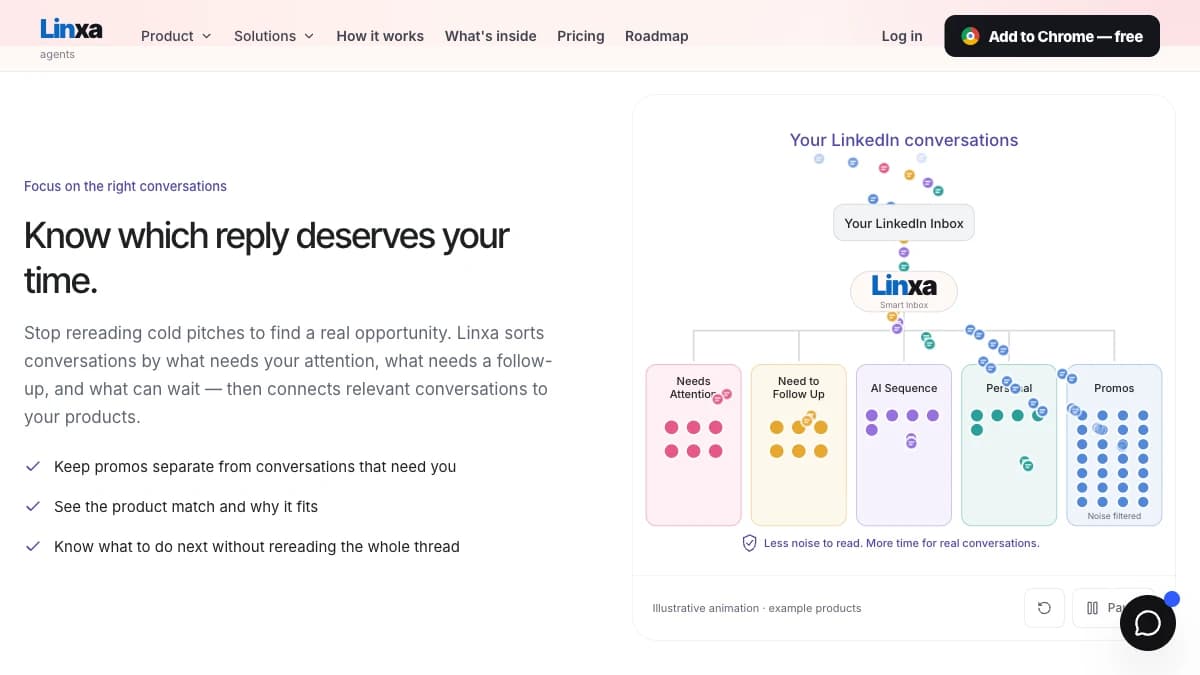
Linxa's Smart Inbox page: five fixed views, with conversations grouped by product
Per Linxa's pricing page, the Inbox plan is free with 50 AI-drafted replies a month. Outreach is $39 a month, Team $49 and Human Support $79 per LinkedIn account a month.
Sorting runs in Linxa's cloud. Its privacy policy says message text and profile data are processed by Google Cloud Vertex AI, with primary hosting in Google Cloud's EU region (europe-west1).
Our Linxa review covers its reply drafts, Deal Maker and account risk in depth.
Why People Look for Linxa Alternatives
You want your own definition of a lead. Linxa's five views are its own, and its pages describe sorting into them, not categories you write.
A recruiter, a founder raising money and an agency owner each mean something different by "worth answering." Fixed views work until your definition doesn't match.
You'd rather not keep every DM in a vendor's cloud. Linxa's privacy policy says it reads, stores and analyzes the content and metadata of your conversations to organize your inbox and suggest replies.
You can't see how accurate it is. As our Linxa review found, Linxa publishes no accuracy figure for its sorting. A missed buyer in Promos costs more than ten pitches left in Needs Attention.
The paid plans change the risk. Linxa's extension page says outreach runs on Linxa servers through a proxy in your selected country, so moving up from the free inbox turns a sorting tool into an automation tool.
None of that makes Linxa a bad pick, especially at $0. But if any of those four points matter to you, the tools below handle them differently.
Three Ways AI Sorts a LinkedIn Inbox
Every tool on this list uses one of three methods. Knowing which one you want narrows the field faster than any feature list.
- Prompt-based filters. You describe, in plain English, what a hot lead or a pitch looks like, and the AI labels threads against that. It's the most flexible method, and the quality depends on your prompt. Tools #1 and #5 work this way.
- Fixed categories. The vendor picks the buckets, such as Lead, Cold or Marketing, and the AI files each message into one. Setup takes no time, but you live with their definitions. Linxa, Narrow and LeadDelta work this way.
- 0-100 lead scores. Each person gets a number against your ideal customer profile, so you answer the 94 before the 58. Scores rank people well, but they rate the sender, not whether this message is a pitch. Quicklead works this way.
Some tools mix methods. A prompt-based tool can still score each condition against a threshold, and a fixed-category tool can let you choose which categories reach your main view.
How We Compared Each Tool
We scored each Linxa alternative on five things that decide whether AI sorting is worth paying for:
- Sorting method — Your own prompt, the vendor's fixed categories, or a 0-100 score.
- Pitches vs real leads — Does it separate cold pitches and mass messages from people worth answering?
- Where messages are processed — Your device, your browser, or the vendor's cloud and AI provider.
- Sending — Does it ever send on its own, or only when you click?
- Price — The cheapest plan that includes AI sorting, at list price.
Every feature and price was checked on the vendor's own pricing, product, security or privacy pages on November 29, 2026. Black Friday promo prices are left out, because they don't renew.
We didn't run paid accounts on every tool, so feature descriptions follow each vendor's documentation. The test in the section further down shows how to check sorting on your own inbox.
1. syncIn by SyncGTM
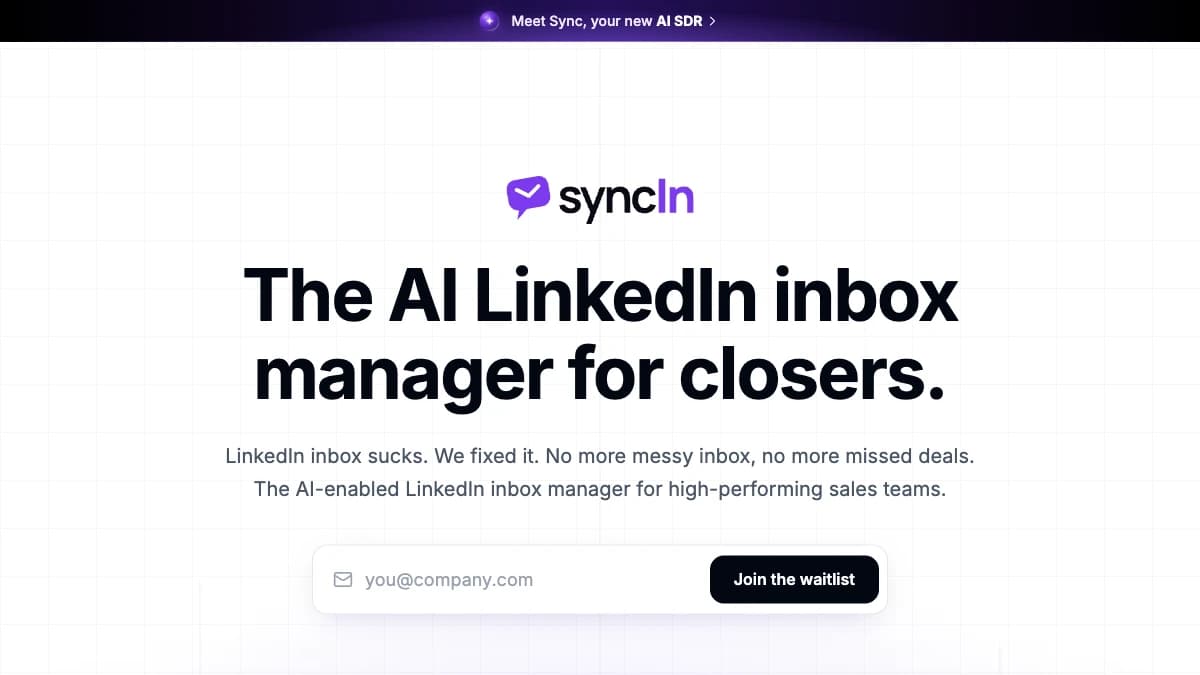
syncIn — LinkedIn inbox manager with AI filtering on your own prompt (early access)
syncIn is a LinkedIn inbox manager from SyncGTM whose AI filtering runs on your own prompt. It's the pick for people whose idea of a good lead doesn't fit someone else's categories.
On Pro, when someone accepts your connection, syncIn reads the new conversation and adds the labels your prompt defines, like Hot lead or Not a fit. Each label is a list of plain-English conditions.
Per the syncIn FAQ, a label is added only when every condition scores at or above your threshold, 60% by default. Re-runs change only the qualifier's own tags, never the ones you added by hand.
Pitches are handled separately: on Pro, AI reads every new DM and moves sales pitches into Spam. Every thread also gets an intent, a priority, whether it needs a reply, a one-line summary and a next step.
A browser extension in Edge, Chrome or Brave makes LinkedIn's own web requests with the session you're signed in with. Your LinkedIn password never goes to syncIn and your cookies never leave your browser, while your inbox, archive and 1st-degree connections are copied into syncIn's inbox.
syncIn sends only when you click Send, in conversations you already have. On Pro, agents connected over MCP can search, tag, snooze, archive and save drafts, but there's no send tool.
Be clear on the limits. It's in early access through a waitlist, the extension isn't on the Chrome Web Store, and CRM sync is coming soon.
No tool that works through LinkedIn's website can promise LinkedIn won't restrict an account, and syncIn doesn't either. For the wider category, see our LinkedIn inbox manager roundup.
Pros
- ✓ AI filtering on your own prompt, with a score threshold per label (Pro)
- ✓ Sales pitches moved to Spam automatically (Pro)
- ✓ Every thread gets an intent, priority, one-line summary and next step
- ✓ Sends only on your click; MCP agents can save drafts but not send
- ✓ Works in Edge, Chrome and Brave
Cons
- ✗ Early access only, through a waitlist
- ✗ Extension isn't on the Chrome Web Store
- ✗ CRM sync is still coming soon
- ✗ AI filtering and auto spam need Pro, not Basic
Best for: Founders and sellers who want the AI to sort by their own definition of a good lead
Pricing: Basic $29/seat/month, Pro $55/seat/month (adds the Claude MCP connector and AI filtering); 25% off yearly. Join the syncIn waitlist.
2. Narrow
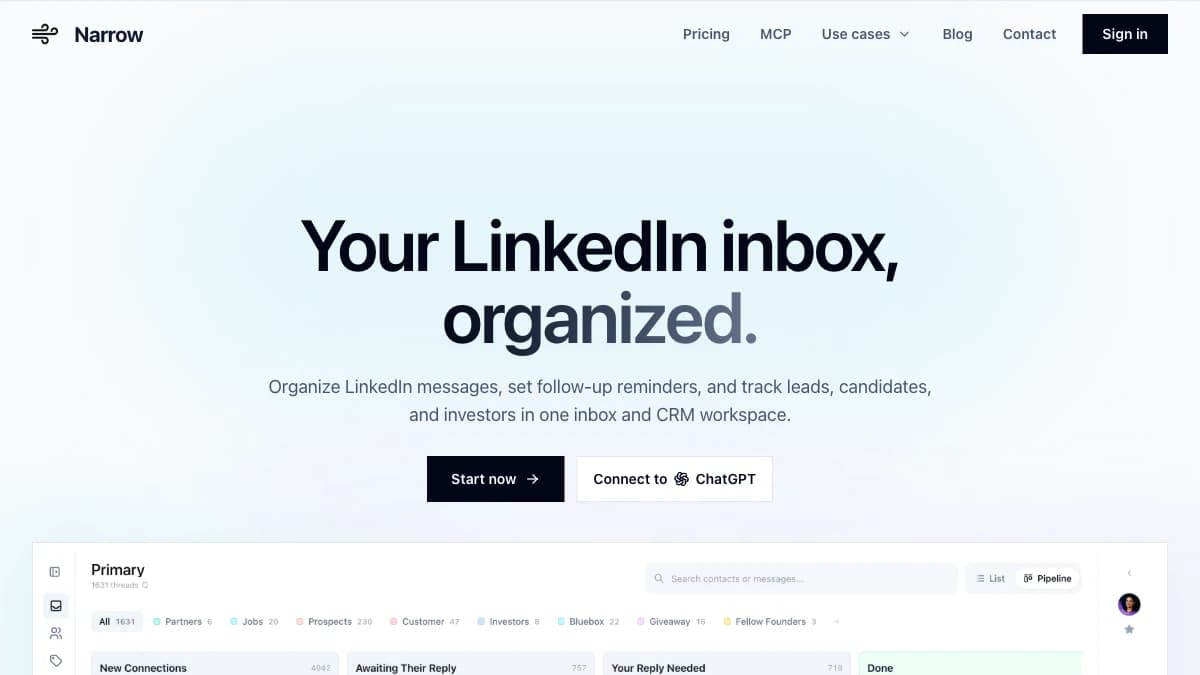
Narrow — local-first LinkedIn inbox with labels, reminders and an AI screener
Narrow is a LinkedIn inbox and light CRM whose AI Auto Screener files each new message into one of four categories. It's the cheapest real AI sorter on this list.
Per Narrow's own comparison post, the screener classifies each new message as Lead, Network, Cold or Broadcast, and it doesn't send. Cold and Broadcast catch pitches and mass messages, so the split between pitches and real leads is built in.
The screener is on Super Pro, the middle plan, with 24,000 Screener credits a year per the pricing page. Pro covers labels, reminders, a Kanban board and snippets, without screening.
Narrow's homepage calls it local-first and says your message history stays on your device. Its privacy policy is more careful: cloud storage may be used for AI features, and AI model providers are among the services that may receive data.
Narrow never auto-sends. One nuance: on Super Pro, its MCP page says a connected AI app can send messages if you grant that permission.
Our Narrow review covers the pipeline board and MCP, and Narrow alternatives covers the rest of the field.
Pros
- ✓ Four clear categories: Lead, Network, Cold and Broadcast
- ✓ Lowest AI-sorting price here: $22 a month billed yearly
- ✓ Local-first inbox with no scraping, sequences or auto-sending
- ✓ Sales Navigator inbox and MCP on the same plan as the screener
Cons
- ✗ Screener isn't on Pro, the entry plan
- ✗ Runs on credits, and the pricing page doesn't say how many one message uses
- ✗ AI features may send message content to cloud storage and AI model providers
- ✗ Custom integrations only on Max Pro, sold through Contact us
Best for: Solo founders, recruiters and investors who want pitches screened out cheaply
Pricing: Pro $15, Super Pro $22, Max Pro $35 a month billed yearly ($180, $264 and $420 a year). Narrow pricing.
3. LeadDelta
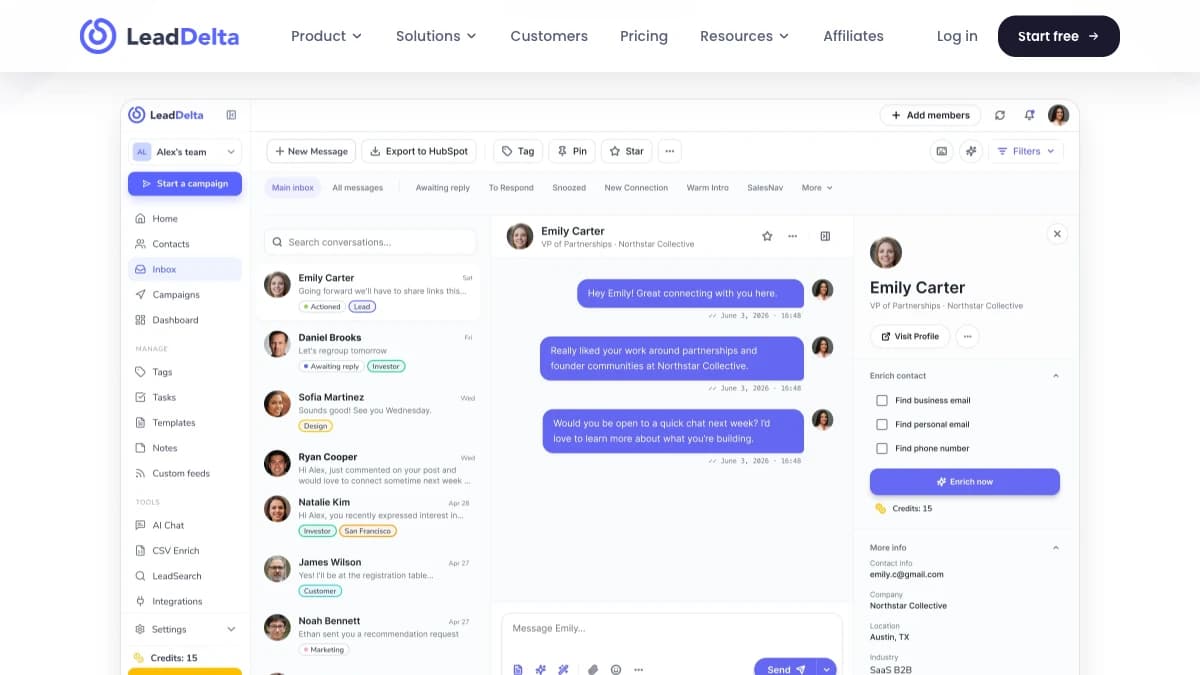
LeadDelta — LinkedIn connections CRM with an AI inbox that labels every message
LeadDelta is a LinkedIn connections CRM with an AI inbox that labels every incoming message. It suits Linxa users who want their network organized, not only their DMs.
The Smart AI Inbox page lists labels such as Introductions, Awaiting reply, Action items and Marketing. You decide which labels reach your main inbox, and the rest wait in All Messages.
The same page names marketing noise as one label, which is where pitches go. When you reply, AI drafts the message in your voice, and you send each one yourself.
The pricing page says the AI Inbox sorts, labels and prioritizes replies. It comes in one self-serve Growth plan that also includes LinkedIn and email campaigns, a people database and a contact finder.
That bundle is the trade-off. If you only want sorted DMs, you're paying for a CRM and outreach you may not use.
Our LeadDelta review covers its connection filters, HubSpot sync and campaign limits.
Pros
- ✓ Every incoming message labeled automatically
- ✓ You choose which labels reach the main inbox
- ✓ Inbox, connections CRM, campaigns and contact finder in one plan
- ✓ 7-day free trial with no credit card
Cons
- ✗ Labels come from LeadDelta; its inbox page describes no prompt of your own
- ✗ Highest per-seat price among the inbox-first tools here
- ✗ One self-serve plan, so inbox-only users pay for campaigns and data too
Best for: Networkers and small teams who want AI-labeled DMs plus a CRM of their connections
Pricing: Growth $69.30/user/month billed yearly ($831.60 a year); the page says yearly saves $356 a year per user. LeadDelta pricing.
4. Quicklead
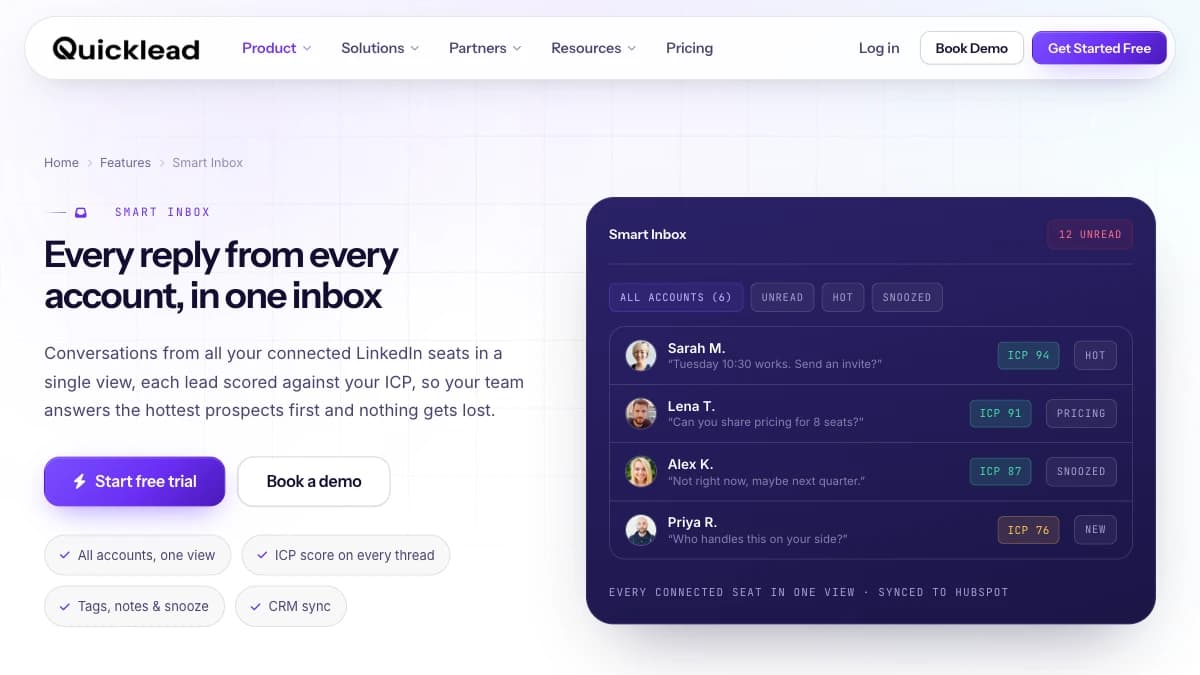
Quicklead — cloud LinkedIn automation with a Smart Inbox that scores every lead
Quicklead is cloud LinkedIn automation whose Smart Inbox shows a 0-100 ICP score on each thread. It replaces Linxa's Outreach plan more than its free inbox.
You describe your ideal customer in one plain-English sentence. The AI ICP Scoring page says Quicklead then scores every imported lead from 0 to 100 with a line of reasoning, and only leads above your threshold enter a sequence.
In the Smart Inbox, that score means your team answers the 94 before the 58. Scoring is on Scale and Agency only, so Starter gets the merged inbox without scores.
The AI Reply Assistant drafts answers from your knowledge base and classifies each reply as interested, question, objection, out of office or not interested. Nothing sends until someone approves it in Quicklead or Slack.
One caveat for this list: the score rates the person against your ICP, not the message. A pitch from someone who fits your ICP still scores high, and the reply classes Quicklead lists include no pitch or spam bucket.
Per its security page, every connected account runs in its own sandboxed cloud session with a dedicated country-based IP. The same page's FAQ says no tool can promise an account won't be restricted.
Our Quicklead review covers Open Profile InMails, sequences and refunds.
Pros
- ✓ 0-100 ICP score with reasoning on every inbox thread (Scale and Agency)
- ✓ AI reply classes: interested, question, objection, out of office, not interested
- ✓ Replies from every connected LinkedIn account in one inbox
- ✓ Native HubSpot and Zoho sync from Scale
- ✓ 7-day free trial with no credit card
Cons
- ✗ Scores the person, not the message, so pitches from ICP-fit senders aren't filtered
- ✗ ICP scoring and CRM sync need Scale or Agency
- ✗ Cloud automation carries more account risk than an inbox-only tool
- ✗ Priced per LinkedIn account
Best for: Teams running LinkedIn campaigns who want replies ranked by ICP fit
Pricing: Starter $59, Scale $79 per account a month; Agency $690 a month for 10 accounts ($69 each). Quicklead pricing.
5. Master Inbox
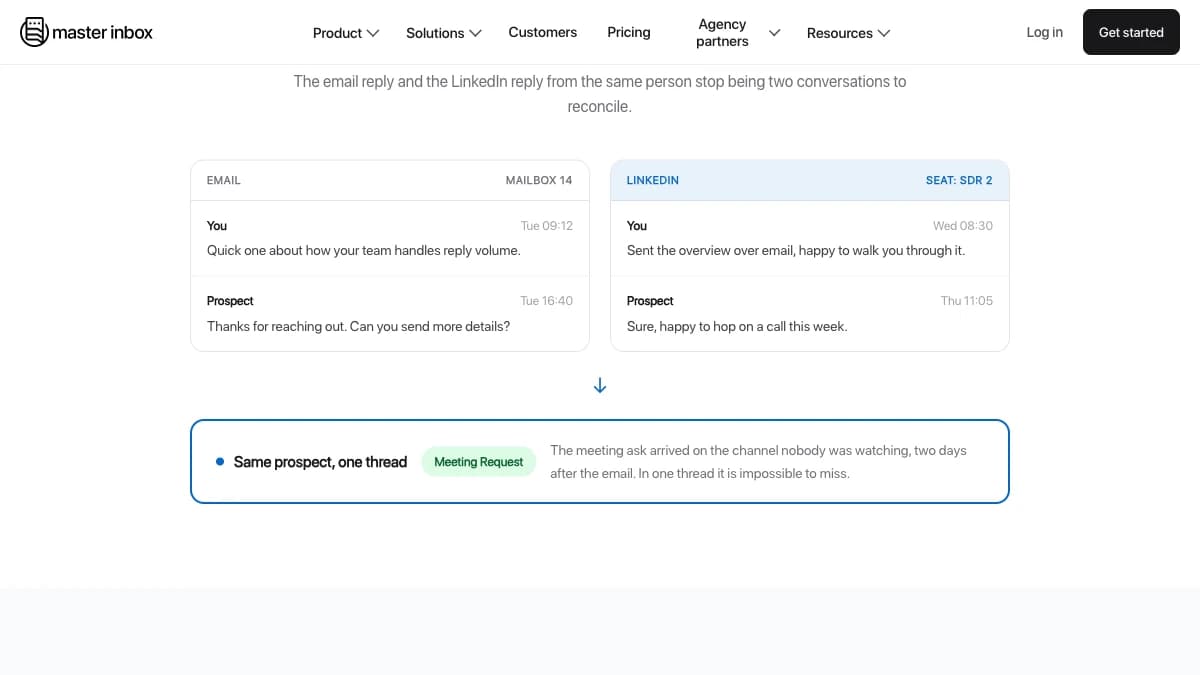
Master Inbox — reply inbox for LinkedIn and email that labels replies on your own AI key
Master Inbox is a reply inbox that pulls LinkedIn and email replies from your sending tools into one place and labels each one as it lands. Its labeling is fully prompt-based, at team-level pricing.
The AI labeling page says thirteen labels come out of the box, from Interested and Meeting request to Out of office and Not now. You can replace them with your own prompt and taxonomy, and the built-in prompt is shown in full so you can edit it.
Labels run on the AI provider you pick, OpenAI, Anthropic or OpenRouter, billed by that provider at its own token rate. An Interested thread that turns into Not Right Now gets relabeled when the next reply lands.
Its LinkedIn inbox page lists HeyReach, Expandi, Aimfox, Salesflow, SalesRobot, lemlist and GetSales as sources. A LinkedIn seat that runs no automation can connect directly as a per-account add-on.
Master Inbox doesn't run campaigns, and reply agents act only on the labels you allow. The catch for a Linxa user is fit: it's built for replies to outbound, and the Sales plan is $799 a month per the pricing page.
Our Master Inbox review goes deeper, and Master Inbox alternatives compares it with agency reply tools.
Pros
- ✓ Thirteen default labels, or your own prompt and taxonomy
- ✓ Runs on your own OpenAI, Anthropic or OpenRouter key with no markup
- ✓ LinkedIn and email replies from the same prospect in one thread
- ✓ Unlimited users on every plan
Cons
- ✗ $799 a month on Sales; Revenue, with two-way CRM sync, is priced on a call
- ✗ Built for replies to outbound campaigns, not screening one person's DMs
- ✗ AI tokens are a second bill from your model provider
- ✗ 14-day trial needs a card
Best for: Sales teams answering replies from several LinkedIn and email sending tools
Pricing: Sales $799/month, based on an annual plan billed monthly; Revenue priced on a call. Master Inbox pricing.
What About Kondo?
Kondo was on our shortlist and didn't make the five. It's a fast, keyboard-first DM inbox for LinkedIn, WhatsApp and iMessage, but it has no built-in AI sorting.
AI sorts a Kondo inbox only if you connect your own agent, such as Claude or ChatGPT, over MCP. Agents can search chats, add labels and notes, and write drafts, working from chats stored on your computer whenever possible, and nothing sends until you do.
Basic is $28 per user a month billed annually, per Kondo's pricing page. If speed and labels matter more to you than AI sorting, read our Kondo review.
Linxa Alternatives Compared
Features per each vendor's own pages, November 29, 2026. Linxa is shown as the baseline.
| Tool | How AI sorts | Pitches vs real leads | Where messages are processed | Sends on its own? |
|---|---|---|---|---|
| Linxa (baseline) | Fixed views: Needs Attention, Need to Follow Up, AI Sequence, Personal, Promos, grouped by your products | Cold pitches and noise go to Promos | Linxa's cloud; AI on Google Cloud Vertex AI, hosted in the EU | Free inbox: no. Outreach sequences: yes, once you turn on autopilot |
| syncIn by SyncGTM | Your own prompt (Pro): labels added when every condition scores at or above your threshold, 60% by default | Sales pitches moved to Spam automatically (Pro) | Extension makes LinkedIn's requests in your browser; cookies stay there; conversations copied into syncIn's inbox | No. Only when you click Send; MCP agents can save drafts but not send |
| Narrow | Fixed: Lead, Network, Cold or Broadcast (Auto Screener, Super Pro) | Cold and Broadcast hold pitches and mass messages | Local-first inbox; AI features may use cloud storage and AI model providers | No auto-send; an MCP app can send only if you grant that permission |
| LeadDelta | Fixed AI labels: Introductions, Awaiting reply, Action items, Marketing and more | Marketing noise label; you choose which labels reach the main inbox | LeadDelta's app, fed by its Chrome extension | Inbox drafts wait for you; Growth also runs LinkedIn and email campaigns |
| Quicklead | 0-100 ICP score with one line of reasoning (Scale and Agency); AI reply classes | Scores the person, not the message; no pitch category listed | Isolated cloud session per LinkedIn account with a dedicated country-based IP | Yes, cloud sequences; AI reply drafts wait for approval |
| Master Inbox | Thirteen default labels, or your own prompt and taxonomy | Built for replies to your outbound; default labels cover reply intent | Master Inbox's cloud; AI on your own OpenAI, Anthropic or OpenRouter key | Doesn't run campaigns; reply agents act only on labels you allow |
What AI Sorting Costs per Seat per Year
The figures below are our arithmetic for one seat on the cheapest plan with AI sorting, from each vendor's list prices. They aren't quotes.
| Tool | Plan with AI sorting | Per year | Notes |
|---|---|---|---|
| Linxa | Inbox (free) | $0 | 50 AI-drafted replies a month; outreach starts at $39 a month |
| syncIn | Pro | $660 monthly / $495 yearly | $55 a seat a month, 25% off yearly; AI filtering is a Pro feature |
| Narrow | Super Pro | $264 | Billed yearly; includes 24,000 Screener credits a year |
| LeadDelta | Growth | $831.60 | Billed yearly; one plan with CRM, campaigns and data credits |
| Quicklead | Scale | $948 | 12 × $79 per LinkedIn account on monthly billing; ICP scores start here |
| Master Inbox | Sales | $9,588 | 12 × $799, flat with unlimited users; AI tokens billed by your provider |
Two notes on reading it. Master Inbox is a flat team price with unlimited users per its pricing page, so it only looks expensive per seat if you're one person; a five-person reply desk pays the same $799 a month.
Quicklead and LeadDelta bundle outreach into the price. If you'd use their campaigns anyway, the sorting is close to free on top.
How to Test AI Sorting Before You Switch
Vendors rarely publish sorting accuracy, and Linxa doesn't. Your own inbox is the only test that counts, and a week of DMs is enough.
- Label a week by hand. Before you connect anything, mark each DM from the last seven days as buyer, follow-up, personal or pitch.
- Run the tool on the same week. Use the trial or the cheapest AI plan, and set up products, prompts or ICP so it has something to work with.
- Count missed buyers first. A real buyer filed as Cold, Promos, Marketing or Spam is the costly error. One of those outweighs ten pitches left in your main view.
- Then count pitches that got through. This tells you how much reading the tool actually saves.
- Tune once, then re-run. With a prompt-based tool, rewrite the prompt using the misses. With a score, move the threshold. With fixed categories, you can only change which views you read.
For what else is worth automating in a LinkedIn inbox, and what isn't, see our guide to LinkedIn inbox automation.
How to Choose
- You want to define what a good lead is → syncIn (Pro) for your own LinkedIn inbox, or Master Inbox if replies come from several sending tools.
- You want pitches screened out cheaply, with no setup → Narrow Super Pro, at $22 a month billed yearly.
- You also want a CRM of your LinkedIn connections → LeadDelta, whose single Growth plan bundles the inbox, CRM and campaigns.
- You run LinkedIn campaigns and want replies ranked by fit → Quicklead on Scale, with 0-100 ICP scores on every thread.
- You want speed and labels, with AI optional → Kondo, connecting your own agent over MCP if you want AI help.
- Linxa's five views already fit and $0 matters → stay on Linxa's free Inbox plan.
If account safety is your first filter, our ranking of LinkedIn inbox apps by account safety looks at that question alone. LinkedIn's prohibited software page bans browser extensions that scrape, modify the appearance of, or automate activity on its site, so treat every vendor's safety claim with care.
Final Verdict
Linxa's free inbox is hard to beat on price, but it sorts into views you don't control and keeps your conversations in its cloud. The right alternative depends on which of those bothers you more.
If you want the AI to follow your own definition of a lead, syncIn's Pro plan filters on your prompt and moves cold pitches to Spam, and nothing sends without your click. Master Inbox offers prompt-based labels too, but at $799 a month it's a team reply desk.
Narrow is the best value if four fixed categories are enough, and LeadDelta makes sense if you want a connections CRM in the same tool. Quicklead belongs on the list only if you run campaigns, because its scores rate people, not messages.
If you answer prospects from your own LinkedIn account and want sorting on your terms, join the syncIn waitlist.